[ This is a content summary only. Visit our website http://ift.tt/1b4YgHQ for full links, other content, and more! ]


by Web Desk via Digital Information World

Cleeean one page portfolio for ‘Ognew’, aka Michael. His site is simple, only showing a few projects, and the layout is responsive. Very nice work.
This is my personal portfolio showing my projects, i created during my study Interaction Design in Schwäbisch Gmünd, Germany
The post Ognew Portfolio appeared first on One Page Mania.

Clean single page template called Altius. Love the simplicity and customizability on this one. Get it from Themeforest for only $17.
A powerful HTML5 website template, designed for corporates, creative agencies and freelancers. Beautifully crafted and loaded with tons of capabilities, Altius is the template that will help you reach the utmost heights. What makes Altius so flexible is that it offers unlimited customization options. Switch between layouts, change colors, header and menu styles in just a few clicks. Seriously, you’ll be amazed with how many options you have. Massive shortcodes, 20+ ready-made pages and UI blocks will help you create the perfect website for you. Be it business, portfolio, creative and more…. Imagination is the only limit!
The post Altius appeared first on One Page Mania.

Custom launching soon page for barbershop, You & Sundry. Love the unique signup form this site is using. Very original.
Since this is just an introductory site for my latest venture, You & Sundry, I wanted to keep the build simple. I used the Middleman framework so that I could still write modular code but it would easily translate into a static website. Style wise, I decided to try something new for the newsletter forms instead of your typical input boxes.
The post You And Sundry appeared first on One Page Mania.
This article was originally published on David Kaye.
I found a rounding bug in Number().toFixed() in every JavaScript environment I've tried (Chrome, Firefox, Internet Explorer, Brave, and Node.js). The fix is surprisingly simple. Read on…
I found this version of the rounding bug in toFixed() while revising a number-formatting function that performs the same kind of thing as Intl.NumberFormat#format().
(1.015).toFixed(2) // returns "1.01" instead of "1.02"
The failing test is on line 42 here. I had missed it until December 2017, and that spurred me to check for other problems.
See my tweets about it:
There is a long history of bug reports with respect to rounding errors using toFixed().
Here is a short sample of StackOverflow questions about this problem:
In general, these point out a bug for a value, but none reports a range or pattern of values returning erroneous results (at least none that I have found, I may have missed something). That leaves the programmers to focus on the small without seeing a larger pattern. I don't blame them for that.
Unexpected results based on input must arise from a shared pattern in the input. So, rather than review the specification for Number().toFixed(), I focused on testing with a series of values to determine where the bug shows up in each series.
I created the following test function to exercise toFixed() over a series of integers ranging from 1 to a maxValue, adding the fraction such as .005 to each integer. The fixed (number of digits) argument to toFixed() is calculated from the length of the fraction value.
Continue reading %Number().toFixed() Rounding Errors: Broken But Fixable%
This article on building a todo app with Angular CLI is the first in a four-part series on how to write a todo application in Angular 2:

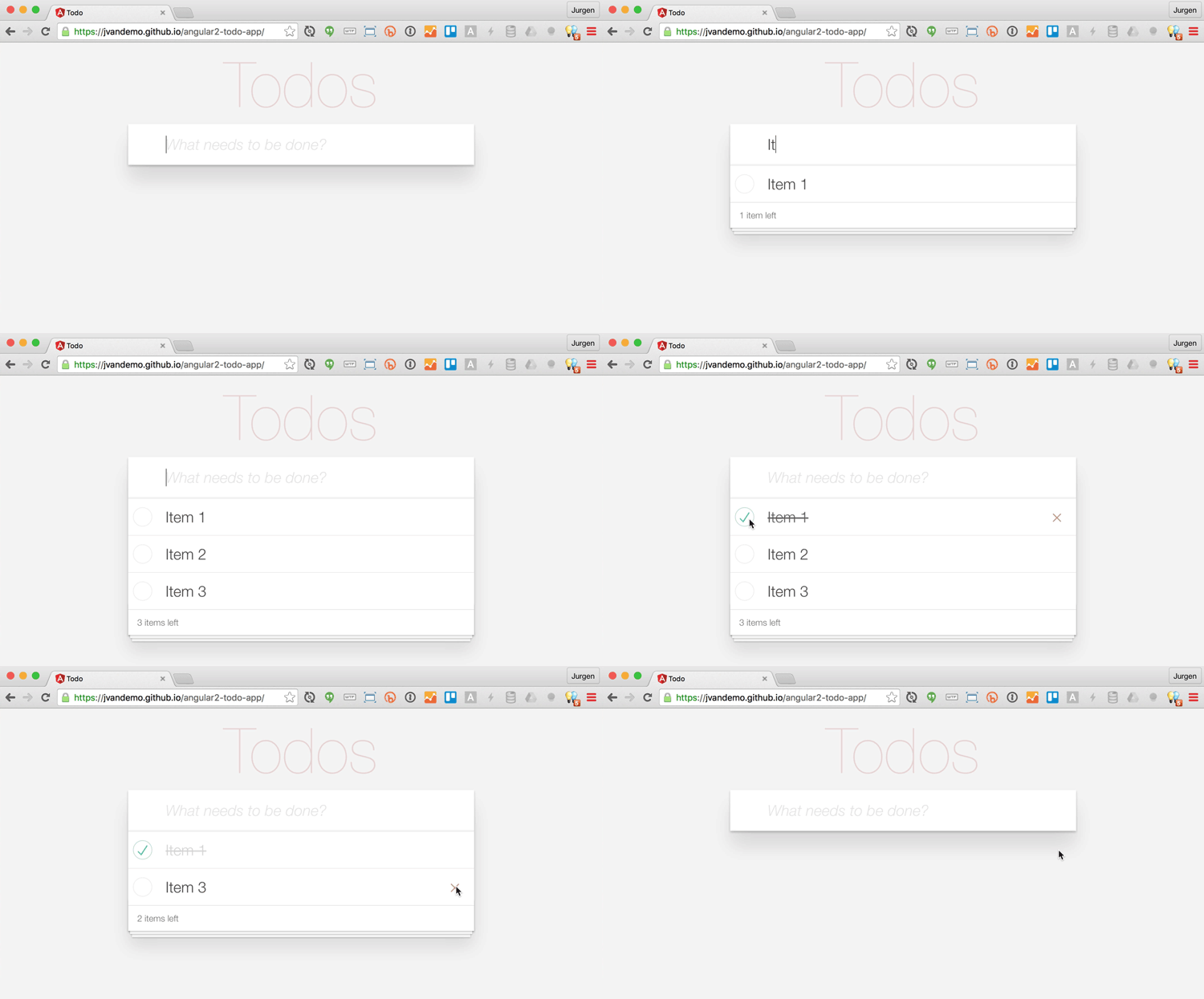
In each article, we’ll refine the underlying architecture of the application and we make sure we have a working version of the application that looks like this:
By the end of this series, our application architecture will look like this:
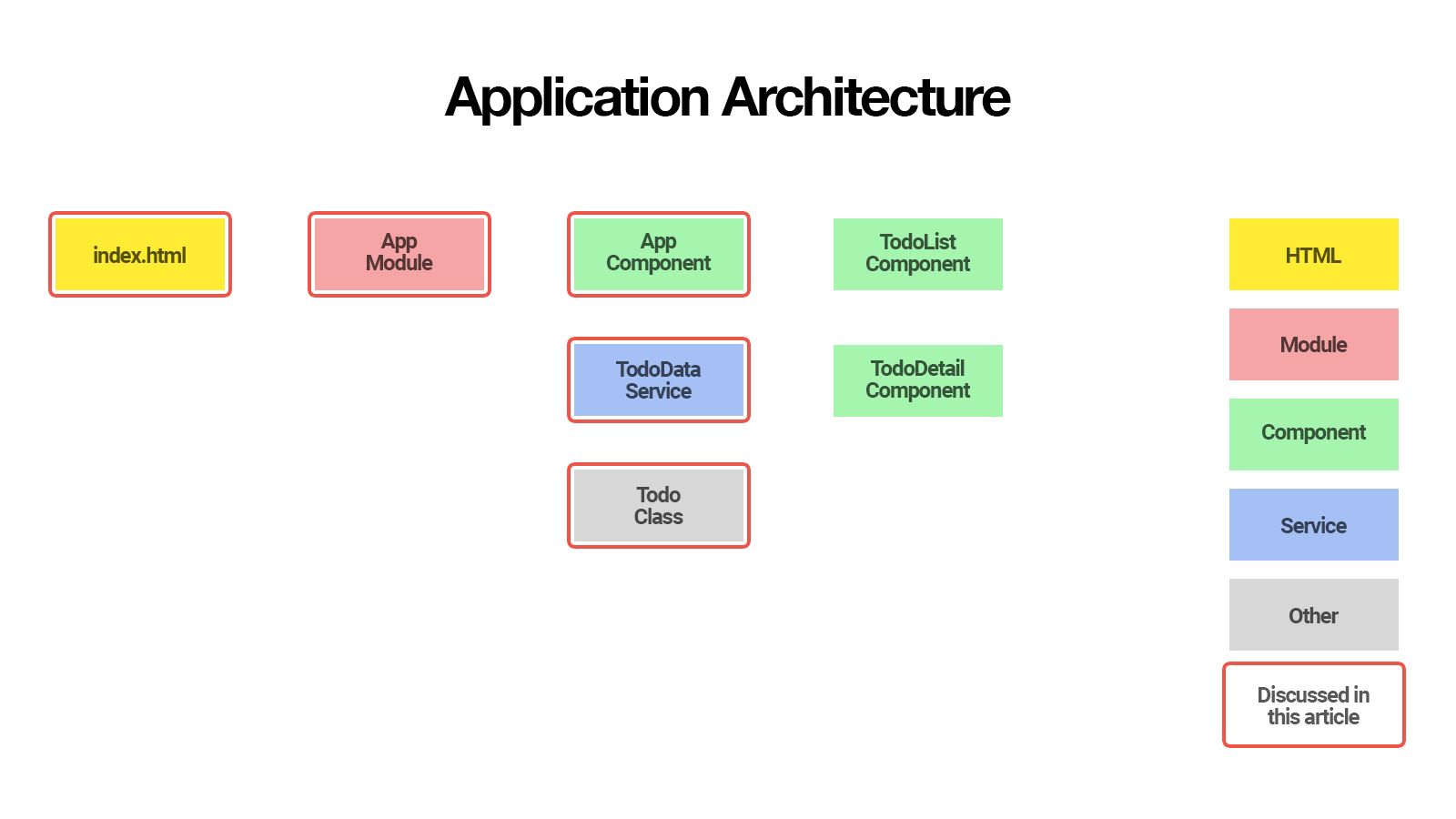
The items that are marked with a red border are discussed in this article, while items that are not marked with a red border will be discussed in follow-up articles within this series.
In this first part, you’ll learn how to:
Todo class to represent individual todosTodoDataService service to create, update and remove todosAppComponent component to display the user interfaceSo let’s get started!
Rather than a successor of AngularJS 1.x, Angular 2 can be considered an entirely new framework built on lessons from AngularJS 1.x. Hence the name change where Angular is used to denote Angular 2 and AngularJS refers to AngularJS 1.x. In this article, we’ll use Angular and Angular 2 interchangeably, but they both refer to Angular 2.
As of February 9, 2017, the ng deploy command has been removed from the core of Angular CLI. Read more here.
One of the easiest ways to start a new Angular 2 application is to use Angular’s command-line interface (CLI).
To install Angular CLI, run:
$ npm install -g angular-cli
This will install the ng command globally on your system.
To verify whether your installation completed successfully, you can run:
$ ng version
This should display the version you’ve installed:
angular-cli: 1.0.0-beta.21
node: 6.1.0
os: darwin x64
Now that you have Angular CLI installed, you can use it to generate your Todo application:
$ ng new todo-app
This creates a new directory with all files you need to get started:
todo-app
├── README.md
├── angular-cli.json
├── e2e
│   ├── app.e2e-spec.ts
│   ├── app.po.ts
│   └── tsconfig.json
├── karma.conf.js
├── package.json
├── protractor.conf.js
├── src
│   ├── app
│   │   ├── app.component.css
│   │   ├── app.component.html
│   │   ├── app.component.spec.ts
│   │   ├── app.component.ts
│   │   ├── app.module.ts
│   │   └── index.ts
│   ├── assets
│   ├── environments
│   │   ├── environment.prod.ts
│   │   └── environment.ts
│   ├── favicon.ico
│   ├── index.html
│   ├── main.ts
│   ├── polyfills.ts
│   ├── styles.css
│   ├── test.ts
│   ├── tsconfig.json
│   └── typings.d.ts
└── tslint.json
If you’re not familiar with the Angular CLI yet, make sure you check out The Ultimate Angular CLI Reference.
You can now navigate to the new directory:
$ cd todo-app
Then start the Angular CLI development server:
$ ng serve
This will start a local development server that you can navigate to in your browser at http://localhost:4200/.
The Angular CLI development server includes LiveReload support, so your browser automatically reloads the application when a source file changes.
How convenient is that!
Continue reading %Building a Todo App with Angular CLI%


