Friday, March 8, 2019

SitePoint Premium New Releases: Vue Projects, Django & Isomorphic Go

We're working hard to keep you on the cutting edge of your field with SitePoint Premium. We've got plenty of new books and mini-books to check out in the library — let us introduce you to them.

Build a Real-time Chat App with Pusher and Vue.js

Build a real-time chat application using Vue.js powered by ChatKit. The ChatKit service will provide us with a complete back end necessary for building a chat application on any device, leaving us to focus on building a front-end user interface.

Read Build a Real-time Chat App with Pusher and Vue.js.

Django Design Patterns and Best Practices Second Edition - Packt

Build maintainable websites with elegant Django design patterns and modern best practices. Explore aspects from Models and Views to testing and deployment. You’ll also understand the nuances of web development, such as browser attack and data design.

Read Django Design Patterns and Best Practices Second Edition.

Creating Beautiful Charts Using Vue.js Wrappers for Chart.js

Learn how to represent data in the form of various types of chart with the help of Chart.js and Vue.js.

Read Creating Beautiful Charts Using Vue.js Wrappers for Chart.js.

Isomorphic Go

Learn isomorphic development in Go, getting a unified view of web and back-end development. Learn how to build Isomorphic Go web apps. Neatly organize your isomorphic codebase to enhance the maintainability of your app. Leverage the same Go code across the web server and the web browser.

Read Isomorphic Go.

How to Build a Chrome Extension with Vue

Learn how to build a simple extension for Chrome. For the JavaScript part of the extension, we'll be using Vue.

Read How to Build a Chrome Extension with Vue.

And More to Come…

We're releasing new content on SitePoint Premium almost every day, so we'll be back next week with the latest updates. And don't forget: if you haven't checked out our offering yet, take our 7 day free trial for a spin.

The post SitePoint Premium New Releases: Vue Projects, Django & Isomorphic Go appeared first on SitePoint.


by Joel Falconer via SitePoint

Twitter Launched New Tools to Increase Video Engagement on the Platform

In January, Twitter announced at CES2019 it will introduce new tools that would assist publishers in understanding what their follower is most interest in. A dashboard would allow them to analyze what type of content is more engaging, and at what time, which kind of post is doing well. In...

[ This is a content summary only. Visit our website https://ift.tt/1b4YgHQ for full links, other content, and more! ]

by Aqsa Rasool via Digital Information World

How JavaScript's '==' actually works, step by step

#427 — March 8, 2019

Read on the Web

JavaScript Weekly

Handtrack.js: Realtime Hand Detection, Directly in the Browser — A neat way to prototype hand-related gestures or interactions in the browser in very few lines of code. Naturally, there's a live demo, there's also a CodePen you can play with, or just the plain ole' GitHub repo.

Victor Dibia

JavaScript Performance Pitfalls in V8 — A very detailed article where Benedikt Meurer of the core V8 team shows how V8 compiles your code and shares some tricks you can use to avoid performance problems.

Benedikt Meurer

Don’t Miss the New Developer Track at Slack’s Annual Conference — Whether you’re new to Slack or an expert app builder, there’s something for everyone at Frontiers, including a developer track designed just for you. Attend workshops, new feature demos, one-on-one advice sessions, and more. Register today to reserve your spot.

Slack sponsor

How Loose Comparisons (==) Work Step-by-Step — Determining what’s equal in JavaScript when you use == (versus ===) is notoriously tricky but this quick tool demonstrates the process JavaScript takes to figure it out - you can put your own values in to play around too.

Felix Kling

JavaScript Symbols: But Why? — Not played with symbols (a new data type introduced with ES6) yet? This is a gentle way to get up to speed with not only what they are but why you might use them.

Thomas Hunter II

The Third Party Web of Excessive JavaScript Execution — Research shows that across the top 1 million Web sites, just 800 origins account for 65% of all script execution time. Which third party scripts are slowing down the Web?

Patrick Hulce

Storybook 5.0: The UI Component WorkshopStorybook is a popular tool for building UI components for React, Angular, and Vue.js apps, now with an all-new interface. Wondering why you should use Storybook? They’ve got that covered in this 2 minute intro video.

Michael Shilman

💻 Jobs

JavaScript Developer at X-Team (Remote) — Join the most energizing community for developers. Work from anywhere with the world's leading brands.

X-Team

Senior Software Engineer - Invoca (Santa Barbara, or Remote US) — Join our collaborative engineering team, deploying code to our production SaaS platform & public cloud infrastructure.

Invoca

Find A Job Through Vettery — Vettery specializes in dev roles and is completely free for job seekers.

Vettery

📘 Tutorials and Opinions

What the Functor? Functional Terminology Explained with JS — We recently linked to a neat jargon-free intro to functional programming concepts and the author is now back with… an introduction to some of the jargon! Functors, categories, endofunctors, monoids, and monads are deftly explained here.

Matthew Gerstman

▶  How Google Search Indexes JavaScript Sites — Martin Splitt briefly explains how JavaScript influences SEO and how to optimize your JavaScript-powered website to be search-friendly.

Google Webmasters

Get Up to Speed in Building Web Applications with Node.js — Learn the basics, and gain proficiency in building, testing, and deploying apps in the cloud through concrete examples & practical projects.

Microsoft Azure sponsor

How Does Aurelia 'React'?Aurelia is an interesting framework in its own right - this new series aims to show how Aurelia approaches things you might otherwise do in React.

Rob Eisenberg

▶  Discussing Maintaining Vue.js with Evan You — An hour long podcast chat with the maintainer of Vue.js.

ShopTalk podcast

Building a Plasma Canvas Effect with Rust and WebAssembly — Yes, the actual effect is coded in Rust, but JavaScript is used to bring everything together and may be of interest to you if you want to bring other languages into your frontend development via WebAssembly.

Jeremy Likness

Executing Arrays of async/await Functions in Series vs. Concurrently

Corey Cleary

🔧 Code and Tools

Cherow: A Fast, Standards-Compliant JavaScript Parser — Parses right up to ECMAScript 2020(!) and there’s a live demo so you can see what it outputs.

KFlash

Use Sencha’s Powerful Grid for Your React Apps — Grids can be frustrating to build. Save time: Easily integrate our pre-built grid & 115+ components into your React app.

Sencha, Inc. sponsor

A Naive, 27 Line Reimplementation of React Hooks — OK, it’s hard to read and there’s a (minor) bug in it, but reading through this code example might help you understand how hooks work under the surface a little more. Here’s an interactive, copy/pasteable alternative you can play with yourself.

Shawn Wang

iro.js: An SVG-Based HSV Color Picker WidgetLive demo and code example.

James Rakujira

NLP.js: Natural Language Utilities for Node.js — Guess the language of a text, stemming/tokenization, sentiment analysis, etc.

AXA

Share Your Whole Stack with Your Team with One Workflow 👩‍💻

Manifold sponsor

Ink 2.0: Like React, But For Building CLI Apps — A component-based UI building experience, but for CLI apps.

Vadim Demedes

React-Calendar: A Simple Calendar Component — A straightforward, compact monthly view. (BTW, if you want more React libraries and components, you’ll enjoy our React newsletter, which is where most of them go! 😄)

Wojciech Maj

AV1: AVIF (AV1 Still Image Format) Polyfill for the Browser — AVIF is a image format whose spec has just reached version 1.0.

Kagami Hiiragi


by via JavaScript Weekly

After Instagram and Pinterest, Google is All Set To Test Shoppable Ads

After Instagram and Pinterest, Google is also incorporating e-commerce into its search results. Within image searches, shoppable ads will be displayed which will give basic details of shopping and also link to buy it. Suppose when a desk is searched in Google images, by clicking on the shopping...

[ This is a content summary only. Visit our website https://ift.tt/1b4YgHQ for full links, other content, and more! ]

by Aqsa Rasool via Digital Information World

Google and CERN collaborate to create the Big Bang AR app

None of us experienced the Big Bang; however, we can all catch a replay of the action through a new app created by CERN and Google. The maker duo has developed an AR app for Big Bang that turns the world around us into nothing, which ultimately becomes everything. The app is intriguing and...

[ This is a content summary only. Visit our website https://ift.tt/1b4YgHQ for full links, other content, and more! ]

by Saima Salim via Digital Information World

Facebook is finally rolling out text formatting feature to its Groups section

Despite a scandalous year, Facebook continues to live up to its reputation of being the leading social media giant by frequently introducing new features and updating its services to keep the users engaged. This time it is all geared up to allow users to format their texts on Groups. According...

[ This is a content summary only. Visit our website https://ift.tt/1b4YgHQ for full links, other content, and more! ]

by Saima Salim via Digital Information World

How to promote your upcoming events using Squarespace

Squarespace Logo

If you’re an artist, you’ll agree; gigging is not easy.

After years of perfecting your art (music, painting or performance) you have decided it’s time to get out there.

With the stresses bundled with live events, you don’t have time to build a full website with an event schedule. Lucky for us, Squarespace is an all-in-platform allowing you to easily build a beautiful online presence, list your upcoming events and even collect the email addresses of your fans.

In this tutorial I show you how to easily add an event calendar to your Squarespace website. Below that I handpick my 3 favorite Squarespace artist templates to give you a kickstart.

How to promote your upcoming events using Squarespace


One Page Love Exclusive Coupon

OPL10

Yay! Squarespace has been kind enough to give One Page Love readers the exclusive coupon OPL10 for 10% Off your first website or domain purchase. (There is a free 14-day trial with no credit card needed, so you can try risk free.)


Tutorial: How to add an event calendar to your Squarespace home page

1. Start with any Squarespace template: To speed things up I’d recommend starting with any of the 3 below this tutorial or a Squarespace template within your industry.

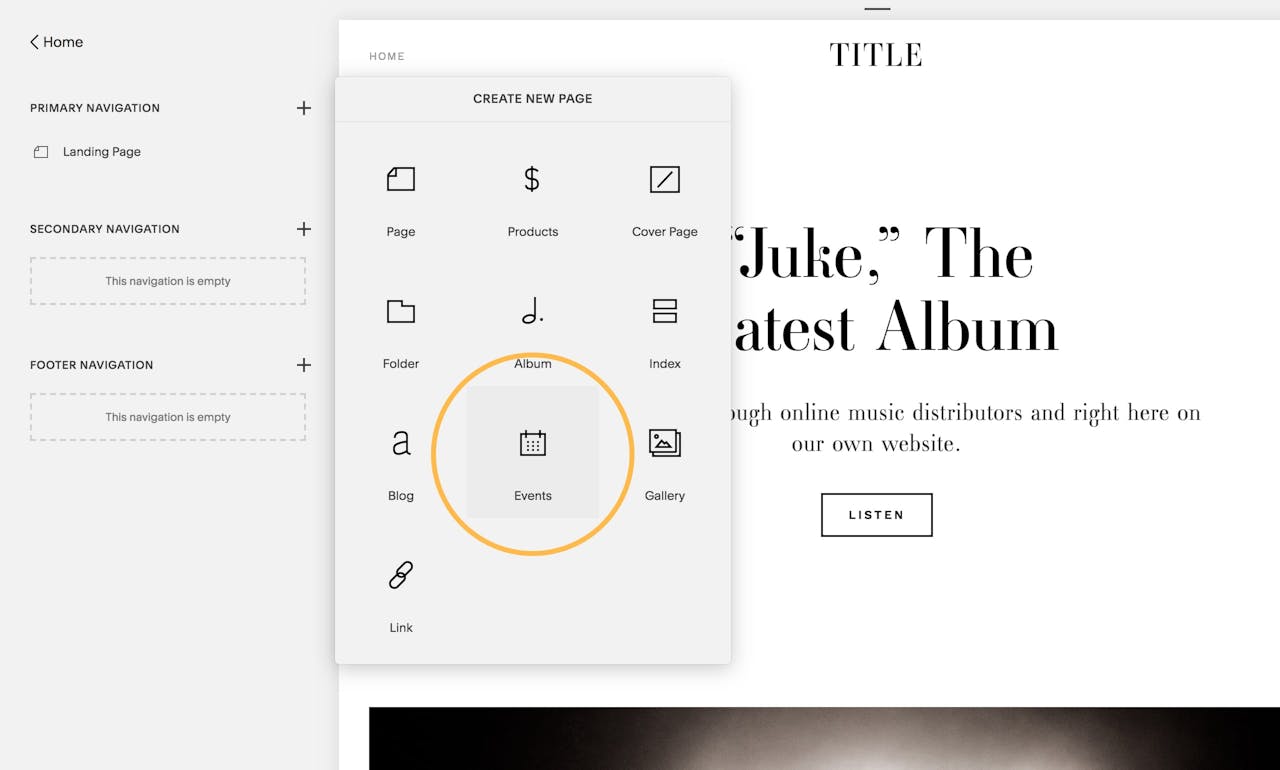
2. Add an Events page: Head to Main Menu > Pages > plus (+) Icon > select Events page:

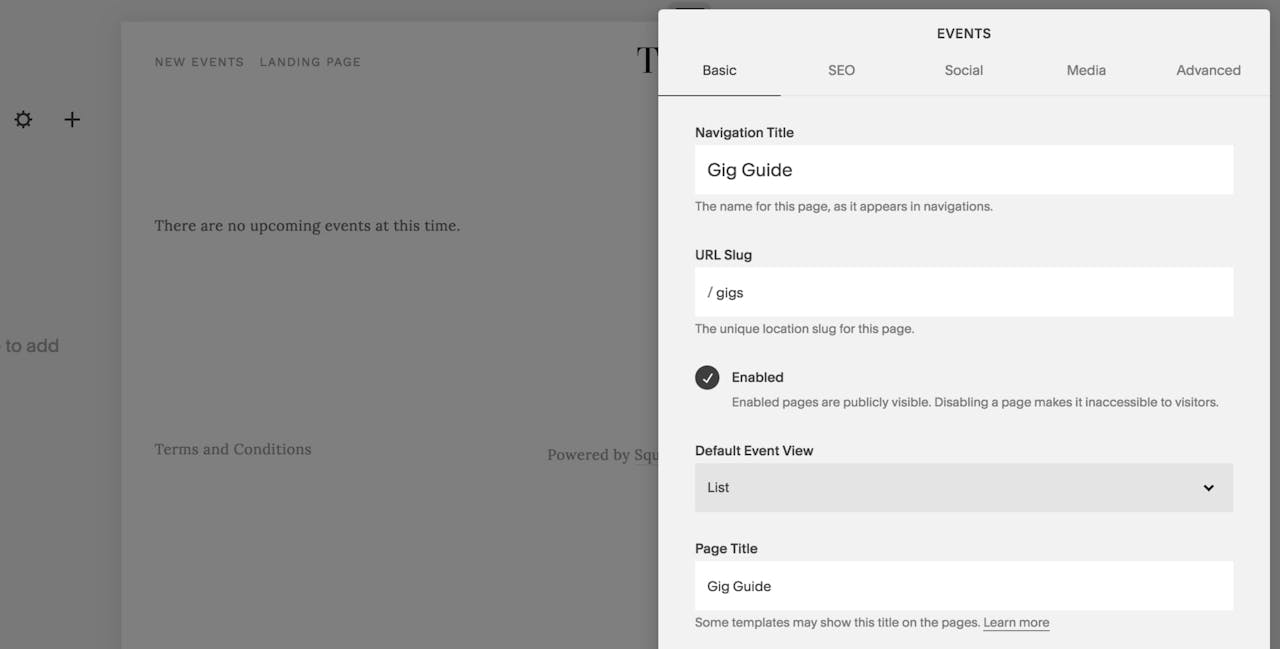
3. Set Events page details: Name the Event navigation item, add the Event page title and then choose if you want the Event page in a list or calendar view:

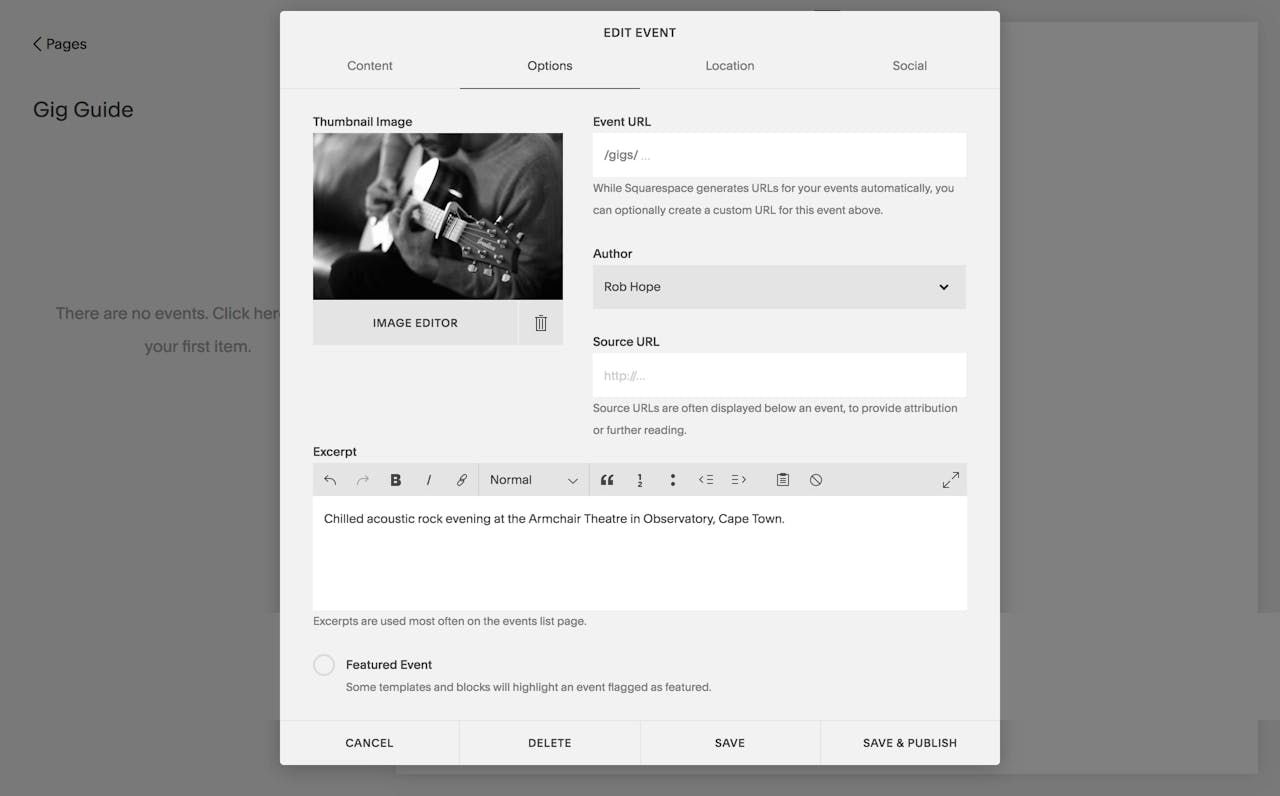
4. Add Events: In the Events panel on the left, click the plus (+) icon to add a new event. Continue to fill in as many details as possible including event title, date, times and location. There is even an option to add an image for the event thumbnail. Once complete, Save & Publish on the bottom right:

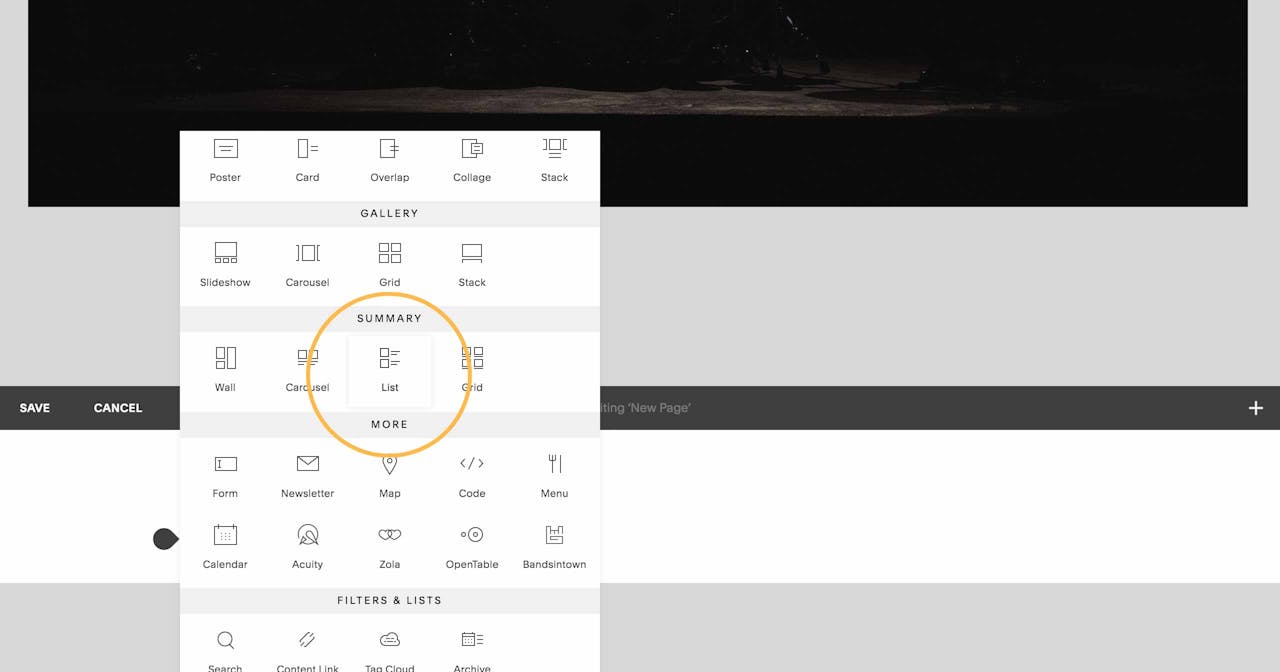
5. Add a List Content Block to your home page: Head to Main Menu > Pages > Home page. Now open the editor anywhere in your home page where you would like the gig list. Hover in the exact area (until you see the tear-drop editor prompt) and click to add a Content Block. Scroll to the Summary section and add a List Content Block:

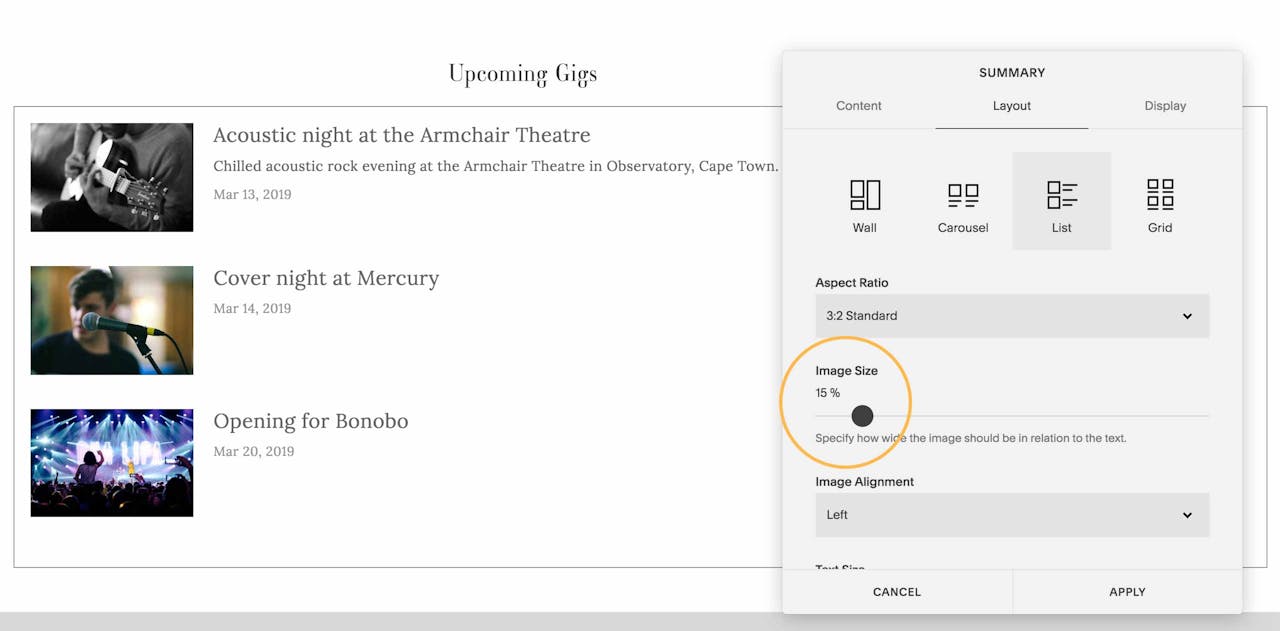
6. Adjust the Content Block design: Once you’ve assigned the correct event for the block, go through all the option until you are happy with the design. Here you can see the powerful options for thumbnail aspect ration and even size. I like having my thumbnails quite small in the list:

7. Publish: Once you are happy with the event list design simply hit Apply and your upcoming gig guide will display in your home page. What’s neat is when Events pass, the block will automatically hide old events. Same goes with adding new events on the Events page, they automatically get added to the home page in chronological order.


Where to start? Here are 3 Squarespace Artist Templates

Here are my 3 favorite Squarespace templates offering an excellent online presence for musicians, performers, artists and the alike.

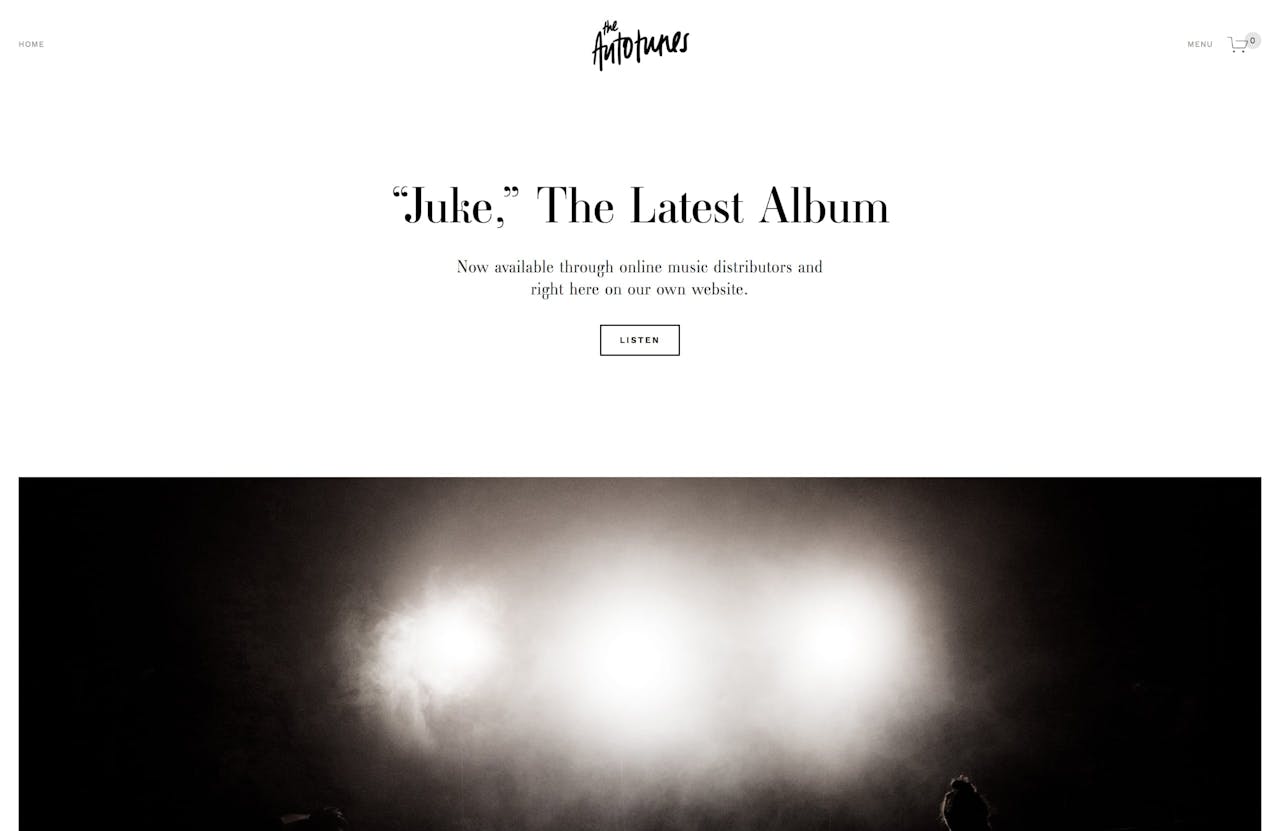
1. Juke (Band, Musician, Solo Artists)

Juke is a minimalistic template featuring big images, good whitespace, a gig list and a merchandise section with commerce functionality.


2. Om (Musician, Painter, Artist, Tutor)

Om is a template demo’d as a Yoga studio but is perfect for an artist wanting to list events as well as host workshops. The template is fully integrated with a system to browse and book available time slots.


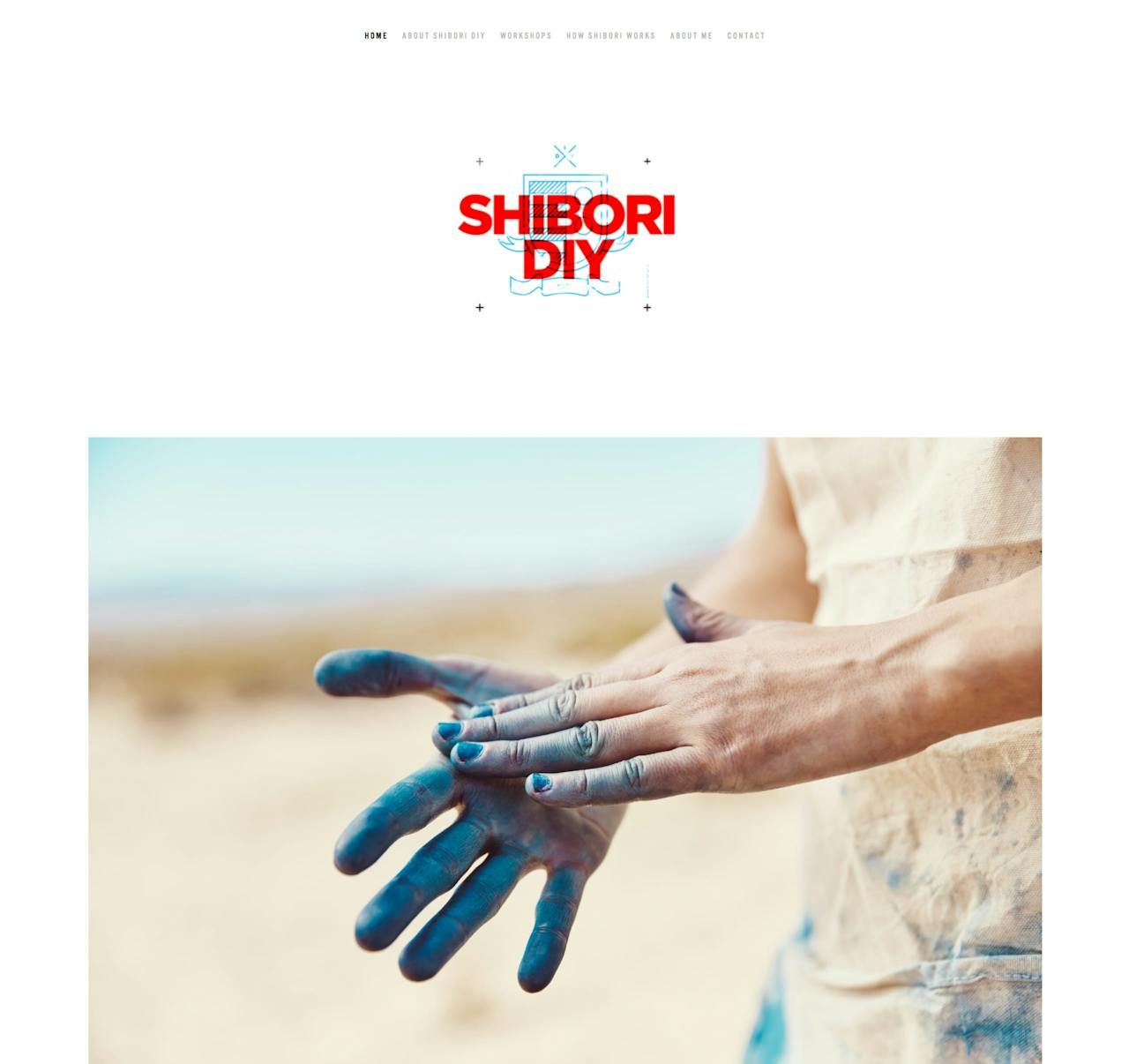
3. Shibori (Artist, Painter, Designer, Illustrator)

Shibori is a great template to showcase big images of your paintings, prints or sculptures. There is a Workshop section that could easily renamed Exhibitions to list all your upcoming events.


FAQ: What are the benefits of using Squarespace?

Squarespace is a leading online website builder. What sets them apart from the rest is their superior level of design and customer support. They have a huge support team and are available 24/7. Other main benefits are:

  • No Website Hosting Needed - their platform is fast and secure
  • Online Content Management - all edits are done within your browser, no software needed
  • Easily Drag and Drop Images - unlimited galleries with unlimited bandwidth
  • Free Domain Name - when registering for your first website, if you pay annually (renews at standard rate)
  • Beautifully Responsive - all templates work for all devices, so you only have to design your website once. Test and preview how your website will appear on a range of screen sizes.
  • Blog Sections - can easily be added to start sharing your journey
  • Commerce Solutions - are an upgrade away if you want to start selling products
  • Email Marketing - gather email addresses, send marketing emails and analyze the reader email activity

That’s a wrap! Don’t forget your 10% Off coupon: OPL10

OPL10

I hope you enjoyed this tutorial on adding a gig calendar to any Squarespace template. Props to Squarespace for creating a platform where we can create beautiful Landing Pages, easily. If you missed it I wrote a tutorial on using Squarespace to announce your Startup and gather Email Leads.


by Rob Hope @robhope via One Page Love