
Wednesday, September 18, 2019

Google to Release More Project Jacquard Smart Clothing Soon

Google is known for making products that are generally considered to be more or less game changing, but a lot of the time their announcements often don’t pan out into anything that can be considered as truly worthy of serious consideration and this is because of the fact that in several cases the...

[ This is a content summary only. Visit our website https://ift.tt/1b4YgHQ for full links, other content, and more! ]

by Zia Zaidi via Digital Information World

Is the “Delete for Everyone” WhatsApp feature bias when it comes to deleting media files sent to iPhone users?

We are all guilty of sending messages, especially media files to someone on WhatsApp that we shouldn’t have! Luckily, WhatsApp, along with its rival Telegram introduced the ‘Delete for Everyone’ feature that allowed many (if not most) of us to reciprocate (unsend) our mistake – if realized almost...

[ This is a content summary only. Visit our website https://ift.tt/1b4YgHQ for full links, other content, and more! ]

by Saima Salim via Digital Information World

How to Build Your First Telegram Chatbot with Node.js

So, this morning you woke up with the idea to develop a way to store and label interesting articles you've read. After playing with the idea, you figure a Telegram chatbot is the most convenient solution for this problem.

In this guide, we'll walk you through everything you need to know to build your first Telegram chatbot using JavaScript and Node.js.

To get started, we have to register our new bot with the so-called Botfather to receive our API access token.

Bot Registration with @BotFather

The first step towards our very own Telegram bot is registering the bot with the BotFather. The BotFather is a bot itself that makes your life much easier. It helps you with registering bots, changing the bot description, adding commands, and providing you with the API token for your bot.

The API token is the most important step, as this allows you to run the code that can perform tasks for the bot.

1. Finding the BotFather

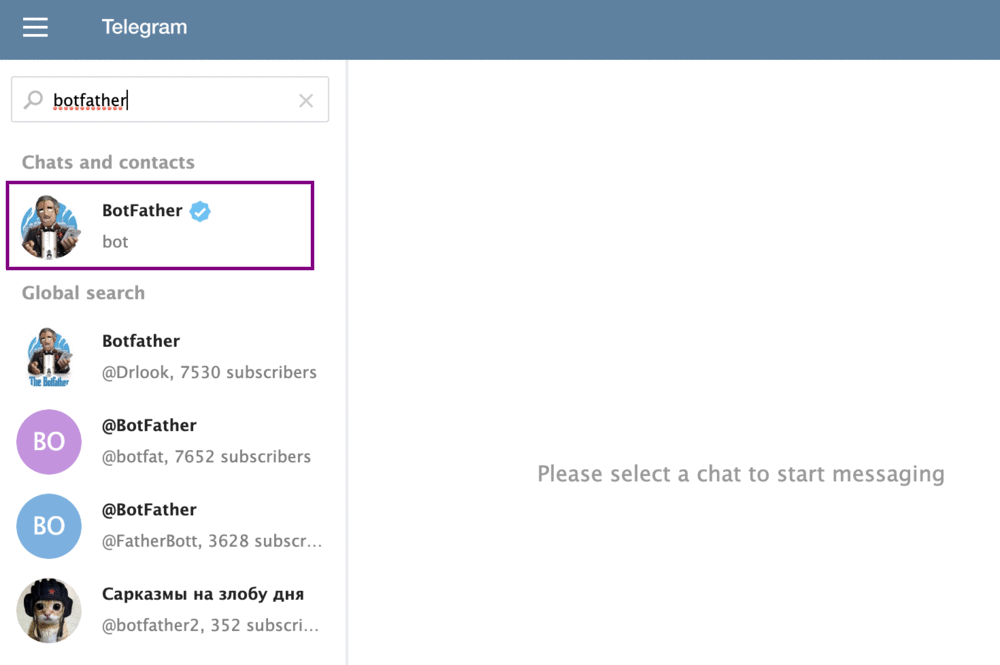
The BotFather can be found on Telegram by searching for 'BotFather'. Click on the official BotFather, indicated with the white checkmark icon in the blue circle.
2. Registering a New Bot

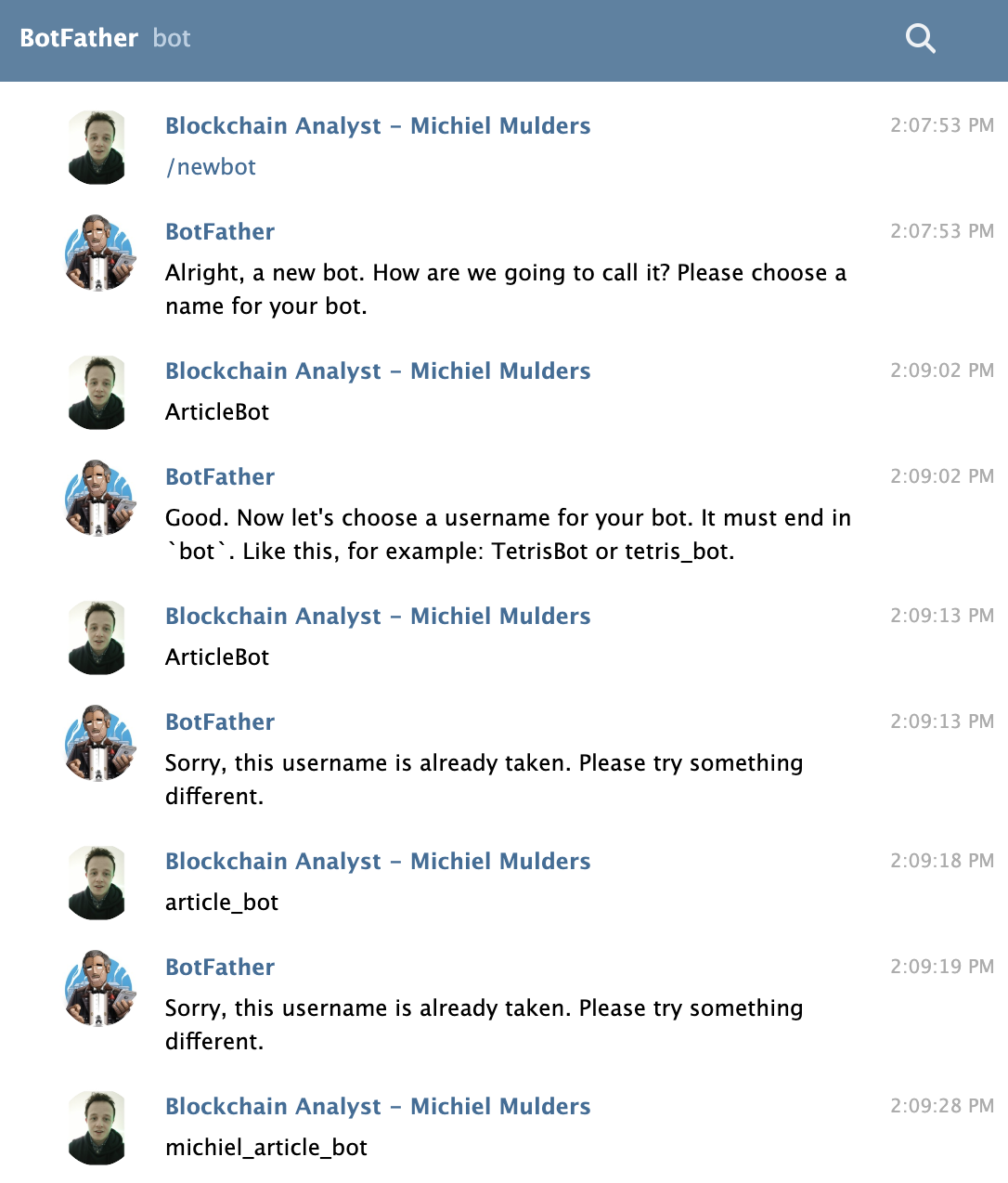
Now we've found BotFather, let’s talk to him! You can start the conversation by typing /newbot. BotFather will ask you to choose a name for your both. This name can be anything and doesn’t have to be unique. To keep things simple, I named my bot ArticleBot.

Next, you will be prompted to input a username for the bot. The username must be unique and end in bot. Therefore, I chose michiel_article_bot, as that username was not yet taken. This will also be the username you use for looking up the bot in Telegram's search field.
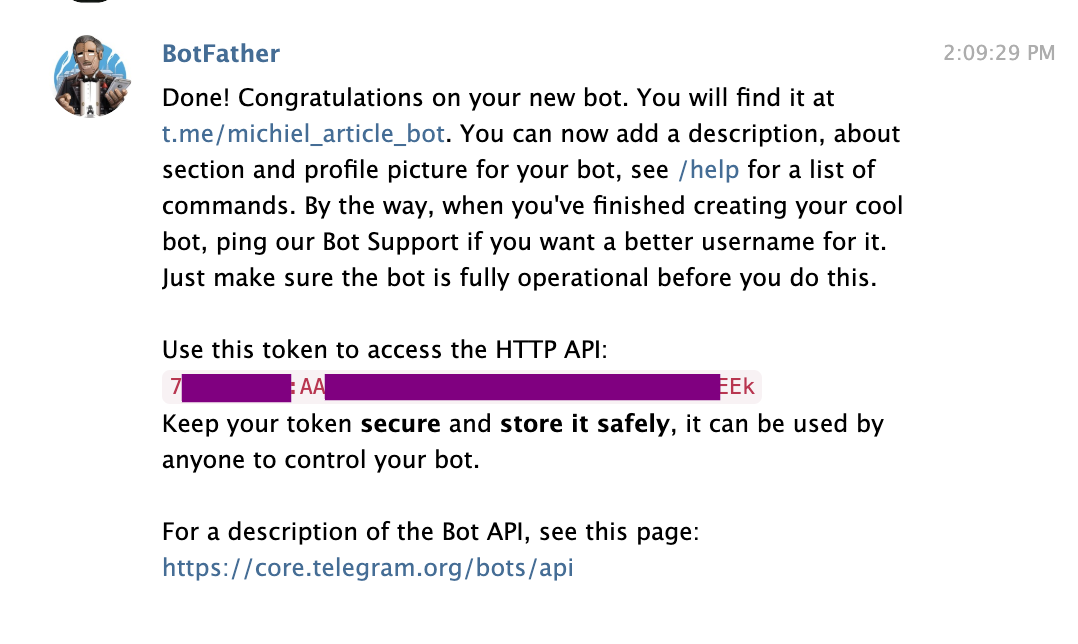
FatherBot will return a success message with your token to access the Telegram HTTP API. Make sure to store this token safely, and certainly don't share it with anyone else.
3. Modifying the Bot

We can further modify the bot by adding a description or setting the commands we wish the bot to know. You can message the bot with the text /setcommands. It will show you how to input the commands with the format command1 - Description.

The post How to Build Your First Telegram Chatbot with Node.js appeared first on SitePoint.


by Michiel Mulders via SitePoint

There’s a rumor about a flaw in iOS 13 before it’s even launched

Companies try to introduce new technology every once in a while to engage their users. Apple is one of the largest tech giants with millions of users utilizing its products on a daily basis. Every year Apple launches its new series of smartphones and along with its new series of software for its...

[ This is a content summary only. Visit our website https://ift.tt/1b4YgHQ for full links, other content, and more! ]

by agha ali via Digital Information World

Website Inspiration: MakeTheWeb

Long-scrolling One Pager featuring a strong card design hosting the projects of creative studio, MakeTheWeb.

Full Review


by Rob Hope @robhope via One Page Love

Machine learning For frontend developers

#409 — September 18, 2019

Read on the Web

Frontend Focus

Machine Learning For Frontend Developers With Tensorflow — Charlie Gerard covers how to get started with machine learning using JavaScript and frameworks like Tensorflow.js, and highlights some of the limits of using machine learning in the frontend.

Smashing Magazine

(Why) Some HTML is "Optional" — A little look into why certain HTML tags (such as a closing </p>) are optional — it mainly comes to down to historical backwards compatibility and an evolving approach to how syntax is written.

Remy Sharp

Image & Video Management Made for Front-End Developers — Simplify and automate the process of uploading, manipulating, optimizing, and delivering images and videos across every device at any bandwidth. Try Cloudinary. See how easy media management can be. Get your own free account today.

Cloudinary sponsor

Firefox Moving to a Faster 4-Week Release Cycle — It’ll only be a couple of years before we reach Chrome 100 and it seems Firefox wants a piece of the action :-) Firefox’s release cadence will be moving from approx 6-8 weeks per version to just 4 from Firefox 71 onward.

Mozilla Hacks

Two Browsers Walked Into a Scrollbar — A quick exercise in styling scrollbars in an unobtrusive, cross-platform considerate manner.

Zach Leatherman

All 245 Entries in The 2019 JS13kGames Competition — We linked to the competition a few weeks back and now the fruits of everyone’s efforts are here to check out and play. Some very impressive results here considering the 13 kilobyte file size limit.

Andrzej Mazur

What's New in Chrome 77 for Developers? — Chrome 77 is rolling out to users now. Here, Pete LePage dives in to what’s new for developers in this latest version.

Google Developers

💻 Jobs

Can You Help Our Client Migrate to Node.js? Docklands, London — Do you have experience & strong opinions on Node best practices? Come and share your advice with an engaged, friendly team of excellent software engineers.

CareersJS

Find a Frontend job through Vettery — Vettery specializes in tech roles and is completely free for job seekers. Create a profile to get started.

Vettery

📙 Articles, Tutorials & Opinion

Logical Operations with CSS Variables — How to emulate functions like not(var(--i)) in CSS by using arithmetic operations via the calc() function.

Ana Tudor

Contemporary Frontend Architectures — A frontend engineer’s perspective on modern web application architecture.

Harshal Patil

Ghost Buttons with Directional Awareness in CSS — Animating the fill of a ghost button such that the background fills up in the direction from which a cursor hovers over it.

Jhey Tompkins

Software Development Partner for CTOs, Product Owners and Tech Leaders — Build or extend your JavaScript team. In days, not months.

The Software House sponsor

CSS Grid: Illustrated Introduction — A detailed, visual look at how to get to grips with Grid.

Mustapha Aouas

Why I'm Preloading A Font Even When I Shouldn't Have to — Talks about the benefits of preloading fonts, even if they’re referenced in inline CSS.

Alex Painter

💡 Tip of the Week

supported by

Using CSS to highlight images with no alt tags

If you're preparing a site for production it can be a good idea to have images call attention to themselves if they're lacking an alt attribute. This is a simple enough thing to do and is a helpful, visual way to check that your site is accessible.

To do this you'll need to make use of the CSS negation pseudo class :not(). This accepts a selector, such as alt, as an argument to check against.

The :not() selector will check if an image has an alt attribute specified, and if not, will trigger. The example below will turn any image lacking alternate text to grayscale.

img:not([alt]) {
  filter: grayscale(100%);
}

The filter: property has a variety of functions, so you can experiment with how 'obvious' you want the images lacking an alt tag to be. Another solution may just be using the tried and tested red border or you could use display: none to hide a non-compliant image entirely! 😉

Ire Aderinokun runs through a similar technique here for highlighting broken images.

This Tip of the Week is sponsored Pantheon, the WebOps platform built for agility. Learn how you can empower your web team and drive results on your website with WebOps.

🔧 Code, Tools & Resources

image-actions: Automatically Compress Images On Pull Requests — This new GitHub Action automatically compresses/optimizes raster images (with minimal setup). Here’s a direct link to the Action.

Calibre

Introducing 'Can I Email' — An idea heavily inspired by Can I Use, a popular index of Web features and their cross-browser support. Can I Email takes the same idea to what different email clients support.

Can I Email

Button Contrast Checker — A straightforward tool to test whether your buttons and links are compliant with WCAG 2.1 contrast guidelines.

Aditus

Accessibility for Web Developers. Get the Whitepaper

Progress Kendo UI sponsor

css-camera — A way to add depth to your web page with CSS3 3D transform. Documentation, and repo here.

Mingyu Kim

Headroom.js: Hides Your Page Header Until Needed — A pure JS widget for hiding elements until needed.

Nick Williams

CSS Card Hover Effect — A nice hover effect for a card style element.

Jhonier Riascos Zapata codepen

   ðŸ—“ Upcoming Events

Fronteers Conference, October 3-4 — Amsterdam, Netherlands — One of Europe’s premiere conferences on front-end web development.

SmashingConf New York, October 15-16 — New York, USA — The conference is sold out, but some workshop tickets are still available.

Accessibility Scotland, October 25 — Edinburgh, UK — One day of talks. Friendly, open discussion about accessibility.

Frontend Con, November 26-27 — Warsaw, Poland — Brings together 30+ top experts with over 500 experienced frontend pros from all over the world.


by via Frontend Focus

Instagram Ghost Users Could Cause Crashes

The manner in which Instagram defines user accounts is through an incremental Public Key Infrastructure (PKID) system, which means that it is actually quite easy for anyone that knows how to peak through to the source code of the website to figure out who the first accounts on Instagram belong...

[ This is a content summary only. Visit our website https://ift.tt/1b4YgHQ for full links, other content, and more! ]

by Zia Zaidi via Digital Information World