"Mr Branding" is a blog based on RSS for everything related to website branding and website design, it collects its posts from many sites in order to facilitate the updating to the latest technology.
To suggest any source, please contact me: Taha.baba@consultant.com
Tuesday, May 20, 2025
Reels Drive Facebook Video Time Up as News Feed Engagement Drops, Meta Shows
The data—shared during its defense against the Federal Trade Commission—shows Facebook’s feed has evolved into a video-first environment. Over the last few years, time spent watching video on Facebook has surged, while activity around static posts and Stories has waned. One internal chart shows Reels, Meta’s short-form video format, pulling ahead. The classic News Feed is slipping. Stories never really caught on.
That’s no accident. Meta has leaned heavily on a recommendation system that pushes Reels to users regardless of who they follow. This tweak alone appears to be driving a major chunk of engagement across both Facebook and Instagram.
Buried in the documents was another striking stat: messaging now outpaces public sharing by a wide margin. For every post made on someone’s profile, around 63 messages are exchanged privately. That ratio highlights what many have sensed — these apps no longer revolve around public broadcasting. They function more like entertainment hubs paired with messaging services.
For brands, this shift means more than just a format change. Users might still see and tap on video ads, but the real engagement often happens in direct conversations. That’s where Meta’s Click-to-Message ads come in. These campaigns don’t just flash an offer — they invite users into one-on-one chats. And according to Meta, they’ve been gaining momentum.
The trial also revealed that when TikTok faced temporary restrictions in the U.S., traffic didn’t vanish. It rerouted. Platforms like Facebook, Instagram, and YouTube quickly filled the void. Should a ban on TikTok go through under the Protecting Americans from Foreign Adversary Controlled Applications Act, Meta stands ready to absorb even more of that displaced audience.
Another internal slide showed the feature overlap now blanketing social apps. From Stories to Shorts to DMs to algorithmic feeds, the big players are looking more alike every year. Innovation, at least on the surface, has slowed. Everyone’s chasing the same metrics with the same tools.
Meta’s fight with the FTC may hinge on legal definitions, but its internal data reveals something bigger — the way people interact on social media has changed, and the platforms are scrambling to keep up.
Read next: Sally’s Siblings Stump GPT-4: Why Hinton Says AI Isn’t Ready for Real Reasoning
by Irfan Ahmad via Digital Information World
Sally’s Siblings Stump GPT-4: Why Hinton Says AI Isn’t Ready for Real Reasoning
The example he chose was a classic riddle, that is, Sally has three brothers, and each brother has two sisters. Despite the correct interpretation pointing to a single sister — Sally being one of two in total — GPT-4 answered incorrectly, claiming there were two sisters in addition to Sally.
Hinton, who has contributed extensively to AI's foundation, seemed surprised that a model capable of acing law and college admission exams could stumble on such a basic problem. For him, the incident served as a subtle warning that even widely trusted systems remain far from infallible.
While GPT-4 failed the riddle, other versions, such as GPT-4o and GPT-4.1, reportedly answered correctly when users tried the puzzle after the interview aired. These updates, which OpenAI launched after GPT-4’s 2023 debut, aim to improve speed, accuracy, and cross-modal capabilities. GPT-4o, now the default model in ChatGPT, promises smarter voice, text, and vision processing. GPT-4.5 and GPT-4.1 further build on that, though OpenAI hasn't officially addressed the riddle issue.
According to AI model rankings from Chatbot Arena — a crowd-sourced performance leaderboard — Google’s Gemini 2.5-Pro currently holds the top position, with OpenAI's GPT-4 variants closely trailing. These standings reflect the intense rivalry among companies racing to refine general-purpose AI systems.
Elsewhere in the AI research space, findings by model evaluation firm Giskard suggest that when users ask chatbots to respond briefly, those bots tend to generate more false or fabricated statements. The effect was most visible across major models like GPT-4o, Claude, and Mistral, highlighting a trade-off between response length and factual reliability.
Hinton, while optimistic about future improvements, acknowledged that AI’s progress remains uneven. Despite his admiration for the tools he helped inspire, he reminded audiences that intelligence in machines doesn’t always equal sound judgment.
Image: DIW-Aigen
Read next: How to View Any Website’s Past Versions Using the Wayback Machine
by Irfan Ahmad via Digital Information World
Monday, May 19, 2025
How to View Any Website’s Past Versions Using the Wayback Machine
Internet is the most dynamic space available today with changes constantly taking place on it, resulting in updated versions of webpages and relegation of previous ones to obsoleteness. But those obsolete webpages do not lose their worth altogether. They could be required for varied reasons — to study the evolution of a website or gain access to an older version of a web page etc. — by different people and companies. For the same reason, those obsolete web pages are saved for any expected or unexpected future use on the Internet Archive known as the Wayback Machine .
A part of the Internet Archive, the Wayback Machine was introduced in 2001. Its main function is to save snapshots of webpages, so anyone interested can have access to previous versions of webpages of different websites. As of today, the Wayback Machine has over 916 billion web pages saved. In other words, people can access billions of these pages to see changes that occurred on websites over the years or to find a web page of a site at a specific time in its history.
Follow the Guide to Search/Find Older Version Of Web Pages on the Wayback Machine
1) Search Wayback Machine on Google and open the website or simply copy paste this URL or click on it https://web.archive.org/.
2) The search box is present on the front page. Enter the target url of the website whose previous versions of web pages you want to explore. Either use a domain name or the url of a specific page. For example, we are using https://www.wwe.com/ to explore how it appeared in the past.
3) You will see the results showing the yearly history of the website, the calendar view is the depiction of how many times the Wayback Machine crawled the website, not how many times the site received an update.
4) Just below the calendar view (aka timeline), the history saved on a monthly basis is given. The size of the circles encircling the numbers depict the number of times snapshots were saved on that day.
5) It is important to note that each circle color represents a different meaning for example blue indicates the successful retrieval of snapshots; green indicates that the crawler was redirected; orange depicts an error that the crawler faced on the client side during retrieval; and red shows a server error faced by the crawler.
6) Click on the date of your choice and then on the clock time to see that specific snapshot. But remember, some features, like internal links, might not work due to it not being a live page.
While the Wayback Machine primarily depends on direct URLs, it can perform basic keyword searches—though with limits. These keyword queries return entire websites loosely related to the term, not deep pages where the phrase actually appears.
For instance, searching for “AI in healthcare” won’t surface every archived article with that phrase. Instead, it may lead you to archived versions of sites broadly covering AI topics in medicine.
You'll still need to manually sift through the results to find specific content. Even so, this feature remains helpful for tracking down defunct blogs, early-stage company sites, or older institutional reports no longer hosted.
How to Save Pages on the Wayback Machine
1) Go to the main page of the website. You will see save page now at the bottom right corner of the page. Or simply head over to this dedicated Save page: https://web.archive.org/save/.
2) Enter the url of the website or web page that you want to save on the website, and your page will successfully be saved in the archives.
If you have plans to frequently use the Wayback Machine, then add Wayback Machine extension to your Chrome or Firefox to conveniently interact with the website.
While the Wayback Machine remains the most extensive free archive of past web content, a few other tools can be useful in specific cases. Services like archive.today allow users to capture and permanently store snapshots of web pages, even bypassing restrictions that may block traditional crawlers. Though not as comprehensive or navigable as the Wayback Machine, such alternatives can be effective when a page isn’t available or archived elsewhere. Including both tools in your digital research toolkit ensures better access to outdated or disappearing online information.
Web archiving is no longer just a technical convenience; it’s becoming a necessity as the internet shifts faster than ever. Websites change constantly—redesigns, content edits, even entire platforms vanish—making reliable snapshots crucial for journalists, researchers, and legal experts trying to verify facts or trace digital history. Yet, this archival process is far from perfect. Many modern sites rely on complex code and dynamic content that tools like the Wayback Machine still struggle to capture fully, leaving gaps in the record. Beyond technical hurdles, there’s an ethical tension: should deleted or private information remain accessible indefinitely? The debate around digital privacy and responsible archiving is intensifying as more personal data finds its way into these archives. At the same time, archived web data is becoming a valuable asset for AI-driven research and fact-checking, highlighting its growing importance in today’s information landscape. Meanwhile, grassroots and community initiatives to preserve digital culture remind us that archiving is not just a technical task but a shared responsibility—one that will shape how future generations understand the internet’s past.
Read next:
• How to Find the Publish Date of a Website, Webpage or Article. 6 Super Hacks!
• Here's How You Can Enable Or Disable JavaScript in Your Browser
by Ehtasham Ahmad via Digital Information World
Sunday, May 18, 2025
New LinkedIn Influencer Report Reveals Key Niches, Growth Formats, and Data-Backed Content Performance Metrics
Image: DIW-Aigen
The Influencer Marketing Factory recently published its Ultimate LinkedIn Influencer Guide , one of the first creator economy reports of its kind featuring exclusive data on top B2B LinkedIn influencers, LinkedIn influencer marketing performance, and overall sentiment towards LinkedIn influencer marketing. The Influencer Marketing Factory analyzed over 64,000 U.S.-based LinkedIn influencers to identify key trends and best practices for both creators and businesses. Plus, The Influencer Marketing Factory invited over 25 LinkedIn Top Voices, B2B influencers, and leaders in the creator economy to share their exclusive insights on the developing field of LinkedIn influencer marketing.
1. How do LinkedIn Influencers Differ from Other Creators?
Unlike B2C creators, B2B LinkedIn influencers uplift brands with their “halo of credibility” thanks to their authentic approach to thought leadership, professional storytelling, and value-driven content. LinkedIn influencers also stand out from standard Instagram or TikTok influencers since LinkedIn has its own unique algorithm. LinkedIn’s algorithm recommends content on the condition that one of your connections or viewers engages with it via reactions, commenting, or reposting, while popular social platforms typically recommend content based on someone's sole interests and past engagement. Once someone engages with a creator’s post, that content will be shared in the individual’s followers’ and connections’ feeds, and so on, as the post continues to reach new users. With this in mind, LinkedIn creators must curate engaging, shareable content to reach diverse user networks since LinkedIn’s algorithm doesn’t recommend content simply based on past behaviors or interests.
2. Big Picture LinkedIn Trends
The Influencer Marketing Factory analyzed LinkedIn creator data from Favikon across diverse sample sizes to better capture large-scale trends on the platform.
- The Influencer Marketing Factory’s analysis of 9,500 U.S.-based LinkedIn creators with over 3,000 followers revealed 12 key content niches dominating LinkedIn. Among these niches, Business & Entrepreneurship (15.6%) was the top content category among LinkedIn influencers. Other top niches include Tech & Innovation (6.2%) and Sales & Marketing (4.1%).
- 19% of LinkedIn creators have between 5,000 and 10,000 followers, while only 16% have 10,000 to 30,000 followers, according to The Influencer Marketing Factory’s analysis of 64,000 U.S.-based LinkedIn creators with over 1,000 followers—Favikon’s follower threshold to be considered a LinkedIn creator.
- A majority of LinkedIn influencers (71.36%) have an average engagement rate of 0-1%, as per The Influencer Marketing Factory’s analysis of 5,500 U.S.-based LinkedIn creators with over 3,000 followers.
3. Content Trends From LinkedIn’s Top 100 B2B Creators
The following are some of The Influencer Marketing Factory’s top insights from its analysis of LinkedIn’s Top 100 B2B Creators, as categorized by Favikon.
- Images are the most common content category among B2B LinkedIn influencers at 43.7%. Videos are secondary to Images (27.7%), followed by Text posts (20.3%).
- Male creators make up the majority (72.9%) of LinkedIn’s Top 100 B2B accounts, while women only make up 27.1% of the pool, signaling an opportunity for more diversity and female voices in the B2B content space.
- The Influencer Marketing Factory revealed that the overwhelming majority (67.7%) of LinkedIn’s Top 100 B2B Creators are based in the United States, with 11.5% from the UK and 6.3% from India.
4. LinkedIn Influencer Marketing Trends
The Influencer Marketing Factory analyzed a sample of 195 LinkedIn influencer marketing posts utilizing Favikon creator to better understand how often creators share promotional content on the platform, as well as which content performs best.
- The Influencer Marketing Factory’s analysis of 195 LinkedIn influencer marketing posts across various niches revealed that Images are the most common content category among creators at 42.3%.
- Approximately 4.52% of an influencer's LinkedIn posts are considered sponsored or paid promotions, according to The Influencer Marketing Factory’s analysis of 195 LinkedIn influencer marketing posts from 74 unique influencers.
- Influencer marketing sentiment on LinkedIn is overwhelmingly positive, with 73.2% of comments categorized as “Very Positive” and 11.1% as “Positive Leaning.”
5. Key Quotes & Takeaways from Industry Experts
Interested in learning more about how to improve your LinkedIn content strategy as a brand or creator? The following are some of The Influencer Marketing Factory’s top insights on LinkedIn growth and how to share engaging content from leaders in the creator economy.
- LinkedIn’s Growing Influence: “LinkedIn is the platform to share unique knowledge and perspectives, allowing anyone to carve a niche for themselves and become associated as a subject matter expert…94% of audiences trust content on LinkedIn more than other platforms.” — Daniel Markovits, Creator & Community Manager at LinkedIn
- Lead With Stories, Connect With Purpose: “Think of LinkedIn as your personal newsroom. Position yourself as a thought leader by curating a mix of content: original insights, industry news with your commentary, and behind-the-scenes moments that showcase your journey.” — Raffaele Pieroni, Influencer Marketing Manager at Ogilvy
- Why Your Experience Belongs on LinkedIn: “Most people don't think they have enough knowledge or expertise to share on LinkedIn. But everybody has something worth sharing! Even if you are a few years into your career, you can share advice for somebody looking to be in your position. And seasoned professionals are always looking to see what the younger generation is doing.” — Vin Matano, Founder of Creatorbuzz
- Understanding the LinkedIn Algorithm: “I've interviewed the people who build LinkedIn's algorithm, and they tell me that the algo is looking for a few things: It rewards posts that contain knowledge and advice, that are written from a unique perspective, that build upon your area of expertise, and that drive meaningful comments. So write your posts with that in mind!” — Jason Feifer, Editor in Chief of Entrepreneur Magazine
- What Do I Post on LinkedIn?: “If you’re thinking about growing on LinkedIn right now, there are two content formats doing the heavy lifting when it comes to reach and engagement: vertical video and newsletters. And it's not just about the algorithm favoring these formats (though it does)—it’s about how people are showing up on LinkedIn today.” — Lia Haberman, Creator Economy Expert
For more exclusive insights on LinkedIn influencer marketing and B2B content strategy, download The Influencer Marketing Factory’s Ultimate LinkedIn Influencer Guide with over 70 pages of free data and tips here.
Read next: Try These Prompts in AI Chatbots To Go Deeper into Your Questions and Issues
by Irfan Ahmad via Digital Information World
Try These Prompts in AI Chatbots To Go Deeper into Your Questions and Issues
All users need to do is just copy and then paste these prompts, with minor adjustments, to receive a similar response. These prompts are general in nature and can be used almost in all situations.
Image: DIW-AigenI am using WhatsApp AI Chatbot to demonstrate these prompts and responses given by the AI chatbot. The following are the prompts:
Prompt 1: Make this topic (.....) easier for me. Break it down into smaller components and explain each component individually. Use clear language without jargon. Do remember that I am not an expert so explain it in a way that even a layman can understand it.
This prompt can solve your complexity problems related to technical questions. Because one is not an expert in every field, this prompt can generate a response which even a student can understand easily.
I chose the topic of quantum mechanics. The response is prompt 1 is (extract):
Quantum mechanics can be complex, but I'll break it down into smaller components and explain each one in simple terms.
*Component 1: What is Quantum Mechanics?*
Quantum mechanics is a branch of physics that studies the behavior of tiny things like atoms and particles that make up everything around us. At this scale, the normal rules of classical physics don't apply, and strange, seemingly random things happen.
*Component 2: Wave-Particle Duality*
Imagine you're at a beach, and you see waves in the water. Now, imagine those waves can also behave like tiny balls (particles) that can be in specific locations. This is similar to how tiny particles, like electrons, can behave like both waves and particles. This property is called wave-particle duality.
Prompt 2: Make the following (Email, story etc.) more concise and short. Remove any vagueness and filler words. Rewrite a stronger opening.
Use the mentioned prompt to make your written material better. AI will remove all unimportant words and replace them with stronger words, making your writing more powerful.
This was the answer of AI:
India and Pakistan's recent war has reshaped the strategic landscape. The ceasefire has established a new reality, with Pakistan's Air Force outmaneuvering India's, exposing its vulnerabilities. Despite both nations claiming victory, the outcome reveals a different story.
Prompt 3: I need to choose between (Option A) and (Option B). I do not know much about both. Give me some advantages and disadvantages of both. Then tell me which will be a better option as far as advantages are concerned. Also give one main reason why I should choose the other option.
We all get stuck in decision making. We have to choose between two or three options, but due to our lack of knowledge of all options, we postpone the final decision and make the wrong decision sometimes. Just give this prompt t9 AI and let it decide for you the best option.
The answer of AI is (extract ):
*Which option is better in terms of advantages?*
Based on the advantages, a BS in AI might be a better option for you, offering high demand, innovation, variety, and career growth opportunities.
*Main reason to choose PAF:*
One main reason to choose PAF is the sense of serving your nation and contributing to national security, which can be a deeply fulfilling experience.
Ultimately, the decision depends on your personal interests, values, and priorities. Consider what matters most to you and make an informed decision.
Prompt 4: Explain this (concept to me) in simple terms. Explain it being an expert, but use only plain and simple language. What does the general population think about it? Give reasons why they like or hate it. The information should make me able to talk about it in front of an audience, but it should be concise.
We come across many issues that require an expert opinion to understand it. By giving this prompt to AI, you can have an expert opinion on any topic, making you even able to talk about it.
The response of AI is (extract):
*What is Artificial Intelligence (AI)?*
Artificial Intelligence is a technology that enables machines to think and learn like humans. It allows computers to perform tasks that typically require human intelligence, such as:
- Recognizing faces or objects
- Understanding language
- Making decisions
- Solving problems
- *Love AI* because it:
- Makes their lives easier (e.g., virtual assistants like Siri or Alexa)
- Helps solve complex problems (e.g., medical diagnosis or climate change)
- Enables innovation (e.g., self-driving cars or personalized recommendations)
- *Fear AI* because it:
- Might replace human jobs
- Raises concerns about privacy and data security
- Could become uncontrollable or even "awaken" to its own consciousness (as depicted in science fiction)
Prompt 5: Pretend I am a 20 year old person in the early 2000s. Give me some advice about (Topic). Give me some pros and cons of this topic. Also provide some counter arguments against the main pros. Highlight some key points that I wish I knew then.
Time travelling with AI is not just about information, but also about deep interest. We all wish that we knew something before we made some wrong decision or met an unpleasant end. Make AI your consultant and ask it about an imaginary situation in which you are in the past asking about the future.
Its response is (extract):
If you're thinking about becoming a writer, here's what you should know:
*What I wish I knew then:*
- *The importance of building a community*: Connecting with other writers and readers can help you stay motivated, get feedback on your work, and learn about new opportunities.
- *The value of perseverance*: Writing is a marathon, not a sprint. Don't give up if you face rejection or criticism – keep writing and pushing forward.
- *The need for self-care*: Writing can be emotionally demanding, so make sure to take care of your physical and mental health.
I hope this helps! Let me know if you have any other questions.
Similarly, other AI chatbots, like ChatGPT, Gemini etc., could also be used. The responses by these AI chatbots do not differ from one another significantly. So whatever AI chatbot you are using, these prompts can help you in going deeper into questions and issues in a simple manner.
Read next:
• What’s Better Than ChatGPT? These 6 Alternative Tools Are Making Waves in 2025
• When Algorithms Decide Who Gets Hired, Bias Wins Every Time
by Ehtasham Ahmad via Digital Information World
Saturday, May 17, 2025
What’s Better Than ChatGPT? These 6 Alternative Tools Are Making Waves in 2025
ChatGPT cannot provide real-time data, and some people even complained that it lacks creative tone options. There are also some people complaining that ChatGPT doesn't have deeper integration tools, which is kind of correct. So this has made people explore other AI tool options because, let's be real, there are a variety of AI tools right now.
Some of those AI tools are being used for specific purposes, while some are direct alternatives to ChatGPT. As people are already looking for some alternatives to AI, whether for specific tasks like research or productivity, or just to explore their options, the following are some of the best alternatives to ChatGPT in 2025.
AI Tools that are Best Alternatives to ChatGPT
Here are the top 6 AI tools that are alternatives to ChatGPT and have been evaluated on the basis of their integrations, performance, response quality, and where they can be used best. Some of these tools can be used as direct alternatives to ChatGPT, while some have specific features that ChatGPT does not have.1. Google Gemini
2. Claude
3. Perplexity AI
4. Meta AI
5. X Grok AI
6. Microsoft CoPilot
Limitations of ChatGPT
Before diving into details about the alternatives to ChatGPT in detail, we should take a look at the limitations of ChatGPT and what tasks it cannot perform well and features it lacks.Limited Built-In Tools
ChatGPT basically works as a chatbot, and that's why it does its best in conversation generation, but when it is asked to handle complex tasks, it cannot perform well. Most of its users rely on third-party apps to use other features, which can lead to a lot of frustration. It feels like you are going back and forth between different apps.Frustrating Customisation:
OpenAI promises ChatGPT’s customisation features, but they aren't always up to the mark. It can become a huge problem for businesses that are using ChatGPT for highly-tailored or industry-specific solutions.Pricing:
One of the biggest issues ChatGPT users have with the AI chatbot is its pricing issue. For light or individual users of ChatGPT, $20 a month seems alright, but ChatGPT requires large amounts of money for business plans. On the other hand, AI tools like Perplexity AI and Claude provide flexible pricing.Security Concerns:
There are also security concerns on ChatGPT for regulated industries like healthcare or finance, where doubts in data security aren't an option, as it is highly needed. Even though ChatGPT provides general protection, it doesn't comply with regulations like GDPR and HIPAA.Limitations in Integration:
Another major problem with ChatGPT is that it doesn't get integrated with external platforms like CRMs, Google Workspace, or any other custom apps. There are some APIs and plugins available, but there isn't a seamless solution as they feel like add-ons. On the other hand, AI tools like Google Gemini are deeply integrated in their ecosystems so users can smoothly collaborate with other tools like Gmail, Google Docs, Sheets, etc, for their work.What Do People Look for in Alternatives to ChatGPT?
Now this is a question that is important, because if ChatGPT is one of the best AI tools out there, what are people even looking for in its alternatives?Response Quality:
Many users want AI tools to provide quick and accurate responses with awareness of context. Users also want AI tools that sound natural, do not repeat things, and get the tone. In short, users want AI tools that sound human instead of sounding robotic.Performance:
Laggy responses break the flow of the whole conversation, so the alternatives to ChatGPT should also have speedy and efficient responses.Integrations:
One of the most important things people look for while finding alternatives is that the AI tool should exist in the workflow and not the other way around. Users want AI tools that can integrate with tools like Slack, Microsoft 365, Google Workspace, X, or Meta platforms so the work can be productive instead of wasting time constantly going from one platform to the other.Security and Privacy:
Users who are handling sensitive data need AI tools that have clear privacy policies, strong encryption, and regulatory compliance with HIPAA, GDPR, etc.AI-Powered Features:
Users aren't just looking for alternatives, they are looking for alternatives that can provide them with advanced features like multimodal input, real-time web search, document summarization, natural language understanding, voice interaction, and many more.Support and Community:
Users need a responsive support team and an active user community when an issue arises within the app. There needs to be an immediate response if the user wants to discuss a new feature or explore advanced capabilities in an AI tool. Any bugs should also be dealt with immediately.Better Pricing:
Users also value their money, so they look for alternatives that can provide them with the best features at a minimum price. They also look for free tiers that aren't void of any good features, and a Pro Plan that justifies the cost they want with premium features. Businesses and teams also look for customizable pricing as they need AI tools a lot for work.The Best Alternatives to ChatGPT
Now, just take a look at the alternatives to ChatGPT and look at what advanced features they offer us, and if these AI tools are the ones you need.1- Google Gemini
Google Gemini is one of the best AI tools after ChatGPT. It is especially suitable for you if you use Google Workspace and need AI assistance. Not only does it provide real-time information from Google search and can do image, text, and data analysis, it also has the capability to get integrated with Google tools, which create powerful features when combined with Google Gemini.
It is developed by DeepMind and is a great chatbot for tasks that you usually do on ChatGPT. It has all the features a good AI chatbot should have, and it stands out because of its clear and practical responses.
Features of Google Gemini
Real Time Search Access:
As it is integrated with Google tools, it provides real-time search access so you can have all the latest trends, news, and facts on Google Gemini using Google search.Works in Google Docs, Sheets, and Drive
If you work with Google Workspace (Docs, Sheets, Drive) and need an AI model to write, analyze, and suggest data and texts, Google Gemini is a good AI tool for that.Multimodal AI
Not only does Google Gemini handle text, but it can also handle images, YouTube links, and give more versatile responses.Creative and Productive
You can use Google Gemini to brainstorm ideas and get help from it for your content creation and presentations.Advanced Research
Google Gemini also has a feature called Deep Research which interacts with YouTube videos and files in Drive to provide a more advanced response.Pros:
● It provides real-time research.
● Google Gemini has Google Workspace integration.
● It has a strong creative output and supports various input types like images, texts, and links.
● Google Gemini is great for productivity and research purposes.
Cons:
● It has some privacy concerns because it handles a lot of Google data.
● It has limited availability in some regions.
● If you are new to Google Workspace, you may need some learning time to understand how Google Gemini works there.
Pricing:
● Its free plan has basic features for all Google users, and the advanced plan is available for $19.99 per month.
● The advanced plan offers all premium tools, and there is a 2-month free trial as well.
User Rating:
It is rated 4.4 / 5 based on 162 reviews on G2.
2- Claude AI:
Claude by Anthropic is one of the best ethical AIs if you value one. Claude offers all the features about trust and safety, and is best for use in sensitive industries like education, healthcare, and customer service. It is made to do conversations that are context-aware and handles different things like brainstorming, summarisation, content writing, and other types of content with ease.
Features of Claude:
Ethical Design:
Claude by Anthropic is designed in a way that minimizes any bias and harmful content.Handles Complex Prompts:
It has the ability to handle all types of prompts from professional emails to writing, brainstorming ideas, and summaries.Customizable Writing Styles:
You can customize the writing style of Claude and ask it to write in specific tones like friendly, formal, or concise.Advanced Capabilities:
It has very advanced capabilities and can write code, create documents, and analyze data, all while staying in a conversational tone if you want.Neutral Tone:
Most of the replies by Claude have a neutral tone and most of its replies feel genuinely human without sounding robotic.Pros:
● Claude is ethically safe and best for sensitive use.
● Most of its responses are accurate and up to the mark.
● It has a very adjustable tone and writing style.
● Claude can handle most of the document tools and advanced data.
● Most of its responses feel human and neutral, without showing any bias.
Cons:
● Sometimes, replies by Claude can feel too cautious, which can decrease some creativity.
● It has no plugin, internet access, or image tools that you can use for prompts.
● It has fewer integrations than ChatGPT and Google Gemini.
Pricing:
● Its free plan provides basic access, while the Pro Plan starts at $20 a month.
● There is also a team plan for $25 a month, which is billed annually, while enterprises can get custom pricing.
User Rating:
Claude is rated 4.5 / 5 based on 24 reviews on the G2.
- You might like: 2025’s Best Social Media Sentiment Analysis Tools to Help Brands Know Customers Better
3- Perplexity AI:
Perplexity AI provides fast and fact-based answers. It looks on the web and gathers answers in real time and provides responses that are latest, cited, and research-based. It doesn't rely on any pre-trained data, but gets its data from searching on the web.
You can easily verify the information, as most of it is cited, so it is best if you are keeping up with real-time news and need an AI tool that can help you with research and fact-checking.
Features of Perplexity:
Real-Time Responses:
Perplexity AI provides real-time responses that are taken from live sources, and it's best for queries that are time sensitive.Cited Responses:
Every answer by Perplexity has references and links so you can easily verify the information and know where to look if you need to research more.Quick and Credible:
Perplexity is best for academic, business and personal research purposes because it provides quick and clear answers, in topics ranging from complex and nice.Easy to Use:
Perplexity is fairly easy to use and has a user-friendly interface, which makes it easy to research topics.Pros:
● It provides live web research to give real-time responses.
● Every reply by Perplexity comes with proper citations.
● It is best if you want to do focused research tasks.
● It provides a simple and efficient user interface for the best experience.
Cons:
● Perplexity is not good for storytelling and creative writing purposes.
● The quality of responses by Perplexity depends on external sources.
● Most of the short answers by Perplexity don't have any depth.
Pricing:
● The free plan by Perplexity provides access to all of its main features.
● Pro Plan starts at $20 a month and provides 300 Pro searches every day.
User Rating:
Perplexity has a rating of 4.7 / 5 based on 37 reviews on G2.
4- Meta AI:
Meta AI is integrated into Meta apps like Instagram, Facebook, WhatsApp, and Messenger, and is a good ChatGPT alternative if you want one. As these are the platforms a lot of users use daily, Meta AI provides a great AI experience on those platforms with features like text and image generation.
It is best for casual and conversational tasks and can also be used as a creative tool. It also comes as a built-in feature in Meta apps, so users are already familiar with the interface.
Features:
Integration in Meta Apps:
Meta AI is already available in Meta apps, so there is no need to download or sign up separately.Best for Day-to-Day tasks:
You can use it anytime and anywhere for tasks like writing captions, content creation, and finding quick ideas, all within the apps you already use.Image Generation:
It also provides quick image generation features whenever you need AI to generate a picture according to your prompt.Pros:
● It is already available in apps most people regularly use, like WhatsApp, Facebook, Instagram, and Messenger.
● It allows you to create images and other visual and written content.
● Most of its responses are conversational, and Meta AI offers replies that are relevant and smart.
● Meta AI is very user-friendly, as there is no setup or separate app required for it.
Cons:
● Meta AI only works on Meta apps.
● It has limited versatility as compared to ChatGPT, so it is not best for in-depth research.
● As it is available on Meta apps, there are also some concerns regarding privacy.
Pricing:
● Meta AI is completely free.
User Rating:
It is rated 4.3 / 5 based on 146 reviews on G2.
5- X Grok AI
Grok AI is developed by xAI and is an AI assistant made specifically for X. ChatGPT is a general-purpose AI tool, but Grok focuses on providing contextual and real-time conversations that happen on the X platform. Grok is best for asking answers to your questions, generating images, and providing live insights, and users don't even need to leave their X feed for that.
Features:
Up-to-Date Information:
Grok has all the latest news and up-to-date information, and it provides all of that in a witty and conversational tone.Integration into X:
Grok is deeply integrated into X, which makes this AI tool very convenient as it provides all the information without breaking your social media flow.Easy and Quick:
Grok is quick and easy to use, and you can ask Grok for its insights anywhere during browsing on X.Pros:
● Grok is directly integrated into X, so there's no need for a separate app or third-party tools for it.
● Grok responses feel personalized and engaging, which makes the whole conversation feel more human.
● X Grok AI has a strong MMLU score of 87.5%, which makes its reasoning abilities close to ChatGPT 4o’s.
● Grok is accessible for free across all platforms, so users can use it daily as well.
Cons:
● X Grok AI only works within the platform and cannot be cross-app integrated into other platforms.
● There are some concerns regarding content moderation on Grok, as it has faced some criticisms about generating provocative and inappropriate responses and images.
● Grok doesn't have as many advanced features as ChatGPT and cannot do tasks related to creativity and problem-solving well.
Pricing:
● Grok is completely free at the moment.
Ratings:
There are no ratings for Grok currently available at G2.
6- Microsoft CoPilot
Microsoft CoPilot is a great AI tool when it comes to getting work done. It is built directly into Microsoft 365 apps like Excel, Word, PowerPoint, Outlook, and Teams, which means that there is no need to learn anything new on Microsoft CoPilot. Just use the tools you already know, and Microsoft CoPilot will improve everything while working in the background.
Features:
Contextual Awareness:
Microsoft CoPilot is very contextually aware, which means it pulls information out of your documents and emails using Microsoft Graph.Knows What to Do:
It knows exactly what to do and how to make your task get done faster and more accurately.Integrated with Microsoft 365:
Microsoft CoPilot is deeply integrated with Microsoft 365, so it is what you want when you give it a prompt.Pros:
● It knows all the user tools like Excel, Word, PowerPoint, etc, so you do not need to switch the apps for it to work.
● Most of its suggestions are taken from your own files and conversations, which are useful while preparing a document.
● Microsoft CoPilot is highly time-saving and helps with writing, summarizing, creating presentations and applying formulas for data in Excel, and performing data analysis.
Cons:
● Microsoft CoPilot only works within the Microsoft 365 ecosystem, so it's not useful if you aren't using those apps.
● There is little room for creativity or ideation as Microsoft 365 is mainly structured for business tasks.
● Some of the advanced features of Microsoft CoPilot may take time for you to learn and use.
Pricing:
● It is a paid AI tool, with $20 per month pricing.
Ratings:
Microsoft CoPilot is rated 4.8 / 5 based on 207 reviews on G2.
What is the Best Alternative to You?
Now that you have taken a look at the top 6 best alternatives to ChatGPT, which alternatives seem the best to you?Simply speaking, the best alternative, depends on your priorities. This means that you are the one who has to decide for what purpose you need an AI tool.
For those needing real-time and up-to-date data, Google Gemini and Perplexity are the best alternatives to ChatGPT out there.
If you need ethical and unbiased data, Claude by Anthropic is the best AI tool for you.
If you need social media integrated with AI tools, Grok AI and Meta AI seem like the best option for you, as they are directly linked to the apps and social media you are using. Microsoft CoPilot can help you boost your productivity within the Microsoft ecosystem.
You need to consider different things when you are hunting for an AI tool, as each tool can excel in a specific task, while there can be some cons as well.
Read next:
• 7 Free Tools Replacing Costly Creative Software for Budget-Conscious Users
• Best AI Tools to Instantly Enhance Photos Without Editing Skills
by Arooj Ahmed via Digital Information World
Friday, May 16, 2025
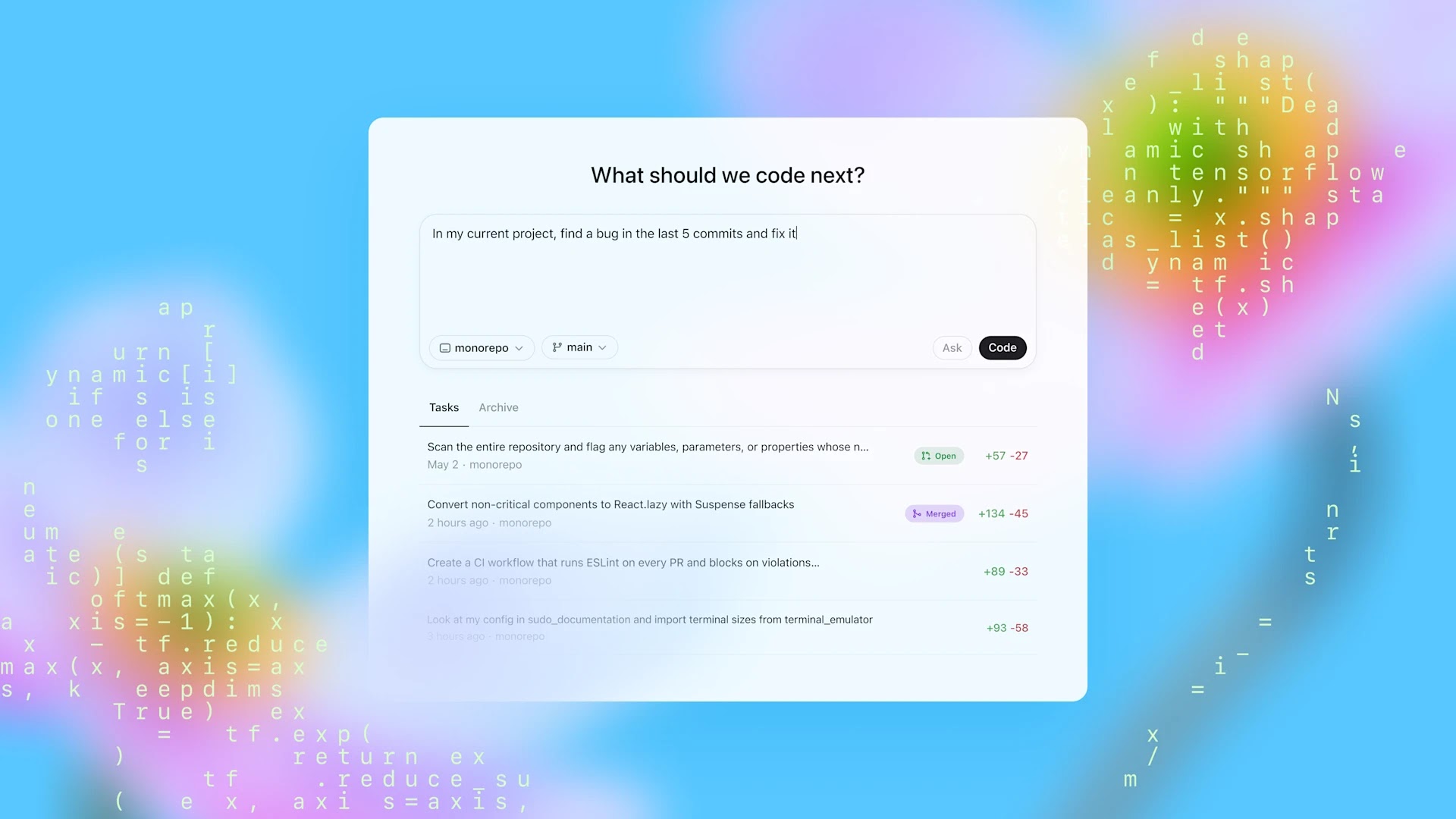
Codex Arrives in ChatGPT as OpenAI’s New Assistant for Developers Writing and Reviewing Code
Accessible directly through the ChatGPT interface, Codex appears as a new sidebar tool within the web app. Developers interact with it by entering a prompt, then choosing whether they want code generation or guidance. With either path, the tool responds within a simulated environment built to mirror the user's actual development stack.
Each task runs inside an isolated container that pulls in the user's current codebase. This gives Codex enough context to offer relevant, accurate output rather than vague or out-of-place suggestions. If users want to guide Codex’s behavior further, they can add a special AGENTS.md file to their repository. That document acts like a manual tailored for the AI—defining architecture details, coding conventions, and project-specific notes.
This system runs on a specialized model called codex-1, which stems from OpenAI’s o3 family but is further refined through reinforcement learning. It was trained not just to output code but to evaluate, test, and revise it—closer to how real programmers work when iterating.
OpenAI isn’t ignoring the skepticism around AI coding tools. Developers have long pointed out that these systems can produce clumsy, error-prone, or even unsafe code—especially when they're asked to generate entire scripts rather than just assist with small pieces. Codex-1 tries to tackle those concerns head-on by making its process visible. Instead of spitting out answers in a black box, it works step by step, showing how it arrives at decisions and flagging uncertainties when needed.
That said, OpenAI urges users not to treat the system as a finished product. Any code it produces still needs thorough human review before it’s used in production. Codex is meant to assist—not replace—the developer’s judgment.
The tool is already rolling out to users on ChatGPT Pro, Team, and Enterprise plans, with support for educational and Plus accounts on the horizon. During the early preview window, access is unrestricted and free for those accounts, though OpenAI has confirmed that rate caps and a pricing model will arrive later as usage scales.
Read next: ChatGPT Usage Statistics: Numbers Behind Its Worldwide Growth and Reach
by Irfan Ahmad via Digital Information World