Tuesday, August 9, 2016

How to Manage Your Facebook Ad Frequency

ek-facebook-ad-frequency-600

Do you run Facebook ad campaigns? Wondering how many times your audience should see your ads? In this article, you’ll discover what marketers need to know about managing the frequency of Facebook ads. Why Ad Frequency Matters Facebook defines “ad frequency” as the average number of times users see your ad. As an advertiser, you [...]

This post How to Manage Your Facebook Ad Frequency first appeared on .
- Your Guide to the Social Media Jungle


by Ekaterina Konovalova via

Learn how to build interactive storytelling One Pagers with SkrollMagic Workshop

scrollmagicThis weeks RSS and site sponsor is parallax scrolling wizard Petr Tichy who just launched his latest premium online course, the SkrollMagic Workshop

If you’re new to SkrollMagic, it’s basically a JavaScript library to help create magical scroll interactions. In other words it really helps you to easily react to the user’s current scroll position while adding awesome effects.

Petr already has several successful online courses that include the popular Parallax Scrolling Master Class ($67) and the excellent Skrollr Workshop ($67). There is no one better to help you level up your skills than Petr.

He also has free intro courses on getting started with GreenSock and even the basics of Parallax Scrolling.


What’s packed in the course for $97?

The objective of the SkrollMagic Workshop is to teach you how to build more advanced scrolling animations and awesome effects using the power of ScrollMagic and GreenSock. Here is exactly what you get:

  • A step-by-step guide to get up to speed with the ScrollMagic API very quickly
  • Project 1: Learn how to cross-reveal sections (demo)
  • Project 2: Learn how to reveal parts of a product one by one (demo)
  • Project 3: Learn how to create an interactive scrolling website (demo)
  • All the above working project files are included and available for download
  • Exported SVGs are also included – no need to have Illustrator or Sketch installed to complete this workshop
  • A 100% money-back guarantee if you are not satisfied, the reviews all over his site can give you a lot of confidence you’ll never need a refund

scrollmagic-workshop-breakdown

If you really want to stun your boss or your clients with some creative hand-coded animations, the SkrollMagic Workshop gives you the dev chops you need.


by Rob Hope via One Page Love

Monday, August 8, 2016

A Solid Keyword Research System To Get Your Post On The First Page Of Google

How To Find Keywords To Reach The First Page Of Google

Being a content marketer, you at least know the basics of SEO or what is meant by it. SEO is the way to get your content ranked on the first page of search engines mainly Google, although it sounds extremely easy and attractive, let me tell you that it isn’t.

If your business operates online, then optimizing your site for search is crucial. Organic search results are an excellent place to advertise to potential buyers and reach new clients.

Unfortunately, there is a lot of misinformation on the internet about how to improve your website ranking and how to build links to it.

by Guest Author via Digital Information World

Build a Solid SEO Foundation for Your Site Migration

This article is part of an SEO series from WooRank. Thank you for supporting the partners who make SitePoint possible. If you own or optimize a site for long enough, you’ll eventually find yourself staring down the barrel of a website migration. Website migrations can be a difficult technical process to go through, regardless of […]

Continue reading %Build a Solid SEO Foundation for Your Site Migration%


by Sam Gooch via SitePoint

The difference between good and great designers

Design is meant to show the intent that exists behind an action or an object in a clear way. Great design strips away all possible interpretations of intent, leaving only one. That is to say – it must be unambiguous. For a design to be great, everyone should be able to understand the point of the design, regardless of their background, experience, and taste. Achieving that level of clarity, however, is incredibly difficult.

Design

Within the context of software, a designer must be empathetic to the user’s pain. She must then extend that empathy to a more important place – understanding. Understanding not only of the problem, but the context in which it exists, and how to fix it. Because all jobs are problem-solving jobs, most solutions can be codified into an efficient formula, given enough practice.

A designer who incessantly works at her craft will undoubtedly get better. While the quality of her work will keep increasing, practice alone doesn’t make a good designer great. What differentiates one from the other is not a difference of quality, it is a difference of kind. Not what to make, but how and why to make it.  

Good designers are specialists

Formulaic is the way of the specialist – someone who excels at one thing.

Think of a UI/UX Designer who’s at the top of her game. She is able to take any piece of software and design beautiful, easy-to-use navigation for it. With time, her approach to designing UI becomes formulaic, regardless of what app she’s working on. The framework “to get from A to B – do X” becomes habitual. She understands the problem, and designs a solution that makes dealing with it easier.

Now think about thermostats before Nest. They were all infuriatingly difficult to use because the path to their programmable features was obscured by poorly designed navigation. Nest came along and said, “Nonsense! Here’s a big dial – turn left for ‘cooler’ and right for ‘warmer.’ This thing will remember what you like. You shouldn’t have to think about your thermostat – it should think about you.”

Consider the implications of that kind of design approach. It starts with the user experience and works backwards to the technology.

By figuring out why a problem exists in the first place, a great designer doesn’t just mitigate its effects – she can eliminate it completely. Being a specialist – even one with a broad skill set – is not enough to arrive at that result. You need a systemic approach.

Great designers are generalists

Being the best graphic or UI/UX Designer in the world doesn’t solve your design problem, just like being a writer is not about being good at English, or being able to put words in a sentence. We’re all capable of writing, and most practice that skill daily. Being a great writer isn’t about communicating thoughts clearly – it’s about knowing which thoughts deserve being written.

Technical skills complement problem-solving skills, and design problems are solved best through the cross-pollination of ideas and varied fields of knowledge.

Consider that each problem has three parts – what the problem is, why it exists, and how to solve it.

The what (identifying a problem) is the easiest step because we feel its effects. We experience some pain and want to eliminate it. You’ve probably heard that anecdote about university students building apps that help other university students find internships. Or the one about freelancers building marketplaces that help other freelancers find work?

The why is infinitely more difficult to figure out because of our reliance on common knowledge and intuition when looking for an answer. To figure out the why, a designer must force deliberate thinking and distill the problem to one indisputable fact – the foundation. That is to say – not “what is the problem?” but “why is the problem?” A great designer must make it her starting point, because the answer to that question will inform…

The how of solving a design problem. This is where technical skills are most important, and being a generalist puts you at a massive advantage. The old adage of “everything is nails to someone with a hammer” comes to mind. In reality, a myriad of ways to solve any given problem exist, but only one is optimal. The one that eliminates it altogether.

Which brings me to:

Great designers are opinionated

Harry Beck was an electrical draftsman employed by the London Underground in the 1930s. This was the time when London Underground used topological (geographically accurate) maps that were a nightmare to read because they looked like this:

Underground1

Harry Beck thought that was bad for the soul, and in his spare time designed a map that looked like this:

Underground3

Naturally, his map was originally rejected because it went against existing expectations for what maps were supposed to look like. Next time you take public transit, take a look at the map, and appreciate the fact that it’s a descendant of the one above. The opinionated map that defied convention in favour of clarity and good user experience.

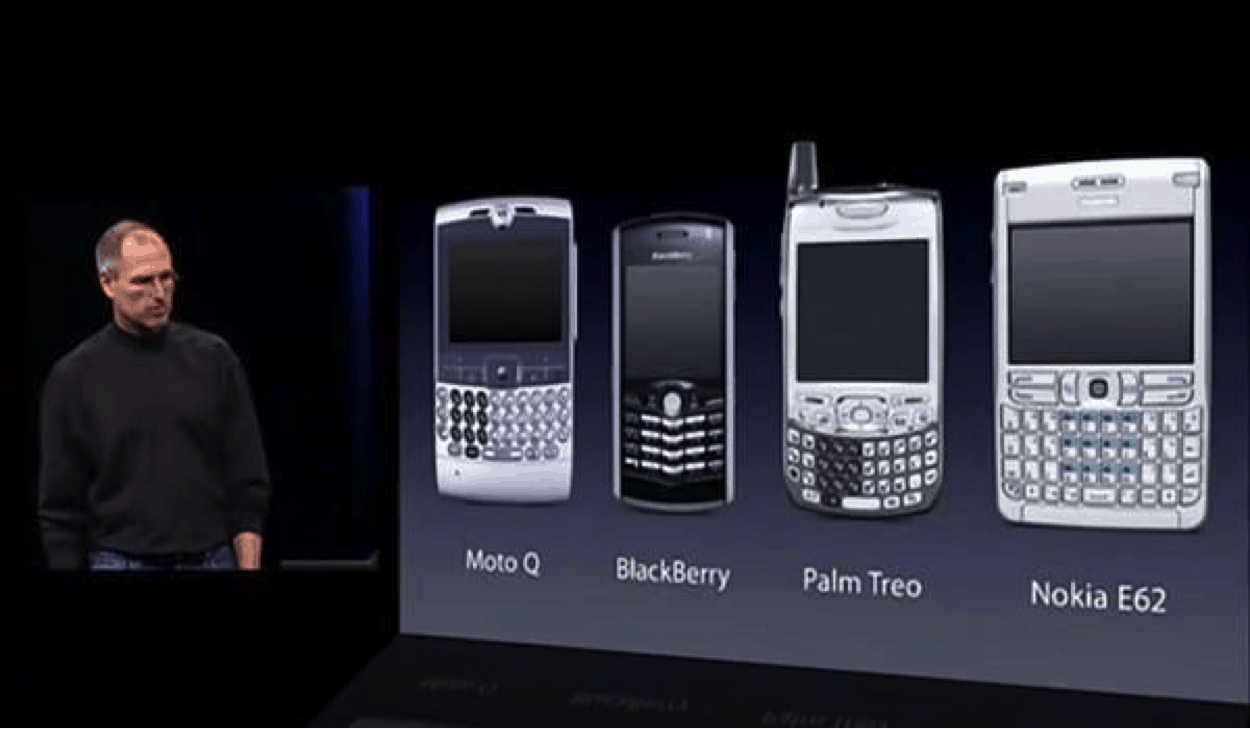
Here’s a more contemporary example. Before June 27, 2007 when the first generation iPhone was introduced to the world, most smartphones looked like this:

Phones

Great designers have strong opinions about what the world should look like. Even when those opinions go directly against common wisdom and what is expected. One of my favourite book covers is for a book by Augusten Burroughs called Dry. It was designed by Chip Kidd and looks like this. How easy do you think it would have been to make that cover look actually dried and withered?

Exercising strong opinions and making them come to life is a hallmark of a great designer. She doesn’t mistake “opinionated” for “being loud with her opinions.” Because the difference between a good designer and a great designer is not a difference of quality – it is a difference of kind.

A great designer doesn’t feel contempt towards people who use her product, and never assumes they’re too stupid to understand it. It is her job to arrive at a solution that is unambiguous. She holds strong conviction about what the world should look like, and exercises humility while making it better.

Great designers are prolific learners

Does all this mean that you have to strive to be a generalist? Absolutely not. If you’re someone who kicks major ass in your profession, and you really are the best visual, or UI/UX Designer in the world – rock on.

Is it good to be infinitely curious and constantly learning new things? I think we can all agree that the answer to that is a resounding “yes!” If you’re someone who is not content with being good, and strive for greatness – the best place to start is learning how to think. What does it mean to reason from the first principles? How to apply design thinking in your daily work? What are the fundamentals of great design? What are the essentials of effective visual and web design? These are the types of questions you should be asking yourself – and seeking to answer – every day.

Further learning

Look through this free UX Design curriculum from Springboard, to learn more about the topics mentioned above. There are 131+ hours of videos, articles, and books for you to look through and choose something interesting to explore further, or something new to pick up.

You can no longer ship trash by Jennifer Aldrich who writes awesome stuff, and works at InVisionApp. This short piece examines the contrast between designs of the not-so-distant past versus now. There used to be a time when starting from the user experience and working backwards to the technology wasn’t even a thing anyone considered. Even in the present time, the vast majority of products fail to take that approach. We know we should but seldom do. Why do you think that is?

Typography for User Interfaces by Viljami Salminen is a riveting, thoroughly researched article to broaden your horizons. Attention to the smallest details demonstrates care for the product, and profound respect towards the end user. Jony Ive believes that we are capable of discerning far more than we are capable of articulating. What do you think?

Features for Identification of Uppercase and Lowercase Letters is a wonderful research paper from Department of Psychology, University of Victoria, and Centre de Recherche en Neuropsychologie et Cognition, Département de Psychologie, Université de Montréal. It’ll teach you things you didn’t know you wanted to know. Getting into this level of specificity, and figuring out how the brain perceives visual elements is (sometimes) the difference between good and great.

What do you think marks a good vs a great designer? Let us know in the forums.

The post The difference between good and great designers appeared first on UX Mastery.


by Alex Palmer via UX Mastery

Web Design Weekly #247

Headlines

The Headless Web

The Web in a year will be different. The Web in a few is unfathomable. This excites me massively. Will the Web be Headless? This might be a crazy concept to get your head around but the Headless Web is a concept that enables the user to rarely ever interact with a web page in a web browser. You might never actually visit a site directly but it’s still powered by URLs and content that is directly addressable and available to every person in the world. (paul.kinlan.me)

Are you writing legacy CSS code? (tinnedfruit.com)

Articles

Hidden Expectations

Dave Rupert hits the nail on the head with this post. The hardest parts of the Web are the invisible parts. He covers topics like accessibility, security, performance and empathy. (daverupert.com)

How Netflix does A/B Testing

Jessie Chen shares some insights into how Netflix went about designing their homepage through A/B testing. Always great to see how the large teams go about this. (uxdesign.cc)

Using A Static Site Generator At Scale

Static site generators are amazing for small scale sites, but that’s not always the case. Sites grow and evolve. In this article Stefan Baumgartner shares some great knowledge on how to best go about using them when things get big. (smashingmagazine.com)

Save valuable resources by prototyping

A nice reminder by Davey Heuser that the world of prototyping tools might look scary at first, but are an invaluable tool for quickly exploring different solutions and making you a better designer. (awkward.co)

Tools / Resources

HyperDev – Developer playground for building full-stack web apps, fast

Combining automated deployment, instant hosting and collaborative editing, HyperDev gets you straight to coding with no setup. Build products, prototype ideas and invite teammates to collaborate on code together. (hyperdev.com)

Bootstrap 4 Alpha 3 Released

An overhauled grid, updated form controls, a new font stack and lots of bug fixes. If you are using Bootstrap for any of your projects, it’s probably a good idea to keep an eye on what’s changing. (getbootstrap.com)

PNG optimisation

A great post by the Bjango team that looks at the default PNG export settings shipped with the popular design tools and ways to adjust them to get the smallest PNG possible. (bjango.com)

High Performance SVGs

Need to optimise your SVGs? This post is for you. Worth bookmarking. (css-tricks.com)

Sharing Buttons

Quickly generate social sharing buttons that have a tiny performance footprint. (sharingbuttons.io)

A library of Framer snippets to help speed up your workflow (github.com)

Use a Slack bot to deploy your app (tech-blog.serenytics.com)

Stack Overflow Documentation (stackoverflow.com)

Inspiration

CSS-only scroll indicator by Mike Riethmuller (codepen.io)

A Curated Collection of the 40 Best Google Fonts (typewolf.com)

Great Products Don’t Happen By Accident (medium.com)

Jobs

Product Designer at Xero

We’re looking for an experienced Product Designer to work on our most important projects and initiatives. You will work closely with global design and product team leadership to craft experiences that help small businesses succeed by better connecting them with their employees and customers. (xero.com)

Front-End Developer at Pitchfork

Pitchfork’s Product team is hiring. We’re looking for a sharp, creative front-end developer excited about pushing hard on UI and UX across all platforms. Your work will be seen daily by millions around the world, and you’ll be a part of a small team of designers and developers whose work has been praised for redefining online music journalism and influencing the medium itself. (pitchfork.com)

Need to find passionate developers or designers? Why not advertise in the next newsletter

Last but not least…

Do you really need that staging environment? (vimeo.com)

The post Web Design Weekly #247 appeared first on Web Design Weekly.


by Jake Bresnehan via Web Design Weekly

10 jQuery Form Validation Plugins

HTML5 introduced new form attributes so that the browser could validate forms natively. With CSS3 and JavaScript you can realize a basic form validation without the need of a plugin – as described in this article. But this has a few restrictions:

  • Error messages are left to the browser itself, you can only provide titles of input fields
  • You aren't able to customize the styling of error messages
  • You'll have to create patterns for input fields yourself

The following 10 jQuery form validation plugins set themselves the goal of customizing error messages and styling, as well as simplifying the creation of validation rules.

1. Parsley

An extensible plugin that offers ordinary options like localization and custom validation rules, but also a remote Ajax validation. The documentation is clean and easy to read and the project is actively maintained. Validation rules can be controlled using HTML5 form or custom data attributes.

See the Pen Parsley Plugin Demo by SitePoint (@SitePoint) on CodePen.

Website
Source code

2. jQuery Form Validator

A modular plugin, that offers a basic set of validation rules by default and lets you load further modules on demand. For example: a file validator when uploading files, but also date, security or location modules. It also allows you to provide input suggestions. The validation is controlled with HTML5 data attributes.

See the Pen jQuery Form Validator Plugin Demo by SitePoint (@SitePoint) on CodePen.

Website
Source code

3. jQuery Validation Plugin

One of the first validation plugins from 2006. It lets you specify custom validation rules using HTML5 attributes or JavaScript objects. It also has a lot of default rules implemented and offers an API to easily create rules yourself. Finding detailed information about the plugin may be hard at first and it's limited to jQuery 1.x, but they promised to make it better – see this campaign.

See the Pen jQuery Validation Plugin Demo by SitePoint (@SitePoint) on CodePen.

Website
Source code

Continue reading %10 jQuery Form Validation Plugins%


by Julian Motz via SitePoint