This article was sponsored by Tumult. Thank you for supporting the partners who make SitePoint possible.
The goal of this article is to show how to create a rich media advertisement with Tumult Hype. It covers the basics of using the app in the context of building an ad and discusses ad-specific tips and tricks. By the end of reading you’ll be able to make HTML5 ads quickly and beautifully!
The Rise of HTML5 Ads
It is well known that adding animation and interactivity in digital advertising makes ads more effective. Beyond catching visitors’ eyes, rich media ads can better convey the product or branding as well as add engagements leading to more clicks.
As rich media ads are visual in nature, it makes sense to build them using visual tools. Changes are seen immediately. Adobe’s Flash reigned as king of the visual ad creation tools for years, but has been toppled by HTML5’s compatibility on mobile devices. As a technology, HTML5 ads have the additional advantage of often being more accessible while having lower power requirements. But HTML5 itself is just a markup language and has no inherently included visual tools, as Flash did with the Flash Professional app. Building ads via hand coding would be a laboriously slow process. Luckily, there are now sophisticated visual tools that can output HTML5.
Tumult Hype is Your Visual Design Tool
Tumult Hype is the leading HTML5 animation and interactivity app for macOS. Hype’s raison d’etre is to be easy to use and quick to learn. Layout is similar to Keynote, and per-property animation keyframes can be automatically created with its quick “Record” functionality. Hype provides a powerful set of animation features, such as animation along curved motion paths, customizable easings/timing functions, simultaneously running timelines, and encapsulated reusable symbols. Coding is not required for most common interactivity, although JavaScript actions can extend its capabilities by integrating with other libraries and services.
While Tumult Hype can be used for a wide range of HTML5 content, it is especially capable for rich media ad creation. A plug-in system, called “Export Scripts”, can integrate ad platform features and help package its export output for delivery. Advanced Export functionality can further help automate export tasks. Hype’s runtime library is very small with a compressed size of 25KB, giving plenty of room for your assets. This runtime drives the animations and manages browser compatibility issues (though the app still gives warnings if a feature won’t work on specific browsers).
The Ad Creation Workflow with Tumult Hype
Grab Tumult Hype and an Export Script
Step zero is to download Tumult Hype. The trial is fully functional for 14 days. Tumult Hype has two flavor modes: Standard and Professional. For ad creation (and following along with this article!), you’ll want to use Hype Professional.
You can then optionally grab an Export Script, which will augment Hype with extra ad-related features. Currently there are scripts for Sizmek, DoubleClick Studio, and DoubleClick Campaign Manager. If you are using a different ad platform, the steps are usually straight forward to adapt the standard output.
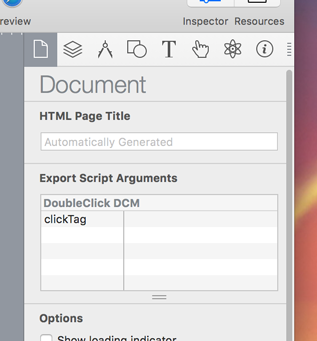
You can verify an Export Script has been installed by looking within Hype’s Preferences. Export Scripts may also have options that are show in the Document Inspector.
Choosing an Ad Size
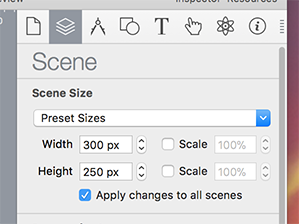
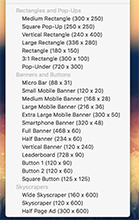
After launching Hype, you’ll want to set the scene size to match the ad you are creating. This can be done in the Scene Inspector by setting the width and height, or choosing one of the Preset Sizes. Hype contains presets for common ads banners and rectangles.
If your ad will have different size representations, you could make use of the Responsive Layout and Flexible Layout systems. Responsive Layout allows different content that is shown on width-based breakpoints. They can later be individually exported. The Flexible Layout system will adjust element positions and sizes based on container dimensions.
Continue reading %Visual Ad Creation Workflow with Tumult Hype%
by Jonathan Deutsch via SitePoint