Thursday, April 5, 2018

Social Media Plan: 3 Challenges + Templates to Solve Them

This article was originally published on monday.com. Thank you for supporting the partners who make SitePoint possible.

If you’re responsible for managing a day-to-day social media plan, you know how hard it can be to juggle everything. Chances are at some point you’ve found yourself in this scenario:

You’ve built a strategy you’re so proud of, it can’t fail. You’ve found the perfect publishing tool and have all your posts scheduled for just the right time. Your community management is on point and engagement is through the roof. You’re tracking every metric and measuring the success of your strategy.

Yet no matter how organized you are, your day-to-day life is still more chaotic than anyone else’s in your company. You’re missing an image for tomorrow’s social post. Your team doesn’t understand the tone of voice or visual unity you’re trying to maintain on Instagram. You’re going back and forth with your client to get their approval on your editorial calendar. You need an edit on a graphic that was supposed to go live an hour ago.

Sound familiar? Trust me, we’ve been there. The good news is there’s a solution. Here are the three biggest challenges we’ve encountered managing the social plan here at monday.com and the templates we use to solve them.

Challenge #1: Keeping Designers Synced with Your Schedule

After you’ve finished planning your social media schedule for the week or month, the next step is to connect with your team of designers and copywriters. Your goal is to create beautiful images, infographics, and content to distribute across your social channels.

The problem is, keeping everyone up-to-date and getting your assets ready to schedule in your favorite publishing tool (Buffer, Hootsuite, or Coschedule) can quickly get out of hand. The asset you assigned isn’t ready. The designer doesn’t know what’s going live when. No one has access to nor understands how your scheduling tool works.

Moreover, a tool like Buffer or Coschedule doesn’t help your team sync on your editorial calendar. They’re perfect for scheduling and posting, but they lack the essential function of helping your team plan, collaborate, and execute together. Just like that, your perfect social media plan is collapsing.

The solution? Create a monthly schedule and share it with everyone.
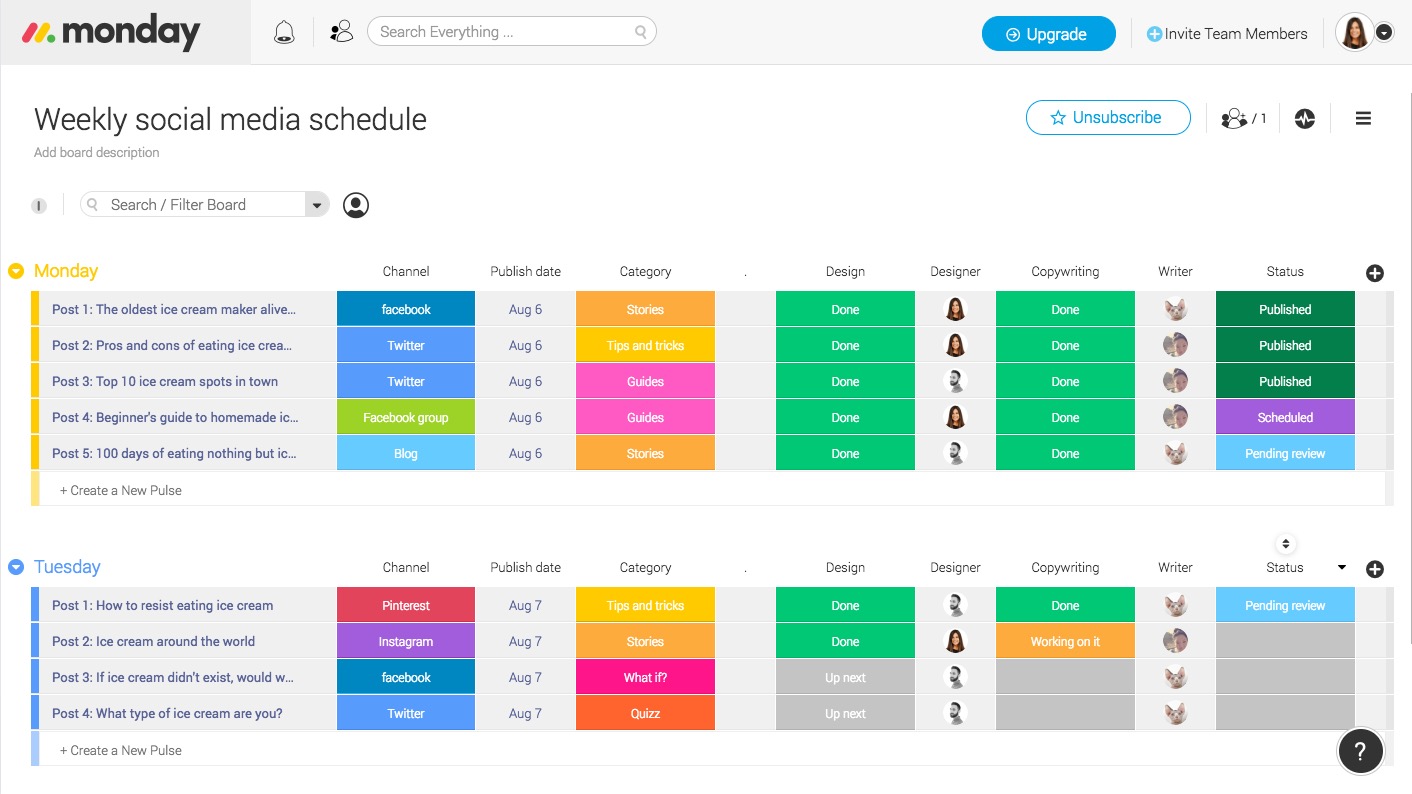
social media plan weekly schedule

Take a look above. In this template, we’ve outlined a weekly workflow that clearly defines the handshakes between different departments or stakeholders. It syncs everyone on where things stand and helps you plan a consistent weekly content schedule. See the number of posts, the titles, the publishing date, and the category. Your day-to-day job of social media planning just became way less painful. 🙂

Continue reading %Social Media Plan: 3 Challenges + Templates to Solve Them%


by SitePoint Team via SitePoint

A Practical Guide to Angular Directives

This article focuses on Angular directives — what are they, how to use them, and to build our own.

Directives are perhaps the most important bit of an Angular application, and if we think about it, the most-used Angular unit, the component, is actually a directive.

An Angular component isn't more than a directive with a template. When we say that components are the building blocks of Angular applications, we’re actually saying that directives are the building blocks of Angular applications.

Basic overview

At the core, a directive is a function that executes whenever the Angular compiler finds it in the DOM. Angular directives are used to extend the power of the HTML by giving it new syntax. Each directive has a name — either one from the Angular predefined like ng-repeat, or a custom one which can be called anything. And each directive determines where it can be used: in an element, attribute, class or comment.

By default, from Angular versions 2 and onward, Angular directives are separated into three different types:

Components

As we saw earlier, components are just directives with templates. Under the hood, they use the directive API and give us a cleaner way to define them.

The other two directive types don't have templates. Instead, they’re specifically tailored to DOM manipulation.

Attribute directives

Attribute directives manipulate the DOM by changing its behavior and appearance.

We use attribute directives to apply conditional style to elements, show or hide elements or dynamically change the behavior of a component according to a changing property.

Structural directives

These are specifically tailored to create and destroy DOM elements.

Some attribute directives — like hidden, which shows or hides an element — basically maintain the DOM as it is. But the structural Angular directives are much less DOM friendly, as they add or completely remove elements from the DOM. So, when using these, we have to be extra careful, since we’re actually changing the HTML structure.

Using the Existing Angular Directives

Using the existing directives in Angular is fairly easy, and if you've written an Angular application in the past, I'm pretty sure you've used them. The ngClass directive is a good example of an existing Angular attribute directive:

<p [ngClass]="{'blue'=true, 'yellow'=false}">
    Angular Directives Are Cool!
</p>

<style>
    .blue{color: blue}
    .yellow{color: yellow}
</style>

So, by using the ngClass directive on the example below, we’re actually adding the blue class to our paragraph, and explicitly not adding the yellow one. Since we’re changing the appearance of a class, and not changing the actual HTML structure, this is clearly an attribute directive. But Angular also offers out-of-the-box structural directives, like the ngIf:

@Component({
  selector: 'ng-if-simple',
  template: `
    <button (click)="show = !show"></button>
    show = 
    <br>
    <div *ngIf="show">Text to show</div>
`
})

class NgIfSimple {
  show: boolean = true;
}

In this example, we use the ngIf directive to add or remove the text using a button. In this case, the HTML structure itself is affected, so it's clearly a structural directive.

For a complete list of available Angular directives, we can check the official documentation.

As we saw, using Angular directives is quite simple. The real power of Angular directives comes with the ability to create our own. Angular provides a clean and simple API for creating custom directives, and that's what we’ll be looking at in the following sections.

Continue reading %A Practical Guide to Angular Directives%


by Claudio Ribeiro via SitePoint

TheMads

New website of the digital—agency from Russia.Design, animation, soul.
by via Awwwards - Sites of the day

Chat and Messenger Bots: New Research for Marketers

Wondering why chatbots are gaining popularity? Interested in how savvy businesses are using bots to improve communications with their customers? In this article, you’ll discover insights from research that show how bots are evolving and affecting customer service experiences across many industries. #1: Bot Technology Is Changing How Businesses Communicate Many companies in a variety [...]

This post Chat and Messenger Bots: New Research for Marketers first appeared on Social Media Examiner.


by Lisa Clark via

Mark Zuckerberg Says That Most Of The Facebook’s User Data Has Been Compromised

In a latest revelation, the founder of Facebook Mark Zuckerberg has said that most of the 2.2 billion Facebook users should assume that their data has been scraped by third-party compromisers. During his statement to the reporters, he said: “We've seen some scraping and I would assume if you had...

[ This is a content summary only. Visit our website https://ift.tt/1b4YgHQ for full links, other content, and more! ]

by Zubair Ahmed via Digital Information World

Wednesday, April 4, 2018

16 Good Luck Charms from Around the World

This visual from Invaluable on good luck charms shares the different charms people use for good fortune all over the world! For example, in Guatemala, a common talisman for sleep anxieties is the worry dolls. Sleepers will tell the doll their worries, then place it under their pillow. They...

[ This is a content summary only. Visit our website https://ift.tt/1b4YgHQ for full links, other content, and more! ]

by Irfan Ahmad via Digital Information World

ES6 in Action: New String Methods — String.prototype.*

In my previous article on ES6 array methods, I introduced the new methods available in ECMAScript 6 that work with the Array type. In this tutorial, you'll learn about new ES6 methods that work with strings: String.prototype.*

We'll develop several examples, and mention the polyfills available for them. Remember that if you want to polyfill them all using a single library, you can employ es6-shim by Paul Miller.

String.prototype.startsWith()

One of the most-used functions in every modern programming language is the one to verify if a string starts with a given substring. Before ES6, JavaScript had no such function, meaning you had to write it yourself. The following code shows how developers usually polyfilled it:

if (typeof String.prototype.startsWith !== 'function') {
  String.prototype.startsWith = function (str){
    return this.indexOf(str) === 0;
  };
}

Or, alternatively:

if (typeof String.prototype.startsWith !== 'function') {
  String.prototype.startsWith = function (str){
    return this.substring(0, str.length) === str;
  };
}

These snippets are still valid, but they don't reproduce exactly what the newly available String.prototype.startsWith() method does. The new method has the following syntax:

String.prototype.startsWith(searchString[, position]);

You can see that, in addition to a substring, it accepts a second argument. The searchString parameter specifies the substring you want to verify is the start of the string. position indicates the position at which to start the search. The default value of position is 0. The methods returns true if the string starts with the provided substring, and false otherwise. Remember that the method is case sensitive, so “Hello” is different from “hello”.

An example use of this method is shown below:

const str = 'hello!';
let result = str.startsWith('he');

// prints "true"
console.log(result);

// verify starting from the third character
result = str.startsWith('ll', 2);

// prints "true"
console.log(result);

A live demo of the previous code is shown below and also available at JSBin.

ES6 in Action: New String Methods on jsbin.com

The method is supported in Node and all modern browsers, with the exception of Internet Explorer. If you need to support older browsers, a polyfill for this method can be found in the method's page on MDN. Another polyfill has also been developed by Mathias Bynens.

String.prototype.endsWith()

In addition to String.prototype.startsWith(), ECMAScript 6 introduces the String.prototype.endsWith() method. It verifies that a string terminates with a given substring. The syntax of this method, shown below, is very similar to String.prototype.startsWith():

String.prototype.endsWith(searchString[, position]);

As you can see, this method accepts the same parameters as String.prototype.startsWith(), and also returns the same type of values.

A difference is that the position parameter lets you search within the string as if the string were only this long. In other words, if we have the string house and we call the method with 'house'.endsWith('us', 4), we obtain true, because it's like we actually had the string hous (note the missing “e”).

An example use of this method is shown below:

const str = 'hello!';
const result = str.endsWith('lo!');

// prints "true"
console.log(result);

// verify as if the string was "hell"
result = str.endsWith('lo!', 5);

// prints "false"
console.log(result);

A live demo of the previous snippet is shown below and is also available at JSBin.

ES6 in Action: New String Methods on jsbin.com

The method is supported in Node and all modern browsers, with the exception of Internet Explorer. If you need to support older browsers, a polyfill for this method can be found in the method's page on MDN. Another polyfill has been developed by Mathias Bynens.

Continue reading %ES6 in Action: New String Methods — String.prototype.*%


by Aurelio De Rosa via SitePoint