Friday, April 6, 2018

14 Top Sci-Fi Designs to Inspire Your Next Interface

Interface design has been around for more than 50 years.


Image Credit

The first ever GUI was designed for the NLS computer collaboration system in late 1968. Since then the hardware has gotten more and more advanced, allowing us to make GUIs as awesome as they are today, or will be someday...

Do you remember this scene from the Matrix?

https://www.youtube.com/watch?v=ZPPBzmn6Fh4

Or the terrific interfaces Tony Stark manipulates with his bare hands...

https://www.youtube.com/watch?v=mRi1dmFgRfo

But even in the 60s and 70s people were dreaming of interfaces like those we have today, and they found their place in sci-fi movies like in “2001: A Space Odyssey” released in 1968.

Sci-fi movies are known to be a sort of a window into the future. Many of the fantastical technologies filmed only decades ago are already available, and can be found in our pockets or on our wrists.

Computer interfaces in sci-fi movies can be real masterpieces. Let's look at some movies, and I’ll show you examples of interfaces you can use as an inspiration while designing another dashboard or website template.

Let’s begin.

BLIND

The first on my list is the design studio BLIND.

They’re known to be one of world’s top creative design studios with extensive expertise in UI design. They’ve created interfaces for movies that all of us have seen. Check them out:

Justice League

“People are so slow...” — I wonder how many years will pass until we get interfaces resembling these?


The Dark Knight Rises

When you’re a billionaire you can afford to have your own UX department, can’t you?

The Fifth Estate

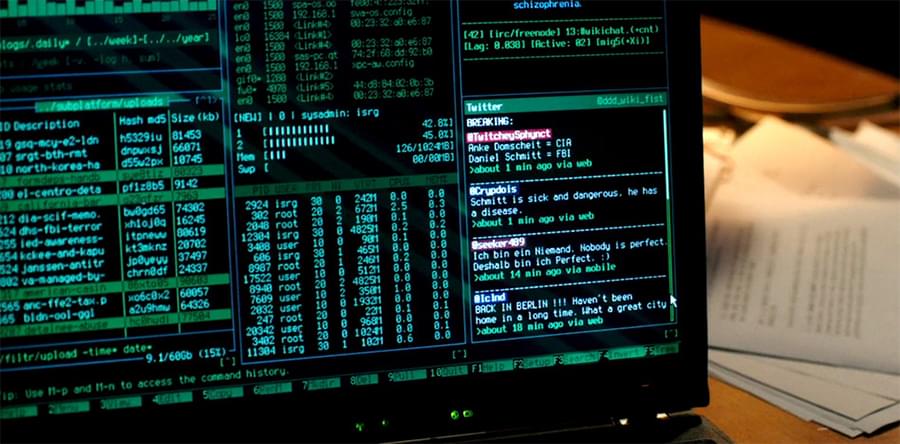
Perhaps we'll take a page from the typical hacker's desktop in the future.


The Dark Knight

When you’re hunting criminals and are feeling tense 24/7, a green, soothing color scheme should definitely help you.


Doom

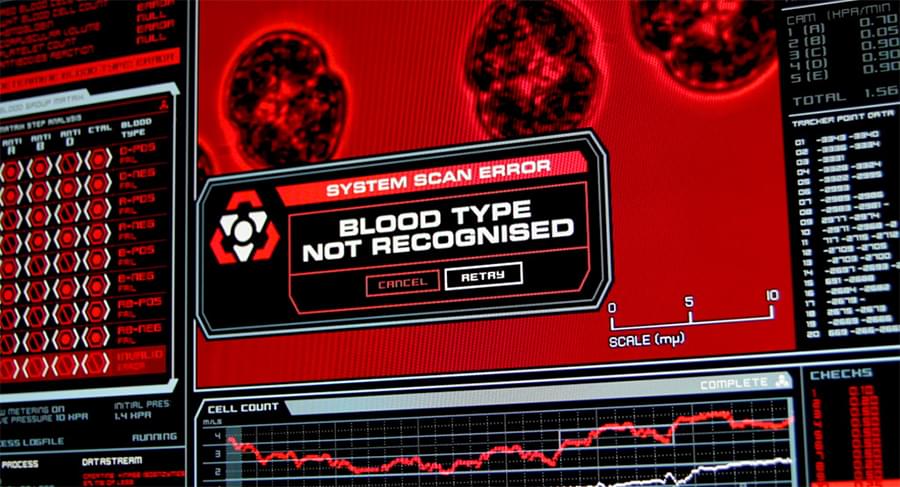
Even though the game Doom 4 was released almost 12 years after this movie, the interfaces look like the ones you can see in this movie.


Rogue One

The iconic interfaces in the Star Wars saga were really minimal. Maybe George Lucas was right and minimal interfaces are the future?

Continue reading %14 Top Sci-Fi Designs to Inspire Your Next Interface%


by Alex Bulat via SitePoint

ES6 in Action: let and const

In this tutorial, I'll introduce let and const, two new keywords added to JavaScript with the arrival of ES6. They enhance JavaScript by providing a way to define block-scope variables and constants.

This article is one of many covering new features of JavaScript introduced with ES6, including Map and WeakMap, Set and WeakSet, new methods available for String, Number, and Array, and the new syntax available for functions.

let

Up to ES5, JavaScript had only two types of scope, function scope and global scope. This caused a lot of frustration and unexpected behaviors for developers coming from other languages such as C, C++ or Java. JavaScript lacked block scope, meaning that a variable is only accessible within the block in which it’s defined. A block is everything inside an opening and closing curly bracket. Let's take a look at the following example:

function foo() {
  var par = 1;
  if (par >= 0) {
    var bar = 2;
    console.log(par); // prints 1
    console.log(bar); // prints 2
  }
  console.log(par); // prints 1
  console.log(bar); // prints 2
}
foo();

After running this code, you'll see the following output in the console:

1
2
1
2

What most developers coming from the languages mentioned above would expect, is that outside the if block you can't access the bar variable. For example, running the equivalent code in C results in the error 'bar' undeclared at line ... which refers to the use of bar outside the if.

This situation changed in ES6 with the availability of block scope. The ECMA organization members knew that they could not change the behavior of the keyword var, as that would break backward compatibility. So they decided to introduce a new keyword called let. The latter can be used to define variables limiting their scope to the block in which they are declared. In addition, unlike var, variables declared using let aren't hoisted. If you reference a variable in a block before the let declaration for that variable is encountered, this results in a ReferenceError. But what does this mean in practice? Is it only good for newbies? Not at all!

To explain you why you'll love let, consider the following code taken from my article 5 More JavaScript Interview Exercises:

var nodes = document.getElementsByTagName('button');
for (var i = 0; i < nodes.length; i++) {
  nodes[i].addEventListener('click', function() {
    console.log('You clicked element #' + i);
  });
}

Here you can recognize a well-known issue that comes from variable declaration, their scope, and event handlers. If you don't know what I'm talking about, go check the article I mentioned and than come back.

Thanks to ES6, we can easily solve this issue by declaring the i variable in the for loop using let:

var nodes = document.getElementsByTagName('button');
for (let i = 0; i < nodes.length; i++) {
  nodes[i].addEventListener('click', function() {
    console.log('You clicked element #' + i);
  });
}

The let statement is supported in Node and all modern browsers. There are, however, a couple of gotchas in Internet Explorer 11 which you can read about in the ES6 compatability table.

A live demo that shows the difference between var and let is shown below and is also available at JSBin:

ES6 in Action: let and const on jsbin.com

Continue reading %ES6 in Action: let and const%


by Aurelio De Rosa via SitePoint

AngularJS and Angular 2+: a Detailed Comparison

This article compares the major differences between the the original AngularJS and Angular 2+. If you’re currently stuck with an AngularJS project and not sure whether you should make the jump, this article should help you get started.

In recent years, we’ve seen Angular grow tremendously as a framework and as a platform for developing single page applications (SPAs) and progressive web apps (PWAs). AngularJS was built on top of the idea that declarative programming should be used for building the views. This required decoupling the DOM manipulation from the business logic of the application and the approach had many benefits on its own.

However, AngularJS had many shortcoming in terms of performance and how things worked under the hood. Hence, the development team spent a year rewriting the code from scratch and finally released Angular 2 in late 2016. Most developers felt that Angular 2 was a different platform that had very little resemblance to the original AngularJS.

So let’s compare and contrast AngularJS and Angular 2+.

Frameworks in AngularJS and Angular 2

AngularJS follows the traditional MVC architecture that comprises a model, a view and a controller.

  • Controller: the controller represents how user interactions are handled and binds both the model and the view.
  • Views: the view represents the presentation layer and the actual UI.
  • Model: the model is an abstract representation of your data.

Some developers are of the opinion that AngularJS follows MVVM pattern that replaces the Controller with a View-Model. A View-Model is a JavaScript function that’s similar to that of the controller. What makes it special is that it synchronizes the data between a view and a model. The changes made to a UI element automatically propagate to the model and vice versa.

The following diagram shows how various AngularJS pieces are connected together.
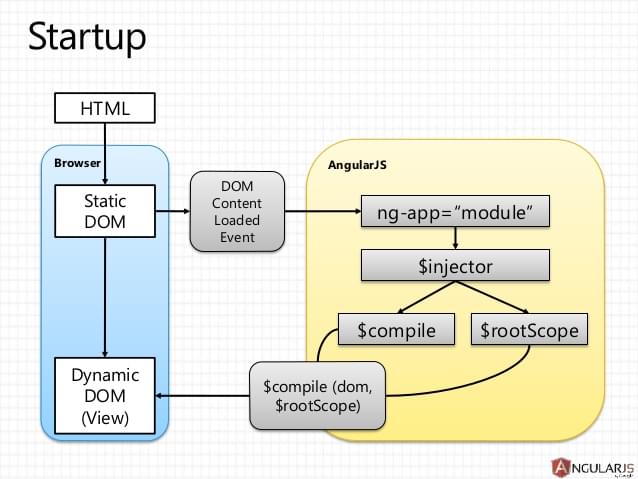
AngularJS and Angular 2: AngularJS architecture

You can read more about AngularJS’s architecture on the official documentation page.

Angular, on the other, hand has a component-based architecture. Every Angular application has at least one component known as the root component. Each component has an associated class that’s responsible for handling the business logic and a template that represents the view layer. Multiple, closely related components can be stacked together to create a module and each module forms a functional unit on its own.
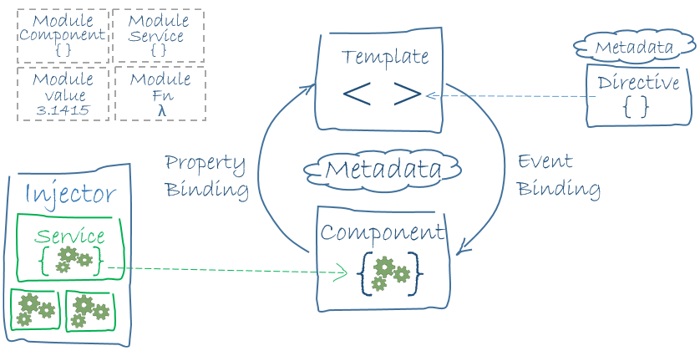
AngularJS and Angular 2: High-level overview of the Angular architecture

As you can see in the figure, the component is bound to the template. Components are composed using TypeScript classes and templates are attached to them using @Component annotations. Services can be injected into a component using Angular’s dependency injection subsystem. The concept of modules in Angular is drastically different from that of the AngularJS modules. An NgModule is a container for defining a functional unit. An NgModule can comprise components, services and other functions. The modular unit can then be imported and used with other modules.

All the Angular concepts are better explained at Angular.io.

Templates in AngularJS and Angular 2

In AngularJS the template is written using HTML. To make it dynamic, you can add AngularJS-specific code such as attributes, markups, filters and form controls. In addition, it supports the two-way data binding technique mentioned earlier. The following code snippet demonstrates the use of directives and double curly brackets within the template:

<html ng-app>
 <!-- Body tag augmented with ngController directive  -->
 <body ng-controller="MyController">
   <inpu#t ng-model="foo" value="bar">
   <!-- Button tag with ngClick directive -->
   <!-- Curly bracket is a template binding syntax -->
   button ng-click="changeFoo()"></button>
   <script src="angular.js"></script>
 </body>
</html>

In Angular, AngularJS’s template structure was reworked and lots of new features were added to the templates. The primary difference was that each component had a template attached to it. All the HTML elements except <html>, <body>, <base>, and <script> work within the template. Apart from that, there are features such as template binding, template interpolation, template statements, property binding, event binding and two-way binding. Built-in attribute directives like NgClass, NgStyle and NgModel and built-in structural directives such as NgIf, NgForOf, NgSwitch are also part of the template.

Continue reading %AngularJS and Angular 2+: a Detailed Comparison%


by Manjunath M via SitePoint

Caption

Minimal, centrally-divided One Pager for Caption – an open-source app to help quickly get the correct subtitles for your shows. Really like this down-arrow on the download button to choose other platforms.

Full Review | Direct Link


by Rob Hope @robhope via One Page Love

Fitty : Snugly Resizes Text to fit its Parent Container

Scales up (or down) text so it fits perfectly to its parent container.Ideal for flexible and responsive websites.

Features:

  • No dependencies
  • Easy setup
  • Optimal performance by grouping DOM read and write operations
  • Works with WebFonts (see example below)
  • Min and max font sizes
  • Support for MultiLine
  • Auto update when viewport changes
  • Monitors element subtree and updates accordingly

The post Fitty : Snugly Resizes Text to fit its Parent Container appeared first on Best jQuery.


by Admin via Best jQuery

GPU.JS : GPU Accelerated JavaScript

Gpu.js is a JavaScript Acceleration library for GPGPU (General purpose computing on GPUs) in Javascript. gpu.js will automatically compile simple JavaScript functions into shader language and run them on the GPU. In case a GPU is not available, the functions will still run in regular JavaScript.

The post GPU.JS : GPU Accelerated JavaScript appeared first on Best jQuery.


by Admin via Best jQuery

Everything New in ES2016, 2017, and 2018

#380 — April 6, 2018

Read on the Web

JavaScript Weekly

Examples of Everything New in ES2016, 2017, and 2018 — This is a worthwhile roundup of all the new bits and pieces in recent ECMAScript specs, but note that SharedBufferArray support has been disabled in most runtimes due to Spectre, so give that a miss.

Raja Rao DV

Martin Fowler Announces 2nd Edition of "Refactoring"; Switches Book from Java to JavaScript — This is a big deal given the weight this book has in the field.

Martin Fowler

JavaScript to Rust and Back Again: A wasm-bindgen Talewasm-bindgen enables interoperability between WebAssembly modules and JavaScript.

Alex Crichton

Scrivito: the World’s First JS CMS Solely Based on ReactJS — Scrivito is a user friendly, secure and serverless JavaScript CMS. Due to client-side rendering, it is 100% maintenance free and combines WYSIWYG editing with maximum flexibility for developers. Pricing starts at $4.99 - get a 30 days free trial now.

Scrivito sponsor

▶  Learn RxJS in 60 Minutes for Beginners — RxJS is used for reactive programming using observable streams and this is a great ‘from scratch’ crash course.

Gary Simon

Understanding JavaScript Proxies — Uses an examination of Sindre Sorhus’ on-change library to dig into how proxies, a feature introduced in ES6, work.

Arfat Salman

A Beginner’s Guide to JavaScript Geolocation Tracking — A 4 part series from PubNub brought together in one place walking through bringing the Google Maps JavaScript API together with PubNub’s real-time services.

Joe Hanson

webpack 4.5.0 Released

webpack on Twitter

What's New in Aurelia? Aurelia's 2018 Q1 Report — Aurelia is also now included in the RealWorld project.

Rob Eisenberg

💻 Jobs

Sr. Fullstack Engineer (Remote) — Sticker Mule is looking for passionate developers to join our remote team. Come help us become the Internet’s best place to shop and work.

Sticker Mule

Mobile Developer - Milan, Italy — MotorK is looking for passionate Junior and Senior mobile devs to join the team. Great place to work and career opportunities.

MotorK

No Search, No Spam, No Hassle — SW engineer positions in SF and NY personalized to you. Discreetly create a profile on Woo.io today.

woo.io

📘 Tutorials

Hit The Ground Running with Vue.js and Firestore — Firestore is a new data storage approach from Google Firebase.

Lukas Van Driel

Learn Kotlin in 2 Days — $99 Introductory, online rate. In-person rate available to join us at the Ranch.

Big Nerd Ranch sponsor

Tips to Make Your webpack Bundle Smaller When Using JS Libraries

Google

Dr. Axel's JavaScript Array Cheatsheet

Dr. Axel Rauschmayer

[1] + [2] - [3] === 9? A Look Behind JavaScript Coercion

Marcin Wanago

Making a Statically-Linked, Single-File Web App with React and Rust — Experimental but neat.

Anders Pitman

A Simple Guide to Taking a Web Page Offline (with Service Workers)

Adeyinka Adegbenro

A Killer Vue.js Blog Demo: Launch in 2 Hours Tops

Snipcart sponsor

Write Better JavaScript With Webpack

DJ Walker

Using ES6 Collections: Map, Set, WeakMap, and WeakSet

Kyle Pennell

A Practical Guide to Using and Creating Angular Directives

Claudio Ribeiro

🔧 Code and Tools

Fly Edge Apps: Running JS at the Edge — Imagine a CDN but more dynamic and with more control.

Fly.io

gron: A Tool That Makes JSON 'greppable' — It’s written in Go (yes, we have the newsletter) but may prove handy to JS developers too.

Tom Hudson

One API for All the Tools — Try Segment and integrate 200+ tools with the flip of a switch.

Segment sponsor

An ESLint Plugin for JSON i18n Translation Files

GoDaddy Open Source

Sails.js 1.0: A Rails-esque MVC Framework for Node

The Sails Company

Glide.js: A Dependency-Free ES6 Slider and Carousel“Designed to slide. No less, no more” says the creator.

Jędrzej Chałubek

vue-testing-library: A 'Low Surface Area' Testing Library for Vue — Inspired by Kent C Dodds’ react-testing-library.

Daniel Cook

casex: A Function for Transforming Word Casings — Based on a pattern like ‘ca_se’ or ‘CaSe’.

Pedro Moreira

Nothing: A Chainable, Callable Mock Object Which Always Returns Itself

Vladimir Simonov


by via JavaScript Weekly