|

by via JavaScript Weekly
|
In this post, there's lots of stuff to cover across a wide and wildly changing landscape. It's also a topic that covers everyone's favorite: The JS Framework of the Month™.
We'll try to stick to the "Tools, not rules" mantra and keep the JS buzzwords to a minimum. Since we won't be able to cover everything related to JS performance in a 2000 word article, make sure you read the references and do your own research afterwards.
But before we dive into specifics, let's get a broader understanding of the issue by answering the following: what is considered as performant JavaScript, and how does it fit into the broader scope of web performance metrics?
First of all, let's get the following out of the way: if you're testing exclusively on your desktop device, you're excluding more than 50% of your users.

This trend will only continue to grow, as the emerging market's preferred gateway to the web is a sub-$100 Android device. The era of the desktop as the main device to access the Internet is over, and the next billion internet users will visit your sites primarily through a mobile device.
Testing in Chrome DevTools' device mode isn't a valid substitute to testing on a real device. Using CPU and network throttling helps, but it's a fundamentally different beast. Test on real devices.
Even if you are testing on real mobile devices, you're probably doing so on your brand spanking new $600 flagship phone. The thing is, that's not the device your users have. The median device is something along the lines of a Moto G1 --- a device with under 1GB of RAM, and a very weak CPU and GPU.
Let's see how it stacks up when parsing an average JS bundle.

Addy Osmani: Time spent in JS parse & eval for average JS.
Ouch. While this image only covers the parse and compile time of the JS (more on that later) and not general performance, it's strongly correlated and can be treated as an indicator of general JS performance.
To quote Bruce Lawson, “it's the World-Wide Web, not the Wealthy Western Web”. So, your target for web performance is a device that's ~25x slower than your MacBook or iPhone. Let that sink in for a bit. But it gets worse. Let's see what we're actually aiming for.
Now that we know what our target platform is, we can answer the next question: what is performant JS code?
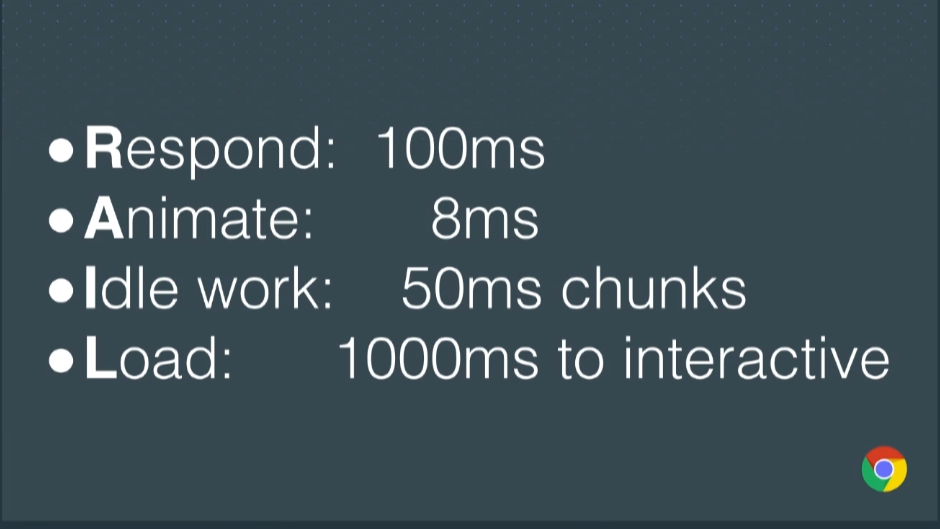
While there's no absolute classification of what defines performant code, we do have a user-centric performance model we can use as a reference: The RAIL model.
Sam Saccone: Planning for Performance: PRPL
If your app responds to a user action in under 100ms, the user perceives the response as immediate. This applies to tappable elements, but not when scrolling or dragging.
On a 60Hz monitor, we want to target a constant 60 frames per second when animating and scrolling. That results in around 16ms per frame. Out of that 16ms budget, you realistically have 8–10ms to do all the work, the rest taken up by the browser internals and other variances.
If you have an expensive, continuously running task, make sure to slice it into smaller chunks to allow the main thread to react to user inputs. You shouldn't have a task that delays user input for more than 50ms.
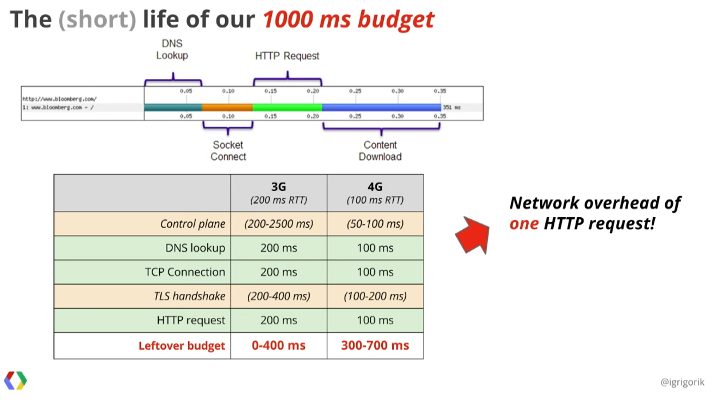
You should target a page load in under 1000ms. Anything over, and your users start getting twitchy. This is a pretty difficult goal to reach on mobile devices as it relates to the page being interactive, not just having it painted on screen and scrollable. In practice, it's even less:
In practice, aim for the 5s time-to-interactive mark. It's what Chrome uses in their Lighthouse audit.
Now that we know the metrics, let's have a look at some of the statistics:
And a bit more, courtesy of Addy Osmani:
Feeling sufficiently frustrated? Good. Let's get to work and fix the web. ✊
You might have noticed that the main bottleneck is the time it takes to load up your website. Specifically, the JavaScript download, parse, compile and execution time. There's no way around it but to load less JavaScript and load smarter.
But what about the actual work that your code does aside from just booting up the website? There has to be some performance gains there, right?
Before you dive into optimizing your code, consider what you're building. Are you building a framework or a VDOM library? Does your code need to do thousands of operations per second? Are you doing a time-critical library for handling user input and/or animations? If not, you may want to shift your time and energy somewhere more impactful.
It's not that writing performant code doesn't matter, but it usually makes little to no impact in the grand scheme of things, especially when talking about microoptimizations. So, before you get into a Stack Overflow argument about .map vs .forEach vs for loops by comparing results from JSperf.com, make sure to see the forest and not just the trees. 50k ops/s might sound 50× better than 1k ops/s on paper, but it won't make a difference in most cases.
Continue reading %JavaScript Performance Optimization Tips: An Overview%
There are lots of JavaScript frameworks out there. Sometimes I even start to think that I'm the only one who has not yet created a framework. Some solutions, like Angular, are big and complex, whereas some, like Backbone (which is more a library than a framework), are quite simple and only provide a handful of tools to speed up the development process.
In today's article I would like to present you a brand new framework called Stimulus. It was created by a Basecamp team led by David Heinemeier Hansson, a popular developer who was the father of Ruby on Rails.
Stimulus is a small framework that was never intended to grow into something big. It has its very own philosophy and attitude towards front-end development, which some programmers might like or dislike. Stimulus is young, but version 1 has already been released so it should be safe to use in production. I've played with this framework quite a bit and really liked its simplicity and elegance. Hopefully, you will enjoy it too!
In this post we'll discuss the basics of Stimulus while creating a single-page application with asynchronous data loading, events, state persistence, and other common things.
The source code can be found on GitHub.
Stimulus was created by developers at Basecamp. Instead of creating single-page JavaScript applications, they decided to choose a majestic monolith powered by Turbolinks and some JavaScript. This JavaScript code evolved into a small and modest framework which does not require you to spend hours and hours learning all its concepts and caveats.
Stimulus is mostly meant to attach itself to existing DOM elements and work with them in some way. It is possible, however, to dynamically render the contents as well. All in all, this framework is quite different from other popular solutions as, for example, it persists state in HTML, not in JavaScript objects. Some developers may find it inconvenient, but do give Stimulus a chance, as it really may surprise you.
The framework has only three main concepts that you should remember, which are:
data-controller "magic" attribute appears on the page. The documentation explains that this attribute is a bridge between HTML and JavaScript, just like classes serve as bridges between HTML and CSS. One controller can be attached to multiple elements, and one element may be powered up by multiple controllers.data-action attributes.data-target attributes.As you can see, the attributes listed above allow you to separate content from behaviour logic in a very simple and natural way. Later in this article, we will see all these concepts in action and notice how easy it is to read an HTML document and understand what's going on.
Stimulus can be easily installed as an NPM package or loaded directly via the script tag as explained in the docs. Also note that by default this framework integrates with the Webpack asset manager, which supports goodies like controller autoloading. You are free to use any other build system, but in this case some more work will be needed.
The quickest way to get started with Stimulus is by utilizing this starter project that has Express web server and Babel already hooked up. It also depends on Yarn, so be sure to install it. To clone the project and install all its dependencies, run:
git clone https://github.com/stimulusjs/stimulus-starter.git
cd stimulus-starter
yarn install
If you'd prefer not to install anything locally, you may remix this project on Glitch and do all the coding right in your browser.
Great—we are all set and can proceed to the next section!
Suppose we are creating a small single-page application that presents a list of employees and loads information like their name, photo, position, salary, birthdate, etc.
Let's start with the list of employees. All the markup that we are going to write should be placed inside the public/index.html file, which already has some very minimal HTML. For now, we will hard-code all our employees in the following way:
  <h1>Our employees</h1>

  <div>
    <ul>
      <li><a href="#">John Doe</a></li>
      <li><a href="#">Alice Smith</a></li>
      <li><a href="#">Will Brown</a></li>
      <li><a href="#">Ann Grey</a></li>
    </ul>
  </div>
Nice! Now let's add a dash of Stimulus magic.
As the official documentation explains, the main purpose of Stimulus is to connect JavaScript objects (called controllers) to the DOM elements. The controllers will then bring the page to life. As a convention, controllers' names should end with a _controller postfix (which should be very familiar to Rails developers).
There is a directory for controllers already available called src/controllers. Inside, you will find a hello_controller.js file that defines an empty class:
import { Controller } from "stimulus"

export default class extends Controller {

}
Let's rename this file to employees_controller.js. We don't need to specifically require it because controllers are loaded automatically thanks to the following lines of code in the src/index.js file:
const application = Application.start()
const context = require.context("./controllers", true, /\.js$/)
application.load(definitionsFromContext(context))
The next step is to connect our controller to the DOM. In order to do this, set a data-controller attribute and assign it an identifier (which is employees in our case):
<div data-controller="employees">
  <ul>
    <!-- your list -->
  </ul>
</div>
That's it! The controller is now attached to the DOM.
One important thing to know about controllers is that they have three lifecycle callbacks that get fired on specific conditions:
initialize: this callback happens only once, when the controller is instantiated.connect: fires whenever we connect the controller to the DOM element. Since one controller may be connected to multiple elements on the page, this callback may run multiple times.disconnect: as you've probably guessed, this callback runs whenever the controller disconnects from the DOM element.Nothing complex, right? Let's take advantage of the initialize() and connect() callbacks to make sure our controller actually works:
// src/controllers/employees_controller.js

export default class extends Controller {
  initialize() {
    console.log('Initialized')
    console.log(this)
  }

  connect() {
    console.log('Connected')
    console.log(this)
  }
}
Next, start the server by running:
yarn start
Navigate to http://localhost:9000. Open your browser's console and make sure both messages are displayed. It means that everything is working as expected!
The next core Stimulus concept is events. Events are used to respond to various user actions on the page: clicking, hovering, focusing, etc. Stimulus does not try to reinvent a bicycle, and its event system is based on generic JS events.
For instance, let's bind a click event to our employees. Whenever this event happens, I would like to call the as yet non-existent choose() method of the employees_controller:
  <ul>
    <li><a href="#" data-action="click->employees#choose">John Doe</a></li>
    <li><a href="#" data-action="click->employees#choose">Alice Smith</a></li>
    <li><a href="#" data-action="click->employees#choose">Will Brown</a></li>
    <li><a href="#" data-action="click->employees#choose">Ann Grey</a></li>
  </ul>
Probably, you can understand what's going on here by yourself.
data-action is the special attribute that binds an event to the element and explains what action should be called.click, of course, is the event's name.employees is the identifier of our controller.choose is the name of the method that we'd like to call.Since click is the most common event, it can be safely omitted:
<li><a href="#" data-action="employees#choose">John Doe</a></li>
In this case, click will be used implicitly.
Next, let's code the choose() method. I don't want the default action to happen (which is, obviously, opening a new page specified in the href attribute), so let's prevent it:
// src/controllers/employees_controller.js

// callbacks here...

  choose(e) {
    e.preventDefault()
    console.log(this)
    console.log(e)
  }
e is the special event object that contains full information about the triggered event. Note, by the way, that this returns the controller itself, not an individual link! In order to gain access to the element that acts as the event's target, use e.target.
Reload the page, click on a list item, and observe the result!
Now that we have bound a click event handler to the employees, I'd like to store the currently chosen person. Why? Having stored this info, we can prevent the same employee from being selected the second time. This will later allow us to avoid loading the same information multiple times as well.
Stimulus instructs us to persist state in the Data API, which seems quite reasonable. First of all, let's provide some arbitrary ids for each employee using the data-id attribute:
  <ul>
    <li><a href="#" data-id="1" data-action="employees#choose">John Doe</a></li>
    <li><a href="#" data-id="2" data-action="click->employees#choose">Alice Smith</a></li>
    <li><a href="#" data-id="3" data-action="click->employees#choose">Will Brown</a></li>
    <li><a href="#" data-id="4" data-action="click->employees#choose">Ann Grey</a></li>
  </ul>
Next, we need to fetch the id and persist it. Using the Data API is very common with Stimulus, so a special this.data object is provided for each controller. With its help, we can run the following methods:
this.data.get('name'): get the value by its attribute.this.data.set('name', value): set the value under some attribute.this.data.has('name'): check if the attribute exists (returns a boolean value).Unfortunately, these shortcuts are not available for the targets of the click events, so we must stick with getAttribute() in their case:
  // src/controllers/employees_controller.js
  choose(e) {
    e.preventDefault()
    this.data.set("current-employee", e.target.getAttribute('data-id'))
  }
But we can do even better by creating a getter and a setter for the currentEmployee:
  // src/controllers/employees_controller.js
  get currentEmployee() {
    return this.data.get("current-employee")
  }

  set currentEmployee(id) {
    if (this.currentEmployee !== id) {
      this.data.set("current-employee", id)
    }
  }
Notice how we are using the this.currentEmployee getter and making sure that the provided id is not the same as the already stored one.
Now you may rewrite the choose() method in the following way:
  // src/controllers/employees_controller.js

  choose(e) {
    e.preventDefault()
    this.currentEmployee = e.target.getAttribute('data-id')
  }
Reload the page to make sure that everything still works. You won't notice any visual changes yet, but with the help of the Inspector tool you'll notice that the ul has the data-employees-current-employee attribute with a value that changes as you click on the links. The employees part in the attribute's name is the controller's identifier and is being added automatically.
Now let's move on and highlight the currently chosen employee.
When an employee is selected, I would like to assign the corresponding element with a .chosen class. Of course, we might have solved this task by using some JS selector functions, but Stimulus provides a neater solution.
Meet targets, which allow you to mark one or more important elements on the page. These elements can then be easily accessed and manipulated as needed. In order to create a target, add a data-target attribute with the value of {controller}.{target_name} (which is called a target descriptor):
  <ul data-controller="employees">
    <li><a href="#" data-target="employees.employee"
      data-id="1" data-action="employees#choose">John Doe</a></li>

    <li><a href="#" data-target="employees.employee"
      data-id="2" data-action="click->employees#choose">Alice Smith</a></li>

    <li><a href="#" data-target="employees.employee"
      data-id="3" data-action="click->employees#choose">Will Brown</a></li>

    <li><a href="#" data-target="employees.employee"
      data-id="4" data-action="click->employees#choose">Ann Grey</a></li>
  </ul>
Now let Stimulus know about these new targets by defining a new static value:
// src/controllers/employees_controller.js

export default class extends Controller {
  static targets = [ "employee" ]

  // ...
}
How do we access the targets now? It's as simple as saying this.employeeTarget (to get the first element) or this.employeeTargets (to get all the elements):
  // src/controllers/employees_controller.js
  choose(e) {
    e.preventDefault()
    this.currentEmployee = e.target.getAttribute('data-id')
    console.log(this.employeeTargets)
    console.log(this.employeeTarget)
  }
Great! How can these targets help us now? Well, we can use them to add and remove CSS classes with ease based on some criteria:
  // src/controllers/employees_controller.js

  choose(e) {
    e.preventDefault()
    this.currentEmployee = e.target.getAttribute('data-id')

    this.employeeTargets.forEach((el, i) => {
      el.classList.toggle("chosen", this.currentEmployee === el.getAttribute("data-id"))
    })
  }
The idea is simple: we iterate over an array of targets and for each target compare its data-id to the one stored under this.currentEmployee. If it matches, the element is assigned the .chosen class. Otherwise, this class is removed. You may also extract the if (this.currentEmployee !== id) { condition from the setter and use it in the chosen() method instead:
  // src/controllers/employees_controller.js

  choose(e) {
    e.preventDefault()
    const id = e.target.getAttribute('data-id')

    if (this.currentEmployee !== id) { // <---
      this.currentEmployee = id

      this.employeeTargets.forEach((el, i) => {
        el.classList.toggle("chosen", id === el.getAttribute("data-id"))
      })
    }
  }
Looking nice! Lastly, we'll provide some very simple styling for the .chosen class inside the public/main.css:
.chosen {
  font-weight: bold;
  text-decoration: none;
  cursor: default;
}
Reload the page once again, click on a person, and make sure that person is being highlighted properly.
Our next task is to load information about the chosen employee. In a real-world application, you would have to set up a hosting provider, a back-end powered by something like Django or Rails, and an API endpoint that responds with JSON containing all the necessary data. But we are going to make things a bit simpler and concentrate on the client side only. Create an employees directory under the public folder. Next, add four files containing data for individual employees:
1.json
{
  "name": "John Doe",
  "gender": "male",
  "age": "40",
  "position": "CEO",
  "salary": "$120.000/year",
  "image": "https://burst.shopifycdn.com/photos/couple-in-love-at-sunset_373x.jpg"
}
2.json
{
  "name": "Alice Smith",
  "gender": "female",
  "age": "32",
  "position": "CTO",
  "salary": "$100.000/year",
  "image": "https://burst.shopifycdn.com/photos/woman-listening-at-team-meeting_373x.jpg"
}
3.json
{
  "name": "Will Brown",
  "gender": "male",
  "age": "30",
  "position": "Tech Lead",
  "salary": "$80.000/year",
  "image": "https://burst.shopifycdn.com/photos/casual-urban-menswear_373x.jpg"
}
4.json
{
  "name": "Ann Grey",
  "gender": "female",
  "age": "25",
  "position": "Junior Dev",
  "salary": "$20.000/year",
  "image": "https://burst.shopifycdn.com/photos/woman-using-tablet_373x.jpg"
}
All photos were taken from the free stock photography by Shopify called Burst.
Our data is ready and waiting to be loaded! In order to do this, we'll code a separate loadInfoFor() method:
  // src/controllers/employees_controller.js

  loadInfoFor(employee_id) {
    fetch(`employees/${employee_id}.json`)
    .then(response => response.text())
    .then(json => { this.displayInfo(json) })
  }
This method accepts an employee's id and sends an asynchronous fetch request to the given URI. There are also two promises: one to fetch the body and another one to display the loaded info (we'll add the corresponding method in a moment).
Utilize this new method inside choose():
  // src/controllers/employees_controller.js

  choose(e) {
    e.preventDefault()
    const id = e.target.getAttribute('data-id')

    if (this.currentEmployee !== id) {
      this.loadInfoFor(id)
      // ...
    }
  }
Before coding the displayInfo() method, we need an element to actually render the data to. Why don't we take advantage of targets once again?
<!-- public/index.html -->

<div data-controller="employees">
  <div data-target="employees.info"></div>
  <ul>
    <!-- ... -->
  </ul>
</div>
Define the target:
// src/controllers/employees_controller.js

export default class extends Controller {
  static targets = [ "employee", "info" ]
  // ...
}
And now utilize it to display all the info:
  // src/controllers/employees_controller.js

  displayInfo(raw_json) {
    const info = JSON.parse(raw_json)
    const html = `<ul><li>Name: ${info.name}</li><li>Gender: ${info.gender}</li><li>Age: ${info.age}</li><li>Position: ${info.position}</li><li>Salary: ${info.salary}</li><li><img src="${info.image}"></li></ul>`
    this.infoTarget.innerHTML = html
  }
Of course, you are free to employ a templating engine like Handlebars, but for this simple case that would probably be overkill.
Now reload the page and choose one of the employees. His bio and image should be loaded nearly instantly, which means our app is working properly!
Using the approach described above, we can go even further and load the list of employees on the fly rather than hard-coding it.
Prepare the data inside the public/employees.json file:
[
  {
    "id": "1",
    "name": "John Doe"
  },
  {
    "id": "2",
    "name": "Alice Smith"
  },
  {
    "id": "3",
    "name": "Will Brown"
  },
  {
    "id": "4",
    "name": "Ann Grey"
  }
]
Now tweak the public/index.html file by removing the hard-coded list and adding a data-employees-url attribute (note that we must provide the controller's name, otherwise the Data API won't work):
<div data-controller="employees" data-employees-url="/employees.json">
  <div data-target="employees.info"></div>
</div>
As soon as controller is attached to the DOM, it should send a fetch request to build a list of employees. It means that the connect() callback is the perfect place to do this:
  // src/controllers/employees_controller.js

  connect() {
    this.loadFrom(this.data.get('url'), this.displayEmployees)
  }
I propose we create a more generic loadFrom() method that accepts a URL to load data from and a callback to actually render this data:
  // src/controllers/employees_controller.js

  loadFrom(url, callback) {
    fetch(url)
        .then(response => response.text())
        .then(json => { callback.call( this, JSON.parse(json) ) })
  }
Tweak the choose() method to take advantage of the loadFrom():
  // src/controllers/employees_controller.js

  choose(e) {
    e.preventDefault()
    const id = e.target.getAttribute('data-id')

    if (this.currentEmployee !== id) {
      this.loadFrom(`employees/${id}.json`, this.displayInfo) // <---
      this.currentEmployee = id

      this.employeeTargets.forEach((el, i) => {
        el.classList.toggle("chosen", id === el.getAttribute("data-id"))
      })
    }
  }
displayInfo() can be simplified as well, since JSON is now being parsed right inside the loadFrom():
  // src/controllers/employees_controller.js

  displayInfo(info) {
    const html = `<ul><li>Name: ${info.name}</li><li>Gender: ${info.gender}</li><li>Age: ${info.age}</li><li>Position: ${info.position}</li><li>Salary: ${info.salary}</li><li><img src="${info.image}"></li></ul>`
    this.infoTarget.innerHTML = html
  }
Remove loadInfoFor() and code the displayEmployees() method:
  // src/controllers/employees_controller.js

  displayEmployees(employees) {
    let html = "<ul>"
    employees.forEach((el) => {
      html += `<li><a href="#" data-target="employees.employee" data-id="${el.id}" data-action="employees#choose">${el.name}</a></li>`
    })
    html += "</ul>"
    this.element.innerHTML += html
  }
That's it! We are now dynamically rendering our list of employees based on the data returned by the server.
In this article we have covered a modest JavaScript framework called Stimulus. We have seen how to create a new application, add a controller with a bunch of callbacks and actions, and introduce events and actions. Also, we've done some asynchronous data loading with the help of fetch requests.
All in all, that's it for the basics of Stimulus—it really does not expect you to have some arcane knowledge in order to craft web applications. Of course, the framework will probably have some new features in future, but the developers are not planning to turn it into a huge monster with hundreds of tools.
If you'd like to find more examples of using Stimulus, you may also check out this tiny handbook. And if you’re looking for additional JavaScript resources to study or to use in your work, check out what we have available in the Envato Market.
Did you like Stimulus? Would you be interested in trying to create a real-world application powered by this framework? Share your thoughts in the comments!
As always, I thank you for staying with me and until the next time.


Nano ID is a tiny, secure, URL-friendly, unique string ID generator for JavaScript.It uses cryptographically strong random APIs and guarantees a proper distribution of symbols.It uses a larger alphabet than UUID (A-Za-z0-9_~) and has a similar number of unique IDs in just 21 symbols instead of 36.
The post Nano ID : Unique string ID Generator for JavaScript appeared first on Best jQuery.

This jQuery plugin will provide you an accessible and simple non-modal tooltip, using ARIA.
The post jQuery Accessible simple Tooltip window using ARIA appeared first on Best jQuery.