
by via Awwwards - Sites of the day

Welcome to this week’s edition of the Social Media Marketing Talk Show, a news show for marketers who want to stay on the leading edge of social media. On this week’s Social Media Marketing Talk Show, we explore Instagram shoppable tags in Stories with Jeff Sieh, Facebook ads updates, Twitter news features with Madalyn Sklar, [...]
The post Facebook Advertising Updates appeared first on .
The role of web animation has evolved from mere decorative fluff to serving concrete purposes in the context of user experience --- such as providing visual feedback as users interact with your app, directing users' attention to fulfill your app's goals, offering visual cues that help users make sense of your app's interface, and so on.
To ensure web animation is up to such crucial tasks, it's important that motion takes place at the right time in a fluid and smooth fashion, so that users perceive it as aiding them, rather than as getting in the way of whatever action they're trying to pursue on your app.
One dreaded effect of ill-conceived animation is jank, which is explained on jankfree.org like this:
Modern browsers try to refresh the content on screen in sync with a device's refresh rate. For most devices today, the screen will refresh 60 times a second, or 60Hz. If there is some motion on screen (such as scrolling, transitions, or animations) a browser should create 60 frames per second to match the refresh rate. Jank is any stuttering, juddering or just plain halting that users see when a site or app isn't keeping up with the refresh rate.
If animations are janky, users will eventually interact less and less with your app, thereby negatively impacting on its success. Obviously, nobody wants that.
In this article, I've gathered a few performance tips to help you solve issues with JavaScript animations and make it easier to meet the 60fps (frame per second) target for achieving smooth motion on the web.
Whether you plan on animating CSS properties using CSS Transitions/CSS keyframes or JavaScript, it's important to know which properties bring about a change in the geometry of the page (layout) --- meaning that the position of other elements on the page will have to be recalculated, or that painting operations will be involved. Both layout and painting tasks are very expensive for browsers to process, especially if you have several elements on your page. As a consequence, you'll see animation performance improve significantly if you avoid animating CSS properties that trigger layout or paint operations and stick to properties like transforms and opacity, because modern browsers do an excellent job of optimizing them.
On CSS Triggers you'll find an up-to-date list of CSS properties with information about the work they trigger in each modern browser, both on the first change and on subsequent changes.
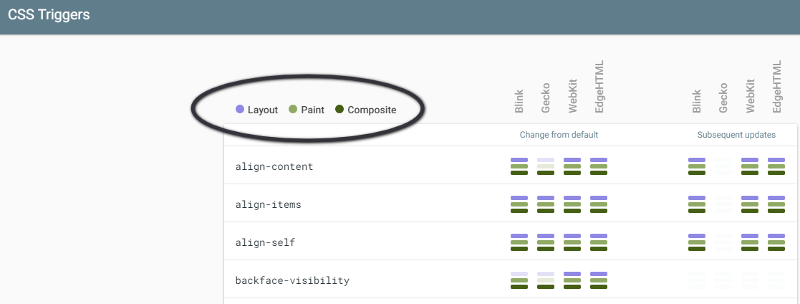
Changing CSS properties that only trigger composite operations is both an easy and effective step you can take to optimize your web animations for performance.
If the element you want to animate is on its own compositor layer, some modern browsers leverage hardware acceleration by offloading the work to the GPU. If used judiciously, this move can have a positive effect on the performance of your animations.
To have the element on its own layer, you need to promote it. One way you can do so is by using the CSS will-change property. This property allows developers to warn the browser about some changes they want to make on an element, so that the browser can make the required optimizations ahead of time.
However, it's not advised that you promote too many elements on their own layer or that you do so with exaggeration. In fact, every layer the browser creates requires memory and management, which can be expensive.
You can learn the details of how to use will-change, its benefits and downsides, in An Introduction to the CSS will-change Property by Nick Salloum.
JavaScript animations have commonly been coded using either setInterval() or setTimeout().
The code would look something like this:
var timer;
function animateElement() {
  timer = setInterval( function() {
    // animation code goes here
  } , 2000 );
}

// To stop the animation, use clearInterval
function stopAnimation() {
  clearInterval(timer);
}
Although this works, the risk of jank is high, because the callback function runs at some point in the frame, perhaps at the very end, which can result in one or more frames being missed. Today, you can use a native JavaScript method which is tailored for smooth web animation (DOM animation, canvas, etc.), called requestAnimationFrame().
requestAnimationFrame() executes your animation code at the most appropriate time for the browser, usually at the beginning of the frame.
Your code could look something like this:
function makeChange( time ) {
  // Animation logic here

  // Call requestAnimationFrame recursively inside the callback function
  requestAnimationFrame( makeChange ):
}

// Call requestAnimationFrame again outside the callback function
requestAnimationFrame( makeChange );
Performance with requestAnimationFrame by Tim Evko here on SitePoint offers a great video introduction to coding with requestAnimationFrame().
The post 7 Performance Tips for Jank-free JavaScript Animations appeared first on SitePoint.
|


Fabric is a Python library and command-line tool for streamlining the use of SSH for application deployment or systems administration tasks. Fabric is very simple and powerful and can help to automate repetitive command-line tasks. This approach can save time by automating your entire workflow.
This tutorial will cover how to use Fabric to integrate with SSH and automate tasks.
Fabric is best installed via pip:
$ pip install fabric
Below is a simple function demonstrating how to use Fabric.
def welcome():
    print("Welcome to getting started with Fabric!")
The program above is then saved as fabfile.py in your current working directory. The welcome function can be executed with the fab tool as follows:
$ fab welcome
Welcome to getting started with Fabric
Fabric provides the fab command which reads its configuration from a file, fabfile.py. The file should be in the directory from which the command is run. A standard fabfile contains the functions to be executed on a remote host or a group of remote hosts.
Fabric implements functions which can be used to communicate with remote hosts:
This operation is used to run a shell command on a remote host.
Examples
run("ls /var/www/")
run("ls /home/userx", shell=False)
output = run('ls /var/www/mysites'
This function is used to download file(s) from a remote host. The example below shows how to download a backup from a remote server.
# Downloading  a back-up
get("/backup/db.bak", "./db.bak")
This functions uploads file(s) to a remote host. For example:
with cd('/tmp'):
    put('/path/to/local/test.txt', 'files')
As the name suggests, this function reboots a system server.
# Reboot the remote system
reboot()
This function is used to execute commands on a remote host with superuser privileges. Additionally, you can also pass an additional user argument which allows you to run commands as another user other than root.
Example
# Create a directory
sudo("mkdir /var/www")
This function is used to run a command on the local system. An example is:
# Extract the contents of a tar archive
local("tar xzvf /tmp/trunk/app.tar.gz")

# Remove a file
local("rm /tmp/trunk/app.tar.gz")
The function prompts the user with text and returns the input.
Examples
# Simplest form:
environment = prompt('Please specify target environment: ')

# specify host
env_host = prompt('Please specify host:')
This function is used to check for given keys in a shared environment dict. If not found, the operation is aborted.
One of the ways developers interact with remote servers besides FTP clients is through SSH. SSH is used to connect to remote servers and do everything from basic configuration to running Git or initiating a web server.
With Fabric, you can perform SSH activities from your local computer.
The example below defines functions that show how to check free disk space and host type. It also defines which host will run the command:
# Import Fabric's API module
from fabric.api import run

env.hosts = '159.89.39.54'

# Set the username
env.user = "root"


def host_type():
    run('uname -s')


def diskspace():
    run('df')


def check():

    # check host type
    host_type()

    # Check diskspace
    diskspace()
In order to run this code, you will need to run the following command on the terminal:
fab check
fab check[159.89.39.54] Executing task 'check'
[159.89.39.54] run: uname -s
[159.89.39.54] Login password for 'root':
[159.89.39.54] out: Linux
[159.89.39.54] out:

[159.89.39.54] run: df
[159.89.39.54] out: Filesystem     1K-blocks    Used Available Use% Mounted on
[159.89.39.54] out: udev              242936       0    242936   0% /dev
[159.89.39.54] out: tmpfs              50004    6020     43984  13% /run
[159.89.39.54] out: /dev/vda1       20145768 4398716  15730668  22% /
[159.89.39.54] out: tmpfs             250012    1004    249008   1% /dev/shm
[159.89.39.54] out: tmpfs               5120       0      5120   0% /run/lock
[159.89.39.54] out: tmpfs             250012       0    250012   0% /sys/fs/cgroup
[159.89.39.54] out: /dev/vda15        106858    3426    103433   4% /boot/efi
[159.89.39.54] out: tmpfs              50004       0     50004   0% /run/user/0
[159.89.39.54] out: none            20145768 4398716  15730668  22% /var/lib/docker/aufs/mnt/781d1ce30963c0fa8af93b5679bf96425a0a10039d10be8e745e1a22a9909105
[159.89.39.54] out: shm                65536       0     65536   0% /var/lib/docker/containers/036b6bcd5344f13fdb1fc738752a0850219c7364b1a3386182fead0dd8b7460b/shm
[159.89.39.54] out: none            20145768 4398716  15730668  22% /var/lib/docker/aufs/mnt/17934c0fe3ba83e54291c1aebb267a2762ce9de9f70303a65b12f808444dee80
[159.89.39.54] out: shm                65536       0     65536   0% /var/lib/docker/containers/fd90146ad4bcc0407fced5e5fbcede5cdd3cff3e96ae951a88f0779ec9c2e42d/shm
[159.89.39.54] out: none            20145768 4398716  15730668  22% /var/lib/docker/aufs/mnt/ba628f525b9f959664980a73d94826907b7df31d54c69554992b3758f4ea2473
[159.89.39.54] out: shm                65536       0     65536   0% /var/lib/docker/containers/dbf34128cafb1a1ee975f56eb7637b1da0bfd3648e64973e8187ec1838e0ea44/shm
[159.89.39.54] out:


Done.
Disconnecting from 159.89.39.54... done.
Fabric enables you to run commands on a remote server without needing to log in to the remote server.
Remote execution with Fabric can lead to security threats since it requires an open SSH port, especially on Linux machines.
For instance, let's assume you want to update the system libraries on your remote server. You don't necessarily need to execute the tasks every other time. You can just write a simple fab file which you will run every time you want to execute the tasks.
In this case, you will first import the Fabric API's module:
from fabric.api import *
Define the remote host you want to update:
env.hosts = '159.89.39.54'
Set the username of the remote host:
env.user = "root"
Although it's not recommended, you might need to specify the password to the remote host.
Lastly, define the function that updates the libraries in your remote host.
def update_libs():
    """
        Update the default OS installation's
        basic default tools.
                                            """
    run("apt-get    update")
Now that your fab file is ready, all you need to do is execute it as follows:
$ fab update
You should see the following result:
$ fab update
[159.89.39.54] Executing task 'update'
[159.89.39.54] run: apt-get    update
[159.89.39.54] Login password for 'root':
If you didn't define the password, you will be prompted for it.
After the program has finished executing the defined commands, you will get the following response, if no errors occur:
$ fab update
............

Disconnecting from 159.89.39.54... done.
This tutorial has covered what is necessary to get started with Fabric locally and on remote hosts. You can now confidently start writing your own scripts for building, monitoring or maintaining remote servers.


Bootstrap Strength Meter is a simple password strength meter based on Password Score.
The post Bootstrap Strength Meter with jQuery appeared first on Best jQuery.


