Thursday, February 7, 2019

7 Awesome Wireframing Tools You Should Be Using

A Roundup of the Best Wireframing Tools

Over the years, we’ve become so much more knowledgeable about the UX design process, especially in regards to wireframing — a highly useful design exercise that can significantly improve the overall user experience of the final product.

In this roundup, we’ll take a look at the best wireframing tools.

What is a Wireframe?

A wireframe is the skeletal mockup of a design — the unstyled, barebones foundation that exists before the addition of fonts, colors, and any other visual aesthetics. Wireframing often happens after ideation but before high-fidelity prototyping.

Wireframing is sometimes referred to as “mid-fidelity,” and what defines a wireframing tool is the fact that they allow designers to drag and drop ready-made design elements and components onto the canvas, so that they can experiment with ideas quickly in a non-destructive environment, collect feedback from stakeholders, and even conduct user testing.

How Are Wireframes Used in UX?

Wireframing offers designers a chance to carefully think about the core UX of their design, meaning the usability, accessibility, scannability, clickability, and so on (often with special focus on the navigation, form, and checkout UX).

While visual design contributes to UX as well, designing the “surface layer” alongside the core UX can quickly turn into a complicated mess, which is why we design these skeletal mockups known as wireframes before moving to high-fidelity.

Let’s take a look at the best wireframing tools that are currently available.

Balsamiq

  • Platforms: Web, macOS, Windows
  • Pricing: various options for web and desktop

Balsamiq is a major player in the wireframing space.

What makes it stand out from the rest is its (optional) sketch-like visual aesthetic, which reminds us that wireframes should be experimental, low/mid-fidelity, and even disposable — the kind of attitude that makes wireframing thrive.
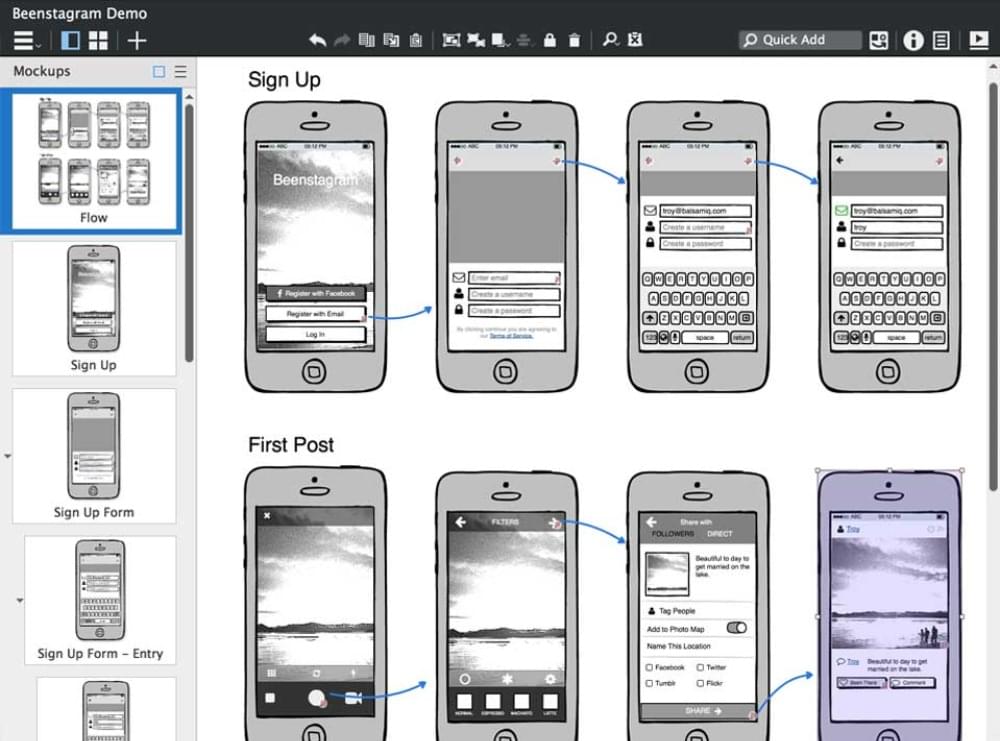
An example of the Balsamiq interface

Balsamiq is ideal for lean, agile teams, with features that help designers test wireframes on real devices, as well as collaborate on feedback with stakeholders. With integrations that enable bug-tracking (for example, with Jira Cloud), Balsamiq suits both designers and manager types alike.

As for wireframing components, Balsamiq is one of the most-equipped, being one of the most-seasoned tools on the market today. As with all wireframing tools, these are used by simply dragging components onto the canvas to visualize ideas quickly.

Whimsical

  • Platforms: Web only
  • Pricing: Free Plan, $8, or $12 (/month)

Despite being relatively new to the industry, and thus having the smallest repertoire of wireframing components, Whimsical is the best looking, the easiest to use, the most fun to use, and finally, the cheapest wireframing tool on the market today (minus Justinmind, which is free for “wireframing only”).
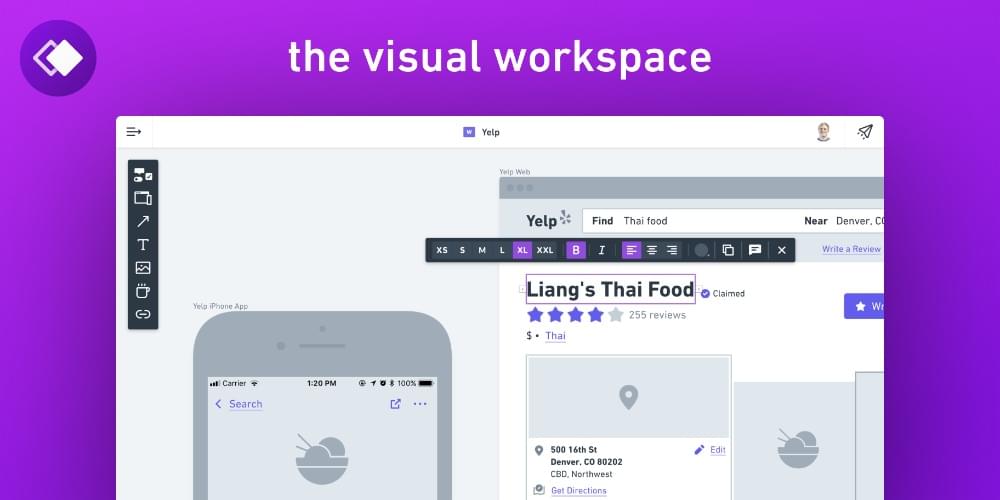
An example of the Whimsical workspace

A major downside is that there aren’t any user testing features. However, other collaborators can at least add their feedback by commenting on wireframes, and even manage bugs, tasks, and improvements in a Trello-like, kanban-style board. So far, the feature set is gearing up to be massively useful in a design sprint-style workflow.

Also, mind-mapping features are on the way.

Axure RP

  • Platforms: macOS and Windows
  • Pricing: various options for teams and individuals

Axure RP, like Balsamiq, is another huge wireframing tool, modestly offering dynamic, data-driven content features, animation features, and also adaptive and conditional layouts. It’s no wonder that “87% of the Fortune 100 companies use Axure”.
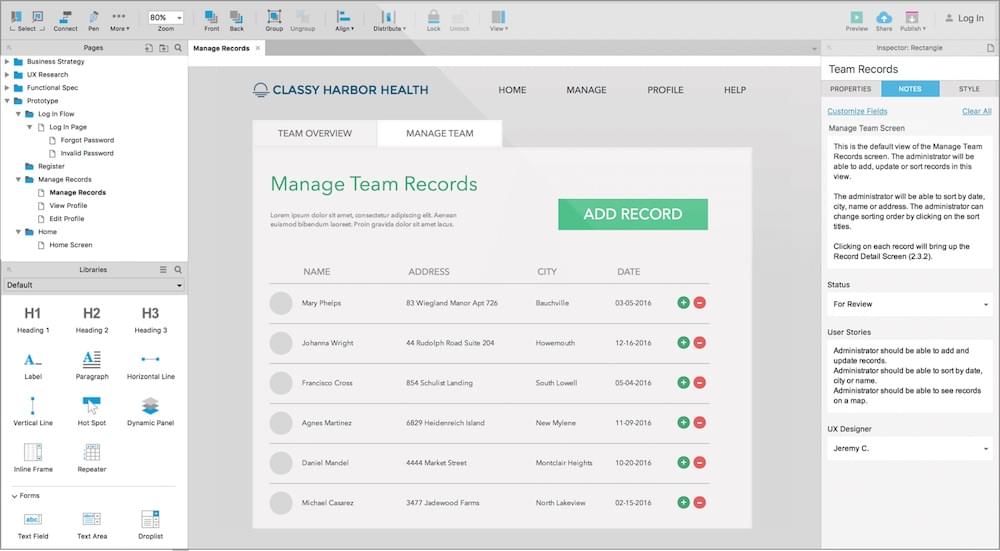
The Axure interface

Axure has been around for a whopping 16 years. Its only downside is the lack of user/usability testing features.

Marvel

  • Platforms: Web
  • Pricing: Free Plan, $12, $42, or $84 (/month)

Marvel is known as being one of the easiest tools to master, which includes its wireframing features. Although the majority of the workflow happens in Sketch, where designs are then handed off to developers, Marvel’s lesser-known wireframing tools are both easy to use and nice to look at — much like Whimsical’s.

The Marvel workspace

Since Marvel integrates with user testing tool Lookback, you could say that Marvel is a more-seasoned Whimsical, albeit more expensive due to the addition of prototyping and handoff features, but nonetheless a very worthy addition to this list.

The post 7 Awesome Wireframing Tools You Should Be Using appeared first on SitePoint.


by Daniel Schwarz via SitePoint

Using Tech To Give Pets A Better Life (Infographic)

Though we love them unconditionally, caring for our pets isn’t always easy and we want to give them the very best we can. Spending on pets has more than doubled in the last 15 years and in 2017 alone, over $70 billion was spent in the US on pet care, including everything from veterinarian visits to...

[ This is a content summary only. Visit our website http://bit.ly/1b4YgHQ for full links, other content, and more! ]

by Web Desk via Digital Information World

Using Squarespace to announce your Startup and gather Email Leads

Squarespace Logo

Squarespace has become an impressive All-In-One platform for small businesses.

Anyone wanting to announce their next startup, can simply setup a website template and start gathering email leads – all within a couple of hours.

In this tutorial I guide you step-by-step from a fresh sign up to capturing quality leads in your startup mailing list integrated with Squarespace Email Marketing Tools.

Squarespace


One Page Love Exclusive Coupon

OPL10

Yay! Squarespace has been kind enough to give One Page Love readers the exclusive coupon OPL10 for 10% Off your first website or domain purchase. (There is a free 14-day trial with no credit card needed, so you can try risk free.)


Step One: Start with any Squarespace template

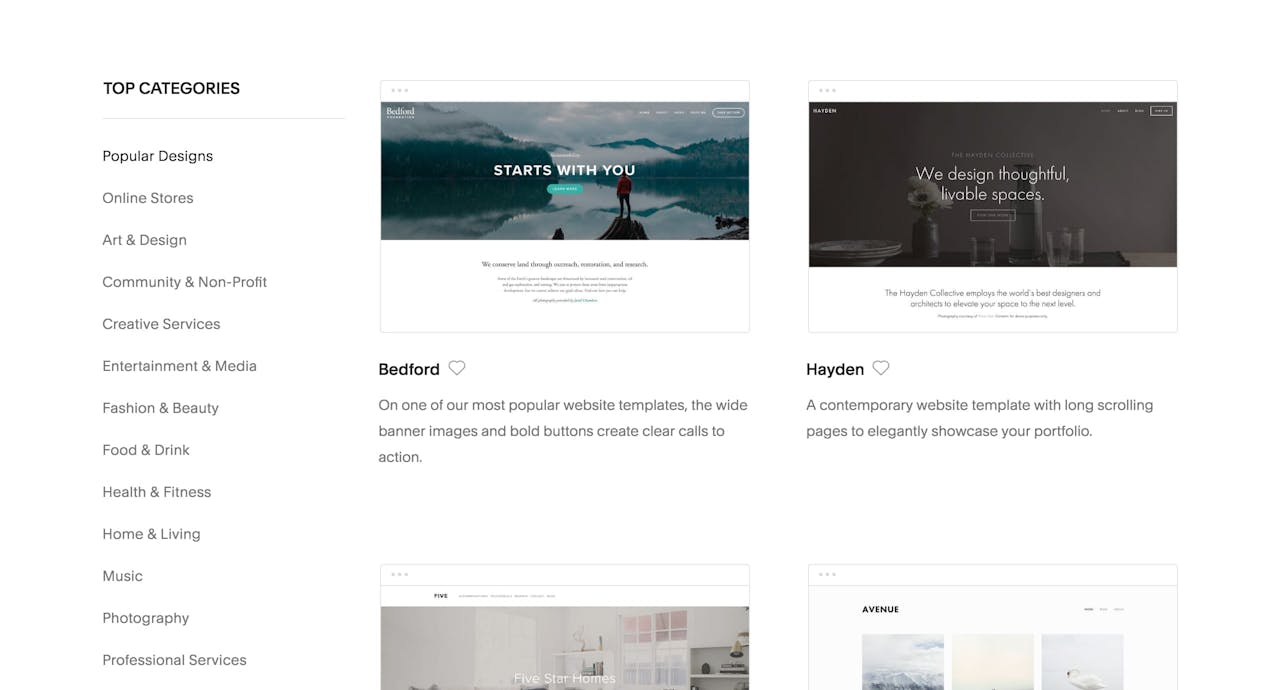
Sign up at Squarespace (starting at only $12/month), then pick the template design similar to your needs. The template editing functionality is super powerful so don’t spend too much time trying to find a perfect match. If you need a kickstart, last month I curated my Top 5 Landing Page templates.


Step Two: Add your branding and content

There are many tutorials on how to get going but my advice is to simply start at the top of the page. Replace the placeholder content with your own and work your down. The Squarespace platform handles all your speed, security and mobile optimization – so all you need to worry about is adding great content.

Here is an article on how to create a converting Landing Page using Squarespace if you need a guideline on making your content more effective.


Step Three: Create your new Mailing List

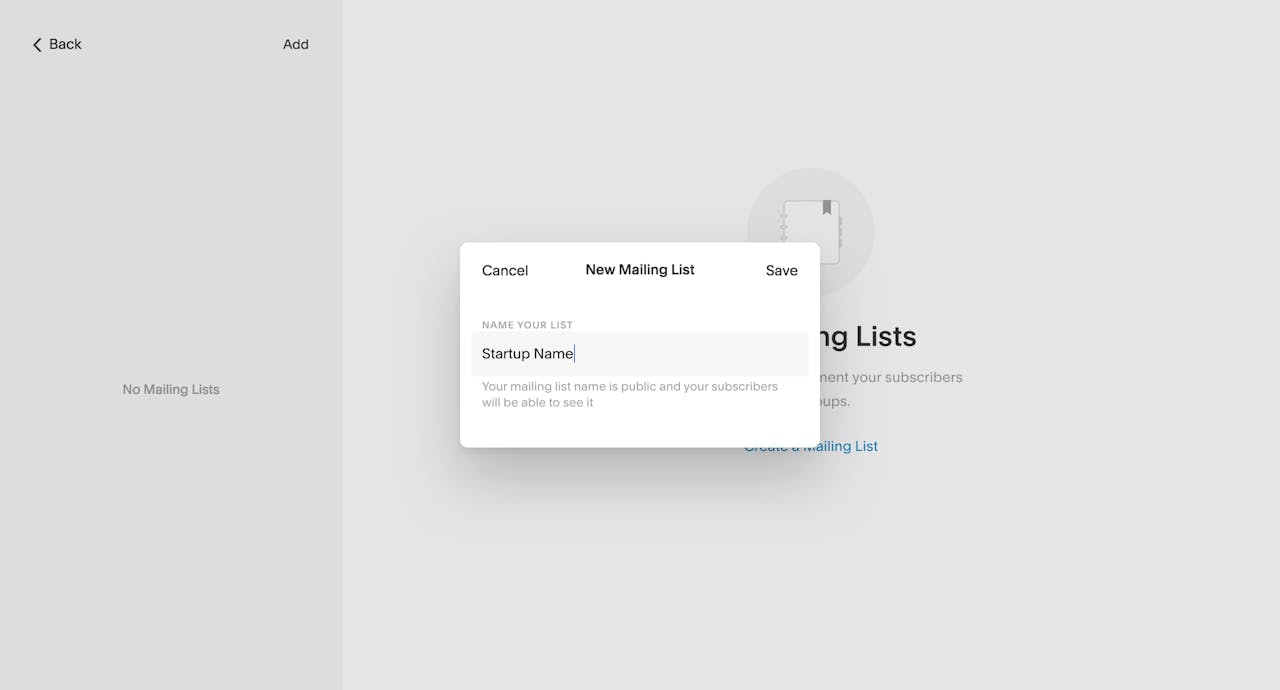
Once you are happy with the aesthetic and content flow, head over to Mailing Lists section. Squarespace Menu > Marketing > Email Campaigns > Mailing Lists. Then click the Create a new Mailing List link. You will be prompted with a pop-up like this, name your list anything you want and hit save. I called mine "Startup Name":

You now have the option of manually add any customers who asked via email communication to be notified when you officially launch.

There is also a very convenient option to import a "CSV file" of customer emails. CSV files are created when exporting your mailing lists from any popular email providers.


Step Four: Add a Promotional Pop-Up

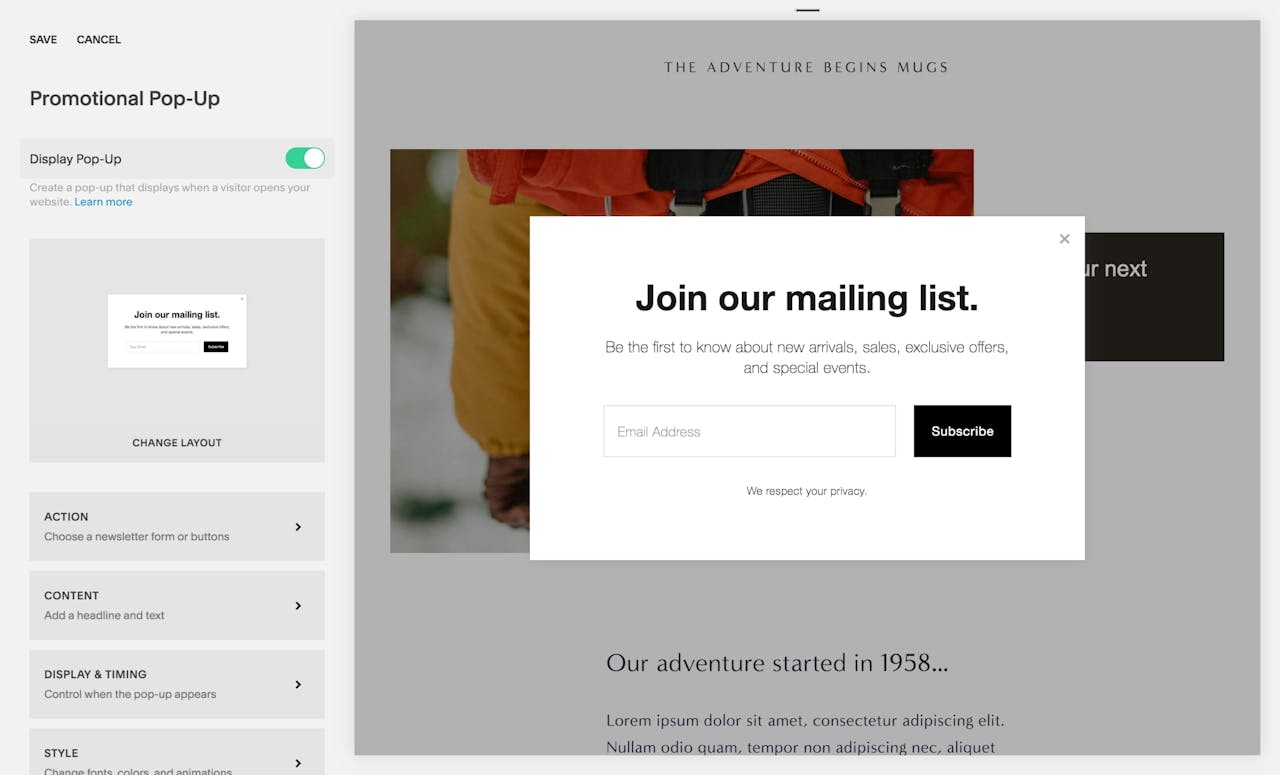
Head over to Squarespace Menu > Marketing > Promotional Pop-Up to enable a mailing list sign up form that appears when visits arrive at your Squarespace website:

Go through the various settings, tweaking the pop-up design accordingly. To help increase sign ups, I’d recommend giving the visitor an exciting reason why they should subscribe eg. receive monthly flower arrangement tips if you are a florist.

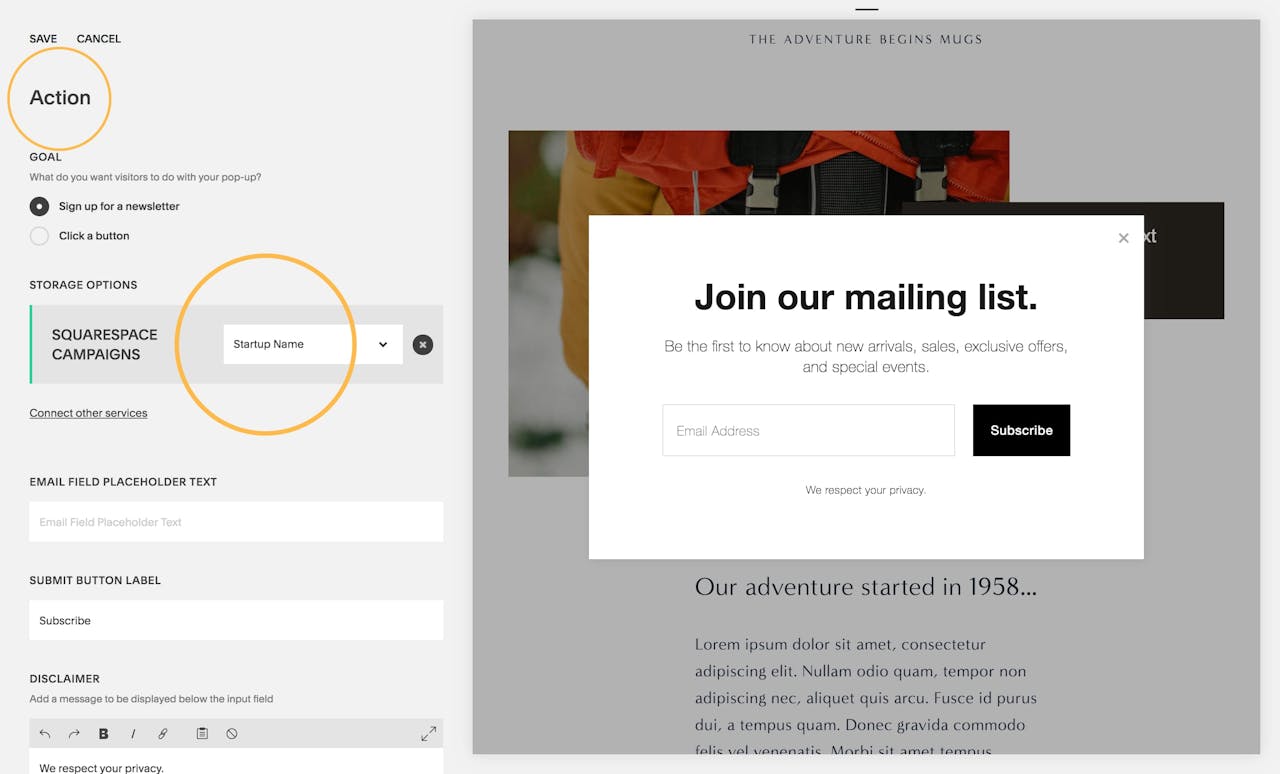
Once you are happy, head to the Action section, set the Goal to "Sign up for a newsletter" and select the new list with created in Step Three:

Hit save and now your Promotional Pop-Up will start adding subscribers to your mailing list. Neat!


Step Five: Connect your domain to your Squarespace website

I’d recommended transferring your domain to Squarespace instead of connecting it via a third party domain provider. Main reasons are billing all in one place and trust me you’d rather have Squarespace support on the end of a domain query than any domain provider out there. Here is a comprehensive guide on how to transfer or comment your domain to Squarespace.


Step Six: Announce your new startup! 🚀

As soon as your domain is connected, you have officially launched! It’s time to share your website address and start collecting marketing leads through your engaging promotional pop-up.


FAQ: What are Squarespace Email Marketing Tools?

Squarespace Email Marketing Tools allow anyone to gather email addresses within their website and then send marketing emails using the same Squarespace platform. Right now existing Squarespace customers can use Email Campaigns at no cost for a limited time during an invite-only early access period. General availability at a low monthly rate is coming soon but noteworthy highlights include:

  • Comprehensive click tracking and reporting
  • A range of customizable templates (preview below) to start designing emails
  • Responsive layouts so emails look great on desktop or mobile
  • Import content from your website or blog straight into emails
  • Compose and edit emails from your mobile if needed
  • Import email addresses using CSV files

My favorite feature is how the click tracking is part of a bigger analytics platform. We can track a click from an email button all the way to the purchase page, meaning we can see how much our Email Marketing Campaigns are converting into sales.


FAQ: What are the benefits of using Squarespace?

Squarespace is a leading online website builder. What sets them apart from the rest is their superior level of design and customer support. They have a huge support team and are available 24/7. Other main benefits are:

  • No Website Hosting Needed - their platform is fast and secure
  • Online Content Management - all edits are done within your browser, no software needed
  • Easily Drag and Drop Images - unlimited galleries with unlimited bandwidth
  • Free Domain Name - when registering for your first website, if you pay annually (renews at standard rate)
  • Beautifully Responsive - all templates work for all devices, so you only have to design your website once. Test and preview how your website will appear on a range of screen sizes.
  • Blog Sections - can easily be added to start sharing your journey
  • Commerce Solutions - are an upgrade away if you want to start selling products
  • Email Marketing - gather email addresses, send marketing emails and analyze the reader email activity

That’s a wrap! Don’t forget your 10% Off coupon: OPL10

OPL10

I hope you enjoyed this tutorial on collecting leads for your startup using a Squarespace template. Props to Squarespace for creating a platform where we can create beautiful Landing Pages, easily. If you missed it I curated 5 Squarespace Landing Page templates to launch your next idea.


by Rob Hope @robhope via One Page Love

Draftium – Turbo prototyping tool

Draftium is a free online turbo prototyping tool for website ideation and collaboration. It is meant to simplify daily routine of web-designers or studios, marketers, and account managers.(Use promo code FLEOWWO to get a 70% discount)


by csreladm via CSSREEL | CSS Website Awards | World best websites | website design awards | CSS Gallery

Dwellito Top Modular Homes

Explore and compare the best Modular Homes of 2019. Dwellito helps you find, compare, purchase and get a home shipped to your home within a few weeks.


by csreladm via CSSREEL | CSS Website Awards | World best websites | website design awards | CSS Gallery

How Cybercriminals Are Abusing The Gmail's Secret Dot Feature

Gmail’s not-so-famous “dot” feature redirects emails to the same account where they are intended even if by mistake a dot (period) is inserted in a recipient’s email ID. This has given cybercriminals a chance to manipulate the feature for illegal gains. They have been using this to commit crimes...

[ This is a content summary only. Visit our website http://bit.ly/1b4YgHQ for full links, other content, and more! ]

by Aqsa Rasool via Digital Information World

Google Is Removing Its Two Rarely Used Features

When you’re as big as Google, you’re bound to create a few features that people are not going to end up using. This is because of the fact that Google operates by creating as many features as possible in an attempt to see if any of the features they are putting out there could potentially end up...

[ This is a content summary only. Visit our website http://bit.ly/1b4YgHQ for full links, other content, and more! ]

by Zia Zaidi via Digital Information World