Monday, July 15, 2019

JavaScript library for HTML Form Persistence

A simple JavaScript library for preserving HTML form data across multiple sessions.

The post JavaScript library for HTML Form Persistence appeared first on Best jQuery.


by Admin via Best jQuery

Hover Effect Style 240

The post Hover Effect Style 240 appeared first on Best jQuery.


by Admin via Best jQuery

Pricing Table Style 123

The post Pricing Table Style 123 appeared first on Best jQuery.


by Admin via Best jQuery

Major security bug detected in Instagram makes users concern about their personal data

Instagram is one of the most popular social media platforms among people from all over the world. It is a network for all sorts of creators, from providing unique beauty tips to earn revenue through vlogs, it is used by all sorts of users. The amount of user engagement in this platform dominates...

[ This is a content summary only. Visit our website https://ift.tt/1b4YgHQ for full links, other content, and more! ]

by agha ali via Digital Information World

Web Design Weekly #361

Headlines

The Future of Websites: Headless CMSs

In order to really grasp the elegance of headless CMS – and its possibilities – you have to cut through the clutter and understand how they work fundamentally. Dan Fries explains. (scotch.io)

Get Your Free .design Domain Name

Thinking of building your portfolio? .design is like .com & .net, but it’s more relevant to what you do as a designer. Claim yours today. (porkbun.com)

Articles

Building a design system — where to start?

In this post, Shane Williams gives some great advice on how and where to start if you are lost. Even if you have a design system in place he drops some solid knowledge. (uxdesign.cc)

CSS Lists, Markers, And Counters

In this article Rachel Andrew starts by looking at lists in CSS, and moving onto some interesting features defined in the CSS Lists specification — markers and counters. (smashingmagazine.com)

Why is my webpack build slow?

Sam Saccone has some hot tips to help you understand and put in place some system to address this issue. Great article. (samsaccone.com)

Tools / Resources

Popups – Problematic Trends and Alternatives

In this article, Anna Kaley discusses key factors to consider, along with realistic alternatives to popups that preserve the sites intent and the users’ experience. (nngroup.com)

React Fundamentals: Props vs State

A simple and informative post that dives into the difference between props and state in React. (kentcdodds.com)

Eva Design System

Customisable Design System easily adaptable to your brand. (colors.eva.design)

The Many Ways to Include CSS in JavaScript Applications (css-tricks.com)

Typography exercises to improve your skills (dribbble.com)

GraphQL and WordPress (syntax.fm)

Next.js 9 (nextjs.org)

Inspiration

Shape Up – Stop Running in Circles and Ship Work that Matters (basecamp.com)

Why I Stopped Using Multiple Monitors (hackernoon.com)

Jobs

UI/UX Designer at Campspot

Campspot is looking for a talented UI/UX Designer to join our team in either our Denver or Chicago office. Our ideal candidate is someone who has a wide variety of skills and is able to contribute across the many steps of the design process. (campspot.com)

Product Designer at Braze

Are you a critical thinker? Are you willing to challenge ideas and receive feedback? Are you comfortable with ambiguity? We are seeking a fearless and passionate Product Designer to join our growing Product Design team. (braze.com)

Need to find passionate developers or designers? Why not advertise in the next newsletter

Last but not least…

Popup Trombone (matthewrayfield.com)

The post Web Design Weekly #361 appeared first on Web Design Weekly.


by Jake Bresnehan via Web Design Weekly

Getting Started with October CMS Static Pages

These days it can be tough for website developers, especially now with WordPress going through the biggest and the most dramatic update in its history. Over the past few months, we’ve observed a growing interest in the October CMS community.

October CMS is the natural choice for developers that look for a modern and reliable content management system based on the Laravel PHP framework. Launched in 2014, today October CMS is a mature platform with a large ecosystem. October CMS is known for its reliability and non-breaking updates, which is greatly appreciated by developers and their clients. The philosophy “Getting back to basics” really matters to freelancers and digital studios, whose businesses depend on the quality of the software they use. The quickly growing Marketplace and the supporting businesses built around October are great proof of the community’s trust. In 2018 October CMS was also voted the Best Flat File CMS in the CMS Critic Award contest.

October CMS has a simple extensible core. The core provides basic CMS functions and a lot of functionality can be added with plugins from the Marketplace. The plugins Marketplace includes a lot of product categories, which include blogging, e-commerce, contact forms, and many others.

In this tutorial, we will demonstrate how to create a website with pages editable in WYSIWYG (What You See Is What You Get) mode, and blogging features. We will use the Static Pages plugin that allows you to create a dynamic website structure with pages and menus manageable by non-technical end users. At the same time, the website will include dynamic blog pages, with content managed with the Blog plugin. All plugins used in this tutorial are free for anyone to install. The ideas from this tutorial can be extended to creating more complex websites. Themes implementing similar features can be found on the Themes Marketplace, but the goal of this tutorial is to show how easy it is to make an October website from scratch.

This is what we will have at the end:
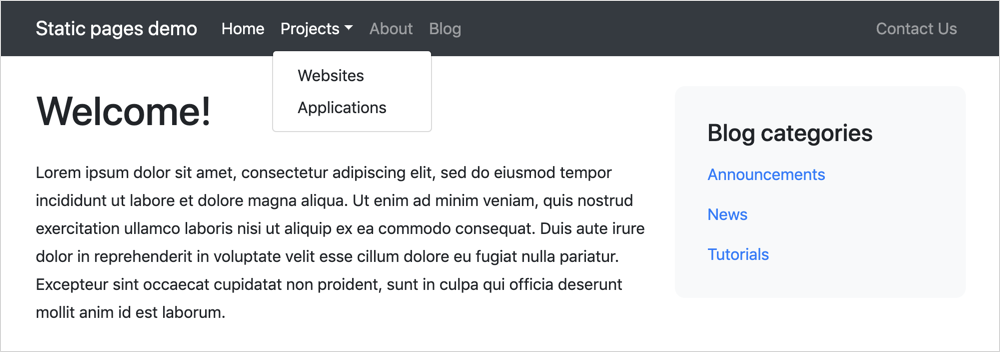
The website theme is completely based on Twitter Bootstrap 4.3. The demo website also includes a simple CSS file that manages some light styling features, such as padding and colors, but since it is not relevant for the topic of this tutorial, it won’t be described in this guide.

Installing October CMS

To install October CMS you must have a web server meeting the minimum requirements. You can use MAMP as a solution to try October on your computer.

The post Getting Started with October CMS Static Pages appeared first on SitePoint.


by SitePoint Team via SitePoint

Twitter Launches ‘Hide Reply’ Option for Canadian Audience to Get Rid of Reply Army

The best thing about Twitter is the fact that it is open, a few words can get the user anywhere. The platform celebrates the true spirit of freedom of expression, it is open for everyone unless the user chooses to go private. Since everyone has the freedom to express themselves, most users spam by...

[ This is a content summary only. Visit our website https://ift.tt/1b4YgHQ for full links, other content, and more! ]

by Aabroo Saeed via Digital Information World