Monday, July 29, 2019

CSS Timeline Style 75

The post CSS Timeline Style 75 appeared first on Best jQuery.


by Admin via Best jQuery

Web Design Weekly #362

Headlines

Design tools are holding us back

Tom Johnson feels that our tools are still using methods, workflows, and features from graphic and visual design. Which is pretty true. A solid rant. (uxdesign.cc)

The Modern Front-End Design System Stack (jxnblk.com)

Sponsor Web Design Weekly and reach over 30,042 passionate designers and developers

Articles

Designing And Building A PWA Without A Framework

The first of a three part series that looks at designing and building a simple Progressive Web Application called ‘In/Out’, built without a framework. (smashingmagazine.com)

The Simplest Way to Load CSS Asynchronously

There are several ways to make CSS load asynchronously, but none are as intuitive as you might expect. Scott Jehl explains. (filamentgroup.com)

When to break up a component into multiple components

There are various reasons to split code into components. In this post Kent C Dodds looks into it and explains the pros and cons. (kentcdodds.com)

A Look Inside the Slack rewrite

A new version of Slack is rolling out, built from the ground up to be faster, more efficient, and easier to work on. This post digs into how they went about doing the rewrite and why. (slack.engineering)

Tools / Resources

Fundamentals of JavaScript

In this episode of Syntax, Scott and Wes talk about the fundamentals of JavaScript – the set of core skills you should know before branching off into other frameworks, libraries, etc. (syntax.fm)

Changefeed App

A beautiful changelog for your product in seconds. Keep your users up to date and engaged with every update your team ships. (changefeed.app)

Treat

Themeable, statically extracted CSS‑in‑JS with near‑zero runtime. (github.io)

Understanding Progressive JPEG and WebP Formats (shopify.com)

Understand the JavaScript SEO basics (developers.google.com)

History and effective use of Vim (begriffs.com)

Introduction to React (jscomplete.com)

Inspiration

The History of Web Design (thehistoryofweb.design)

Repo Lovers (repolovers.com)

Jobs

Product Designer at Sticker Mule

We are looking for a Sr. Product Designer to help create and refine features that drive growth and make our customers happier. (stickermule.com)

Designer at Sprout Social

We’re looking for Product Designers to join our team as we continue to build beautiful, helpful and easy-to-use software that powers human connection. (sproutsocial.com)

Need to find passionate developers or designers? Why not advertise in the next newsletter

Last but not least…

Twitter’s Redesign Isn’t About You (medium.com)

The post Web Design Weekly #362 appeared first on Web Design Weekly.


by Jake Bresnehan via Web Design Weekly

The Story Behind Facebook Dirty Business of Advertisement

Everyone knows about Facebook ads, that where Mark Zuckerberg earns his bread and that’s how the tech giants make money. Apparently, the data breach and privacy scandals were not enough to pull Mark down which is the reason Facebook is working as an animal on an open leash. Although, nothing seems...

[ This is a content summary only. Visit our website https://ift.tt/1b4YgHQ for full links, other content, and more! ]

by Aabroo Saeed via Digital Information World

Facebook’s Messenger bids adieu to Instant Games

Introduced back in 2016, Facebook’s Instant Games feature was an integral part of the Messenger app that allowed users to play numerous casual games with their friends. The free game feature was an instant hit and according to statistics, more than 20 billion games were played during the span of...

[ This is a content summary only. Visit our website https://ift.tt/1b4YgHQ for full links, other content, and more! ]

by Saima Salim via Digital Information World

The Strategic Advantages of Headless Web Design

How Your Agency Can Use Headless Web Design as a Strategic Advantage

This article was created in partnership with Duda. Thank you for supporting the partners who make SitePoint possible.

Kentico’s most recent State of the Headless CMS report claims that the concept of the headless content management system is “becoming the industry standard for future-proofing and streamlining content creation.” In fact, the report estimates that by this summer, headless CMS use will have doubled.

But what does that even mean?

If you’re currently using a traditional CMS such as WordPress, Drupal or Joomla for your web development needs, chances are you may have never heard of a headless CMS. But what you might know is that you want to build a one-of-a-kind website for your growing agency that can scale with ease, and that marketing your brand across multiple channels is a must if you want to beat the competition.

In this article, we’re going to share with you what the headless CMS trend is all about and how using this API-powered approach to design and deploy your company’s website can help you get ahead, no matter how competitive your industry is.

So, let’s get started.

What Is a Headless CMS?

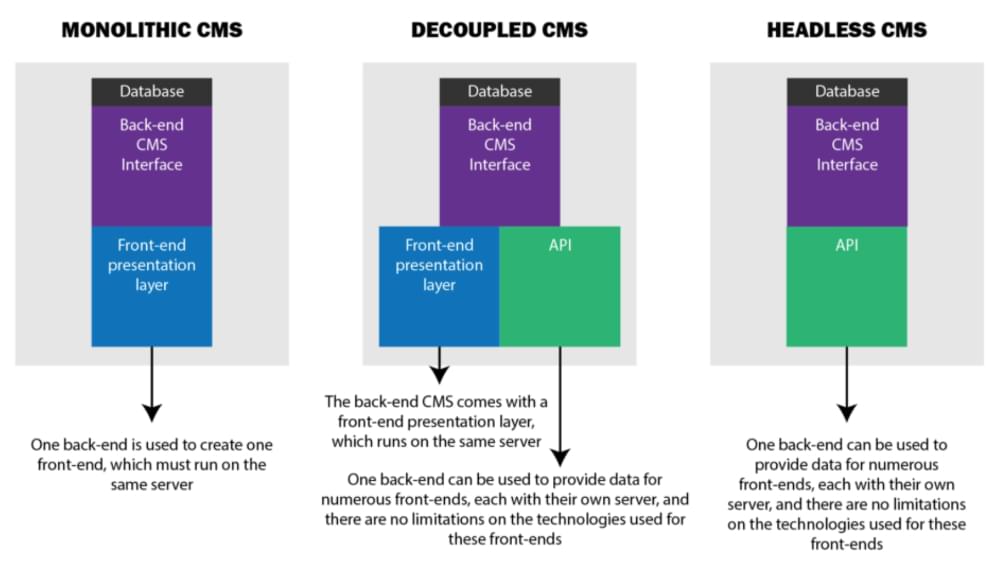
To better understand what a headless CMS is, let’s compare a traditional CMS (or “monolithic”, as developer Bret Cameron likes to call it), a decoupled CMS, and a headless CMS.

Traditional CMS

Traditional CMS platforms like WordPress link the front end of your website, called the head, to the back end of your site, where all your content files and databases are stored. The head of the CMS is strictly responsible for presenting your website to site visitors when they click on your site. The back end, on the other hand, not only stores content, but is where website design and customization applications are stored, where content is created, and where management of site functionality occurs.

Paired together, as they traditionally are, the back-end portion of the website relies on the head of the CMS to display the stored content on devices to users.

Decoupled CMS

With a decoupled CMS architecture, the head portion and the back end of the site are split into two separate systems. One system is responsible for content creation and storage, and the other is responsible for presenting the data to users on an interface, such as a website, mobile app, smartwatch, etc.

When content is created on your website using a headless CMS, a RESTful API helps connect the back end to the head, so that the content can be delivered to users on any device or channel with ease.

A RESTful API is a type of application interface using HTTP requests to GET, POST, PUT, and DELETE data that’s requested by users. It allows for multiple data formats such as JSON, HTML, XML, and plain text. It’s ultimately what links the client and server in a decoupled CMS, allowing your site to infinitely scale and deliver content to anyone on any device.

Headless CMS

A truly headless CMS eliminates the head portion altogether, leaving just the back end. In other words, there’s no dedicated system for front-end presentation. And while you might initially wonder if this type of structure might be to your disadvantage, it’s actually the best way to display content to your site visitors on all devices and interfaces, putting your agency in the best possible position to scale.

Here’s a simple breakdown of how it works:

  • Website owners create content (often in small blocks) in the headless CMS, with no regard for how it will display to users. They also store and manage this content here.
  • An API connects the back end to many different channels and the various engines that power their front ends.
  • The channel or device displays your site’s content.

The way your content will display on the different channels and devices will depend on the frameworks and tools your front-end developers use to act as the “head” portion of your headless CMS.

So it’s more freedom to integrate with more front ends, more scalably and without the risk of breaking anything. How, exactly? Let’s dive a little deeper.

The Advantages of a Headless CMS

APIs work with a headless CMS to do the following:

  • Reduce Strain. Using a headless CMS, which stores content in a cloud repository as opposed to a server, will leverage less bandwidth, save resources, and reduce the strain your clients’ websites experience.

  • Manage and Store Content
.
With a headless CMS, all content, including written text and images, are stored in the back end of the database. With a traditional CMS, not only is content stored and managed here, but so are front-end templates, CSS, and plugins for front-end functionality. Separating the back end from the front end means you can upgrade and customize your website without compromising site speed or performance — since all your client needs to worry about is managing and storing content.
  • Third-party Integrations.

A headless CMS gives you the chance to use third-party systems to trigger, write and read content for you, making development less disruptive. It also gives developers the flexibility to use the front-end framework they prefer to display their site content, focusing more on content creation and less on content management.

Lastly, a headless CMS protects you, your company and your website’s content from future technological advances. After all, platforms and technology are always evolving, making it challenging to keep up.

For example, think about all the problems that those of us who didn’t build responsive websites had when mobile-friendliness became a necessity. People all over, regardless of how well-established and successful they were at the time, had to change everything to ensure a seamless mobile experience.

Alexa

And there’s no end in sight to the trends — from artificial intelligence to augmented reality to voice assistants — that have the power to change the way you build and deliver digital content experiences. Traditional CMS platforms were designed with website publishing in mind. They were not built with social media product listings, smartwatch apps or talking speakers in mind.

So when the build is decoupled from the delivery, you’re in the best possible position to experiment with new channels and formats on an agile basis. And this is a key aspect to any agency’s value proposition.

If you take advantage of the headless CMS approach and use APIs to deliver your content to where it needs to surface, it won’t matter what changes. That’s because as long as an API-fed front end can be built, your client’s content can be configured to render properly.

Headless CMS Limitations

Though it might seem as though a headless CMS is the answer to all your website problems, be aware that there are some downsides preventing traditional CMS users from making the switch:

  • Limited Editing UI.

When compared to traditional CMSs, headless CMSs usually lack the flexibility that content managers generally rely on to optimize the content for specific front end uses. If you need to use your CMS for creating landing pages or even article page layouts, the lack of a “Preview” button might be an issue. There is no WYSIWYG page editor on these platforms, since the whole point of going headless is that it won’t render HTML, which makes designing medium-specific content experiences more difficult.

  • Lack of Built-in Features
.
 Boris Kraft, CTO and co-founder of Magnolia CMS, reminds people that a traditional CMS will generally come with features like “asset management, navigation, security, workflow, access control, caching, categorization and link management.” In fact, he goes on to say that while a headless CMS does provide companies with more flexibility, many often get lost in the hype and forget that “I have to write, debug and maintain everything I need myself” with a headless CMS solution.

While there is no CMS solution that satisfies all needs, it’s worth noting that the headless CMS approach can be beneficial when used in a hybrid situation.

In fact, if you use a solution such as Duda, a leading web design platform for companies providing web design services to others, and take advantage of APIs to deliver content and handle your site’s structure and layouts on multiple channels, you can get the best of both worlds.

The post The Strategic Advantages of Headless Web Design appeared first on SitePoint.


by Gal Shachar via SitePoint

Is Google Developing a Job-Oriented Platform?

Back in November of last year, Google applied for the ‘Clockwork’ word as a trademark in the kingdom of Tonga. If it doesn’t ring any bells, applying for a trademark in Tonga is mostly used by well-established companies to work on projects and safeguard trademarks for them without unveiling their...

[ This is a content summary only. Visit our website https://ift.tt/1b4YgHQ for full links, other content, and more! ]

by Ali Siddiqui via Digital Information World

How to Embed PDF Files on Your WordPress Site With a Free Plugin