Wednesday, September 11, 2019

How to Automatically Optimize Responsive Images in Gatsby

Image optimization — at least in my experience — has always been a major pain when building speedy websites. Balancing image quality and bandwidth efficiency is a tough act without the right tools. Photo editing tools such as Photoshop are great for retouching, cropping and resizing bitmap images. Unfortunately, they are not that good at creating 100% optimized images for the web.

Luckily, we have extension packages for build tools that can optimize images for us quickly:

Unfortunately, image optimization alone is not enough. You need to make sure that the entire website is responsive and looks great at all screen sizes. This can easily be done through CSS, but here lies the problem:

Should you optimize your image for large screens or small screens?

If the majority of your audience is using mobile devices to access your site, then the logical choice is to optimize images for small screens. However, it's likely that a significant source of revenue is coming from visitors with large screens over 17". You definitely wouldn't want to neglect them.

Luckily, we have technology that allows us to deliver optimized responsive images for different screen sizes. This means we need to generate multiple optimized images with different resolutions fit for specific screen sizes or responsive breakpoints.

For WordPress site owners, this kind of image optimization requires the use of a plugin and a third-party service. The creation of these responsive images cannot be done on the hosting server without significantly slowing down the site for users, hence the need for a third-party service.

If you are using Gatsby to run your website, then you are in luck. This feature is built-in and already configured for you to optimize your responsive images. You just need to drop in some images and write a bit of code to link up your responsive images with your web page. When you run the gatsby build command, the images are optimized for you. This saves you from requiring a third-party service to perform the optimization for you. It's simply done on your deployment machine.

In the subsequent sections, we are going to learn:

  • How image optimization works in Gatsby
  • How to optimize images on a web page
  • How to optimize images in a Markdown post

Prerequisites

Before we start, I would like to note that this tutorial is for developers who are just starting with Gatsby and would like to learn specifically about how to handle images. I am going to assume you already have a good foundation in the following topics:

The post How to Automatically Optimize Responsive Images in Gatsby appeared first on SitePoint.


by Michael Wanyoike via SitePoint

Google's latest evolution of rel='nofollow'

#408 — September 11, 2019

Read on the Web

Frontend Focus

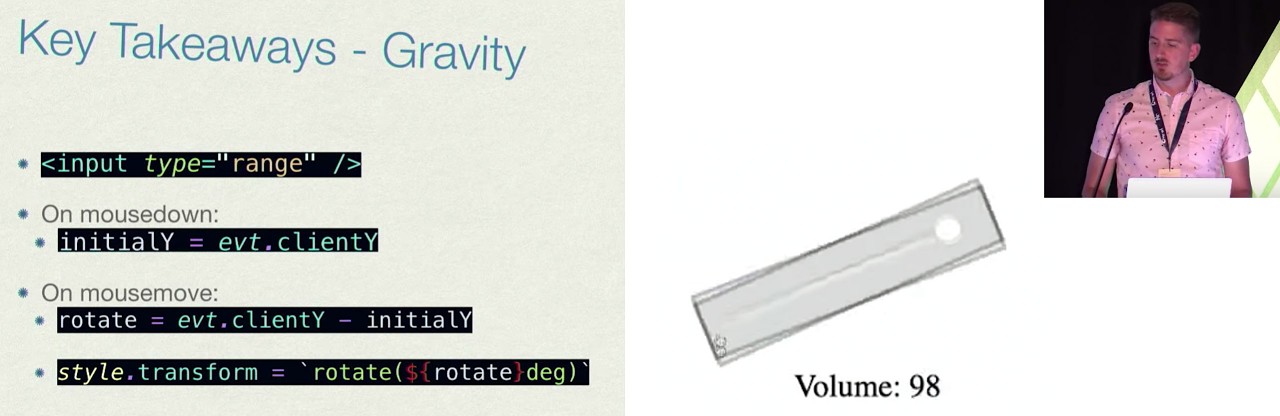
▶  Horrible Web Interfaces and How to Build Them — This entertaining talk from React Rally looks at a variety of ‘horrible’ Web-based interface approaches and the underlying technologies involved. I particularly like the ‘gravity’-based volume control.

Anthony Frehner

Google Is Evolving “nofollow” with New Ways to Identify The Nature of Links — Google introduced rel=’nofollow’ in 2005 as a way for site owners to mark untrusted links that shouldn’t receive any PageRank-related credit in Google’s algorithms. It took off, but now Google is introducing two new rel values for specific types of content.

Google

New Course: ♿️ Accessibility in JavaScript Applications — Make innovative and inclusive JavaScript-powered web apps. You'll learn to remove barriers and allow people with disabilities to use your modern JavaScript web applications in Marcy's new course.

Frontend Masters sponsor

Speeding Up The Web with the Save-Data Header — The Save-Data header field is a request header that indicates a client’s preference for reduced data usage — it’s not particularly new, but this is a good look at what it can achieve.

Matt Hobbs

Caniuse and MDN Compatibility Data Collaboration — MDN’s browser compatibility data is now integrated into the popular caniuse website, with the goal of surfacing even more web compatibility info to web developers.

Florian Scholz & Alexis Deveria (Mozilla Hacks)

What's New In DevTools for Chrome 78 — Including Lighthouse 5.2 in the Audits panel, and Largest Contentful Paint in the Performance panel.

Google Developers

An Animated Chart of Browser Usage Share 1996 - 2019 — One of those popular visuals showing the rise and fall of browsers over the last 20 or so years.

Reddit

💻 Jobs

Mobile App Dev Wanted for High-Growth Fundraising Platform — This company has a big vision, and everyone embraces it, not because it’s a weird cult or something, but only because it’s ethical and cool.

CareersJS

Find a Frontend job through Vettery — Make a free profile, name your salary, and connect with hiring managers from top employers.

Vettery

📙 Articles, Tutorials & Opinion

So You’re Being Sued for Accessibility Non-Compliance? — Compliance with web accessibility requirements is an important legal consideration — here are some tips to get started.

Bekah Rice (Telerik)

Less Data Doesn't Mean a Lesser Experience — Thoughts on how you can provide a good user experience for those looking to save data, without breaking things.

Tim Kadlec

Learn GraphQL in 2 Hours — Open-source tutorials for React, React Native, Vue, Angular, Android, iOS & Flutter developers that'll take you just 2 hours to complete.

Hasura sponsor

The Making of an Animated Favicon — Dynamically changing the pixels in a favicon to display upload progress – A lot of effort here, but it’s a neat little detail.

Preethi Sam

Mastering The HTML <audio> Tag — An in-depth guide covering the HTML <audio> tag and how it can be used.

Jean-Baptiste Jung

Understanding Specificity in CSS — Covers the basics of specificity in CSS and why you should never need !important.

Jess Mitchell

A Beginner's Guide to 'Scrollytelling' — Plenty of examples here on how scrolling can help tell a compelling and dynamic story.

Jeff Cardello

Using rel="preconnect" to Establish Network Connections Early and Increase Performance

Chris Coyier

Why to Stop Infinite Scrolling on Your Website Now — We can’t say we’re fans either.

Monish Reddy

💡 Tip of the Week

supported by

Using :focus-within to highlight a form

If you're working on a form with multiple sections, then the :focus-within property may prove useful.

This CSS pseudo-class can be utilised to highlight an entire form area when the user selects any of a form container's input fields.

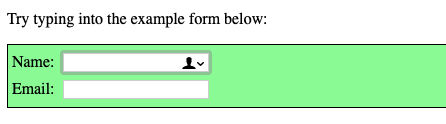
The example image below demonstrates this (you can also see it in action in this little CodePen demo). The user has selected the Name input, and the entire form is highlighted in green:

Using this property is simple enough — just append the :focus-within selector on to the element you wish to highlight. Then, when any of the elements descendants are bought into focused, the desired change will occur.

form:focus-within { background: #98FB98; }

Browser support for this currently sits at around 82% — IE, Edge and Samsung Internet are amonst those yet to implement support.

This Tip of the Week is sponsored Pantheon, the WebOps platform built for agility. Learn what WebOps is and how it can help drive agile transformation and business results.

🔧 Code, Tools & Resources

ruffle: A Flash Player Emulator — An Adobe Flash Player emulator written in the Rust programming language. Ruffle targets both the desktop and the web using WebAssembly. There's a demo here. Related: The once-popular Flash website Newgrounds are planning to make use of this.

Ruffle

Make Your Images & Videos Load Fast & Look Beautiful with Cloudinary

Cloudinary sponsor

A Flexbox Cheatsheet Inside VS Code — This little VS Code extension builds upon the work done by Darek Kay - offering a quick reference guide within VS Code, meaning you can look things up quickly without switching context.

Dzhavat Ushev

   ðŸ—“ Upcoming Events

CSSConf, September 25 — Budapest, Hungary — A community conference dedicated to the designers and developers who love CSS.

Fronteers Conference, October 3-4 — Amsterdam, Netherlands — One of Europe’s premiere conferences on front-end web development.

SmashingConf New York, October 15-16 — New York, USA — The conference is sold out, but some workshop tickets are still available.

Accessibility Scotland, October 25 — Edinburgh, UK — One day of talks. Friendly, open discussion about accessibility.


by via Frontend Focus

Common Gen-Z Mistakes that Should be Avoided at all costs While Creating a Résumé

It can’t be argued that most of us write down things on résumés in a strange way for example missing pronouns, making present participles appear as fragments and making odd word choices to name a few. If that wasn’t concerning enough, a recent The Wall Street Journal report says that Gen-Z...

[ This is a content summary only. Visit our website https://ift.tt/1b4YgHQ for full links, other content, and more! ]

by Ali Siddiqui via Digital Information World

How Brands Can Use Social Media to Influence Consumers

The world of social media has made the landscape that brands operate in very different from what they used to be, so much so that it is quite surprising to see the number of brands that have managed to communicate with users on the basis of their social media accounts. However, more in depth...

[ This is a content summary only. Visit our website https://ift.tt/1b4YgHQ for full links, other content, and more! ]

by Zia Zaidi via Digital Information World

Website Inspiration: Bureau Marnef

Long-scrolling One Page portfolio featuring a big image slider for graphic designer Philip Marnef.

Full Review


by Rob Hope @robhope via One Page Love

In an attempt to avoid technostress we sometimes get addicted to social media without even knowing it

With the upgrading technology, we pretty much rely on smart devices for almost all sorts of tasks. Whether it is a new shopping brand we want to look for or some new holiday destination, smartphone apps have it all covered for us. Sometimes, addiction to social media apps lead us to suffer from...

[ This is a content summary only. Visit our website https://ift.tt/1b4YgHQ for full links, other content, and more! ]

by agha ali via Digital Information World

How to Create a Mailchimp Subscribe Form Widget for WordPress