Wednesday, September 25, 2019

How to Use the Slider Revolution Plugin for WordPress

In this post, we’re going to review the Slider Revolution Responsive WordPress plugin which allows you to create rich and dynamic content on your WordPress websites. nd not just sliders: it allows you to build carousels, content modules and full fledged websites by using the rich built-in editor!

Nowadays, sliders and carousels are important building blocks of any website. Specifically, when it comes to pitching a new idea or a campaign, sliders are one of the best ways to highlight it and attract new visitors. As a WordPress site owner, you would like to have a plugin which allows you to create high quality sliders and carousels without much hassle.

There are thousands of extensions and scripts available for creating sliders and carousels on your WordPress website. And of course, you’ll also find commercial options that provide ready-to-use features and extended support. In the case of commercial options, you should also expect quality code, bug fixes, and new enhancements.

Today, we’re going to discuss the Slider Revolution Responsive WordPress Plugin, available at CodeCanyon for purchase at a very reasonable price—especially considering the number of features it provides. It allows you to create a very high quality web content:  sliders, carousels, hero headers and a lot more. It also comes with a built-in powerful visual editor which allows you to create full fledged websites in no-time. Considering the features it provides, it’s a must-have tool for site builders!

Let’s quickly go through the important features Slider Revolution brings:

  • new visual editor
  • media asset library
  • more than 200+ templates
  • more than of 20+ add-ons
  • sliders, carousals, hero headers and content modules
  • special FX support by add-ons
  • supports customization
  • and many more

The Slider Revolution Responsive WordPress plugin provides a plethora of useful features that allow you to set up modern designs on your WordPress websites quickly and effortlessly. Throughout the course of this tutorial, we’ll explore the different features provided by this tool. We'll also go through the process of creating a new slider from scratch.

To start with, we’ll see how to download and install the Slider Revolution Responsive WordPress plugin from the CodeCanyon marketplace.

Installation and Purchase Code Registration

In this section, we’ll see how to install and configure the Slider Revolution Responsive WordPress plugin once you have purchased and downloaded it from CodeCanyon. For this post, I’ve used WordPress 5.2.3, and the Slider Revolution Responsive WordPress plugin version is 6.1.2. I would recommend that you install it if you want to follow along with this post.

As soon as you purchase this plugin, you’ll be able to download the revslider.zip file. It’s the WordPress plugin file which you could use to install this plugin from the WordPress admin side. So go ahead and follow the standard WordPress plugin installation process and you’re almost done.

Next, we need to register the plugin’s purchase code and that should unlock access to:

  • 200+ premium templates
  • 25+ add-on plugins
  • 2500+ free images, videos and icons
  • 100+ pre-made layers & animations
  • instant plugin updates
  • premium ticket support

Firstly, you need to retrieve your purchase code from the codecanyon.net/downloads section. Click on the Download -> License Certificate link and that should get you a text file which should contain the item purchase code.

Once you get the purchase code, click on the Slider Revolution link in the left sidebar on the admin side of your WordPress site and it should display the plugin dashboard page. On this page, click on the Activation link and enter and register your code. With that, you have unlocked the full power of Slider Revolution.

How Do I Use the Slider Revolution Responsive WordPress Plugin?

In this section, we’ll briefly discuss the possible ways one could use this plugin. The Slider Revolution Responsive WordPress plugin is mainly used to create three types of content on your WordPress site: sliders, scenes and carousels.

Let’s quickly go through each type to understand difference between them.

Slider

Generally, a slider consists of multiple images or slides. Each slide has its own content and user can navigate between different slides by using the navigation elements.

In the context of this plugin, a slide is not just an image, but it could be anything: text, image, video, audio, or something else. In fact, Slider Revolution allows you to create different layers in your slide to add different elements. If you have used Adobe Photoshop or similar software, you know how important and useful this feature is. In fact, when you open the slide editing UI, it’s hard to believe that it’s a web based UI. It feels like creating content in professional image editing software!

Scene

In the terminology of this plugin, a scene is just another type of slider, but with a single slide. Thus, it won’t have navigation elements like in the case of a slider, which allows user to navigate between different slides.

The main purpose of the scene type is to create rich content modules that you could embed at different places on your page. You’ll have the same set of customization options available while editing a scene that you get while creating a slider. Thus, you could set up your scene content with many kinds of media and layers.

Carousel

The carousel type allows you to create content in the same way as that of the slider, but it allows multiple slides to be visible at the same time. This is really useful when you want to combine more than one slide in a single frame.

How to Set Up a Slider

In this section, we’ll build a real-world example to demonstrate how to use the Slider Revolution Responsive WordPress plugin to create sliders on your WordPress site.

Before we proceed, make sure that you have installed this plugin in your WordPress site if you want to follow along.

Go ahead and access the Slider Revolution link in the left sidebar on the back-end. That should present you the different options as shown in the following screenshot.

Slider Revolution dashboard

In the terminology of the Slider Revolution plugin, everything is a module, whether it’s a slider, a carousel or a scene. You could create a new module from scratch, reuse an existing template module, or import one from a file. In our case, we’ll create a new module from scratch, so click on the New Blank Module link.

In the next screen, it should ask you if you want to go through the help guide or straight away start editing. In our case, we want to start editing right away, so click on Quit Guide. That should present you the following UI to create a slider.

Create a New Module

As you can see, it’s a pretty rich interface and provides plenty of customization options—just like professional image editing software!

By default, it already creates the first slide for you. As discussed earlier, you can add any time of content to the slide. In our case, we’ll add image and text to the slide. Go ahead and access the Image > WordPress Library menu and add an image from the WordPress library as shown in the following screenshot.

Insert an Image

Once the image is added, you can use the configuration options in the right sidebar to adjust image related settings. You can add different types of content in the same slide by adding layers to it. So for example, if you want to add text along with the image, you need to add it as shown in the following screenshot.

Insert Text

You can use the drag-and-drop feature to position your layers and adjust it.

Drag and Drop Editor

Once you’re done with the slide configuration, click on the Save button at the bottom right.

To add a new slide, click on the Add Slide(s) > Blank slide as shown in the following screenshot.

Add New Slide

Go ahead and add as many slides as you want to add and configure it. Finally, when you’re done with the slider, you’ll need the embed code to integrate it in one of your pages. On the main plugin page, you can click on the Embed button in your slider to get the embed code as shown in the following screenshot.

Embed Button

And that should present you different options you could choose from to embed the slider:

In my case, the preview looks like this!

So that’s how you can create sliders. The process is pretty much similar even if you creating carousels or scenes. Although, we’ve just discussed sliders, this plugin is capable of doing a lot of amazing things. The more you explore it the more you’ll love it!

The Next Step: A Quick Look at a Couple of Other Slider Scripts

If you're looking for more advanced slider scripts that you could use right away, I recommend that you check out the following post, which summarize some excellent scripts that are available for a reasonable cost.

Conclusion

Today, we reviewed the Slider Revolution Responsive WordPress plugin available at CodeCanyon. It allows you to create dynamic and rich content on-the-fly in your WordPress site. In this post, we’ve barely scratched the surface of features this plugin provides.

I’m sure you’re convinced that the Slider Revolution Responsive WordPress plugin is a powerful plugin to create dynamic and rich content on your website. Although it’s a commercial plugin, I believe it’s fairly reasonably priced considering the plethora of features it provides.

If you have any suggestions or comments, feel free to use the feed below and I’ll be happy to engage in a conversation!


by Sajal Soni via Envato Tuts+ Code

iOS Mobile App Templates for Directories and Classified Apps

What do Yelp, Angie’s List, Craigslist, TripAdvisor, and Amazon have in common apart from being very popular?

They are directory websites and mobile apps where you can buy products and services from the convenience of your mobile devices! 

Directories are among the most popular and most profitable websites. They list thousands of products and services for users to browse. They also deliver information based on location and category. 

Many directories have their own mobile apps and this is why: 

  • 75% of users have mobile devices as their primary way to get online. 
  • 80% of searches conducted on mobile devices result in a sale. 
  • 90% of mobile users spend more time in apps than on the web. 

These are important statistics to keep in mind if you are thinking about starting a directory website and mobile of your own.

However, building a custom directory mobile app can be a massive and expensive undertaking. Here is where mobile directory app templates come in. They are the best and cheapest option for creating a mobile directory map. The template developers have thought of just about anything a directory website will need, so you don't have to code it yourself. 

In this article we’ll focus on mobile directory app templates for iOS, an operating system developed and supported by Apple which only works with Apple devices: iPhones and iPads. 

I’ll show you some premium mobile directory templates for iOS available on CodeCanyon. 

Understanding Directories and Mobile Directory App Templates 

Starting your own online business has never been easier. There are many resources to help you succeed. You have built-in technical and information infrastructure to help your idea off the ground as fast as possible. You also have a built-in audience that is easy to reach. In addition, starting costs are very low. You just need to invest your time. 

If you’re looking to start an online business, directories are popular and profitable. 

What is an Online Directory? 

An online directory lists products and services for users to browse. It is a database that delivers information based on location and category. 

Here are some common characteristics of directories: 

  • Directories contain a large number of listings under different categories. 
  • Directories provide tools like searching, filtering, pictures, location information with maps, product information, contact details, and more.
  • Directories are curated listings. 
  • Directories are community driven. 
  • Directories are built on user-generated content. 
  • Directories generate a lot of traffic! 

Some directories are public: for example to help customers find store or business locations, or to list the names of doctors and their specialties. On the other hand, some directories are private for the internal use of a business or organization. 

Types of Directories

Directories come in all sizes and shapes: complex, simple, local, national, global, or niche. If you want to start a mobile directory app, the best place to begin is identifying a niche in your local area. These examples should give you some ideas:

  • classified ad listings 
  • lists of coupons and deals—e.g. Groupon
  • business listings—e.g. Yellow Pages
  • job listings
  • event listings 
  • real estate listings
  • automotive guide 
  • hotel and restaurant guide
  • city guide or local directory
  • travel websites
  • video directory—e.g. YouTube or Vimeo
  • web link directory

What Do the Above Examples Have in Common? 

You can build a mobile app for any of these directories. Through the mobile app you can also earn money by:

  • displaying advertisements
  • charging listing fees—normal listings and featured listings
  • membership subscriptions 
  • booking and reservation (because users trust directories and prefer to do the booking and reservation through them)

Why Do You Need Mobile Directory iOS App Templates? 

People spend much more time online on mobile apps than on the web. Because of this, most successful directory businesses have taken advantage of apps to reach vast audiences where they are. A mobile directory app template allows you to build your own directory app.

Developing a mobile directory app from scratch is a costly and time-consuming process. Not every business has the deep pockets to foot the bill for such a lengthy and involved process that includes discovery, design, development, testing and deployment, and marketing. 

  • Mobile directory app templates are affordable—much of the code is already written for you.
  • The templates come with all the features you need to create your own mobile app.
  • The heavy lifting has been done so you can focus on creating the app you want by customizing and adding elements that will make your app unique.
  • The templates come with documentation—all you need to do is follow the instructions.

How to Pick a Mobile Directory iOS Templates?

When you're choosing an app template keep the following factors in mind: 

Ease of use: It has to be so simple that someone with no coding expertise can easily learn and use it. The documentation should be clear. 

Design: Since directories are huge databases, simplicity is key. The design of the directory template should be intuitive, uncluttered, and consistent from screen to screen. 

Responsiveness: So your app will work on all mobile devices.

Cost: Compare the prices of other templates and see what fits your budget.

Customization: The template should be easy to customize, so that the finished app can reflect your unique style and branding. Customization should not take a lot of time. 

Social sharability: Make it easy for users to spread the word about your directory app by sharing it with others through social media.

Monetization: Look for the ability to take payments through different payment gateways, ability to earn through regular and featured listings, advertising, subscriptions and so on. 

Back-end tools—for analytics, generating reports, etc.  

Integration with email marketing platforms like MailChimp.

Location-based searches with integrated maps: any directory that deals with physical locations, stores, or services will need location-based search and maps. 

Ratings and reviews: Tools for customers to rate and review businesses. This is user-generated content that makes it easier for people to find your business online, and lets them know they can trust your product or service. 

Downloads: The number of downloads of a particular app template is proof of its popularity among users. It shows they trust the provider. 

Security and frequent updates: Bugs make your app vulnerable to attacks. Regular updates are an indicator of the trustworthiness of the provider. Your choice of an app template should factor this in. 

Support: Once you buy the app template, you may run into some issues. Make sure that the seller offers support. While reading ratings and reviews, be sure to check what other users say about the quality of support from the provider. 

Another very important thing to keep in mind is that directories generate a lot of activity. High activity has the potential to slow down access to your content. This can turn off your visitors. Your hosting provider should have the capacity to handle it.

Best Mobile Directory App Templates for iOS Available on CodeCanyon

There are a wide variety of premium mobile directory iOS templates you can find in the CodeCanyon marketplace. The app templates I've chosen for this list are among the best and will make it easy to create mobile directory apps.

1. AdForest

AdForest

With AdForest, building and managing your classified ad listings directory has never been easier. Once you install the template and customize it your app is ready to use. You can upload it to the iOS App Store with your own business brand name.

Some of the excellent features of this app include: 

  • multi-currency support for ads 
  • social login and register
  • ad status and ad expiry limits
  • Google map integration
  • location or price based search 
  • user can contact seller or buyer with a messaging system
  • Admob and Google Analytics support

Check out the live preview and give it a test drive. 

User by nagdawi says:

Good code with effective support  

2. Classify: iOS Classifieds App Template

Classify iOS Classifieds App Template

Classify is a complete, easy-to-customize app template you can use to offer mobile classifieds services.  

Features include: 

  • users can post and edit ads from their mobile devices 
  • browse all Classify ads as a visitor—no need to log in 
  • home screen with search fields and category buttons
  • ability to set favorite ads, as well as post and edit your own ads
  • ability to contact seller 
  • Admob interstitial ads 

Checkout live preview and see why user arudkosky says: 

The developer has created an amazing product that is easy to customize and has fast and accurate customer support. 

3. Woopy: iOS Universal Listing and Chat App Template

Woopy iOS Universal Listing and Chat Template

The Woopy app template allows developers to create listing apps that make it easy to buy and sell new or used items. 

Woopy has the following great features:

  • users can browse by keyword or category
  • users can also chat with sellers or potential buyers 
  • users can give feedback on each transaction
  • sellers can add a 10-second video to their listings
  • email verification system, email login and Facebook login
  • ability to report or block inappropriate users or ads 

User photikanet says this about Woopy app: 

A really good app and support from the developer is very fast and effective.

4. iOS Recipe App

iOS Recipe App

With the iOS Recipe App template you can build a recipe app that lists recipes according to category—including a favorites category that users will create themselves. 

In addition to push notifications and social sharing, more features of this beautiful app template include: 

  • screen supports multiple images
  • transition between screens 
  • Google AdMob integration
  • a sliding menu on the left side of the app
  • data is stored in XML and can be easily edited or replaced with data loaded from a server. 

User jsbwong says this about iOS Recipe App

Good and nice support, simple and direct, apps run smoothly. Thanks.

5. Events: iOS Universal Events App

Events iOS Universal Events App

Events is an app template that allows you to create your own event directory mobile iOS app. Users can submit new events and you can approve them by changing the status of the submitted event from Pending to Approved

Here are some features of this fantastic app: 

  • ability to automatically add an event on your native iOS Calendar app
  • ability to open its address in Maps (to get directions) 
  • share events on Facebook, Twitter or other apps installed on your device
  • informs users if events are current or they have passed

User  varukeen says:

Good and modern design, like it! Easy to use...

6. Restaurateur iOS 2.0 

Restaurateur iOS 20 app template

Restaurateur iOS 2.0 allows developers to build restaurant listing apps. This app template comes with an extensive back-end management system. 

Users can set up unlimited shops or restaurants searchable by categories, subcategories, or products. 

Have a look at the live preview and see why user by danixcvnyliu says:

Great template, great design, also great support! 

7. List App: Listing Directory Mobile App for iOS

List App Listing Directory Mobile App for iOS

ListApp is a listing directory mobile template that runs as a native app. It allows you to create directory listing apps. It has many elements and features to help you do so. ListApp is built with the very popular React Native mobile app development platform.

Features of this awesome app template include: 

  • a map to help find listing location
  • easy reservation by tapping on the calendar
  • social login supporting Facebook login
  • monetization and advertising: Admob and Facebook ads 

Have a look at the live preview demo and see if it suits your needs. 

User by bobozd says:

Great app, easy to work with, great support.

8. Business Directory Ionic

Business Directory Ionic 3

The Business Directory template allows developers to create store or business listing apps. This template has very clean code and a clean user interface. It also comes with a powerful back-end that can supply data updates. 

Users can browse through businesses and stores by category, name, or distance. Store and business owners can display and promote their products, services, news, contact information and more.

This template was created with the very popular Ionic cross-platform mobile platform.

Conclusion

These iOS directory app templates stood out for me but there are many more templates you will find on CodeCanyon.

If you’ve enjoyed this article, here are more posts to help you find an app template that suits your needs.


by Lorca Lokassa Sa via Envato Tuts+ Code

Search UI – Search Interface That Simply Works by Elastic

Search UI is a react library by Elastic that allows you to quickly implement search experiences without re-inventing the wheel. Use it with Elastic App Search or Elastic Site Search to have a search experience up and running in minutes.

Search UI puts components like Dynamic Filters and Facets, Search Bar, Result Feed Layouts, and Autocomplete at your disposal.


by via jQuery-Plugins.net RSS Feed

Google Maps is rolling out incognito mode for some users

Google announced its under-development feature – the Incognito Mode for Google Maps back at the Google I/O. During the event, Google claimed that the incognito mode feature would allow users to hide their browsing data. It would also restrict the app from storing the logged-in information. The...

[ This is a content summary only. Visit our website https://ift.tt/1b4YgHQ for full links, other content, and more! ]

by Saima Salim via Digital Information World

Real-time Location Tracking with React Native and PubNub

Building a Real-time Location Tracking App with React Native and PubNub

With ever-increasing usage of mobile apps, geolocation and tracking functionality can be found in a majority of apps. Real-time geolocation tracking plays an important role in many on-demand services, such as these:

  • taxi services like Uber, Lyft or Ola
  • food Delivery services like Uber Eats, Foodpanda or Zomato
  • monitoring fleets of drones

In this guide, we’re going use React Native to create a real-time location tracking apps. We’ll build two React Native apps. One will act as a tracking app (called “Tracking app”) and the other will be the one that’s tracked (“Trackee app”).

Here’s what the final output for this tutorial will look like:

[video width="640" height="480" mp4="https://dab1nmslvvntp.cloudfront.net/wp-content/uploads/2019/09/1569381508tracking.mp4"][/video]

Prerequisites

This tutorial requires a basic knowledge of React Native. To set up your development machine, follow the official guide here.

Apart from React Native, we’ll also be using PubNub, a third-party service that provides real-time data transfer and updates. We’ll use this service to update the user coordinates in real time.

Register for a free PubNub account here.

Since we’ll be using Google Maps on Android, we’ll also need a Google Maps API key, which you can obtain on the Google Maps Get API key page.

To make sure we’re on the same page, these are the versions used in this tutorial:

  • Node v10.15.0
  • npm 6.4.1
  • yarn 1.16.0
  • react-native 0.59.9
  • react-native-maps 0.24.2
  • pubnub-react 1.2.0

Getting Started

If you want to have a look at the source code of our Tracker and Trackee apps right away, here are their GitHub links:

Let’s start with the Trackee app first.

Trackee App

To create a new project using react-native-cli, type this in the terminal:

$ react-native init trackeeApp
$ cd trackeeApp

Now let’s get to the fun part — the coding.

Add React Native Maps

Since we’ll be using Maps in our app, we’ll need a library for this. We’ll use react-native-maps.

Install react-native-maps by following the installation instructions here.

Add PubNub

Apart from maps, we’ll also install the PubNub React SDK to transfer our data in real time:

$ yarn add pubnub-react

After that, you can now run the app:

$ react-native run-ios
$ react-native run-android

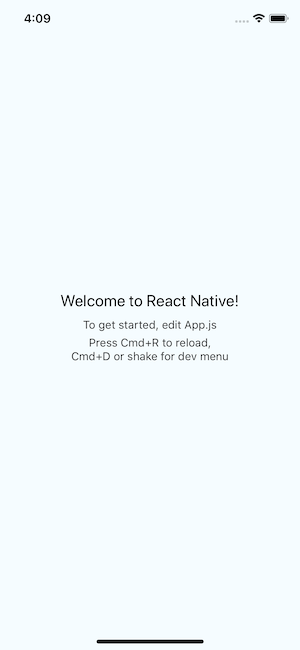
You should see something like this on your simulator/emulator:

Trackee App

The post Real-time Location Tracking with React Native and PubNub appeared first on SitePoint.


by Vikrant Negi via SitePoint

Facebook has Added a New Filter to Help Group Admins in Singling Out People they have Previously Kicked Out!

While it can’t be denied that Facebook Groups make it easier to gather people of the same interests in one place, it has to be pointed out that troublemakers often find their way into a group as well. Troublemakers refuse to comply with the guidelines set by the Group Admin/Moderator and disrupt...

[ This is a content summary only. Visit our website https://ift.tt/1b4YgHQ for full links, other content, and more! ]

by Ali Siddiqui via Digital Information World