Thursday, May 28, 2020

12 Best CRM & Project Management PHP Scripts (+ 3 Free)

Do you want your customers to have confindence in you? Do you want to keep them happy and coming back?

The good news is that with PHP CRM and project management scripts, you can build effortless relationships with your customers. 

A business cannot survive without CRM and project managment software—you need it to manage customer contacts, track leads, and manage your projects and finances. A CRM system can help you streamline your business systems and have all your customer details in one place.

What Are PHP CRM Scripts?

CRM (customer relationship management) software is a tool that helps automate and manage the relationship between your customers and the sales and marketing department. It serves to consolidate every aspect of the relationship with customers, hence improving performance and increasing productivity.

One of the biggest challenges that a business owner faces is managing their multiple projects and tasks. Also, they have to track client and staff activities, plan upcoming events, and a lot more.

Luckily, this doesn't have to be complicated. CodeCanyon offers hundreds of CRM and project management PHP scripts, which can help simplify this process.

Ora School Suite Ultimate School Management System

Best CRM and Project Management PHP Scripts on CodeCanyon in 2020

Here are some of the best-selling PHP CRM scripts and PHP project management scripts on CodeCanyon for 2020.

Best selling PHP scripts

At CodeCanyon, you will find the right CRM software for freelancers, as well as any business that requires this type of software. Some of the features of these CRM and project management software packages include: 

  • proposals and invoices 
  • expense tracking
  • receiving payments with just one click
  • chat systems for communicating with staff and clients 
  • reports
  • payment systems

A good CRM system will allow you to:

  • know every customer's name, contact info, interests, and even address
  • see what products and services a client is interested in based on their inquiries, searches, or purchases
  • prioritize business leads
  • automate repetitive processes
These features will help you build confidence in your customers, keep them happy and coming back. The payoffs are enormous. 

9 Best CRM and Project Management Scripts on CodeCanyon

Let's look at some of the trending CRM and project management scripts available at CodeCanyon.

Best Selling: Perfex: Powerful Open Source CRM

Perfex Powerful Open Source CRM

Perfex is the perfect solution to organize tasks and send out invoices, all from one place. One of the outstanding features of this CRM is that you can set up an auto backup of your database each X days to prevent data loss, and you also get encryption for your data.

Some of the best features of Perfex include:

  • built-in calendar where you can view tasks, contracts, and invoices in one place
  • full-featured customer area
  • project proposal creation tool 
  • goal tracking and reporting all in one place
  • lead management tool
  • reporting, invoicing system, and electronic signatures
  • ticketing system
  • payment systems such as Paypal, Stripe, Mollie, Authorize.net, 2Checkout, PayU Money, Braintree, etc.

Let's take a look at some of the screens from the dashboard. On this screen from the reports panel of the dashboard, you can see a detailed lead report that shows weekly conversion, sources where the leads came from. 

Perfex Powerful Open Source CRM

And here is a look at the projects dashboard, which shows what projects are open, in progress, on hold,  or finished. 

Perfex Powerful Open Source CRM

Try the live demo of this best selling powerful CRM software.  

Freelance Cockpit 3: Project Management and CRM

Freelance Cockpit3 Project Management and CRM

Freelance Cockpit 3 is a simple CRM that allows you to stay organized so that you have the time to focus on getting work done. Freelance Cockpit provides a lot of features such as:

  • messaging platform
  • invoicing
  • supports ticketing for clients
  • Gantt charts for every project
  • dedicated client portal where clients can view the status of their projects and invoices
  • calendar that supports Google integration
  • email notifications
  • payment methods such as PayPal and Stripe
  • ability to assign different states for projects (On Hold, Not Started, Started, or Ended)

Ekushey Project Manager CRM

Ekushey Project Manager CRM

Ekushey is an advanced and powerful CRM which allows you to manage projects, team tasks, and client communication in a single place, in a convenient way. 

  • clients can view the status of their projects, make payments, and get developer support
  • staff will manage assigned projects 
  • perform assigned tasks and provide client support

Some of the notable features of this tool include:

  • informative dashboard which shows your business summary, including an event calendar, as well as financial analysis 
  • utility sidebar where you can note down and manage emergency to-dos
  • client and staff manager
  • project progress system and project discussion wall
  • internal messaging and private notes 
  • per-project payment reports

RISE: Ultimate Project Manager

Rise Ultimate Project Manager

Rise is a multipurpose software package which can cater to all types of organizations. You can use it to manage projects, tasks, clients, invoices, teams, support tickets, or estimates. If you are looking to stay organized at the same time manage your business, this is the right tool for you. It includes all the essential tools to manage your business and stay organized.

Features include:

  • online payment where you can send invoices and get payments
  • project activity logs allow you to check the activities of your team, clients, and members
  • track expenses, and view graphical reports
  • ability to enable or disable modules to fit your business
  • chat feature where you can chat with your clients and team members
  • multiple languages support

Ora School Suite: Ultimate School Management System

Ora School Suite Ultimate School Management System

Managing a school is a Herculean project, with many staff and continuously changing students. Luckily, there is the Ora School Suite. Ora is school management at your fingertips, 24/7 on the web and mobile devices. Everything to do with managing a school is included.

From the dashboard, you can manage:

  • employees, teachers, and students 
  • schedules, including calendars of events and vacations 
  • chat with students, parents, or potential customers
  • sending SMS notifications
  • invoices and payments 

Just take a look at some of the screens from the dashboard. On this screen, you can see the invoice panel of the dashboard, with other panels showing news and messages to be answered

Ora School Suite Invoice panel

And here is a look at the inquiries dashboard, which lets you manage and respond to any incoming leads or questions.

Ora School Suite Inquiries dashboard

Give it a try for yourself in the live demo!

Ultimate Project Manager CRM Pro

Ultimate Project Manager CRM Pro

If you need a comprehensive, all-in-one solution that brings together CRM, human resources management, and project management, Ultimate Project Manager CRM Pro is the best choice. 

Project components include:

  • proposals
  • estimates
  • expenses
  • time tracking
  • invoicing
  • project reporting 

Human resources management components include:

  • recruitment
  • payroll
  • salary template
  • leave management

All this comes with a complete client management package!

Other great features include a powerful file manager and a knowledge base section where you can curate articles that are useful to your clients. 

It also supports eight different payment gateways, including PayPal, Stripe, Authorize, Mollie, Braintree, CCAvenue, and more.

WORKSUITE Project Management System
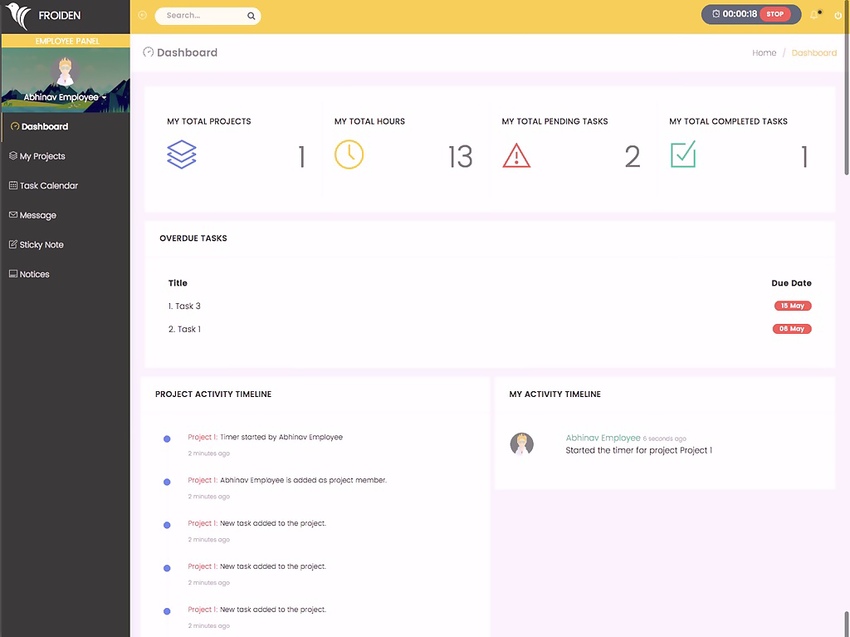
WORKSUITE Project Management System

WORKSUITE can be accessed on a laptop, mobile, or tablet. Its responsive design ensures clear data visibility on all types of devices.

Some features of this system include:

  • teams and departments can share knowledge and keep organized
  • real-time messaging helps team members to communicate
  • reports to analyze what's working and what's not
  • integrated with Slack, Google Drive, Dropbox, AWS, and PayPal 
  • can be accessed on laptop, mobile, or tablet

TITAN Project Management System

TITAN Project Management System

TITAN has many powerful features designed to allow you to manage unlimited projects, teams of users, essential tasks, and so much more.

Some features include:

  • live chat with your team
  • assign tasks for individual team members and receive alerts when tasks are complete
  • plan the progression of your project 
  • use templates to set up recurring invoices and invoices for one-off payments  
  • ticket system where clients can request customer support 

Converting leads to clients has never been easier since Titan lets you build custom forms to send to clients and receive valuable feedback. Their responses are then stored in the Titan Project Management System

Ciuis CRM

Ciuis CRM

Ciuis CRM is a simple CRM tool that allows you to create projects as well as proposals. When it comes to invoicing, Ciuis CRM will enable you to invoice your projects by working hours. It also allows you to track your payments and it features a simple design that makes it super easy to use.

Other features include:

  • reports to keep track of your financial situation
  • voice notification
  • fully responsive design and mobile-friendly interface
  • ability to create and track expenses
  • reports for invoices, customers, support and sales
  • create and share invoices by email

Free CRM & Project Management WordPress Plugins

Premium CRM and project management PHP scripts are more advanced in terms of features and performance. However, I have put together a collection of free WordPress plugins that can be of help if you are not yet sure or are on a budget.

WP-CRM Customer Relations Management for WordPress

WP-CRM allows you to organize and manage your users using custom attributes and filters, as well as keeping track of correspondence. This CRM can effectively manage all parties in your business.

Features include:

  • ability to export users via CSV
  • excellent user organization
  • invoice integration
  • multiple add-ons to enhance functionality
  • dynamic charts 

Zero BS WordPress CRM

Zero BS Wordpress CRM is a simple CRM perfect for ecommerce sites, agencies, freelancers, and small businesses. In addition, Zero BS is adaptable and extendible to other kinds of groups.

WP ERP

WP ERP is the first full-fledged Enterprise Resource Planning (ERP) system through which you can manage your WordPress site and business from a single platform. It provides three core modules: HR, CRM, and Accounting.

Features of the CRM module include:

  • contacts with life stages and contact groups
  • filter contacts
  • schedule calls meetings and directly
  • make notes for each customer
  • activity logs
  • CRM activity reports such as customers and business growth

The Best PHP Scripts on CodeCanyon

Explore thousands of the best and most useful PHP scripts ever created on CodeCanyon. With a low-cost one-time payment, you can purchase one of these high-quality WordPress themes and improve your website experience for you and your visitors.

If you want to learn more about the best-selling and up-and-coming PHP scripts available on CodeCanyon for 2020 check out the following articles: 


by Franc Lucas via Envato Tuts+ Code

10 Best WordPress Facebook Widgets (and 5 Free Plugins)

In order to run a successful business, you need to promote and advertise your company wherever your audience's attention is. Adding premium WordPress Facebook widgets to your website will help you connect with your customers. 

Facebook Chat
One of the many premium WordPress Facebook widgets available on CodeCanyon

Facebook allows you to promote your business through text, images, and videos all of which are necessary to promote your business successfully. At CodeCanyon, you will be able to choose from all the premium Facebook widgets available and they will allow you to display all of these elements on your website.  

Don't miss out on this opportunity to improve your business through premium Facebook widgets for WordPress!

The Best WordPress Facebook Widgets on CodeCanyon

Discover CodeCanyon's extensive library of the best WordPress widgets and plugins ever created. With a cheap one-time payment, you can purchase these high-quality plugins and widgets and grow your business through Facebook. 

Here are a few of the best Facebook WordPress widget plugins available on CodeCanyon for 2020.

These feature-rich WordPress widgets for Facebook will assist you in connecting with your target audiences in one of the most popular social media platforms on the planet. With the premium widgets offered on CodeCanyon, you will be able to:

  • display your Facebook pages feed 
  • customize the feed to fit with your website's theme
  • add Facebook chat widgets
  • grow your Facebook following through customizable Like buttons

Add a high-quality WordPress Facebook widget to your website today!

Top 10 WordPress Facebook Widgets (From CodeCanyon for 2020)

1. Facebook Feed

The Facebook Feed WordPress widget is essentially four Facebook plugins in one.

With it, you can display your Facebook Posts Feed, Image Gallery, Video Gallery, and Events Calendar.

Facebook Feed

Features include:

  • fully responsive and ready for any screen size
  • includes Like and Share actions
  • supports WPBakery (Visual Composer)
  • and more

Facebook Feed is a great way to get your Facebook content on your website.

2. Top Social Stories

You can add more than just your Facebook feed with Top Social Stories: it lets you easily track daily interactions on Facebook, Twitter, and more.

Top Social Stories

Features include:

  • display top stories based on most shares
  • export data to custom fields
  • works for custom post types
  • fully customizable
  • and more

Whether you need it solely for Facebook or you want to add other social media feeds into the mix, Top Social Stories is a great way to display social media posts.

3. Facebook Likebox Slider for WordPress

Facebook Likebox Slider for WordPress

With Facebook Likebox Slider you can easily get more shares, traffic, and fans. With this widgets 3-click configuration, you can easily get up and running in no time. Not only can this widget be used for Facebook, but it supports all other popular social media platforms as well! Here are a few notable features of this widget. 

  • iPad, iPhone, other mobile devices support
  • very fast loading
  • language selection
  • live preview

4. Facebook Reviews Pro

Facebook Reviews Pro

Displaying reviews to your website visitors will help build trust. This trust is essential for making converting visitors into customers. Facebook reviews pro allows you to display your Facebook page's reviews and trust badges on your website, so this trust can be built. Here are a few notable functions of this widget.

  • filter reviews display
  • pagination
  • integrates with WPBakery
  • 24/7 premium support
  • no coding required

5. Facebook Recent Comments Widget

The Facebook Recent Comments Widget for WordPress brings the comment activity from your Facebook page and brings it to your WordPress widget area.

It's SEO friendly and super easy to use!

Facebook Recent Comments Widget for WordPress

You can:

  • receive email notifications for Facebook comment box comments
  • manually or automatically approve comments to display
  • and customize the widget

Facebook Recent Comments Widget for WordPress is an easy way to display the latest Facebook comments on your WordPress-powered website.

6. Facebook Traffic Pop for WordPress

Facebook Traffic Pop for WordPress

The Facebook Traffic Pop plugin for WordPress will allow you to have your users like your pages through a visually appealing popup. This highly customizable popup can fit right into the theme of your website and is guaranteed to boost your Facebook page's presence and popularity. Here are a few features that this plugin includes:

  • multi-theme support
  • mobile responsive
  • locks page functionality
  • quick and easy configuration

7. Social Stream for WordPress with Carousel

Social Stream for WordPress with Carousel is a viable option whether you're interested in only displaying Facebook content or content from multiple social media networks at one time.

With Social Stream, you can funnel all your social media streams to your WordPress-powered website in style.

Social Stream for WordPress with Carousel

There are several display options included with this social media carousel:

  • combine multiple social media feeds into one
  • 3 different styles and customizable colors
  • over 60 animation effects
  • responsive feed layout
  • and more

If you're interested in mixing in other social media streams along with your Facebook feed, Social Stream for WordPress with Carousel may be exactly what you're looking for.

8. Facebook Events Calendar

Display your Facebook events using a widget or shortcode with the Facebook Events Calendar.

This full-featured solution not only looks great, but has some great features as well.

Facebook Events Calendar

Features include:

  • full and compact layouts
  • quick-view popups for each day
  • calendar and list views
  • and more

The Facebook Events Calendar is easy to use and one of the best ways to display your Facebook Page public events on your website. No need to maintain two calendars any more!

9. Facebook Chat

Facebook Chat

Facebook Chat  is the fastest way for your clients to reach you and get their questions answered. This chat widget gives you a direct line of communication to your customers and potential customers 24/7. 

The chat can be customized to be shown on specific pages or to specific users. Keep a line of communication open with your website visitors with this powerful chat widget. 

10. Facebook Messenger Bulksender

Facebook Messenger Bulksender

The Messenger Bulksender not only allows you to send bulk messages to your customer base, but it allows you to use auto-reply to trigger the user's comments on your Facebook page posts. Here are a few notable features of this messenger widget:

  • unlimited ad creation
  • send messages to customers inboxes
  • shortcut for bulk message sending
  • customizable audience segmentation

Now that we have gone over some of the best premium Facebook widgets available, let's go over a few free options. 

5 Free Facebook Widgets and Plugins for Download in 2020

By purchasing a premium Facebook WordPress widget, you will receive the most advanced set of features and functionality. The number of features that these widgets will have and the overall user experience will be much higher with a premium widget. 

If your budget does not allow you to afford these premium Facebook widgets, there are plenty of free alternatives for you to check out.

Here is a list of five of the best free WordPress Facebook widgets and plugins available.

1. Simple Like Page

Simple Like Page is just that, simple. Give your website visitors a chance to connect with your Facebook page by offering a like button on your website. This simple plugin is sure to be help boost your Facebook audience.

2. FB Page Promoter Lightbox

FB Page Promoter Lightbox allows you to display a highly-configurable modal to convert your website traffic into fans. With this plugin, you can display the Facebook lightbox to your visitors on a schedule. 

3. Easy Social Post Feed

Easy Social Post Feed

This beginner-friendly plugin will allow you to not only display a custom Facebook feed, but also a custom Instagram feed. With the custom Facebook feed, you can add posts, links, photos, videos, and events. This plugin is an all in one solution for your Facebook needs!

4. Smash Balloon Social Post Feed

Display completely customizable, responsive, and search engine friendly Facebook feeds on your website with this plugin. You can include multiple Facebook feeds from any public Facebook page and customize their appearance to fit the theme of your website. 

5. WP2Social Auto Publish

WP2Social Auto Publish

WP2Social Auto Publish is one handy plugin. You can publish posts automatically from your blog to Facebook. The plugin supports filtering posts based on custom post-types as well as categories.

How to Add a Facebook Chat to Your Website Using WordPress Facebook Chat Widget

Now that we have gone over the best premium and free WordPress Facebook widget plugins available I am going to show you just how easy it is to implement them into your website. 

The Facebook Chat widget is an incredibly powerful tool that can be used to keep in contact with your website audience around the clock. In this short tutorial, I going to show you how you can connect your business's Facebook page to the chat widget and display the chat in the bottom right-hand corner of your website. 

Once you have installed the Facebook Chat widget, head on over to WP Dashboard > Facebook Chat. This will open up the chat widget creator. Click the Create Widget button and type in "Facebook Chat" in the text field for the name of the widget. 

Next, we will connect our Facebook page to the chat so we can receive messages from the chat. Click on the Connect to Facebook button and you will be asked to log in to your Facebook account. From there, you can select the page that you want to be linked with the chat widget. Click the Connect button and your page will now be connected to the chat. 

Connect To Facebook and styling of Facebook Chat Widget

Finally, we would like to make a few changes to the text and styling of the chat widget that is on the website. We will choose the Chat Bubble menu item and choose the mail icon. Next, we will select the Welcome Message menu item and change the text to say, "Thanks for stopping on by! Feel free to send me a message!"

Now that we have connected our Facebook page and edited the styling and text of the chat, it is time to add it to our website. Click the Save and Exit button at the bottom of the chat editor. This will take you to an overview of all of your chat widgets and display the shortcodes for each widget. Copy the shortcode of the Facebook Chat widget and paste it to the visual editor of the post or page that you would the chat to be displayed on. That is it! You have now successfully added a Facebook chat to your WordPress website. 

Facebook Chat

Install a WordPress Facebook Widget Now! 

It's just a matter of comparing prices, options, and reading a few user reviews before finding the right Facebook widget. Facebook is a powerful social media platform that should not be overlooked. Integrating it into your website can make a big difference.

If you are looking to gain more exposure for your business, then add a premium Facebook widget from CodeCanyon to your WordPress website.

The plugins available will allow you to add Facebook messengers, feeds, images, videos, and like buttons to your website and customize them to fit the theme of your website. 

If the plugins listed in this article did not seem to suit your needs, you can always browse CodeCanyon for more high-quality Facebook widgets and plugins. 

Also, don't miss out on the thousands of other high-quality WordPress plugins on CodeCanyon that can help you grow your business. Have a look through this massive collection of plugins, and you'll find helpful plugins in all different types of categories from marketing to eCommerce to social media.

CodeCanyon has the tools necessary to help your business succeed so act now!

Other Ways to Connect WordPress and Facebook

If you want to learn more about connecting WordPress and Facebook, or want to discover more Facebook plugins for WordPress, check out our other posts here on Envato Tuts+.


by Daniel Strongin via Envato Tuts+ Code

These Changes Coming to YouTube Will Impact Creators

YouTube changes things up quite frequently and a big part of the reason why that is the case has to do with the fact that the needs of its users tend to change as well and there is also the fact that YouTube is part of the larger Google machine that is attempting to compete with various other tech...

[ This is a content summary only. Visit our website https://ift.tt/1b4YgHQ for full links, other content, and more! ]

by Zia Muhammad via Digital Information World

Twitter is rolling out its new docked DM chat window for more web users

Recently, social media apps reverse engineer Jane Manchun Wong reported that Twitter is testing a new DM chat window, much like the Facebook Messenger, with picture-in-picture display for personal and direct messages for its platform on the web application. These messages will be shown in a small...

[ This is a content summary only. Visit our website https://ift.tt/1b4YgHQ for full links, other content, and more! ]

by Arooj Ahmed via Digital Information World