Thursday, October 29, 2020

15 Best eCommerce Android App Templates

Do you need to create an Android app for your online store quickly and easily? Did you know that 90% of mobile users spend most of their time online in apps?

By purchasing an eCommerce Android app template on CodeCanyon, you will be able to create a mobile app for your online store without having to hire an app developer.
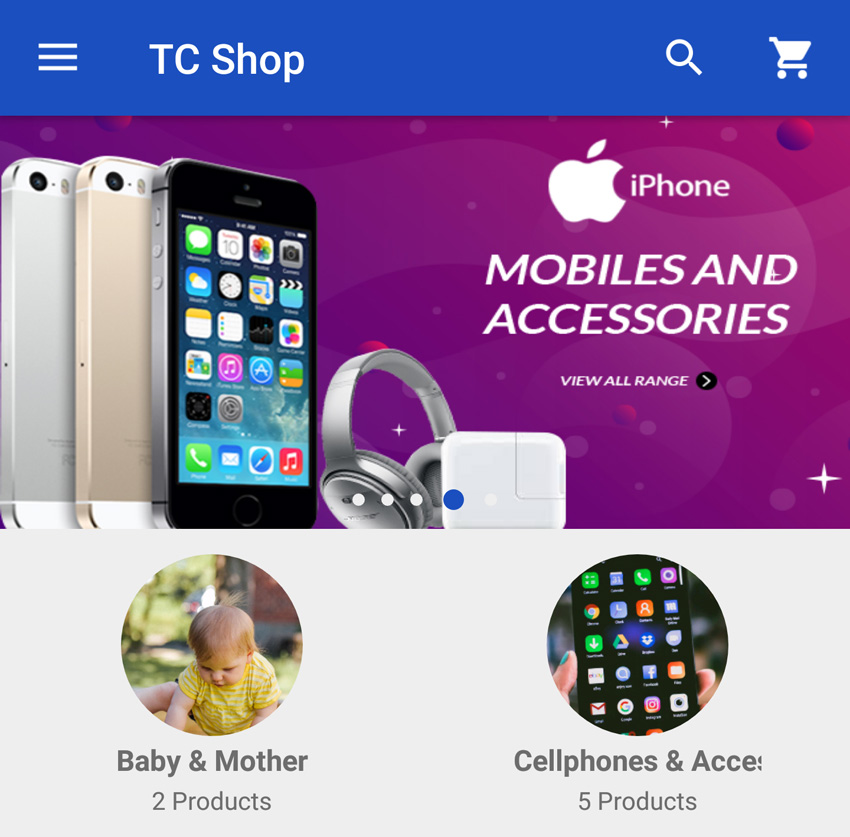
Android Woocommerce
Android WooCommerce is one of the many high-quality eCommerce Android app templates available on CodeCanyon.

Developing apps is a lengthy and complex process that includes finding the right developer and then designing, developing, and testing the app. Most businesses are not going to have the time or money to get an app developed for their eCommerce store from scratch. 

At CodeCanyon, you will be able to choose from all the premium eCommerce Android app templates available and find the perfect template that will help turn your online store into an app.

What Is an App Template?

An app template is a pre-built application with a lot of the core functionality already implemented for you. It allows you to easily customize and add to the template's code to create the kind of app you want. 

Why Do You Need an eCommerce App Template? 

Developing an app is a costly and time-consuming process. An eCommerce app template is the best way to build your mobile app without breaking your budget. Besides, it comes with all the functional features you need. You just need to customize it to reflect your vision. App templates also come with documentation—all you need to do is follow the instructions.

The Best eCommerce Android App Templates on CodeCanyon

Discover over 4,000 of the best Android app templates ever created on Envato Market's CodeCanyon. For a low-cost, one-time payment, you can purchase one of these quality eCommerce Android app templates. 

Here are a few of the best eCommerce Android app templates available on CodeCanyon for 2020.

Best-Selling eCommerce Android App Templates

These fully functional and feature-rich eCommerce Android app templates help you get your online store into an Android app as quickly as possible. With the premium templates offered on CodeCanyon, you will have access to these features and many more:

  • in-app coupons
  • package tracking
  • dynamic layouts
  • product reviews
  • full customizable designs

The templates available on CodeCanyon fit a wide range of eCommerce stores, so you can edit the templates accordingly. 

Let's now have a look and a hand collection of high-quality Android app templates that you can download and use right now!

Top 15 eCommerce Android App Templates  (From CodeCanyon for 2020)

Here are 15 of the best-selling eCommerce Android App templates that are available for you to download on CodeCanyon:

1. MStore Pro

MStore Pro

The MStore Pro eCommerce app template for Android is an easy favorite among developers. For those with an existing online shop, it enables easy conversion to a mobile store app, and for those who own a physical shop but don’t yet have an online store, MStore provides a variety of ready-to-use ecommerce mobile app templates to create a mobile store app from scratch.      

The template requires no coding skills and is very easy to customize.

2. CiyaShop

CiyaShop

The CiyaShop native Android app template allows you to create an eCommerce app without coding. One of the best-rated eCommerce apps for android at CodeCanyon, CiyaShop is perfect for a wide variety of retail stores. There are over 30 demo templates that will give you ideas on how to use the template to suit your specific needs. The app synchronises easily with your WooCommerce site. 

Some other great features are:

  • in-app coupons
  • delivery tracking
  • reward points
  • multi-currency conversions

3. Ionic 3 App for WooCommerce

Ionic 3 App for WooCommerce

The Ionic 3 App for WooCommerce android shopping application template for Android allows you to build an app that will connect to your WooCommerce store and sync categories and products in real time. It supports almost all payment methods, allows customers to search products globally on the home page and filter products within categories, allows customers to review items, leave feedback and read the reviews posted by others, supports automatic login, and much more.

4. Electromerce—Flutter based eCommerce UI

Electromerce - Flutter Based eCommerce UI

This high-quality eCommerce app UI template uses Flutter technology and is compatible with not only Android but also iOS. The template features a social login, detailed product descriptions, and a quick and easy way to check out on the store. The spacious and modern design gives you a starting point to create a professional eCommerce Androp app. You can view a live preview of the app template to see if it's right for you!

5. Markeet

Markeet

Markeet is an eCommerce app template developed using native languages which ensures that your apps will run smoothly and quickly. It also uses Google Material Design for a great UI experience. Some of its best features are its simple drawer menu, list category view, product and category details view, and slider feature.

6. Android eCommerce

Android E-Commerce

Android eCommerce is a great app template for store owners and developers alike. It provides a variety of ready-made eCommerce pages to help you create your own personalised Android shopping app quickly and easily. 

It includes a number of useful features like coupon support, social share, wish lists, product filters, product sorting, ability to manage and track orders, and more. Apart from the usual support, the developer provides customisation and installation services at a reasonable price.

7. WooCommerce Mobile App
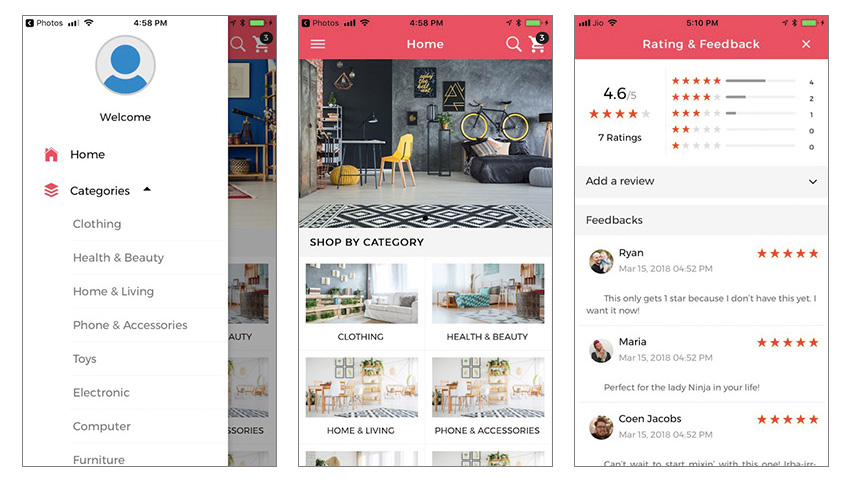
WooCommerce Mobile App

WooCommerce Mobile App allows clients to connect to their WooCommerce store and sync categories and products in real time. 

Once customers register and log in, they can shop, pay for items, view order status and order history, and manage their account. Useful features include a featured products page, categories, a powerful search and filter, list and grid views, ratings, and reviews. 

8. Ecommerce Online Shop App

Ecommerce Online Shop App

Ecommerce Online Shop App is an Android app that follows the Material Design guidelines to ensure a great UI experience. It comes with a powerful admin panel to manage every aspect of your store’s setup and operation. You can create, update, or change product menus and categories. You can configure tax rates and currencies. Additional features of this template include a bottom navigation menu, cart and checkout menu, and the ability for buyers to build profiles and see their purchase histories. 

9. Ionic 5 App for WooCommerce 

Ionic4 App for WooCommerce

Ionic 5 App for WooCommerce is an app template that can be used to build hybrid apps that function on multiple platforms. It is easy to use, with no coding skills required. It comes with highly customizable account layouts, login layouts, category layouts, product layouts, 150 prebuilt colors, and more. It supports WooCommerce reward points and rewards. Customers can view their reward points balance and redeem them for a discount at checkout. It also comes with a robust push notification system for both the customer and seller. 

New eCommerce Android App Templates on CodeCanyon

The following newest additions to the Android eCommerce app templates category on CodeCanyon are already making waves, and they promise to be popular templates for developing Android apps for your online stores.  

Some are based on the Flutter framework developed by Google. Flutter makes it easy to develop applications for Android and iOS. Development in Flutter is faster than native, and the performance of apps is as good as that of those developed natively.

10. E-Commerce Flutter App UI Kit   

E-Commerce Flutter App UI Kit
This eCommerce UI kit saves you time when it comes to coding your front-end layouts for Android and iOS. The layouts in this UI kit have clean code, are easy to customize, and are easy to connect with your back-end. They are also fully responsive and support multiple languages, and you can use the animation controller to animate images and so on. 

11. Fluxstore Pro—Flutter Ecommerce Full App

Fluxstore Pro - Flutter Ecommerce Full App

Fluxstore Pro will save you thousands of hours of designing, developing and testing a mobile app. It is made using the Flutter framework from Google. It comes with impressive UX designs and all the basic eCommerce functionalities needed for your app to function smoothly. Other impressive features include Google Analytics, easy customization, white-labeling, deep linking, and offline image caching to speed up the loading performance. 

And if your business already has a website built on WooCommerce, Magento, or OpenCart, you can integrate with FluxStore Pro in just a few steps and quickly release the final app to both the App Store and Google Play. 

The download package comes with full documentation that includes the full source code, designs, documents, and videos that help you install in the smoothest way.

12. Fluxstore WooCommerce—Flutter Ecommerce App

FluxStore WooCommerceFlutter Ecommerce App

Fluxstore WooCommerce has the same features as Fluxstore Pro but is built specifically for the WooCommerce platform. So if you have a store built on WooCommerce, you can transform it into an Android or iOS app in just a few steps. 

Fluxstore WooCommerce also has a dynamic blog with a robust set of built-in components that allow users to engage with your content and products. Components include a banner slider, banner grouping, multi-column product view, tinder animate layout, and a stack animate layout.

In addition, you can do deep linking, enable sell affiliate products, and more.

13. PS Store

PS Store

Store owners can now build an app for their store using the PS Store template. The front-end comes with features like user registration, user login, and user logout. Users can also log in using their Facebook accounts. They can leave comments or rate and review the store. The back-end comes with features like most popular product, most purchased categories, coupon discounts, and push notifications. 

14. Multi-Store

Multi-Store

If you want to create multiple stores for the same business that use different payment gateways, then the Multi-Store Android app template is perfect for you! It will save you over a thousand hours of app and back-end development time. You can create unlimited shops, unlimited products, unlimited categories, and unlimited subcategories. It also comes with all the necessary features: shopping cart and basket, checkout options, multiple shipping methods, payment by PayPal and Stripe, support for multiple languages, and RTL layouts. 

15. ESHOP Native Android eCommerce App

EShop Native Android eCommerce App

The ESHOP Native Android eCommerce App has already received high ratings by users on CodeCanyon. You don't require coding skills to customize and configure this easy-to-use app. You can easily set up your eCommerce store by following the instructions provided in the clear documentation. The app uses WooCommerce as the back-end, and it comes integrated with PayPal. The admin also can push simple messages and product and website promo images using the Firebase push notification console. 


Now that we have gone over the best premium templates available, let's take a look at five of the best free eCommerce Android apps. 

5 Free eCommerce Android App Templates for Download in 2020

The premium Android app templates available on CodeCanyon will undoubtedly give you the most advanced features for your eCommerce app. But if you're on a tight budget, you might not be able to afford to purchase these premium app templates. Don't worry—you can still create an eCommerce app for your business.

To help you with the creation of your app if you are on a strict budget, I have collected five of the best free eCommerce Android app design kits for you to download below. These aren't complete working apps like the ones you can find on CodeCanyon, but they have all the graphic design and assets that you need to create a great-looking app.

1. Fashion E-Commerce Mobile App

Fashion E-Commerce Mobile App Sketch Resource

This free Android app design is ideal for eCommerce stores that sell clothes. The layout and design are modern and spacious and give your users a quality app experience. All the standard features of an online store are in this template.

2. Shopper UI Kit Sketch Resource

Shopper UI Kit is a complete web e-commerce resource. It contains everything you need for your next e-commerce website, and it features a clean and effective UI kit. The flexible UI allows you to put up any type of product you are selling in a visually appealing way.

3. DeWalt Concept Ecommerce Website Sketch Resource

DeWalt Concept Ecommerce Website Sketch Resource

With this diverse template, you can choose your fonts, colors, and the spacing of elements. The template allows you to display your products in a standard product viewing design for mobile devices. Download this app design now!

4. eCommerce App Template

No matter the type of eCommerce business you are running, this free template will help kick-start your app development. The template has a visually appealing design that will stand up to other 2020 app designs. 

5. E-Commerce UI Kit Sketch Resource

E-Commerce UI Kit Sketch Resource

This UI kit makes it easy to customize the views by updating symbols and text styles. In this UI kit, you will have the following features: product search, product details, shopping cart, checkout, shipping details, and much more.

Discover More Great eCommerce Android App Templates for 2020

While the eCommerce Android app templates detailed above are some of the best available for 2020, they may not be the best fit for your online store. If none of the designs mentioned work for your current business or you need even more templates with different designs and functionality, then check out our other articles that contain plenty more high-quality Android app templates:


Best Practices for Building Your eCommerce App

The best practice is to analyze the needs of customers in order to anticipate common customer issues. This means you should put yourself in the place of your customers. 

When you take the position of the customer and test the experience of using your own eCommerce website and app, you will see what works for the customer and what doesn't. This will help you come up with user-centered solutions that will in turn guarantee a smooth shopping experience, high conversions, and high customer retention. 

So when building your eCommerce web store and eCommerce app, these best practices should be your guiding points:

  • Understand the end user.
  • The store design should be beautiful.
  • Products should be displayed in a clean and uncluttered manner.
  • Clear and straightforward menus make for painless navigation.
  • Use call to action (CTA) buttons like Buy Now.
  • Provide convenient payment and shipment methods.
  • Use clear but creative descriptions of products.
  • Use clear language with regards to the shipping, returns, and refund policy.
  • Make it easy for users to reach you with any questions and concerns.
  • Have a Frequently Asked Questions section.

Clear Communication All the Way

A great user experience continues after users have bought and paid for their product. Customers will expect to be informed: 

  • when you receive their order and their payment
  • when the product will ship and when they will receive it
  • when the product has shipped 

Set up an email communication system that does not leave the user in the dark during any stage of the process. In addition, make it easy for users to reach you through a robust contact form and online chat system. 

In a very competitive eCommerce market, another facet of communication that should not be overlooked is creating great content for your eCommerce blog and newsletter.  

Tips for Creating Great Content for Your Online Store

  • Be creative with your product photos so they stand out. Stock photos don't set you apart. 
  • Don't forget video, audio, icons, and other media.
  • Create stories around your products, and don't reproduce manufacturers' descriptions.
  • Use short paragraphs and bullet points—embrace white space. 
  • Divide content into sections with descriptive sub-headers.
  • Hyperlink certain words to lead visitors to more content or products.
  • Don't forget to guide visitors to the next step using call-to-action phrases.

What Every eCommerce App Should Offer

Every eCommerce app should have basic functionalities that allow customers to: 

  • sign up, register, log in, verify and manage their accounts
  • log in through their social media accounts 
  • search by categories and shop product list
  • add items to a shopping cart 
  • edit their shopping cart list 
  • pay using methods like PayPal, Stripe, and more
  • view their order status and order history
  • receive automated email responses
  • contact the seller through email
  • leave comments and feedback, and give reviews and ratings  

Take Advantage of the eCommerce Android App Templates Available on CodeCanyon Now!

Developing an app is a costly and time-consuming process. Using an eCommerce app template is the best way to build your mobile app on a budget. An app template is a pre-built application that has the core functionality implemented. This allows you to easily customize and add to the template's code. 

The professionally created eCommerce templates available on CodeCanyon come fully featured and can be customized to fit your online store app's needs. These templates come full of features that will be required for an enjoyable user experience. 

Whether you are selling clothes, electronics, or books, the best-selling eCommerce Android app templates on CodeCanyon will help you get through the app development in no time and let you focus on running your business.

What are you waiting for? Start developing your eCommerce Android App and start expanding your business!


Best-Selling eCommerce Android App Templates

by Daniel Strongin via Envato Tuts+ Code

TikTok jumps on iOS 14 home screen widget bandwagon

iOS 14 was launched in September and it completely revolutionized the iPhone user interface. Apps were now sorted automatically into folders according to their purpose in the App Library and users could now choose what apps they wanted to be shown on the home screen. Apple added picture-in-picture...

[ This is a content summary only. Visit our website https://ift.tt/1b4YgHQ for full links, other content, and more! ]

by Arooj Ahmed via Digital Information World

18 Best WPBakery Page Builder (Visual Composer) Addons & Plugins of 2020

Add the best WPBakery add-ons and extensions ever developed to your page builder and add give your website visitors the experience they need. From carousel add-ons to extra WooCommerce product extensions, these WPBakery add-ons and extensions will provide endless new possibilities.

The WPBakery add-ons and extensions available on CodeCanyon will allow you to add extra features not only for your website visitors but for you in the back end of your site, making it much easier to manage your WordPress website. 

Create a more powerful website by adding an extension or add-on to your WPBakery page builder today!

The Best WordPress WPBakery Page Builder Add-Ons & Extensions on CodeCanyon

Discover over 7,000 of the best WordPress plugins ever created on Envato Market's CodeCanyon. With a cheap one-time payment, you can purchase one of these high-quality WordPress plugins, extensions, and add-ons. 

Here are a few of the best WPBakery (Visual Composer) add-ons and extensions available on CodeCanyon for 2020.

Best-Selling WordPress WPBakery Page Builder Addons Plugins on CodeCanyon
WordPress WPBakery page builder addons and plugins available for sale at CodeCanyon 

These versatile and unique WPBakery add-ons and extensions will help you get the most out of your website. While WPBakery is a complete page builder, the feature-rich add-ons and extensions will allow you to add a wide variety of features to your website, such as:

  • carousels 
  • extra WooCommerce features
  • audio players
  • content boxes
  • and much more

These extra features and functionality are a must-have for your WordPress website, so don't miss out! Head on over to CodeCanyon and choose from the premium add-ons and extensions available. 

18 Best WPBakery Page Builder Addons & Plugins

Here are 18 of the top-rated WPBakery (Visual Composer) add-ons and extensions that are available for you to download on CodeCanyon:

1. Ultimate Addons for Visual Composer

Ultimate Addons for Visual Composer

It’s no surprise that Ultimate Addons for Visual Composer is one of the highest-rated and best-selling addons for WPBakery Page Builder. With 20 updates since its inception, this is an addon that works consistently to stay ahead of the competition and deliver a product that meets the needs of a wide range of designers. Notable features:

  • parallax and video backgrounds
  • video tutorials
  • over 40 unique elements
  • 15 demo pages for inspiration
  • and more

2. Visual Composer All In One Addons

Visual Composer All In One Addons

One of our most popular WPBakery (Visual Composer) plugins, Visual Composer All In One Addons combines 64 different functions in one powerful tool that extends WPBakery Page Builder wonderfully. Notable features:

  • carousel and gallery
  • to-do list and price table
  • draggable timeline
  • iHover with 35 transitions
  • and more

3. Unlimited Addons for WPBakery Page Builder

Unlimited Addons for WPBakery Page Builder

With over 700 addons and 30 predefined templates, Unlimited Addons for WPBakery Page Builder is the largest add-on bundle available for WPBakery Page Builder (Visual Composer). This mega-pack will help you build website headers and footers or create pages or sections for team member profiles, testimonials and reviews, design simple sliders, carousels and banners, etc.  Notable features:

  • one-click import layout from any WPBakery Page Builder page
  • import only the addons you want to use
  • lifetime updates
  • 24/7 support
  • well-documented

4. Kaswara Modern Visual Composer Addons

Kaswara Modern Visual Composer Addons

Kaswara Modern Visual Composer Addons offers 45 fabulous elements and over 550 shortcode options, and in just two years it has become a powerful contender in the WPBakery Page Builder add-ons and extensions market.  Notable features:

  • contact form designer
  • shortcode manager
  • replica section
  • icon and Google font managers
  • and more

5. WooCommerce Extra Product Options

WooCommerce Extra Product Options

WooCommerce Extra Product Options helps you extend the functionality of your WooCommerce store by creating more product options, add conditional logic (within the form builder), and build a wide variety of forms. Notable features:

  • control the placement of your new fields 
  • full support for checkboxes, radio buttons, and select boxes
  • prices can change depending on the selected product variation 
  • enable different options for certain roles
  • and more

6. Composium WPBakery WordPress Plugin

Composium

One of the top sellers at CodeCanyon, Composium WPBakery WordPress plugin is packed with a dizzying amount of features, including a Google Font Manager with more than 810 fonts, over 70 CSS3 animations, and the option to use any WPBakery Page Builder element in a sidebar. In addition, when you download this extension, you also get a built-in downtime/maintenance manager for your site, which allows you to create a custom maintenance page. Notable features:

  • over 150 different elements
  • icon and Google Font managers
  • custom premium lightbox
  • template and widget builder
  • and more

7. Massive Addons WPBakery WordPress plugin

Massive Addons for WPBakery Page Builder

Massive Addons WPBakery WordPress plugin is an all-in-one extension that's packed with enough features to make even the most demanding web designer happy. The latest version has incorporated a ton of user-suggested improvements. Most notably, it has integrated a feature called "container presets", allowing users to preset entire rows or columns.

Notable features:

  • over 70 customisable shortcodes and addons
  • 31 page templates
  • supports WooCommerce
  • over 15 training videos
  • and more

8. Super Bundle WPBakery WordPress plugin

Super Bundle

If you’re looking for a whole host of great effects all in one place, check out this bundle of over 20 fabulous plugins in a single add-on called Super Bundle WPBakery WordPress plugin.  Notable features:

  • hover animation
  • animated text effects
  • carousel
  • background gradient
  • and more

9. WPBakery Page Builder Add-on Image Hotspot with Tooltip

Image Hotspot with Tooltip

The Image Hotspot with Tooltip comes bundled with another best-selling CodeCanyon addon, All In One Addons, but for those who don’t own that plugin, this standalone enables you to add a hotspot icon with a popup tooltip to any image on your site. The plugin may not be for everyone but will be of great value to photographers and e-commerce or educational sites. Notable features:

  • the tooltip feature supports text, images, video, and other kinds of content
  • hotspot icon’s position easily customisable
  • hotspot icons come in a variety of colours
  • and more

10. VCKit WPBakery (Visual Composer) Plugin 

VCKit

VCKit WPBakery (Visual Composer) plugin is a feature-rich collection of over 45 beautifully designed elements with highly customisable features. This handy addon continues to go from strength to strength every year. Notable features:

  • five pre-designed demo homepage templates
  • over 45 animation effects
  • 30 gorgeous effects
  • one-click installation
  • and more

11Calendarize it! WPBakery (Visual Composer) Plugin

Calendarize it

Calendarize it! WPBakery (Visual Composer) plugin is a feature-rich calendar for your WordPress site that can be used as a standalone plugin or as an addon for WPBakery Page Builder. Notable features:

  • events countdown
  • events year view
  • payment options
  • social share panel
  • and more

12. WP Post Modules

WP Post Modules

WP Post Modules is ideal for creating online magazine layouts, newspaper blocks, creative portfolio showcases, and regular blog feeds using a drag-and-drop interface. Notable features:

  • seven display styles
  • 20 pre-built home page layouts
  • grid and list modes
  • 100% responsive design, optimised for retina display
  • and more

13. Templatera WPBakery WordPress Plugin

Templatera WPBakery WordPress plugin

Created by the authors of WPBakery Page Builder, Templatera is a WordPress template manager that allows users to create, manage and set access to templates based on user roles or content type. Notable features:

  • easy content reuse across templates
  • edit content across templates from one central place
  • ability to import or export templates in XML format
  • and more

14. Cost Calculator WPBakery WordPress Plugin

Cost Calculator

If you’re looking for a WPBakery Page Builder addon that will enable you to create price estimates that give clients an idea of the costs involved in your service or product, Cost Calculator might be the perfect plugin for you. Cost Calculator allows you to easily create quote or price estimation forms for your WordPress site. Notable features:

  • dropdown menus with image icons
  • numeric slider
  • on/off switch
  • reCAPTCHA
  • and more

15. FullPage for WPBakery Page Builder

FullPage for WPBakery Page Builder

This trending WPBakery WordPress plugin is the perfect addition to your website. This Full Page WPBakery (Visual Composer) add-on allows you to create full-page scrolling websites in WordPress in no time.

It's a great WPBakery plugin to download: it's fully responsive, easy to customize and has a clean code.

16. WooCommerce Page Builder

WooCommerce Page Builder

If you have an online store supported by WooCommerce, this WPBakery WordPress plugin is great for you. This WPBakery (Visual Composer) WooCommerce Page Builder provides a full set of easy-to-use WooCommerce shortcodes.

Use this trending WPBakery WordPress plugin to create fresh and unique WooCommerce stores thanks to its customized Single Product and Product Archive pages. 

17. WPBakery Page Builder Clipboard

WPBakery Page Builder Clipboard

Clipboard is a best-selling WPBakery WordPress plugin. This WPBakery (Visual Composer) add-on allows you to copy/cut and paste single elements to a stack of elements across pages without leaving the WPBakery interface.

Not only that, you can also export and import content and also, save it in the cloud. A five-star rating proves this is one of the most loved plugins for Visual Composer. User ugurterzi said:

If you have heavy use of the WPBakery page builder, it's such a lifesaver.

18. Mega Addons For WPBakery Page Builder (Visual Composer)

Mega Addons For WPBakery Page Builder Visual Composer

This is a great WPBakery WordPress plugin to have. Mega Addons is a superb WPBakery (Visual Composer) plugin bundle. See what you'll get in this fully responsive plugin with 32+ unique elements like:

  • Team profile
  • Info banner
  • Advanced carousel
  • Flip box
  • Timeline
  • Countdown
  • Modal popup
  • Testimonial
  • And More

It's one of our best-rated plugins for Visual Composer. User-LC said: 

It's creative, visually inspiring and very easy to use. The pack is everything I have hoped for and more. They are very useful for non-coders.

Free WPBakery Page Builder Addons & Extensions for Download in 2020

The premium plugins for Visual Composer available on CodeCanyon will offer you the most comprehensive set of features. If your current budget will not allow for the purchase of these high-quality add-ons and extensions, there are free alternatives that you can take advantage of.

Below is a collection of the four best WPBakery templates for free available to download.

1. Livemesh Visual Composer WordPress Free Plugin

Livemesh is a great tool to add to your arsenal if you don't have the budget for a premium WPBakery (Visual Composer) plugin. It features many different website building items such as post grids, bar charts, testimonial cards, and much more. Each element can easily be added to your website by dragging and dropping. 

2. Mega Addons Visual Composer WordPress Free Plugin

This add-on collection includes a whopping 28 add-ons that can help enhance your WordPress website. You can expect features such as member profiles, pricing tables, timelines, and countdowns.

3. Ultimate Carousel Visual Composer WordPress Free Plugin

Ultimate Carousel is a versatile extension for your WPBakery Page Builder that allows you to create carousels for any kind of content. Ultimate Carousel is responsive and touch-enabled and is compatible with mobile devices.

4. Image Hover Effects Visual Composer WordPress Free Plugin

This extension gives you the option to add over 80 hover effects for your images with captions. Most of the transitions have thumbnail support, lightboxes, or custom links. This gives your images an interactive component that your users will love. 

More Great WPBakery Resources on Envato Tuts+

In this article, we have gone over some of the best premium WPBakery (Visual Composer) addons and free WPBakery plugins available. However, just owning the WPBakery page builder and the add-ons and extensions will not be enough to create a feature-rich website that your users will love. You need to know how to use these tools in order to build a successful website.

Check out the articles below on how you can get the most out of WPBakery and its extensions and add-ons.

Learn More About WordPress

We know WordPress can seem intimidating if you're just starting to use this awesome platform. But don't worry, here I have some resources that might help you with your WordPress website.

Additionally, you can check our fantastic course: A Beginner’s Guide to Using WordPress and our Tuts+ YouTube channel, where you'll find awesome videos like these:

Install a WPBakery Page Builder Addon or Extension Now! 

In order to give your website visitors the best possible experience on your WordPress website, you will need to have a feature-rich website.

The premium WPBakery add-ons and extensions available on CodeCanyon will help you add these extra features to your website so that you can gain more traffic and run your business more effectively. 

This list of WPBakery Page Builder add-ons and extensions just scratches the surface of the products available at CodeCanyon. So if none of the add-ons and extensions seem to suit your website's needs, there are plenty of other great options to choose from. 

In addition to the WPBakery extensions and add-ons, there are thousands of other high-quality WordPress plugins on CodeCanyon that can help you improve your website. The large library of plugins contains everything from marketing to eCommerce and social media plugins.

Find a WordPress plugin that helps your business succeed today!


by Daniel Strongin via Envato Tuts+ Code

WooCommerce: Adding the Product Short Description to Archive Pages

Final product image
What You'll Be Creating

WooCommerce comes bundled with archive pages and loops that do a great job, but sometimes you might need to display a bit more information on your main shop and other archive pages.

In this tutorial, I'll show you how you can add the product short description to your archive pages and display it below the product title.

If you want to learn how to use WooCommerce from start to finish, check out my free beginner's course.

If you want to learn how to use WooCommerce from start to finish, check out my free beginner's course.

What You'll Need

To follow along, you'll need:

  • A development installation of WordPress.
  • A code editor.
  • WooCommerce installed and activated.
  • Products added—I've imported the dummy product data that comes with WooCommerce; for details of how to do this, see this guide.
  • A WooCommerce-compatible theme activated—I'm using Storefront.

Before you start, make sure you've got WooCommerce set up. To add the product short descriptions, you'll follow three steps:

  1. Create a plugin for the function and activate the plugin.
  2. Add a function that outputs the product short description.
  3. Identify the hook in WooCommerce that we need to hook the function to, and attach the function to that hook.

So let's start!

Creating the Plugin

In your wp-content/plugins directory, create a new PHP file. I'm calling mine tutsplus-product-archive-short-descriptions.php.

Open the file in your code editor. At the top of the file, add this:

This sets up the plugin and gives WordPress everything it needs to activate it.

Now go to the Plugins screen in your WordPress admin and find the plugin:

Plugins screen

Now activate it.

At first it won't make any difference as you haven't populated it. Here's what the main shop page looks like right now:

Default shop page

Writing a Function to Output the Short Description

The short description for products in WooCommerce uses the excerpt that you'd find in normal posts, so to display it all you need to do is display the excerpt for the post.

In your plugin file, add the code below:

It's as simple as that! But now you need to hook your function to the right action, so that it's output in the correct place in your archive pages.

Hooking the Function to the Correct Action

Let's take a look at the file in WooCommerce that outputs the content of the loop on archive pages. This file is content-product.php, and you'll find it in the templates folder in the WooCommerce plugin.

The file includes a number of action hooks, all of which are used by WooCommerce to output different content.

As we want to display our excerpt below the title of the product, the hook we need to use is woocommerce_after_shop_loop_item_title. As you can see from the content-product.php file, it's already got two functions attached to it, woocommerce_template_loop_rating() and woocommerce_template_loop_price(), which have priorities of 5 and 10 respectively. So we need to hook our function with a higher priority number, to ensure it fires after those. I'll leave some leeway and use 40 as the priority.

Beneath your function, add this:

Now save your plugin file and refresh the shop page in your browser. You'll now see the product short descriptions below the product names:

Shop with short descriptions

Restricting the Length of the Product Descriptions

If your product short descriptions are long, they could mess up the layout of your shop page. Here’s how it looks with a longer description:

shop with long description

Personally I'd use shorter descriptions on a live site, and keep the more detailed information for the long description. But what if you want to use a longer short description on your product pages but restrict their length on the main shop page?

You can do this by using the wp_trim_words() function in your function to display the excerpt. Edit the function so it looks like this:

Your product short description will be displayed limited to the number of words you specified in your function:

shop page with shorter description

Hiding the Short Description on the Product Page

Another thing you might want to do is use the short description for the shop and archive pages, and use just the long description on the individual product pages.

By default, WooCommerce displays the short description at the top of the product page and the long description lower down:

default product page

To remove the short description from the product page and add the long description in its place, you need to unhook the function that outputs the short description and replace it with one outputting the content, which is the long description.

Add this to your plugin file:

This will remove the short description form the top of the product page and replace it with the long description. But the long description is now duplicated at the bottom of the page, so you need to remove it from the product tabs. Do it with another function, hooked to the woocommerce_product_tabs hook:

Now you’ll find that your individual product pages have the long description at the top instead of the short one:

long description on product page

Summary

Because WooCommerce outputs nearly all of its content using action hooks, it's straightforward to add more content by writing functions and attaching them to those hooks. In this tutorial you've learned how to add product short descriptions to your product archives. If you wanted to take this further, you could include one or more conditional tags in your function to do this on specific archive pages.


by Rachel McCollin via Envato Tuts+ Code