Wednesday, September 28, 2022

Google Tests Card-Style Pop-Ups For Its Discover And Search Instead Of Fullscreen Previews

The digital world that we live in today is all about experimenting and staying in line with trends. It’s no wonder why big tech giants like Google are conducting more tests to see what really works best.

It’s the ultimate way to ensure your users get the best and that’s why you’ll often find YouTube, Gmail, and even Google Discover undergoing scores of changes.

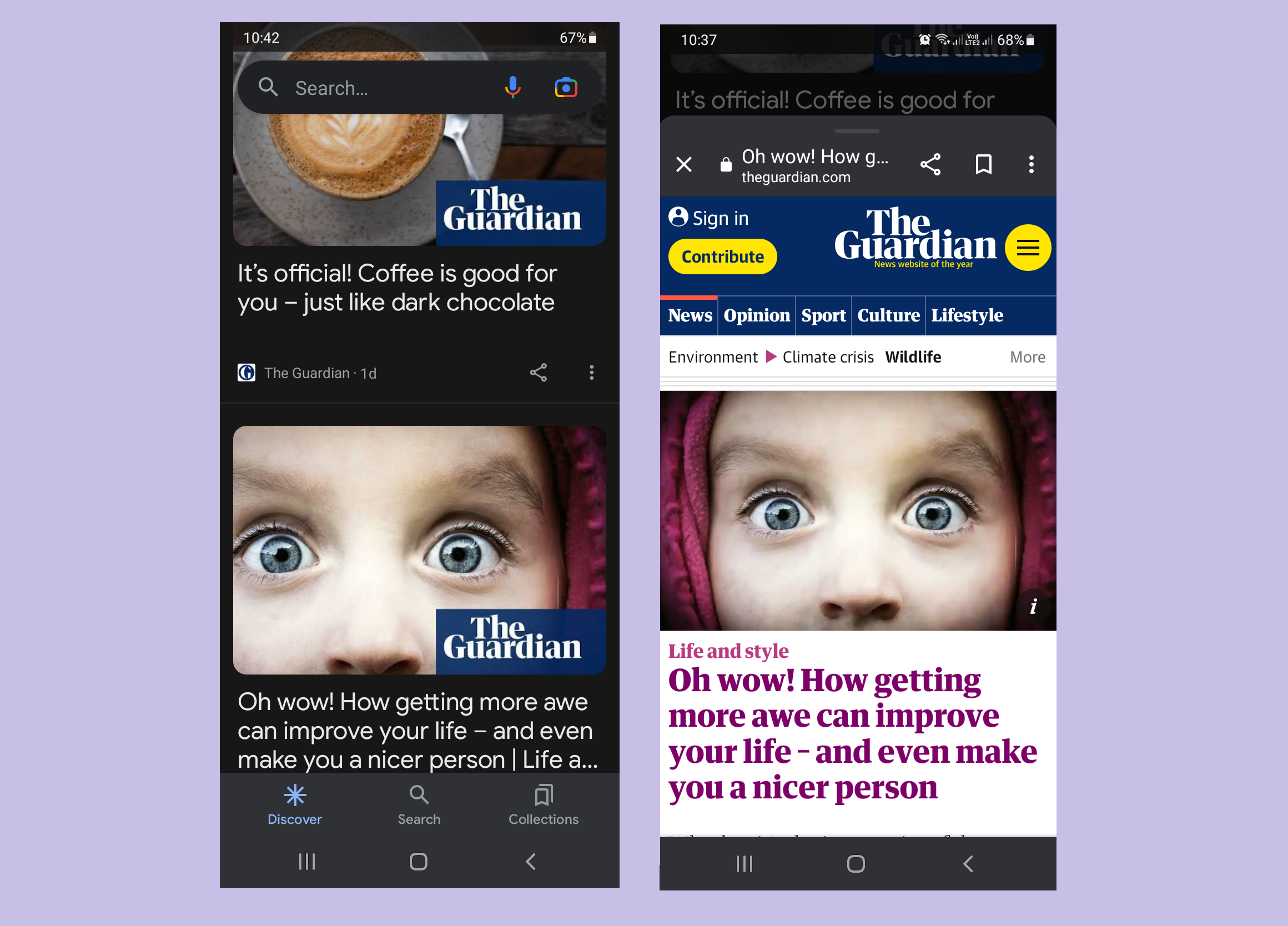
As a part of its latest trial, the company has opted to make use of card-style views in a pop-up form whenever an article pops up. Hence, it’s like shunning the classic fullscreen preview that many of us have been used to over time.

The change, if approved, will be applied to Google Discover and also to Google’s Search results.

The news comes to us thanks to 9to5Google. Their report says the test will now allow Google Discover and Search to open up like a card on the upper part of your screen. These changes were seen on the pixel phone’s home screen and also across the feed for the Discover app. And it’s definitely a new and happening interface that’s very different from what we’re usually accustomed to.

To open up the articles, you still need Google Chrome and many famous icons are still seen in the same locations, as noted by the testers. When you swipe in a downward direction, it shuts and you’re taken back to the Discover feed or your results for Search. And in case you wish to enter the full-screen mode, the app will allow you to do that with a simple swipe.

One interesting point noted by users is how the app continues to use the fullscreen method for previewing in certain scenarios like when you open up a particular video.

There is definitely plenty of ambiguity regarding the whole situation as to why Google is switching in the first place. But we do feel it’s so much more convenient now to get back to your search results in a more seamless manner.

In the end, you do lose up a bit on vertical space, thanks to the feed seen in the background. But we do feel the change is very welcoming in terms of an overall user experience.

9to5Google claims this new design may be rolling out soon as a test for users but there are rumors that it’s a widespread beta test across the company’s app as many people can see it running across their devices.

We do hope a wider rollout comes about sooner than later.


Read next: App Developers Are Scrambling To Find New Avenues For Monetization After The Discontinuation Of IDFAs And Cookies
by Dr. Hura Anwar via Digital Information World

YouTube Shorts Adds Many New Features That Are Popular On TikTok To Better Compete With The App

The race to become the world’s most popular social media app is on and YouTube is doing a pretty decent job at that.

YouTube Shorts was recently seen adding plenty of new features that you would call popular on TikTok. And that includes the launch of a new narration voiceover for iOS, commonly seen and loved on the app.

Creators can utilize the narration in cases where they feel commentary could add more value to the content that’s already been recorded. This might be in the form of cooking tutorials that comes with instructions, live reactions to content, or any form of narration that might be needed. Commonly sought-after examples include the likes of videos that surround the ‘day in the life’ theme.

To utilize the voiceovers across the Shorts app, simply click on the button with a checkmark that’s located on the bottom right-hand side of the camera screen. Then press on the button for voiceovers and start wherever you’d like to begin the narration. Don’t forget to click on the record button and be sure to adjust the volume to your liking afterward too.

Creators will be given the chance to redo and even undo so that their overall editing process is made easier.

YouTube Shorts was seen adding a new feature for iOS, other than the one described above. This includes the capability for creators to reply to comments using new videos. This feature was first launched by TikTok in the year 2020 and then we saw Instagram pick up the pace and launch its own version in December.

But one of the biggest news coming out from the app has to be its expansion for Shorts’ partner program. This is the first time ever that the app is giving creators who make short content the chance to earn funds via ad revenue on their content. And if things do go as planned, creators are going to be ecstatic.

Yes, YouTube does get a share but seeing these mighty developments is definitely a major and a new threat to TikTok.

By now, TikTok must be used to seeing all leading apps follow in its footsteps and this is no exception. But YouTube has been called out as one of the best ways through which creators can earn a decent living and that’s why such initiatives are being appreciated more than others.


Read next: YouTube Begins Testing New Creator Donation Feature ‘Super Thanks’ In Shorts
by Dr. Hura Anwar via Digital Information World

Twitter Is Adding A New Communities Section For Users To Embellish Upon In Their Professional Profiles

Twitter’s adding in a new Professional Profile option via which users can feature any Community that they are a part of.

As an individual who’s not all that active on Twitter, coming back to the platform once or twice a month, I’m always just a little taken aback by just how many new things are added to the interface. I just got used to Professional Profiles being a (sort of) thing, and now we have Spaces and Communities to boot. As far as I can comprehend, Communities are just the equivalent of Facebook groups on Twitter; a common ground via which individuals with overlapping interests can communicate with each other. Professional profiles, as I’m sure most Twitter users are aware, refer to a profile model that users can sign up for to make their accounts come off as professional businesses and such. This sort of business account method is something that Meta, Twitter, and even Snapchat have adopted to some extent, which goes to show just how much our professional and personal lives have managed to bleed into each other. Personally, not a fan of this happening, but hustle culture will either work us to death or drown us in the process.

Professional profiles allow users to feature a myriad of information about either themselves or their small businesses and startups, and this new Twitter feature that we’re discussing adds something new to the mix. Now, users can add Communities to their professional profiles, allowing users the ability to share a single space where they can discuss the business at hand. This can be especially useful to the likes of influencers or online personalities since such individuals have already amassed mass followings that would love to cohabit in an online dedicated space. If subreddits aren’t enough, maybe an officially created or endorsed Twitter Community is what everyone was looking out for.


H/T: Alessandro Paluzzi

Read next: Twitter Intends To Collaborate with Top Researchers To Curb Its Misinformation Struggles
by Arooj Ahmed via Digital Information World

Instagram Releases New Version Of A Parents’ Guide For Better Support Of Kids On The App

It’s back-to-school time and to help keep kids in line with that theme in the digital world, Instagram is going public with its ‘back to school’ guide.

The app just released the new version of its parents’ guide that entails a full overview of the platform’s features linked to greater control and privacy. In the same way, there are plenty of notes that give parents the guidance they require for young users on the app. And yes, that’s super important, the company adds.


The news was recently announced by Instagram where they revealed how adults commonly assume their teenagers’ real lives and those witnessed on social media are very different. You might be appalled to learn how they’re both so well linked. This is where most teens love expressing their thoughts and emotions on the matter. Similarly, you’ll find them hanging out with friends while exploring some great ideas across this app.

And yes, it’s a mixed bag of emotions. Some you’ll love, others, not so much. But all forms of interactions are a part of life, be it drama, romance, or anxiety. Be it on the web or not, that’s the reality and the app wants parents to understand that it's not only linked to technology. However, the app does feel it might be exacerbated through this means.

It’s true that so many researchers are coming forward and talking about the great dangers linked to this app. And when you’ve got the added pressure of going back to school at hand, we can see why quite a few people are worried.

Social media can take a toll on mental health as people begin to compare their lives with so many others. It’s the dangers that such consequences have that experts worry about. So that’s exactly where the Guide from Instagram steps in. We do recommend grabbing a hold of it and going through it deeply. And there are around 40 different variations available, according to various regions and languages.

The guide entails a complete overview of the app’s options for both privacy and safety, including how each of these added features works. The most important one is how users can limit who sees what on the app and how sharing things with a limited audience is the key to success here.

Meanwhile, a separate section has been reserved linked to DM safety which many critics feel is a major area of concern for the younger generation. There are some notes that are a great way that parents can guide their kids and talk to them about how important online safety is in today’s day and age.

Instagram reiterates how there’s no better time than now to really put some great information out there. Now is the time we’re seeing kids get adjusted to new rules and regulations, not to mention new surroundings at school. Hence, making them aware at this critical time is important.

Read next: Instagram Begins New Test Of Replacing Its Shop Tab With A New Notifications Tab
by Dr. Hura Anwar via Digital Information World

Microsoft Launches New Tool That Keeps Users Safe From Losing Their Passwords

There’s a new update for Windows 11 users and it arises in the form of a tool that keeps users safe from losing their passwords.

The tool is a part of the most recently put out Windows 11 update and is referred to as an Enhanced Phishing Protection functionality. It’s sending out a warning whenever users go about typing their passwords on a particular app or webpage that might be insecure. And that could entail Microsoft’s own applications such as Microsoft Word.

See, the company wants its users to stay protected all of the time. And that’s why the update has come about in the first place.


The company was quick to go public with the news by publishing it through a blog post. Moreover, it boldly declares how this new feature will alarm users when they’re writing out sensitive details like passwords and they’re in plan view. Hence, this will ensure it’s covered and safely kept away from both scammers and those trying to hack into their accounts.

For this to work, the tool will make use of a SmartScreen. This is another name reserved for saved passcodes that can be entered at any time. It usually comes up with a warning that states how it's not safe to store passwords on the app. They also send another alert that mentions how it’s important to remove passwords seen across this file.

Users that wish to utilize this will have to have the new feature toggled. Remember, those that do end up installing the update will notice how this feature is disabled and hence needs to be switched on.

If you wish to have it enabled, simply enter the Start menu, click on Settings and then enter your privacy and security. There will be a button for Windows Security so click on that, which will lead you to your app and browser control. And that’s where you can find the section for Phishing Protection in the reputation settings.

You’ll need to click on the option that says you’d like to be warned about the storage of unsafe passwords and passwords being reused.

In the same way, Microsoft mentioned how IT admins have the ability to customize alerts with their mobile devices through solutions such as MDM. This includes the likes of Microsoft Intune.

This new launch is a major one in the new security update seen for Windows 11 this year and one of the most talked about ones on the platform to occur for months.

There is another new update that makes use of AI-powered technology that halts users from having malicious apps run across Windows 11. This is known as the Control For Smart Apps. After getting refreshed on a daily basis, this will evaluate the types of threat at hand and in case it’s high, it’s not going to be given the chance to run.

In the same way, we’ll be seeing a new series of updates soon that separately work to shield the app from vulnerable drivers.

Read next: New Microsoft Index Shows the Dangers of Productivity Paranoia
by Dr. Hura Anwar via Digital Information World

Instagram Begins New Test Of Replacing Its Shop Tab With A New Notifications Tab

Instagram is one app that we’ve seen evolve quite a bit in recent months. While some changes have been appreciated, others have not so much. And now, we’re hearing more news on how the app is busy making another change that’s being tested.

The test replaces the Shop Tab with a Notifications tab. This is seen on the app’s navigation bar and some users have stated that their Shop tab is missing and has been replaced.


As of now, the company has failed to announce the test publicly but one spokesperson from Meta did speak to a media outlet called The Verge. They confirmed the change and stated that it was a part of a significant test that was designed to further simplify the workings of the app.

Moreover, now that the test has gone live, the change is being seen by a few people but the exact numbers aren’t specific right now.

The Shop tab was first seen being included around two years back. At that time, the pandemic was in full swing and people were really shopping online. This way, the tab served as the ultimate for people to connect with one another on the app.

Be it a creator, brand, or tiny business- many were able to put up their goods and services for sale. That is what gave users the chance to instantly buy products that were marketed on their feeds.

In the same way, we saw the tab also provide a number of recommendations for products, a handful of picks from editors, and live streams of businesses, among others.

While we’re not quite sure how successful the Shop Tab was on the app for the thousands of creators as well as for the app, one thing is for sure. It’s quite clear now how the firm is searching for a way to move in the right direction through new means.

The changes may be seen coming forward, despite the company offering better shopping features over the last two years. We even saw Instagram debut its ability for users and sellers to allow for direct sales and purchases via their DMs.

Hence, we don’t see how the removal of a Shop tab could make much of a difference if any. See, now it’s been given the importance of being a sub-section located in the app’s Settings.

As mentioned by Meta’s spokesperson on the change to The Verge, commerce has always been an integral factor that makes it so much simpler for people to explore and purchase new goods found on apps through their newsfeeds, Reels, Stories, and other forms of innovations like drops or through live shopping streams.

For now, the current removal is limited simply to a few users but if reports from The Information come out to be true, we could see it removed completely by next year. Hence, that makes the whole user shopping experience less of a personalized venture.

Just like any other update on the app when a feature comes out, Instagram will evolve with time and with the number of its fantastic offerings. Hence, we’ll just need to search some more to see how the change rolls out to other users soon.

Read next: Meta Is Working On A New Profile ‘Switching Tool’ That Allows Users To Jump Between Instagram And Facebook
by Dr. Hura Anwar via Digital Information World

Why Coaching Call Center Agents Is Important

When your call center employees don't feel like they are progressing, there is a higher chance that they leave their employment. Lack of opportunity for career progress or promotion is a factor in 32% of employees leaving their jobs.


However, agent retention rises in call centers with a coaching culture. Additionally, they benefit from increased efficacy in creating stronger client relationships and offering top-notch customer service. You must adhere to certain practices if you want to train your agents properly. In this article, let’s explore why coaching call center agents are important and tips to improve coaching efficiency.

What Is Coaching for Call Centers?

Call center coaching gives agents feedback, real-world cases, and performance evaluations to help them perform better and be productive. Agents can develop their skills and provide excellent customer service when they are aware of best practices to adhere to.

It's critical to distinguish between call center coaching and agent evaluations on their performance. The purpose of coaching must be to improve performance going forward and support continuing reviews.

Additionally, coaching gives agents the tailored feedback they require to function at their highest level. Employees should, in other words, be aware of the many jobs they must complete, their importance, and the specific tasks required to complete them. In the end, a significant portion of what makes consumers satisfied is an agent's improved performance.

Why Is Coaching More Crucial Than Ever?

You may use coaching to retain top people, tap into the tremendous human resource potential, and develop the next generation of leaders for your organization. If you are still unsure about the value of teaching call center agents, take a brief look at some major coaching benefits.

The greatest outcomes are frequently viewed by managers coaching their agents as a quality management method. Now is the moment to fix any problems you may have found after listening to call records or receiving consumer complaints. Providing excellent customer service must be developed through practice. Coaching is the method to assist in teaching that ability and provide guidance on what to do in certain circumstances.

Additionally, you have the chance to identify your best employees and recognize them while also motivating those with lower KPIs. Recognize agent abilities and capitalize on them to maximize everyone's potential. This is one method agents can work toward achieving their objective of moving ahead in the company as time goes on. Through coaching, you can identify employees who may not be the greatest candidates for this position and could be better off performing another task.

Tips for Effective Call Center Coaching

Call center coaching can be challenging, time-consuming, and sometimes emotionally taxing. The success of these sessions can significantly increase by following these tips.

Maintain Confidentiality

Giving direct criticism in a confidential, one-on-one context is beneficial. This makes it possible for agents to interact with your advice in a meaningful way, asking questions and providing justifications for why they find some parts difficult. While one-on-one training is the norm at most contact centers, group sessions have a place as well.

Positive Comments Should Be Shared Before Critical Ones

Starting with a positive attitude is the best approach to persuade your agents to take your recommendations and constructive criticism into account. Share the things that they have recently gotten better at or that they perform consistently well. They will feel appreciated and are more likely to be open to what follows if you do this.

End the discussion on a positive note by highlighting their strength after sharing the negative criticism. This guarantees that the agent is motivated and prepared to advance.

Create a Wallboard and Set Goals

Set goals that your agents can concentrate on and strive toward together. Particularly if they want to advance in their career or hope for a raise, this gives them motivation and a way to track their progress. Try to assist them in generating ideas and creating timetables that are reasonable for achieving these objectives.

A visual board is a fantastic addition to help your team remember their objectives and have something concrete to refer to. Wallboard with a large screen shows real-time project activities and setting it up in a communal area for everyone to observe is one approach to accomplish this.

Work Together to Develop a Strategy

Ad hoc programs are the weakest and least productive forms of coaching. Even for the most seasoned agents, coaching should be a continuous endeavor. This is particularly valid for the rising number of call center agents who operate from their homes.

Goals and activities for the following sessions should be discussed at the end of each session. Collaboration is important in achieving this. Agents are much more likely to internalize the objectives that they helped create.

Hold Private Tutoring Sessions

Some agents are reluctant to disclose their flaws in front of others. In your capacity as the owner or manager of a call center, you ought to limit your use of critical feedback in your one-on-one coaching sessions. Then, hold one-on-one meetings where you subtly highlight the drawbacks. It will boost their self-esteem and inspire them to improve.

by Web Desk via Digital Information World