Friday, November 11, 2022

72% of Gen Z Say They Can Circumvent Parental Monitoring

Young people are being exposed to more information than ever before, and that is prompting most parents to try to establish some boundaries and ground rules to keep their children safe from online predators or information that their minds are not yet ready for. In spite of the fact that this is the case, there is a bit of a generation gap that makes their earnest efforts less than effective, and most Gen Z kids are finding ways to work around the monitoring as well.

With all of that having been said and now out of the way, it is important to note that a new report that was created by 1Password in collaboration with Malwarebytes has revealed that 72% of children say that they can find ways to bypass monitoring protocols put into place by their parents. 70% of them reported receiving some advice for their parents for password hygiene, but the advice is highly suspect with 30% saying they were told to use passwords that are easy to remember and 17% claiming that their parents told them to use the same password for multiple accounts.

Additionally, there seems to be a gulf between how well parents think their own online security is and what it actually looks like. 69% of parents stated that they felt like they were doing all they could to keep themselves secure online, but only 47% of Gen Zs agreed with them. That casts some doubt on the veracity of the claims of parents, since the younger generation would likely know more about cybersecurity than their parental figures.

There are other discrepancies to be noted here as well. Only 34% of parents felt like they should ask their children before posting their pictures online, but this is something that 73% of Gen Z respondents wanted with all things having been considered and taken into account. Parents must be more mindful of the security needs of their kids and treat them like actual people. Posting pictures of someone without their permission is a huge privacy violation, one that parents shouldn’t even think of making.


Read next: Over-apologizing can lead to low self-esteem and should be avoided
by Zia Muhammad via Digital Information World

Google Topics Now Used By 71% of Marketers for Targeted Ads

Increased regulations surrounding user privacy has made identifying consumers really difficult for most marketers, but it appears that Google Topics might be filling the current vacuum with all things having been considered and taken into account. Figuring out a way to target the right consumers without infringing on their inalienable right to privacy is now of paramount importance to marketing professionals, and Google Topics appears to be providing a neutral middle ground that is being adopted by the majority of marketers.

A recent study by Lotame revealed that Google Topics was the research resource of choice for around 71% of marketers. This represents a 50% increase in the probabilistic identity solution, with other platforms like Cohorts also seeing a lot of success. With all of that having been said and now out of the way, it is important to note that 31% of marketers feel like their work has been restricted by the recent developments, and 37% said that they plan to increase investments to make up for the current lack of actionable data.

36% of marketers stated that identity is their most significant priority because of the fact that this is the sort of thing that could potentially end up allowing them to keep going after third party trackers get deprecated. Personalization will be a key strategy for 44%, but 61% reported great results with CDPs so chances are that they will stick to them more than might have been the case otherwise.

Clean rooms are another buzzworthy topic, but it should be noted that 58% of marketers said that they don’t have the budget for them. They seem to be more popular among publishers, with 48% of them using clean rooms and just 37% of marketers said the same.

Budget challenges are not the only issues that are stopping marketers from adopting clean rooms either. 47% mentioned privacy challenges that can disrupt the clean room, and they will be hesitant to adopt clean room tech until improved privacy is evolved. The landscape of marketing is ever shifting, and data management is coming to the fore to deal with the changes.


Read next: 66% of Americans Prefer Buying From Real People Instead of AI
by Zia Muhammad via Digital Information World

Thursday, November 10, 2022

Twitter Users Are Exploiting The App’s System To Make Verified And Fake Accounts

Twitter is giving access to the app’s verified badge via a new $8 Blue Subscription plan. And it doesn’t take a rocket scientist to understand how so many of the app’s users have already started to exploit the system to make verified and fake accounts.

The perfect example is linked to a user who thought it would be a cool idea to impersonate NBA star LeBron James via a verified account. He claimed that the sportsman was all set for a trade-off between the two leading NBA teams but that was just a lie.

Similarly, another scammer was seen posing as the app’s own official account across the app and it stated that users would now be able to buy their way to the famous Twitter Blue subscription with the likes of crypto. The tweets sent out by the scammer were then seen featuring a link that was related to the most malicious website.

Via: @GillianDN

On the other hand, another shocking account came forward that impersonated Donald Trump. He was banned from the app on January 6th in Washington DC. The impersonator acted like he was Trump and started to undermine the efforts of Elon Musk and his plan and how it doesn’t work.

But ever since then, Twitter has made it a point to shut down the impersonating accounts that may be verified but were actually fake. Let’s remember how it would not be hard for scammers and pranksters to keep on exploiting the system.

Despite such shocking claims, Twitter mentioned how it would not be scrutinizing accounts getting the blue ticks, and neither would it be undergoing reviews that ensure that a particular criterion is met.

Twitter is yet to respond to a particular request on the matter but Elon Musk did mention how the app is all set to take action against those trying to exploit it and those taking its verified ticks for granted.

Users may wish to take into consideration the fact that tweets they’re currently reading from a celeb might not be from whom they assume. And while the platform is trying hard to cut down on impersonators, it’s a major challenge ahead.

The new subscription is launching on Wednesday for users across the US, UK, Australia, Canada, and even New Zealand. Now, it’s for those people with iOS devices and can be availed in the form of an in-app purchase.

Read next: Twitter Deletes Its Newly-Launched ‘Official’ Checkmark
by Dr. Hura Anwar via Digital Information World

Ad Prices Finally Stabilize and Reach Yearly Low, Here’s How Much They Cost Now

Big Tech used to be seen as an unassailable industry that was leaving many other industries behind in the dust, but in spite of the fact that this is the case it has been experiencing a glut in terms of its revenues and that is largely due to a decrease in advertising profits. The soaring of ad prices during the pandemic and the relative shortage of liquid cash among businesses brought ad revenues down dramatically, but things are finally starting to look up.

Both Meta as well as Google saw advertisers pulling out of their platforms and decreasing their ad spends, and Amazon also saw some treacherous waters this past year that the company has struggled to successfully navigate. While Amazon saw its ad revenues increase by as much as 30%, it is still in danger of seeing advertisers cut back prompted by below average sales over the holiday season.

The crux of the problem is that consumers are just spending less than might have been the case otherwise, and that is leading to ad revenues declining sharply across the board. With all of that having been said and now out of the way, it is important to note that prices are now at their lowest point of the year which is surprising considering that the opposite usually occurs during the peak demand of the holiday shopping season.

Amazon has seen its cost per click prices decrease by 3% year over year, reaching a value of about $1 in the third quarter of 2022. This comes after several quarters of gradually increasing ad prices which also lead to decreased ad adoption by brands and merchants. Ads for sponsored products saw a 5% decrease, and sponsorships purchased by brands declined by 10% with all things having been considered and taken into account. Search ad conversions for Amazon decreased by 6%, so a decrease in prices might help to fix things.

Meanwhile, Meta’s CPM is hovering at around $14 which is a 3% increase year over year. The social media company has been struggling with a revenue shortfall coupled with a plummeting in its stock prices. Meta attempted to repair the damage done by its bad press by increasing ad rates, but they aren’t making as much of an increase as before. Periods of peak demand usually see a massive uptick in ad prices, and Meta’s decision to not take things to that extent is indicative of a wider trend.

Google’s ad prices are seen in a CPC context, and they are hovering at the 97 cent mark right now. The CPC for Google ads can change based on the niche because of the fact that this is the sort of thing that could potentially end up altering the target demographic, but 97 cents is still a decent average. Google’s third quarter CPC has plummeted by a massive 49% year over year.

Finally, TikTok is one of the only companies that has seen a significant uptick in CPM prices. Their CPM has increased 27% year over year, largely due to the increased demand for ads on the platform. This might change due to the controversies surrounding the short form video app.

Illustration: freepik/rawpixel
Read next: The major UK and US cities where people love (and hate) hybrid working
by Zia Muhammad via Digital Information World

Google search index is not guaranteed: John Mueller

In a recent event, a site owner asks a serious question regarding the Google content index to which Google search advocate John Mueller replied saying that Google search is not 100% predictable.

Reddit users, on the other hand, complain about seeing an index of the content that is published daily—albeit at a faster rate.

To be able to have access to their own Google index, users on Reddit pour out tons of messages to ask the Google advocate if they can use the API index to get the Google index. To this, the advocate was quick to respond and said they use API for more important types of content, such as live streaming and job postings.

Furthermore, he said that Google search is not guaranteed and therefore the index of those content solely depends on Google prioritization. Moreover, in a statement, he said that in order to get the index of all your content; the site needs to hold such importance that it could be indexed.

Mueller further elaborated on what he meant by worthwhile site by laying down some key points. He said Google will choose itself if your content is worthy of being indexed or not. If the site holds the power to provide unique content and high-quality posts, and is valuable, then it is worthy of getting indexed. Otherwise, your site will never get one if it is publishing the same old content each day.

In addition, Mueller agrees that the challenges he poses on sites are challenging and it is hectic to meet Googles criteria. However, Reddit has millions of users on the website and each has its own brain to use. Together as a community, they can bring much more to a platform and target their audience.

The problem also lies in when Google considers the website that originated the content to be of lower value than the website that replicates it when it indexes republished content at a faster rate than the original.

Hence, Reddit needs to bring its game up to the level where Google considers the site worthwhile and starts indexing faster. Reddit needs to work harder on its content and make it more valuable.

Mueller stated, by making the content more interesting, and gravitating, it could automatically hint to Google that there is some new content available. Furthermore, another easy way to get noticed by Google is to mention new content on your home pages.

Many sites frequently mention their new content on sidebars in order to notify Google that there is freshly brewed content. This advantages them in getting their content index faster. Although this may not be certain, the success of getting indexed at a faster rate, as Google does not guarantee to make their content indexed.


Read next: Where does hybrid work cause the most stress?
by Arooj Ahmed via Digital Information World

YouTube has added three new features to its platform for creators, including visual refresh to playlists on studio desktop

The famous YouTube information channel, Creator Insider, is once again back with a new video highlighting new features being added by the developers for YouTube Creators.

The two minutes and three seconds video talked about three new changes. The first change is that in the Studio mobile application, a new interface was recently designed in which the playlist tab was shifted below the Content button. Similarly, two visual changes are being made for the desktop version as well. The first change is that playlists will now be available below the content tab in the left navigation. The second one is that to create a new playlist, the "create" button will now be used as an entry point. This "create" button is placed on the top right side, just like the one used when the creator wants to add a post. Visual changes don’t mean a change in function; hence, they will work the way they used to.


The second topic talked about translations. Back in 2021, YouTube released a new feature that was well-received by its users. The platform introduced the ability to translate comments for all versions of YouTube. Based on the appreciation it received, the developers have now added this feature to the studio mobile application, and as a result, the creators will now be able to get themselves more engaged with their viewers and can respond on time.

And the final topic was based on smart replies. These are auto-suggested replies that are visible to the creator on the Studio mobile app. As a result, the creator can respond to the replies more quickly and stay connected with their followers. Smart replies are only suggestions and can be easily edited if the creator wants to add or remove some words. The new feature has now made smart replies available on the main YouTube application as well. Not only this, but these replies can be given in several languages other than English, including Japanese, French, Portuguese, German, and more.

The developers are continuously adding and modifying features on the platform to ensure a much better user experience for everyone.


Read next: Over-apologizing can lead to low self-esteem and should be avoided
by Arooj Ahmed via Digital Information World

Top 3 Methods to Sign Out of Apple ID without Password

iOS devices are undoubtedly considered king in this world of modern technology, and it's not without reason.

Out of all those reasons, the thing that has allowed iOS devices to increase their popularity exponentially is the unique Apple ID that users can make.

It makes their privacy and device management so easy that no user, after having its taste, wants to revert back to Android devices.

So is it perfect? Of course not!!!

There's a big catch here. And that is the situation where you somehow don't know the password to your Apple ID. In that case, people find it difficult to Sign Out of Apple ID without password.

But you don’t need to panic because we are going to show you the 3 top methods to do it.

Before we dive into those methods, let’s have an overview of what Apple ID is and in what situations people try to remove it without a password.

Part 1: What is Apple ID, and Why Do We Need to Remove It?

An Apple ID is a unique account that any iOS user can create on their iPhone, iPad, or other iOS devices. This gives the users to have the special privilege of protecting their personal information. They can also connect all their iOS devices by adding the same Apple ID and protecting it with a password from unauthorized use.

But if the Apple ID provides so many unique features, why do we need to remove it?

While the owner knows the password in most cases, exceptions may occur if the phone was loaned or bought second-hand or if users forgot their password. Then, they might need to sign out of Apple ID without a password.

And if you’ve also encountered such a situation, then be happy because it’s time to move on to those foolproof methods which you can use to Sign Out of Apple ID without password.

Part 2: Methods to Sign Out of Apple ID Without Password

Method 1: Using Settings

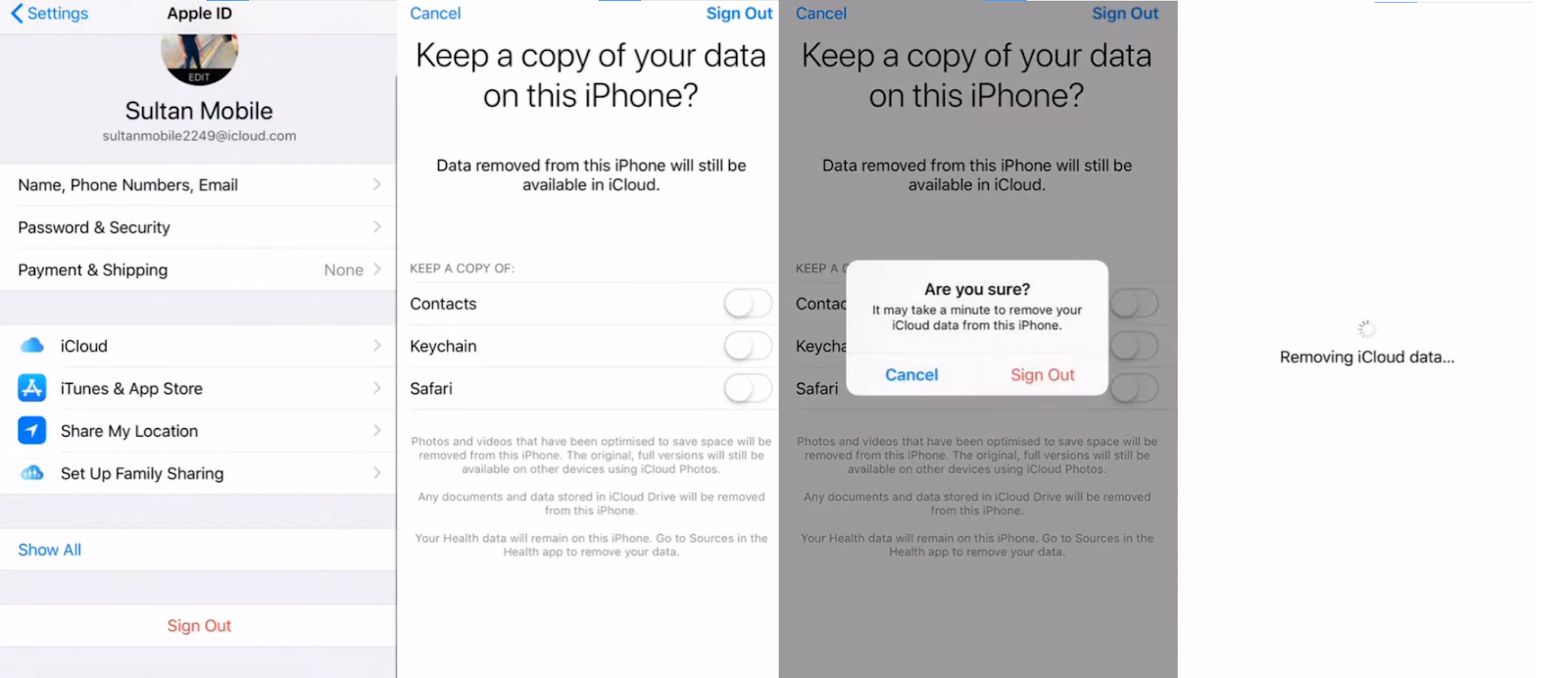
The first and most simple method to Sign Out of Apple ID without password is to use your device's Settings and change your password.

Here’s what you need to do.

Step 1

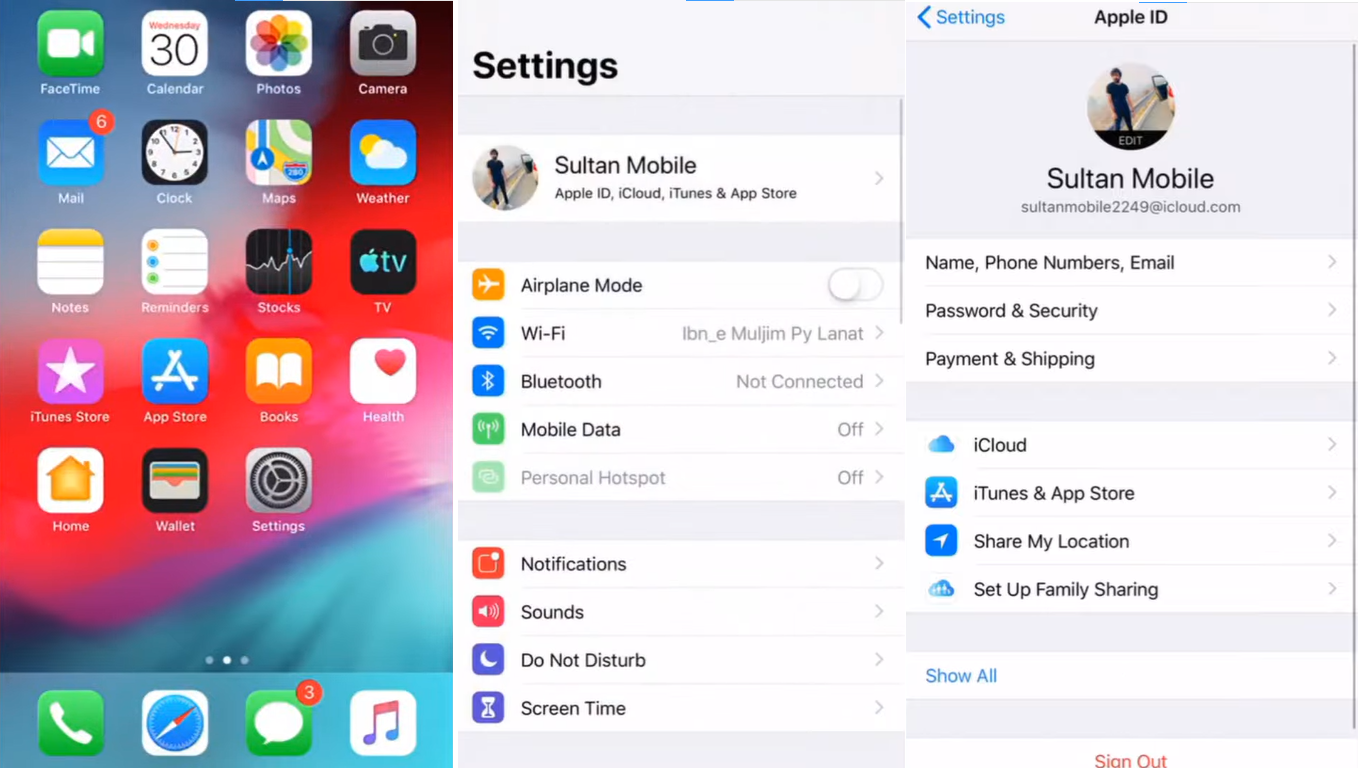
First of all, open Settings and click on your Apple ID on top of the screen to open it.


Step 2

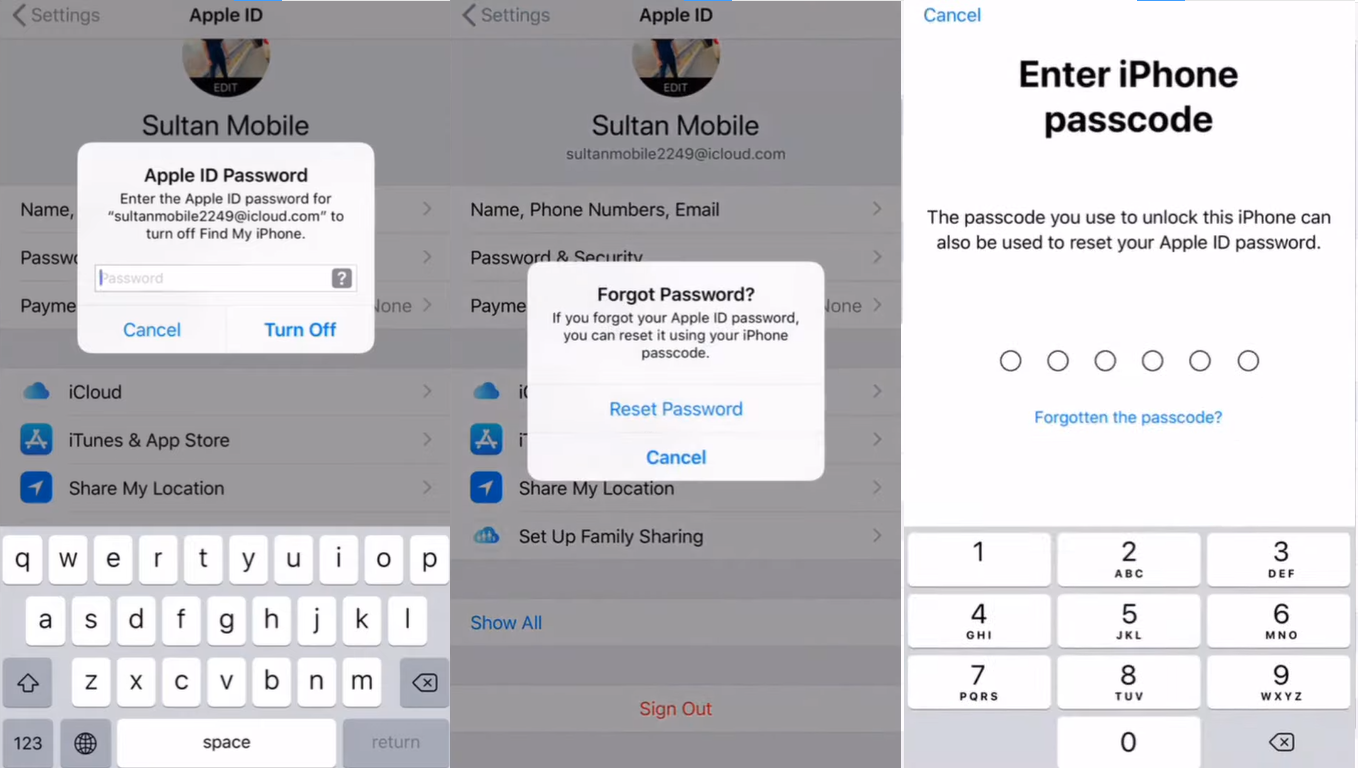
Now scroll down and click on the “Sign Out” option. After that, you have to enter the wrong password twice. The device will show a prompt to ask you if you have forgotten your password. Hit the “Reset Password” and enter your iPhone’s passcode for confirmation.


Step 3

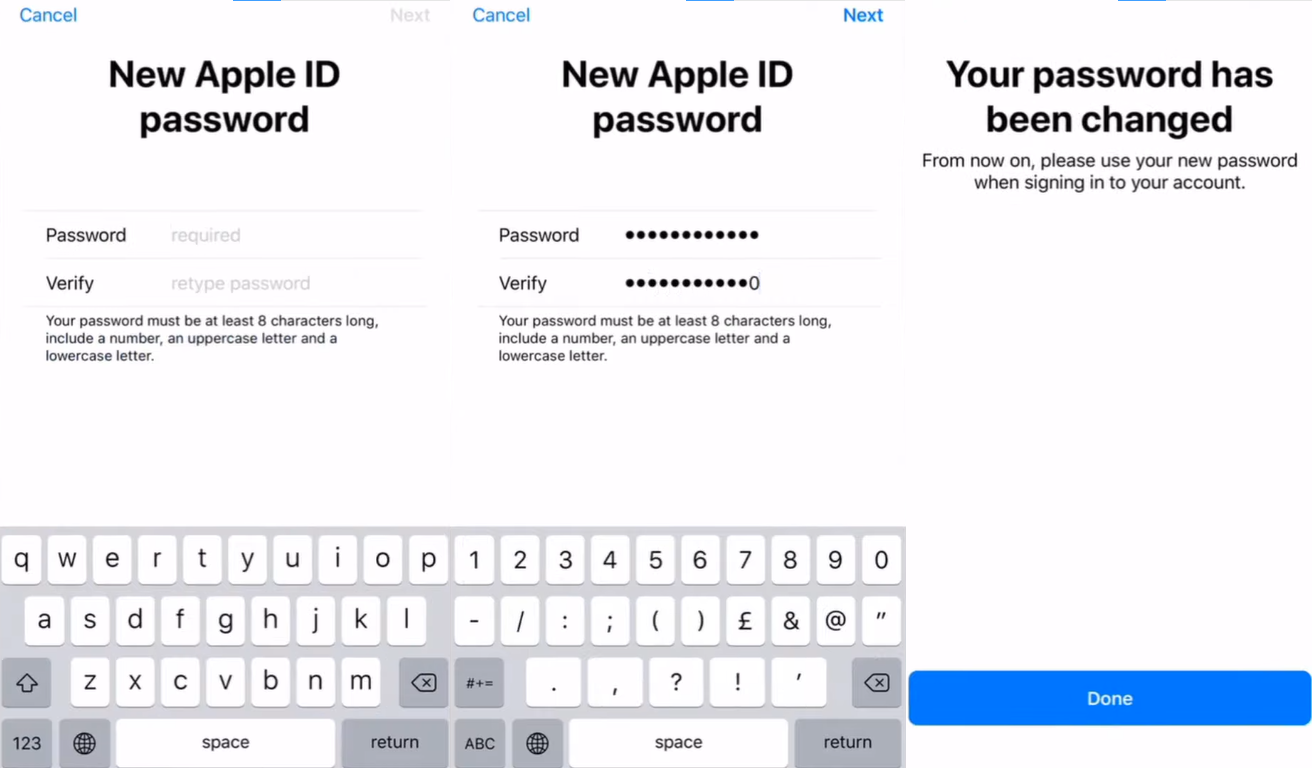
Now it’s time to choose a new password for your Apple ID. After selecting a befitting password, hit the “Next” button on the top right corner of the screen.


Step 4

Finally, go back to your Apple ID settings and Sign Out of your Apple ID with the new password.

Method 2: Using iTunes

But keep in mind that there is a huge downside to using iTunes to Sign Out of Apple ID without password.

So to bypass this tiring process, we are about to reveal an ultimate solution to Sign Out of Apple ID without password once and for all.

Method 3: Using AnyUnlock – iPhone Password Unlocker

The last and most secure method is to use AnyUnlock, the iPhone password unlocker with one of the highest success rates.

The advanced technology of AnyUnlock will allow you to effortlessly remove the locked Apple ID on your iPhone/iPad. This can fix any Apple ID locked for security reasons or if your iPhone/iPad keeps asking for an Apple ID password.

Another killing point of AnyUnlock is that even iPhone 14/iOS 16 is supported with it. On top of that, the 24/7/365 support team of AnyUnlock is always available to answer any of your queries right away.

So if you want to Sign Out of your Apple ID without a password, then here’s a step-by-step guide on how to do it with AnyUnlock.

Step 1

The first thing you do is download the AnyUnlock on your Windows or Mac computer. Once the download is completed, install the software with a stable internet connection.

Step 2

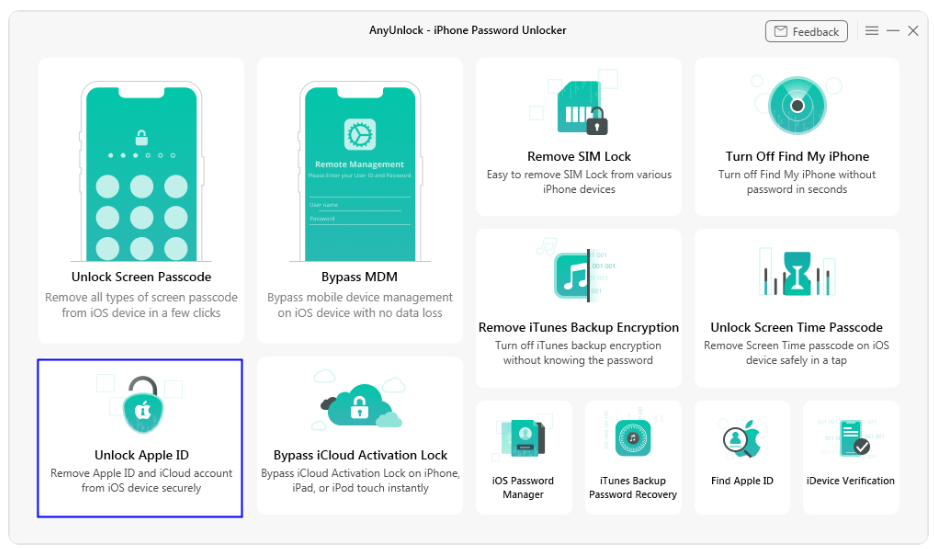
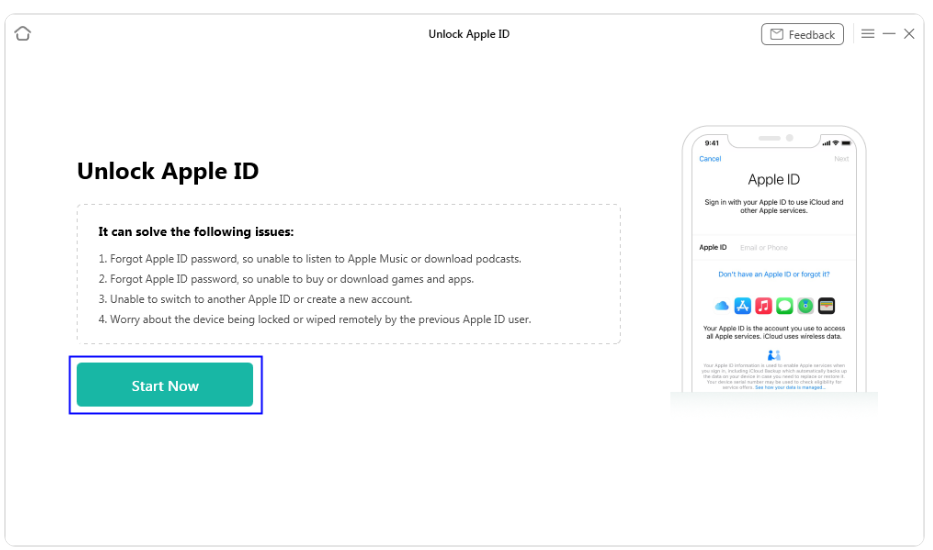
When you launch the software, you’ll see multiple options on the opening interface. Select “Unlock Apple ID” from there.


Step 3

Now a new interface will appear. Click on the “Start Now” button.


Step 4

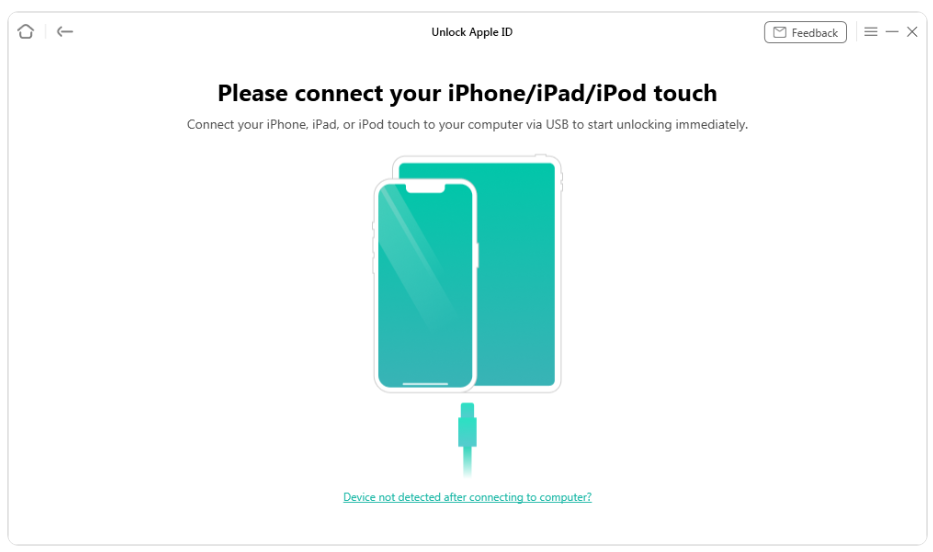
AnyUnlock will now ask you to connect your iOS device to the computer. Make sure you use the original connection cable to connect your iPhone, iPad, or iPod touch to the computer to prevent any mishap.


Step 5

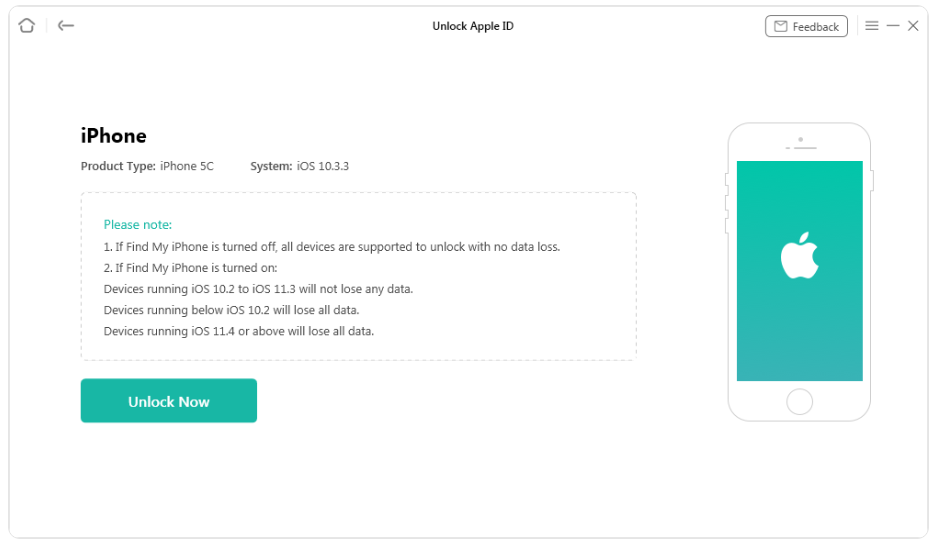
Once the software detects your device, you are ready to proceed forward.
Now, if the “Find My Device” is turned off, then you can just hit the “Unlock Now” button to remove your Apple ID on any iOS device without any data loss.

But if “Find My Device” is turned on, then keep in mind that,
  • Devices with iOS 10.2 to 11.3 will not lose data.
  • Devices with iOS older than 10.2 will lose all data.
  • Devices with iOS versions after 11.4 will also lose all data.
So if the “Find My Device” is turned on, make sure you have a backup of your data before proceeding.


Step 6

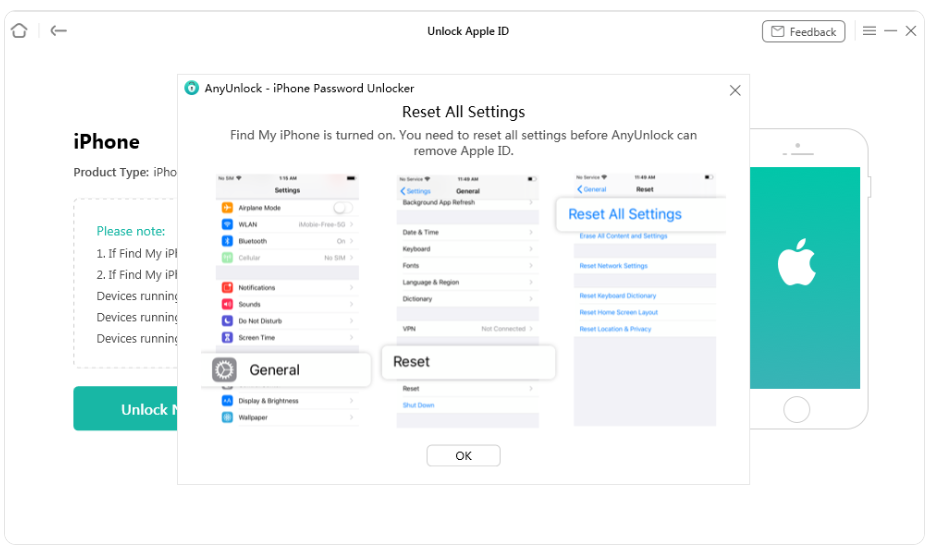
Follow the instructions shown by the AnyUnlock to reset all settings of your device in case your “Find My Device” is turned on, and wait for the device to restart.


Step 7

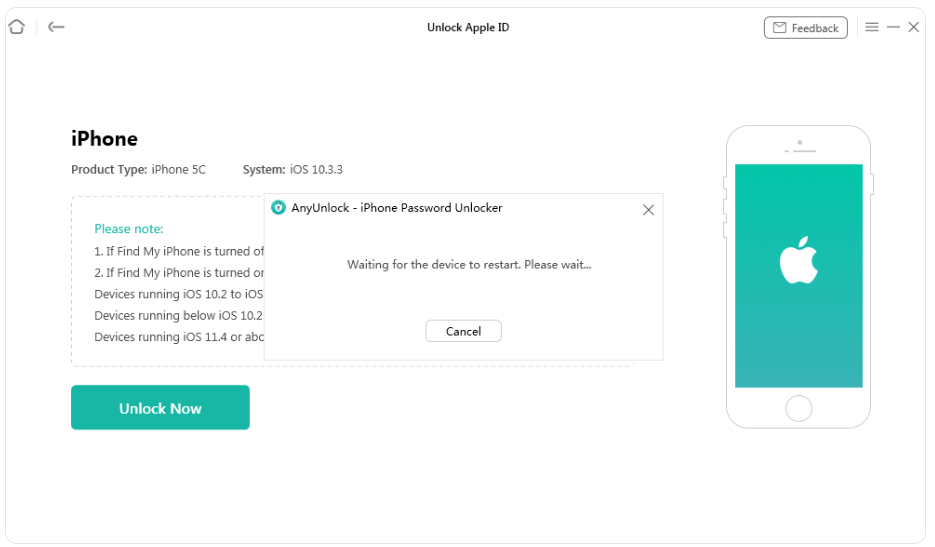
Wait until your device finishes restarting. Then click on “Unlock Now.”

Step 8

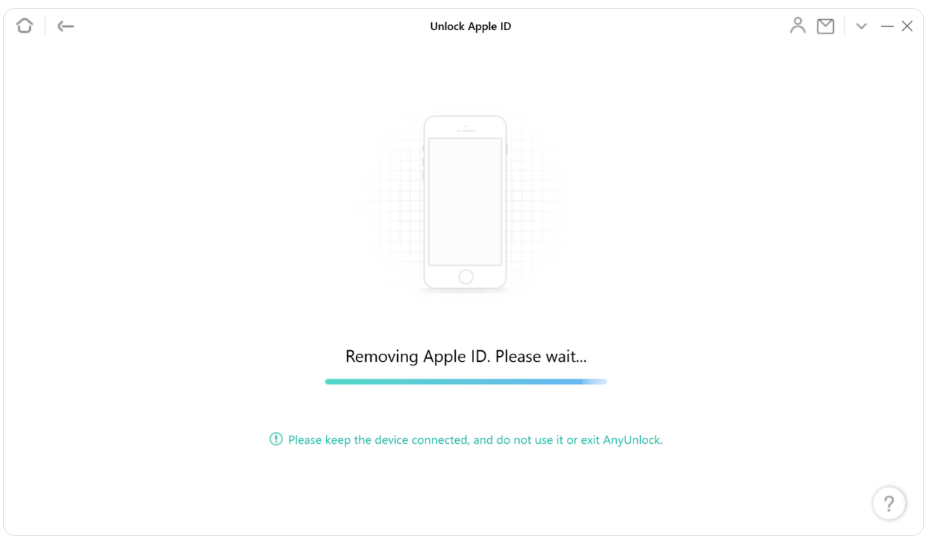
Now AnyUnlock will start removing your Apple ID. Wait patiently until the process finishes.

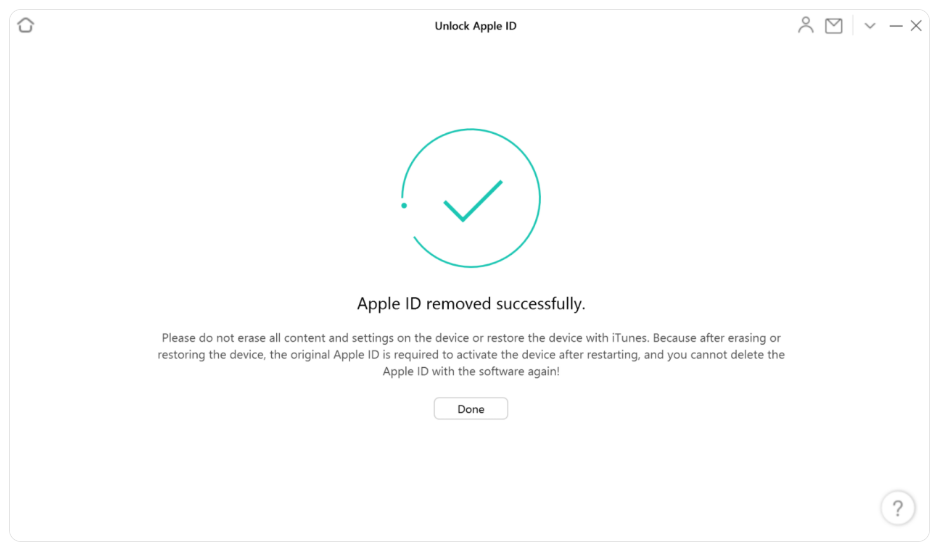
Congratulations!!!

You have successfully removed your Apple ID without a password. Hit the “Done” button and enjoy using your iOS device.


Important Note

Before using AnyUnlock, you need to install the latest version of iTunes on your computer to ensure that the software can easily detect your device.

The “Unlock Apple ID” feature of AnyUnlock is only available in the Pro Version of the software.

Download and install the latest version of AnyUnlock to make sure the process is smoothly completed.

If you still face issues, contact the Support Team of AnyUnlock to fix them.

Bottom Line

Honestly, remembering all the passwords in our life is hard. And if you forget a password for something, there’s always a solution for it.

In the case of an Apple ID, if you forget your password or get a second-hand device with an unknown Apple ID, then you don’t need to fret.

Just follow the above 3 methods, and you will be easily able to Sign Out of Apple ID without password.

Out of these, using AnyUnlock is a trustworthy and sure method.

by Web Desk via Digital Information World