According to the latest report released by Sensor Tower’s State of Education Applications in Europe, the third quarter of the ongoing year ended with education applications available on different online platforms reaching a new growth level once again.
At the beginning of 2022, the install rate was slowing down; however, by the end of the ongoing year, the category had successfully grown by almost 4%, bringing in more users who were ready to pay for the application. It was observed that the number was higher in comparison to previous years.
During the first nine months of the ongoing year, the revenue generated by these applications was over $220 million in Europe alone. The figures went up by 14%. Duolingo topped the list as the app that generated the most revenue from the first quarter until the end of the third quarter. As it appears, Duolingo was responsible for 1/3 of the total amount spent on online educational services. Among the most used features of this application, the gamification features became most evident. It was observed that such services are getting famous in Europe, as many citizens from these countries have been spending over $550 per minute during the first nine months.
While Duolingo ruled the list, Google Classroom, on the other hand, did well too. It is believed that this application can go further in countries including Germany or France, areas from which the app didn’t receive much positive response.
These two countries were found to be among the top ten markets where educational applications were downloaded the most, including Google Meet and Google Drive until the third quarter came to an end.
The response received by these applications in such areas is one reason why it is believed that Google Meet can do much better to make its platform grow while being part of the global market. Based on the data shared by the research team, Spain topped the list of countries where Google Classroom was used the most, followed by the United Kingdom, and Italy was at number three.
Read next: Phone Companies In The UK Are Struggling To Identify And Block Spoofed Calls
by Arooj Ahmed via Digital Information World
"Mr Branding" is a blog based on RSS for everything related to website branding and website design, it collects its posts from many sites in order to facilitate the updating to the latest technology.
To suggest any source, please contact me: Taha.baba@consultant.com
Thursday, November 17, 2022
TikTok Advised Parents To Talk About Online Safety With Their Young Children
TikTok has recently introduced a Family Paring feature on the platform, through which parents are allowed to monitor their children’s app usage activities.
Among TikTok’s stratospheric development, concerns have also been escalated regarding the app’s security, including the dangers of its harmful popular challenges, the accessibility of children to inappropriate video trends, DMs’ buzzard, and other issues. According to a set plan, these vulnerable methods are used to exploit the young generation in irrelevant actions. Many concerns have been raised by parents to safeguard their teens from the drastic effects of these rituals.
Concerning these consequences, TikTok has collaborated with ConnectSafely, an organization to educate people about the security of technologies, to examine how parents should start conversations with their teenagers regarding online safety, and what measures could be taken to increase transparency and participation around this particular subject.
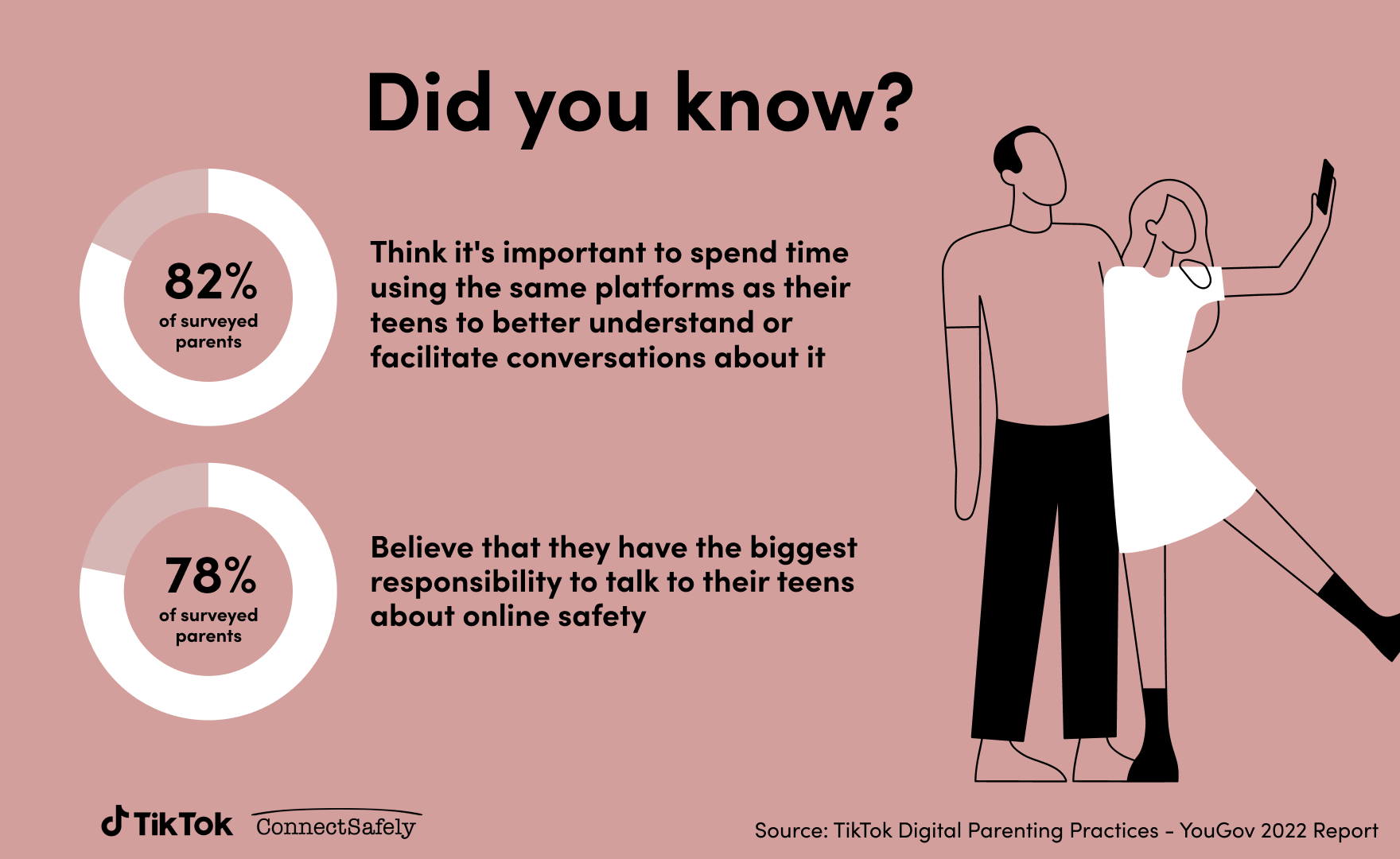
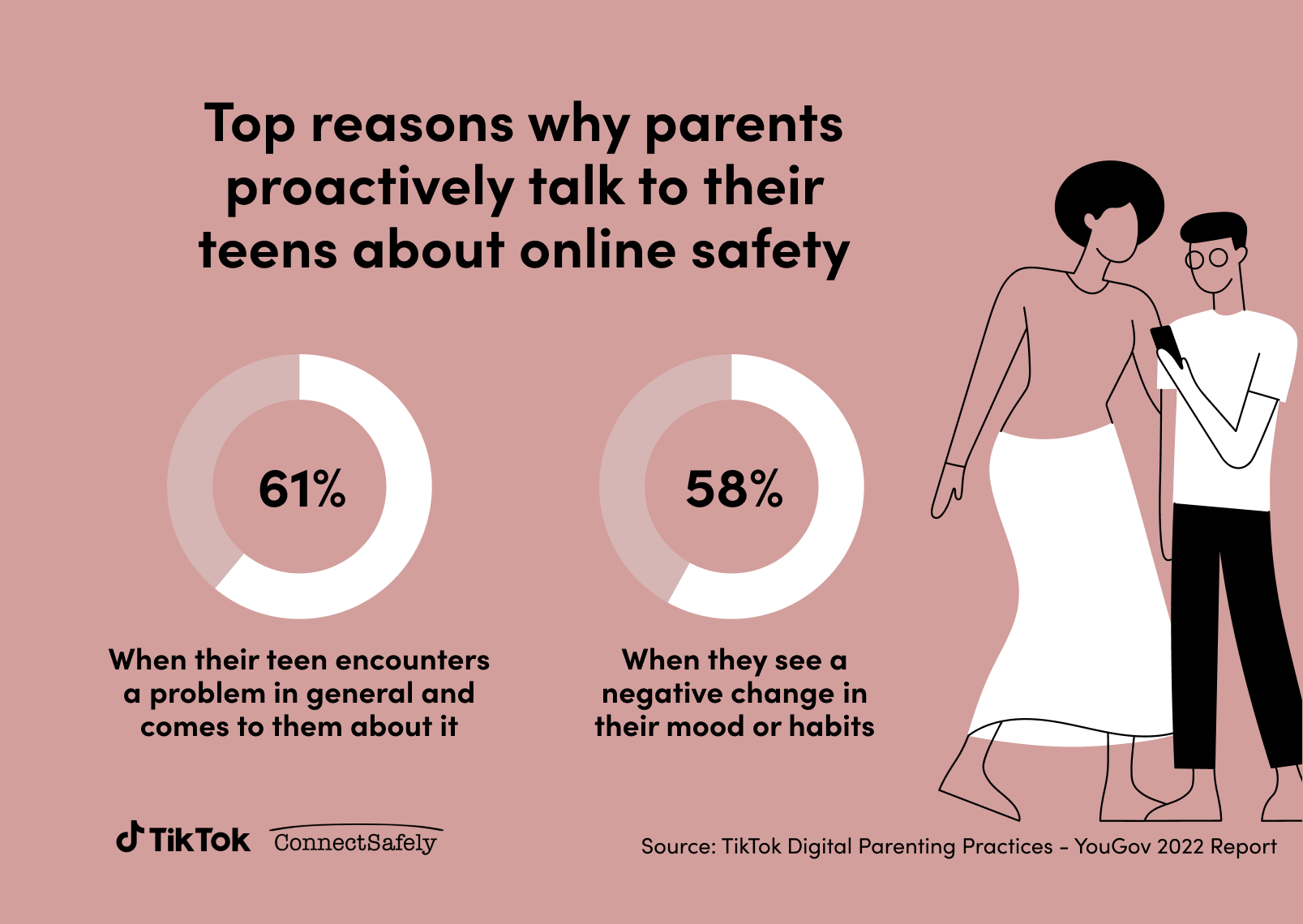
TikTok commissioned YouGov for conducting a poll of more than 2,000 parents of children between the ages of 13 to 17 from the United States. This poll was conducted to explore how frequently parents are involved in the discussion of internet activities with their children, how familiar they are about safety issues, and what kind of safety precautions they use at home to restrict the disastrous effects of these activities. The findings show that about 78% of parents are fulfilling their responsibility of talking to their kids about online safety. Approximately, 61% of them talk when their children report a problem to their parents associated with online safety. And lastly, only 33% of parents communicate on a weekly basis with their children about the usage of social media sites and online platforms.
The findings further say that not all the parents were found comfortable discussing these topics with their kids, and many of them don’t know how to initiate these conversations correctly.
To resolve the communication gap between children and their parents, TikTok has announced a campaign in order to spread awareness of its new feature of Family Pairing and to encourage more conversation on taking several proactive measures to offer direction and assistance.
Read next: Troubled Times For TikTok As FBI Director Calls For The App’s Ban
by Arooj Ahmed via Digital Information World
Among TikTok’s stratospheric development, concerns have also been escalated regarding the app’s security, including the dangers of its harmful popular challenges, the accessibility of children to inappropriate video trends, DMs’ buzzard, and other issues. According to a set plan, these vulnerable methods are used to exploit the young generation in irrelevant actions. Many concerns have been raised by parents to safeguard their teens from the drastic effects of these rituals.
Concerning these consequences, TikTok has collaborated with ConnectSafely, an organization to educate people about the security of technologies, to examine how parents should start conversations with their teenagers regarding online safety, and what measures could be taken to increase transparency and participation around this particular subject.
TikTok commissioned YouGov for conducting a poll of more than 2,000 parents of children between the ages of 13 to 17 from the United States. This poll was conducted to explore how frequently parents are involved in the discussion of internet activities with their children, how familiar they are about safety issues, and what kind of safety precautions they use at home to restrict the disastrous effects of these activities. The findings show that about 78% of parents are fulfilling their responsibility of talking to their kids about online safety. Approximately, 61% of them talk when their children report a problem to their parents associated with online safety. And lastly, only 33% of parents communicate on a weekly basis with their children about the usage of social media sites and online platforms.
The findings further say that not all the parents were found comfortable discussing these topics with their kids, and many of them don’t know how to initiate these conversations correctly.
To resolve the communication gap between children and their parents, TikTok has announced a campaign in order to spread awareness of its new feature of Family Pairing and to encourage more conversation on taking several proactive measures to offer direction and assistance.
Read next: Troubled Times For TikTok As FBI Director Calls For The App’s Ban
by Arooj Ahmed via Digital Information World
2 Convenient Methods to Unlock iCloud Locked iPhone
It’s a great disappointment to be locked out of your iPhone because you don’t have the valid iCloud credentials for the account that was used to lock it. If you can’t complete the iCloud activation step, it’s not possible to enter the iOS or use the device for any practical purpose. We present a couple of viable methods that could help you to resolve this situation that doesn’t require a computer to be successful.
While this mechanism works as intended for the most, in certain situations it can cause difficulties for the legitimate owner of the device. This most commonly occurs when people buy iPhones in the second-hand market and receive them with the Find My iPhone option turned on, but without the accompanying account information. In such a case, a user might be stuck on the lock screen and unable to access the OS unless the phone is unlocked.
Unlocking can be performed in several ways, even without an Apple ID and password. Some of the most optimal methods for iPhone unlocking don’t even require a computer. Once you learn which tools to use to remove the iCloud lock from your iPhone, executing the unlocking procedure won’t take too much time or effort.
Step 1 – Select accurate language and country options on your iPhone
Step 2 – In the Settings menu, find the button with ‘I’ symbol next to the Wi-Fi network and press it
Step 3 – Tap on the Configure DNS field to change the domain name
Step 4 – Tap on Manual, and then enter the code for the geographic region where you are located
Step 5 – Use the Back button to return to the Configure DNS field without proceeding
Step 6 – Try turning on your iPhone again, and you should be able to get past the lock screen
While this workaround is effective, there are some limitations in terms of the iPhone models supported and geographic location that make this approach a poor choice in many situations. It only works on iPhones running iOS 8 to iOS 10, and DNS bypass may not be possible in some countries at all. The device also needs to be charged to at least 80% of the battery capacity for this procedure to be successful, and a stable internet connection is required. Even if all those conditions are met, DNS bypass can sometimes fail, which is why users are motivated to find a better alternative that involves fewer steps and has a higher expected rate of success.
Even more importantly, AnyUnlock is compatible with a wide range of devices, including older models of Apple devices starting with iPhone 5 and iPad 4. In a vast majority of cases, the unlocking procedure will be completed successfully and the user will gain full access to the device within minutes. However, it’s important to be aware that the procedure involves jailbreaking, which may limit the functionalities of the unlocked device (i.e. can’t log into iCloud). All personal data stored on the device or apps downloaded from the App Store will be wiped from the device and may be lost unless it’s backed up.
Here is how you can get around the iCloud lock set with Find My iPhone using AnyUnlock’s specialized feature for unlocking mobile phones without a password:
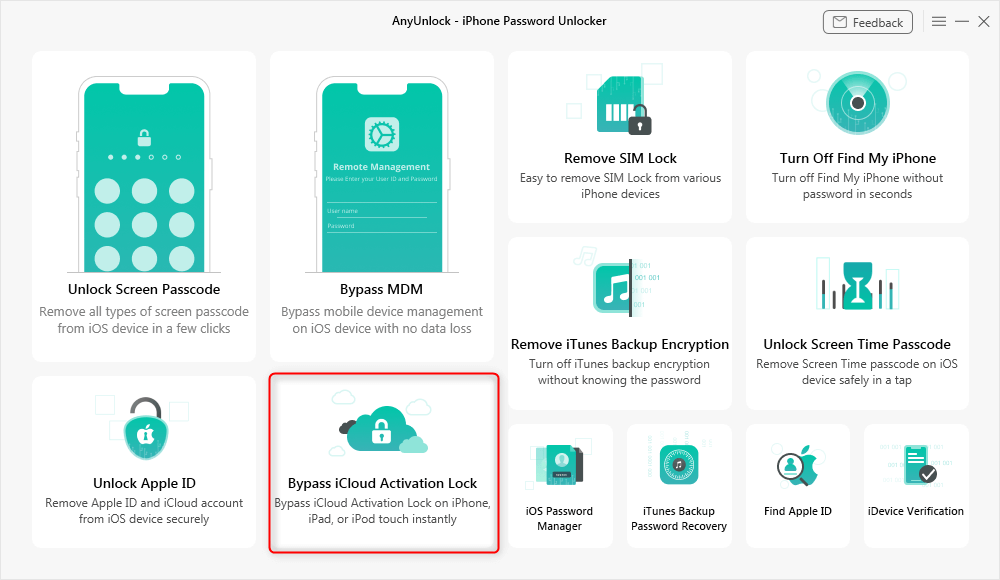
Step 1 – Install AnyUnlock on your computer, start the app, and choose Bypass iCloud Activation Lock feature from the main menu
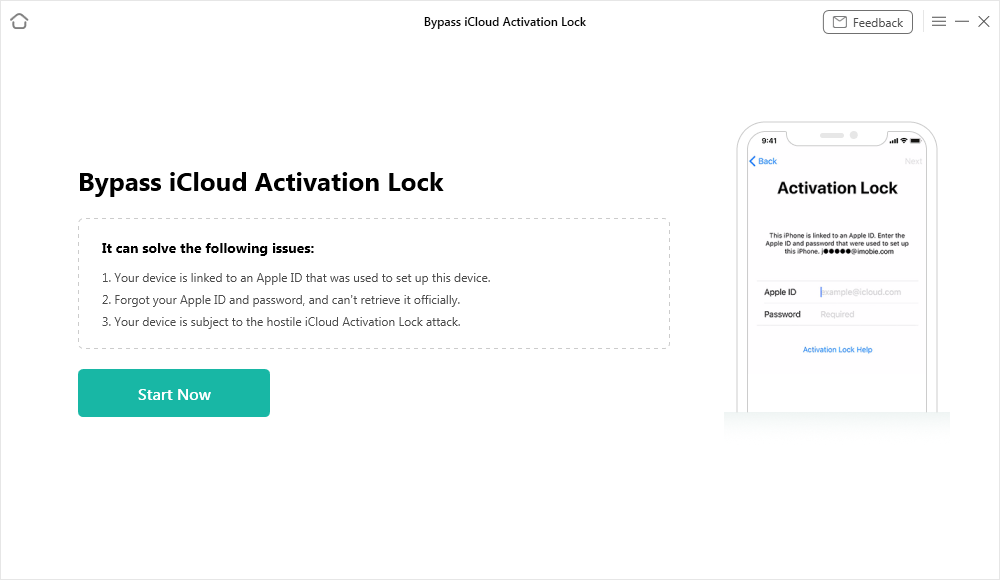
Step 2 – Connect the iPhone to the computer using USB cable, and click on the Start Now button once AnyUnlock recognizes the device
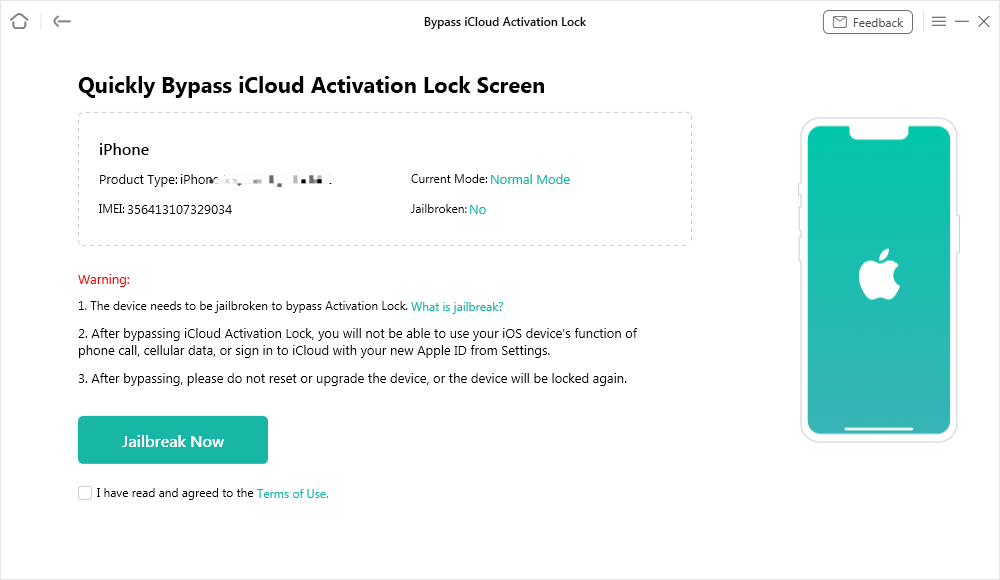
Step 3 – Read and agree to Terms of Use, then click on the Jailbreak Now button or use the Jailbreak Tutorial if you are not familiar with this procedure
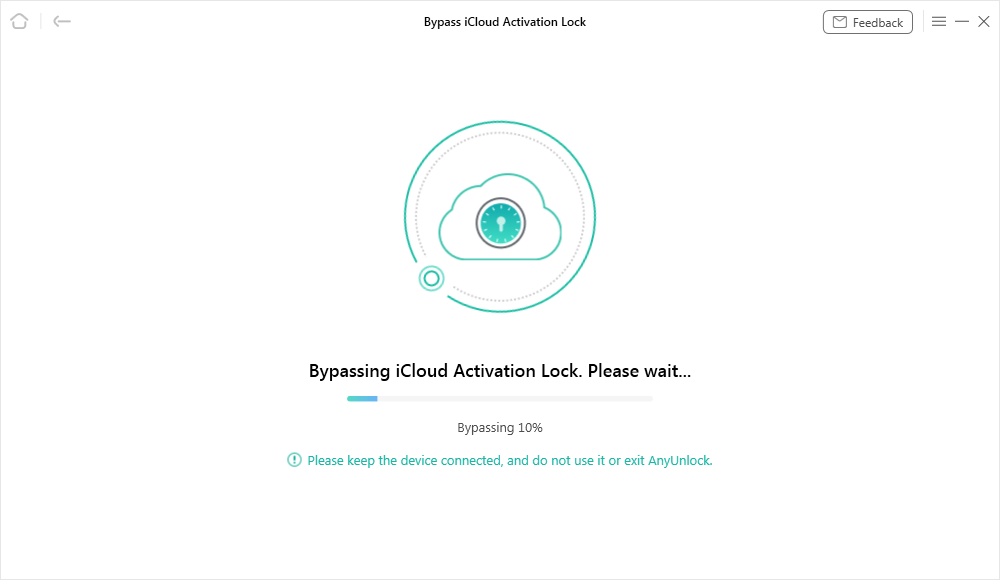
Step 4 – Following the successful jailbreaking of your device, click on the Bypass Now button and wait for a few minutes
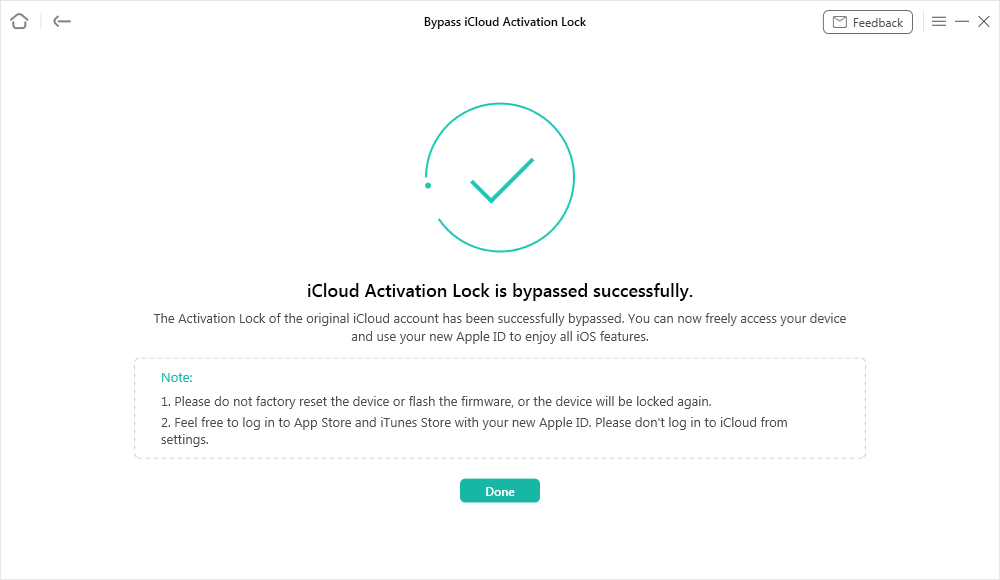
Step 5 – After AnyUnlock finishes the bypass procedure, you can restart your iPhone and use it normally, albeit with a few restrictions
by Web Desk via Digital Information World
Part 1 – Why Is My iPhone Disabled and What Can Be Done About It?
Apple takes device security very seriously and has introduced several mechanisms to keep iPhones safe from unauthorized access at all times. One of those tools is known as Find My iPhone, and it’s fully integrated into the iCloud service. Thanks to this feature, an iPhone can be locked remotely and it requires an Apple ID and password to unlock it once again.While this mechanism works as intended for the most, in certain situations it can cause difficulties for the legitimate owner of the device. This most commonly occurs when people buy iPhones in the second-hand market and receive them with the Find My iPhone option turned on, but without the accompanying account information. In such a case, a user might be stuck on the lock screen and unable to access the OS unless the phone is unlocked.
Unlocking can be performed in several ways, even without an Apple ID and password. Some of the most optimal methods for iPhone unlocking don’t even require a computer. Once you learn which tools to use to remove the iCloud lock from your iPhone, executing the unlocking procedure won’t take too much time or effort.
Part 2 – 2 Methods to unlock iPhone locked with iCloud
Users have several options at their disposal if they want to bypass the iCloud lock on an iPhone without a valid Apple ID. If you don’t currently have a computer with you, it’s still possible to accomplish this task within a short timeframe. The following two methods are suitable for this purpose, but each comes with a unique set of advantages and disadvantages that need to be carefully balanced.Method #1 – Unlock Using DNS Bypass
On some iPhones, it may be possible to use the DNS bypass procedure and remove the activation lock by sidestepping the account verification step. DNS is short for Domain Name Service, so this technique basically involves the insertion of a different URL during the activation step, effectively redirecting the device to a custom server that can help to unlock it. This method doesn’t require a computer or the current iCloud credentials, and it can be performed very easily by practically anyone. Here is what you need to do to execute a DNS bypass on your device:Step 1 – Select accurate language and country options on your iPhone
Step 2 – In the Settings menu, find the button with ‘I’ symbol next to the Wi-Fi network and press it
Step 3 – Tap on the Configure DNS field to change the domain name
Step 4 – Tap on Manual, and then enter the code for the geographic region where you are located
Step 5 – Use the Back button to return to the Configure DNS field without proceeding
Step 6 – Try turning on your iPhone again, and you should be able to get past the lock screen
While this workaround is effective, there are some limitations in terms of the iPhone models supported and geographic location that make this approach a poor choice in many situations. It only works on iPhones running iOS 8 to iOS 10, and DNS bypass may not be possible in some countries at all. The device also needs to be charged to at least 80% of the battery capacity for this procedure to be successful, and a stable internet connection is required. Even if all those conditions are met, DNS bypass can sometimes fail, which is why users are motivated to find a better alternative that involves fewer steps and has a higher expected rate of success.
Method #2 – Unlock with AnyUnlock - iPhone Password Unlocker
If you download and install third-party software made specifically for this kind of intervention, removing the activation lock without a computer may be even easier. In particular, AnyUnlock by iMobie deserves to be at least tested in this capacity as it has a proven track record of providing unrestricted access to all models of Apple gadgets. This software was developed as a general solution for removing all types of locks from iPhones or other devices, including the most advanced lock types such as MDM lock, SIM card lock, or iCloud activation lock. In addition to a wide range of possible uses, this software comes with far fewer limitations than the previously described DNS bypass method. Its interface is very simple and accessible even to complete beginners, and all key functions can be utilized without any technical expertise. It also has a free version that lets users try it without any risk.Even more importantly, AnyUnlock is compatible with a wide range of devices, including older models of Apple devices starting with iPhone 5 and iPad 4. In a vast majority of cases, the unlocking procedure will be completed successfully and the user will gain full access to the device within minutes. However, it’s important to be aware that the procedure involves jailbreaking, which may limit the functionalities of the unlocked device (i.e. can’t log into iCloud). All personal data stored on the device or apps downloaded from the App Store will be wiped from the device and may be lost unless it’s backed up.
Here is how you can get around the iCloud lock set with Find My iPhone using AnyUnlock’s specialized feature for unlocking mobile phones without a password:
Step 1 – Install AnyUnlock on your computer, start the app, and choose Bypass iCloud Activation Lock feature from the main menu
Step 2 – Connect the iPhone to the computer using USB cable, and click on the Start Now button once AnyUnlock recognizes the device
Step 3 – Read and agree to Terms of Use, then click on the Jailbreak Now button or use the Jailbreak Tutorial if you are not familiar with this procedure
Step 4 – Following the successful jailbreaking of your device, click on the Bypass Now button and wait for a few minutes
Step 5 – After AnyUnlock finishes the bypass procedure, you can restart your iPhone and use it normally, albeit with a few restrictions
Final words
If you are ever in a position where you need to unlock a disabled iPhone without a computer, knowing the appropriate methods will save you from some serious frustration. Even if you can’t obtain the Apple ID and password that were used to lock the device through iCloud, it’s possible to bypass the activation lock in multiple ways. You can accomplish this through DNS bypass, but this method is rather complex and doesn’t always work. That’s why it’s highly recommended to use AnyUnlock instead and jailbreak the device before removing the lock and returning the phone to normal operation. AnyUnlock is a complete iOS unlocking toolkit and can also help you to remove any other type of lock if needed.by Web Desk via Digital Information World
Elon Musk Boldly Declares In Court That He’s Not Keen On Being The CEO Of Any Firm
The billionaire is now the owner of Twitter but his shocking statements mentioned during a court appearance recently really had the world in a state of disbelief.
After firing Twitter’s CEO and top executives, not to mention reducing the workforce by half, he opted to be the firm’s CEO and Chief and is handling all the major decision-making himself. Yes, Musk is calling the shots for both Twitter and his other firm called Tesla.
After that, we saw the billionaire share how he felt the current arrangement in the Twitter firm is all temporary. He hopes to reduce his working hours in the company and hire another person to run all the day-to-day dealing in a timely and organized manner.
Both Musk and Tesla are caught up in a trial in the state of Delaware. This dates back to an incident in 2018 where a pay package announced by his firm ended up making him a billionaire and the world’s richest individual.
A shareholder has reportedly sued Elon Musk and Tesla and accused them of taking up a huge compensation that was not only so massive and seeing it be authorized by the board would result in such a huge breach of its own policy.
On that note, Musk was seen speaking about how it’s not correct to use the word CEO in this context. He fails to use that title when he is working at his firms and hence it does not represent the types of work he is busy in.
At SpaceX, he claims to be busy making rockets, and then at Tesla, he’s engaged in the technology linked to car production. He calls the shots and the engineers achieve the goals at hand. He also says that a great team of engineers is working for a great engineer and not just a CEO so his input is important and he sees things as one of them.
And then one of the attorneys asked Musk why he used 50 of his Tesla employees to assist with work at Twitter. To that, the billionaire says that he did it for a voluntary initiative and they were asked to work after hours. Moreover, no other board member from Tesla ended up calling him ever to mention the idea is not good and Musk repeated those statements in court that day.
Photographer: Angela Weiss/AFP via Getty Images
Read next: The Battle For Twitter To Remain Obedient Of The GDPR In The EU Continues
by Dr. Hura Anwar via Digital Information World
After firing Twitter’s CEO and top executives, not to mention reducing the workforce by half, he opted to be the firm’s CEO and Chief and is handling all the major decision-making himself. Yes, Musk is calling the shots for both Twitter and his other firm called Tesla.
After that, we saw the billionaire share how he felt the current arrangement in the Twitter firm is all temporary. He hopes to reduce his working hours in the company and hire another person to run all the day-to-day dealing in a timely and organized manner.
Both Musk and Tesla are caught up in a trial in the state of Delaware. This dates back to an incident in 2018 where a pay package announced by his firm ended up making him a billionaire and the world’s richest individual.
A shareholder has reportedly sued Elon Musk and Tesla and accused them of taking up a huge compensation that was not only so massive and seeing it be authorized by the board would result in such a huge breach of its own policy.
On that note, Musk was seen speaking about how it’s not correct to use the word CEO in this context. He fails to use that title when he is working at his firms and hence it does not represent the types of work he is busy in.
At SpaceX, he claims to be busy making rockets, and then at Tesla, he’s engaged in the technology linked to car production. He calls the shots and the engineers achieve the goals at hand. He also says that a great team of engineers is working for a great engineer and not just a CEO so his input is important and he sees things as one of them.
And then one of the attorneys asked Musk why he used 50 of his Tesla employees to assist with work at Twitter. To that, the billionaire says that he did it for a voluntary initiative and they were asked to work after hours. Moreover, no other board member from Tesla ended up calling him ever to mention the idea is not good and Musk repeated those statements in court that day.
Photographer: Angela Weiss/AFP via Getty Images
Read next: The Battle For Twitter To Remain Obedient Of The GDPR In The EU Continues
by Dr. Hura Anwar via Digital Information World
Phone Companies In The UK Are Struggling To Identify And Block Spoofed Calls
Leading communication regulating firm Ofcom is sharing insights on UK phone companies and how they’re currently facing a major dilemma. It’s related to a failure in both the identification as well as the blocking of spoofed phone calls.
Therefore, what is recommended is that they come forward with new rules that provide protection against such threat actors and scammers who arise with the intention of using fake telephone numbers.
On average, the report by Ofcom is shedding light on how 75% of individuals had such complaints on their devices in the past three months.
Ofcom says that with new rules in place, all telephone networks could not only identify but even block suspicious calls whenever they find it to be feasible technical-wise. It also mentioned how various phone organizations should make it a point to ensure all numbers in the UK are following a specific pattern.
At the same time, a blocking process should begin that is situated across the firm’s Do Not Originate list. Other suggestions included blocking calls that come over from abroad and playing with a UK-based caller’s ID.
Such rules are being implemented on a voluntary basis and have even gone down by nearly 65% in terms of scam complaints arising from phone customers. Those organizations that are not complying would be given a six-month period to make the changes required and these rules would start being enforced as early as next year.
However, no major details on which fines would be coming forward were outlined by Ofcom in case they’re not putting out new guidelines.
The move is set out to make it easier and safer for users while really making the ordeal a simpler process in terms of how to take more action against things like spam calls from their devices.
Did you know that Apple iPhone 13 and beyond models do have a feature for call silencing for those who are not a part of your contact list? This way, users are prevented from being interrupted. Meanwhile, Android applications for Phones do have a similar array of settings in place for enhanced protection.
So as you can see, the goals are plenty and it’s about time various phone organizations got serious and solved a problem that’s turning into a nuisance for so many smartphone users in the country.
Read next: Is Your Password Strong Enough? Weak Password Is a Big Problem of 2022
by Dr. Hura Anwar via Digital Information World
Therefore, what is recommended is that they come forward with new rules that provide protection against such threat actors and scammers who arise with the intention of using fake telephone numbers.
On average, the report by Ofcom is shedding light on how 75% of individuals had such complaints on their devices in the past three months.
Ofcom says that with new rules in place, all telephone networks could not only identify but even block suspicious calls whenever they find it to be feasible technical-wise. It also mentioned how various phone organizations should make it a point to ensure all numbers in the UK are following a specific pattern.
At the same time, a blocking process should begin that is situated across the firm’s Do Not Originate list. Other suggestions included blocking calls that come over from abroad and playing with a UK-based caller’s ID.
Such rules are being implemented on a voluntary basis and have even gone down by nearly 65% in terms of scam complaints arising from phone customers. Those organizations that are not complying would be given a six-month period to make the changes required and these rules would start being enforced as early as next year.
However, no major details on which fines would be coming forward were outlined by Ofcom in case they’re not putting out new guidelines.
The move is set out to make it easier and safer for users while really making the ordeal a simpler process in terms of how to take more action against things like spam calls from their devices.
Did you know that Apple iPhone 13 and beyond models do have a feature for call silencing for those who are not a part of your contact list? This way, users are prevented from being interrupted. Meanwhile, Android applications for Phones do have a similar array of settings in place for enhanced protection.
So as you can see, the goals are plenty and it’s about time various phone organizations got serious and solved a problem that’s turning into a nuisance for so many smartphone users in the country.
Read next: Is Your Password Strong Enough? Weak Password Is a Big Problem of 2022
by Dr. Hura Anwar via Digital Information World
Wednesday, November 16, 2022
Is Your Password Strong Enough? Weak Password Is a Big Problem of 2022
In the era of technology, it is significant to have a strong password to protect your online presence because of a rapid increase in cyber-attacks. However, people do not realize how necessary it is and continue to use weak passwords Like curse words, famous personalities, different states, famous places, or number sequences that can easily be guessed by hackers.
A weak password is a big problem, and it is going to get worse in the next few years, but people are unable to realize the importance of strong ones. A recent study of Cybernews has found that the most common password for 2022 is ‘123456’, a number sequence, that was used in 111,418 instances after analyzing millions of leaked ones. Because people are using the same password for all their accounts, making it is easy for hackers to access all their information.
This research was done to make people realize that keeping a difficult password that you can't remember easily is extremely important today to stay safe online. Keep reading to find out how to ensure that your passwords are strong enough!
In the ranked basic passwords, Cybernews spotted 16,981 samples of the password "admin," with "root" and "guest" coming in second and third, respectively.
Despite continuous warnings from experts, many people are still recycling passwords across different accounts. From 292,869 cases, some are hooked with curse words that are a top site for obscenity, like fuck, shit, and ass are among the top ones used as passwords. Some use "king" and popular celebrities and famous people names courtly, like great football players “Messi” and “Ronaldo”.
A strong password is not just about keeping different names that are not common, but we should emphasize that to make a password more difficult to crack, it must also contain a range of letters and case-sensitive symbols.
According to Mantas Sasnauskas (leader of the Cybernews research team), "Complexity equals diversity, or how much information is included in a given password." It is noteworthy to use randomly generated passwords because they include a high level of complicatedness, and are resistant to forceful attacks. More diversity implies the data is more chaotic, and chaos is great.
It's no secret that passwords are a big security risk. They're often easy to guess or crack, and once someone has access to your account, they can do a lot of damage. So, how can you make your passwords more secure?
There are a few simple steps you can take to make your passwords much more secure. First, use a password manager to generate unique and store strong passwords. It is effortless to function because it generally appears as a browser extension that will automatically create a strong password for you.
Don't lose heart for any reason the first one doesn't work for you; try the second option. Second, use Haveibeenpwned which can quickly determine whether your email address and other sensitive information have been compromised. If they have, try not to be alarmed—at least you now know how to make fresh, robust passwords that are unsusceptible to cybercriminals! And finally, make sure to use different passwords for different accounts. Follow these steps, and you'll be much more secure against password attacks.
Read next: A New Fraud Site, Fangxiao, Is Doing Brand Impersonating With Over 42,000 Sites
by Arooj Ahmed via Digital Information World
A weak password is a big problem, and it is going to get worse in the next few years, but people are unable to realize the importance of strong ones. A recent study of Cybernews has found that the most common password for 2022 is ‘123456’, a number sequence, that was used in 111,418 instances after analyzing millions of leaked ones. Because people are using the same password for all their accounts, making it is easy for hackers to access all their information.
This research was done to make people realize that keeping a difficult password that you can't remember easily is extremely important today to stay safe online. Keep reading to find out how to ensure that your passwords are strong enough!
In the ranked basic passwords, Cybernews spotted 16,981 samples of the password "admin," with "root" and "guest" coming in second and third, respectively.
Despite continuous warnings from experts, many people are still recycling passwords across different accounts. From 292,869 cases, some are hooked with curse words that are a top site for obscenity, like fuck, shit, and ass are among the top ones used as passwords. Some use "king" and popular celebrities and famous people names courtly, like great football players “Messi” and “Ronaldo”.
A strong password is not just about keeping different names that are not common, but we should emphasize that to make a password more difficult to crack, it must also contain a range of letters and case-sensitive symbols.
According to Mantas Sasnauskas (leader of the Cybernews research team), "Complexity equals diversity, or how much information is included in a given password." It is noteworthy to use randomly generated passwords because they include a high level of complicatedness, and are resistant to forceful attacks. More diversity implies the data is more chaotic, and chaos is great.
It's no secret that passwords are a big security risk. They're often easy to guess or crack, and once someone has access to your account, they can do a lot of damage. So, how can you make your passwords more secure?
There are a few simple steps you can take to make your passwords much more secure. First, use a password manager to generate unique and store strong passwords. It is effortless to function because it generally appears as a browser extension that will automatically create a strong password for you.
Don't lose heart for any reason the first one doesn't work for you; try the second option. Second, use Haveibeenpwned which can quickly determine whether your email address and other sensitive information have been compromised. If they have, try not to be alarmed—at least you now know how to make fresh, robust passwords that are unsusceptible to cybercriminals! And finally, make sure to use different passwords for different accounts. Follow these steps, and you'll be much more secure against password attacks.
Read next: A New Fraud Site, Fangxiao, Is Doing Brand Impersonating With Over 42,000 Sites
by Arooj Ahmed via Digital Information World
Elon Musk Says Twitter Would Soon Allow Companies To Identify Which Other Accounts Are Linked With Them
Currently, we see Twitter’s paid Blue account walking on thin ice as the firm tries to figure out how it can control the non-stop attack and abuse conducted by so many impersonators.
Still, the app means business and it’s really trying hard to create a new stream of revenue that would be less reliable on ads and more on subscriptions.
Yesterday, we saw Musk speak in his Tweet about how the firm would be enabling organizations to identify which other Twitter accounts are linked to them. And by that, he meant the organization would be given so much more control over various affiliated accounts while Twitter is in charge.
It is yet to be clear if this tool would be paid for by the firm or would be an exclusive privilege provided to those having the paid Blue tier. As it is, so much uncertainty surrounds the topic of Twitter verification and the blue ticks as it’s put on hold thanks to the controversies arising for so long. People are literally so confused as to what is going on and they don’t even know where to begin.
If things do go as scheduled, Twitter’s plan as set out in tweets is linked to Twitter Blue and other such services that are paused thanks to impersonation to be reinstated by the end of this week. So the waiting game begins.
Twitter and its new owners have really cast a lot of doubts in people's minds about how much chaos surrounds the future of the platform. Today, it’s working with half the number of employees after the workforce was reduced by a significant margin.
There is a new business model in place that is linked to subscriptions, ads, and paywalls too. Hence, a lot is being done and some are publicized while others are not so much. We’ve seen Twitter expand to new highs, then be trolled, and finally, be abused. In the span of just a week.
So we are now waiting for Musk to roll this out and when it does, we’d love to see the response of firms regarding the new affiliated verification and whether or not it’s being accepted with positivity or not.
This feature would make it easier to track those and report others who are unaffiliated on the app. And when it’s a success, Twitter would charge organizations as a premium service.
Read next: Necessity Of Subscribers For Augmentation Of Twitter
by Dr. Hura Anwar via Digital Information World
Still, the app means business and it’s really trying hard to create a new stream of revenue that would be less reliable on ads and more on subscriptions.
Yesterday, we saw Musk speak in his Tweet about how the firm would be enabling organizations to identify which other Twitter accounts are linked to them. And by that, he meant the organization would be given so much more control over various affiliated accounts while Twitter is in charge.
It is yet to be clear if this tool would be paid for by the firm or would be an exclusive privilege provided to those having the paid Blue tier. As it is, so much uncertainty surrounds the topic of Twitter verification and the blue ticks as it’s put on hold thanks to the controversies arising for so long. People are literally so confused as to what is going on and they don’t even know where to begin.
If things do go as scheduled, Twitter’s plan as set out in tweets is linked to Twitter Blue and other such services that are paused thanks to impersonation to be reinstated by the end of this week. So the waiting game begins.
Twitter and its new owners have really cast a lot of doubts in people's minds about how much chaos surrounds the future of the platform. Today, it’s working with half the number of employees after the workforce was reduced by a significant margin.
There is a new business model in place that is linked to subscriptions, ads, and paywalls too. Hence, a lot is being done and some are publicized while others are not so much. We’ve seen Twitter expand to new highs, then be trolled, and finally, be abused. In the span of just a week.
So we are now waiting for Musk to roll this out and when it does, we’d love to see the response of firms regarding the new affiliated verification and whether or not it’s being accepted with positivity or not.
This feature would make it easier to track those and report others who are unaffiliated on the app. And when it’s a success, Twitter would charge organizations as a premium service.
Read next: Necessity Of Subscribers For Augmentation Of Twitter
by Dr. Hura Anwar via Digital Information World
Subscribe to:
Comments (Atom)