Wednesday, February 22, 2023

New Study Says A Whopping 96% Of Users Spend 13 Hours Weekly On Social Media

A new study is shedding light on some fascinating statistics regarding the world of social media.

The study highlights how mobiles are now the leading platform in terms of media consumption. And by that, we mean users are spending nearly 4 hours each day on their smartphones.

This was in comparison to the likes of PCs and televisions where people were spending just 3 hours each day. The research comes to us thanks to the likes of a report by leading experts at Newzoo. They managed to survey nearly 2,500 people across the US.

Furthermore, it was proven how so many generations engaged differently than all others in terms of the world of social media and entertainment.

As far as engagement is concerned, social media was crowned the front-runner. And to be honest, there aren’t a lot of shocked faces here. We all are social beings and we love staying informed about what is happening in our circle and across the globe.

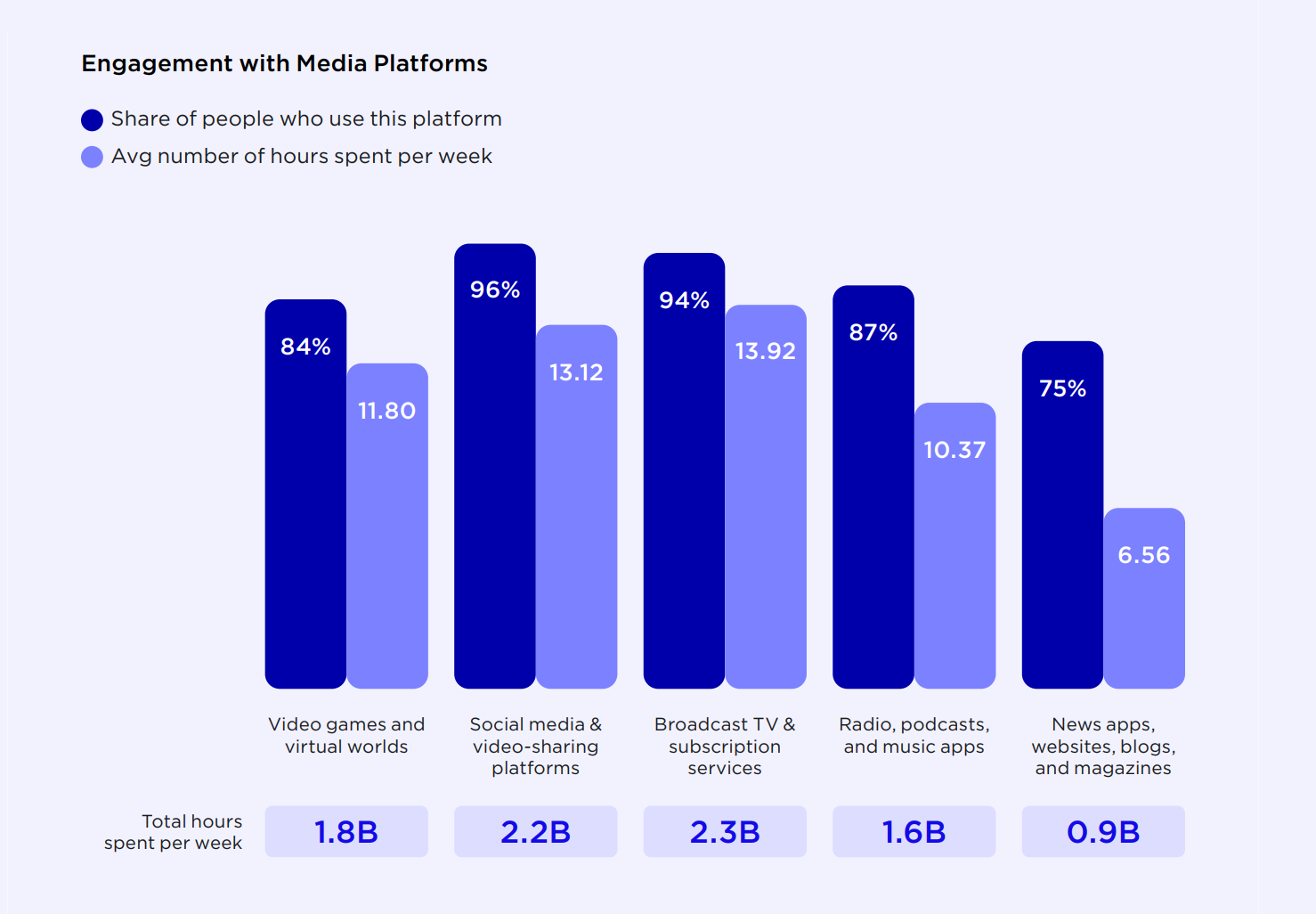
96% of users admitted they spend 13 hours each week on various social media apps including those that share videos. And no surprise here that TikTok and Instagram were classified among the favorites.

But the world of entertainment is just as crucial as all others. And that’s why 94% claim they spend 14 hours on the likes of subscription services as well as broadcast television. Meanwhile, 87% gave credit to the likes of podcasts and music platforms, where they spent 11 hours weekly.

So many video gaming platforms would attract 84% of the user base, where they were functioning at 12 hours each week. Moreover, such findings pointed to the huge trend linked to the world of active engagement as well as entertainment. So many individuals are playing with the likes of digital content and call it a rewarding affair.

Clearly, a lot of this has to do with the world of smartphones. The majority of engagement arises through such means. And the key driver here is social media where engagement goes up to 73% on smartphones than other types of devices. But we did see how a lot of people preferred TV over phones for the categories like broadcast television.

In the same way, this research shed light on the great popularity of video gaming applications. They command a massive amount of the key hours of engagement that are closely followed up by mediums including comics and books. After that, apps linked to sports and fitness arise.

But another interesting aspect highlighted by this study has to do with the likes of users not only watching content. They are also getting more and more involved with various platforms. The goal is to share more content with other people too. And as one can expect, the younger lot leads the race.

On average, 69% spoke about spending 7 hours each week in developing digital content. This was in stark comparison to Gen X where just 46% spend around 6 hours weekly to publish their images or videos on various apps.

When you take on the report as a whole, it’s easy to see that apps are not just linked to media consumption. They also have to do with the likes of user engagement.

The main take-home message if you may put it is that most people spend 13 hours every week engaging with social media. And the majority of this is through their mobiles. And it’s Gen Z who spend 7 hours each week producing digital content.


Read next: US Media Consumption Changed Dramatically In The Past 12 Months, Here’s What You Need To Know
by Dr. Hura Anwar via Digital Information World

Instagram is About to Implement Two Important Changes

With Meta’s stock in a downward spiral and Facebook becoming one of the least popular social media platforms in the world, the burden has been placed on Instagram to save its parent company’s flagging fortunes. Verified users have been a big part of the platforms push these past few years because of the fact that this is the sort of thing that could potentially end up bringing content and viewers to the platform in large quantities.

With all of that having been said and now out of the way, it is important to note that Instagram is adding a new feature that will expand the appeal of verification for the users that are opting for it. It is a minor feature, but in spite of the fact that this is the case it will add a new layer to the verification process.

Essentially, Instagram users who have received the verification tick on the platform will soon receive a new section on their profile, as spotted by Matt Navarra. This section will reveal the exact date at which they received their verification with all things having been considered and taken into account.


Users will now be able to publicize how long they have been verified for, which might add to the exclusivity and make it seem more premium than might have been the case otherwise. However, this is not the only update that beta testers have noted for the platform.

The second update that is being noted here is that of a new sticker. More specifically, Instagram users will now have a Before and After sticker pairing, according to Alessandro Paluzzi. Instagram and Instagram Reels in particular have become popular places to post dramatic physical changes or something along those lines, and these stickers will definitely promote that kind of usage.


These two features show that Instagram is constantly tweaking its platform in order to make it more in line with what users have come to expect. With these updates on the horizon, users can look forward to an improved experience, especially with the sticker since it is something that pretty much every user will be able to take advantage of.

Read next: Researchers release a list of top apps Americans want to keep and delete
by Zia Muhammad via Digital Information World

66% of Consumers Say They’d Be Willing to Share Data if They Get Paid

Data collection is something that you simply can’t escape if you want to use some of your favorite apps, but in spite of the fact that this is the case a lot of consumers don’t seem to be all that happy about having to do it. Secure Data Recovery recently conducted a survey of around 918 Americans that revealed their true feelings about such practices, and the findings from this survey paint a picture of what can make data sharing more appealing.

With all of that having been said and now out of the way, it is important to note that 66% of the consumers who responded to this survey said that they might be willing to share data… if they got some kind of monetary compensation in return. What’s more, 61% went so far as to delete an app because of the fact that this is the sort of thing that could potentially end up taking more data than they were comfortable with.

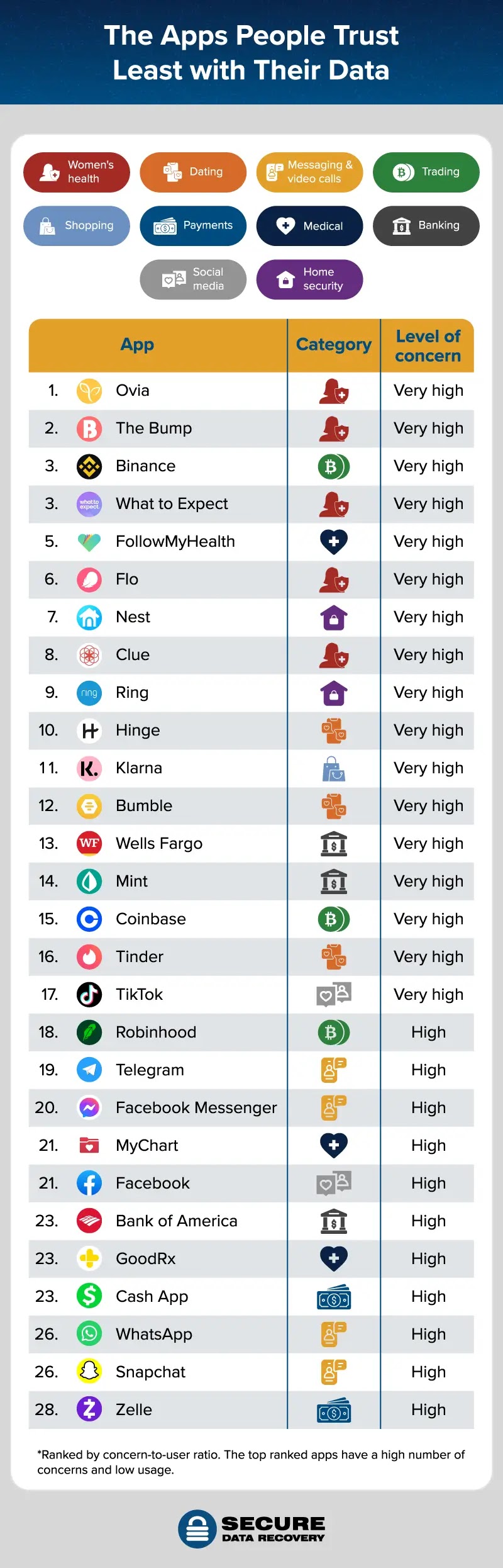
Another thing that this survey dove deep on was the kinds of apps that people are least likely to trust. It turns out that women’s health apps such as Ovia and the Bump elicit very high levels of concern among consumers with all things having been considered and taken into account. That makes sense since these apps have frequently been found to sell this data to the highest bidder.

However, women’s health apps were not the only ones that were viewed with mistrust. Crypto apps such as Binance and Coinbase were also sources of major concern for consumers, since they handle sensitive financial data that could expose them to more risks than might have been the case otherwise.

If we were to zero in on the world of social media, many apps in that space are not highly trusted by consumers either. It turns out that TikTok is the least trusted social media app out there right now, which makes sense when you consider how the Chinese government might be using it to spy on people without their knowledge.

TikTok happened to be the only app that registered a Very High level of concern among consumers, but Facebook, Facebook Messenger and WhatsApp also received High concern ratings as well. What’s more, Snapchat doesn’t seem to be all that trusted either, which suggests that social media in general is not the sort of thing that people trust with their personal and private data and information.

Now that we have an overview on which apps are trusted the least, are there any apps on the other end of the spectrum? It turns out that Dropbox is among one of the apps that consumers trust the most when it comes to handling their data. YouTube is also surprisingly well trusted, which gives it a real edge over its competitors like TikTok and Facebook.

Reddit also seemed to be relatively well trusted, which reveals that not all social media platforms are viewed with suspicion. Consumers are clearly aware of the dangers of being tracked without their consent, and they might not be willing to use apps that compromise their right to privacy for much longer in the future.


Read next: More opportunity time for app creators as the number of abandoned apps goes up by 6 percent
by Zia Muhammad via Digital Information World

Tuesday, February 21, 2023

Top 5 HTML WYSIWYG Editors and Why Your Web App Needs Them

Finding faster, better, and more cost-effective ways to develop web apps comes with the rapid growth of technology. As software developers, we always need to try and improve the way we build our applications and their features.

More recently, this process has heavily involved using tools, frameworks or libraries, APIs, components, and other premade HTML elements.

That’s because these can help developers cut plenty of development time while improving the quality of applications. HTML WYSIWYG editors are some of the most popular tools when it comes to developing, simplifying, and enhancing web applications.

An HTML editor helps both developers and application users easily create web content. Thus, learning about HTML WYSIWYG editors, including how they work, is essential for developers.

In this article, we’ll look at some of the best HTML editors on the market. However, before we get to that, let’s review some HTML editor basics and why we need them for our apps. After reading this, you should have an idea of which HTML editor you should use for your app’s content needs.

What are HTML editors?

People use HTML WYSIWYG editors for work or personal purposes all the time, whether they’re aware of it or not. When you’re developing an app, writing a blog post, or posting any content online, you’re most likely using one.

As its name suggests, an HTML editor lets its users edit HTML content for websites and web applications. They often differ in appearance, purpose, or specialty, but they all have the objective of making web content creation easy.

Since web development became popular, HTML editors started supporting not only HTML code but also other languages. These include stylesheet languages like CSS and SCSS as well as scripting languages like PHP and JavaScript, among many others.

HTML editors have two types, text editors and WYSIWYG (what you see is what you get) editors. Let’s discuss what they are in the following section.

What are the two types of HTML editors?

Text editors

Text editors let developers create HTML content by purely (or mostly) writing code. They have helpful features, like syntax highlighting, autocomplete, code formatting, keyboard shortcuts, and project structure, that allow for efficient coding. It’s no secret that those who use text editors must have HTML or basic programming knowledge at the very least.

And the more complex your requirements are, the more languages, frameworks, or tools you need to integrate and use. Therefore, experienced developers, people who love coding, or programming students usually prefer text editors.

There’s a downside to using text editors, however. Regular people with great ideas but without programming knowledge would need to learn how to code to create HTML content. And this process usually takes up plenty of time and resources, even with the numerous online learning materials and tools. They do provide complete control over development, though.

WYSIWYG editors

On the other hand, we have WYSIWYG editors, which involve an editable graphical interface and a toolbar. The interface gives an idea of how the page or content should look after it’s published. The toolbar, on the other hand, contains buttons corresponding to different rich text editing functionalities that modify the content.

In other words, they allow users to create HTML content, including web pages, without much coding, if any at all. For this reason, they’re perfect for coding beginners or those who have urgent requirements but little to no coding experience.

WYSIWYG editors aren’t always perfect, however. Each of them can vary a lot in terms of features, looks, and pricing. Thus, when looking for a WYSIWYG editor to use, people should carefully assess its features and decide whether it fits their use case or not.

It’s important to note that between text and WYSIWYG editors, there’s no better way to create web apps or content. Instead, developers, organizations, and individuals must choose based on their requirements. However, because WYSIWYG editors have a potentially broader range of users and are easier to use, we’ll be focusing on them in this article.

So, whenever you see the words “HTML editors," we’re referring to the WYSIWYG kind. Before we discuss finding the right HTML editor for you, let’s first check why we need them in our apps.

Why do we need HTML editors?

The answer to why we should use HTML editors for our web apps’ content needs is simple. Nowadays, it’s critical to deploy high-quality applications on time, and that’s something that HTML editors can provide. Here are some reasons why we need these editors:
  • Using feature-rich, third-party editors can save you months of development time
  • You can reuse them for different applications that need content editing
  • Mature HTML editors require minimal or no maintenance
  • They let users of your app publish, share, or send their own content (comments, blog posts, messages, emails, and so on)
  • They give your users a better editing experience (most people might consider pure, unformatted plain text too archaic, especially for modern messaging apps)
Knowing why we need HTML editors is one thing, but what about choosing the right WYSIWYG editor for you? Continue reading below to learn more about the top WYSIWYG HTML editors you can choose from.

What are the best HTML editors in the market?

1. Froala


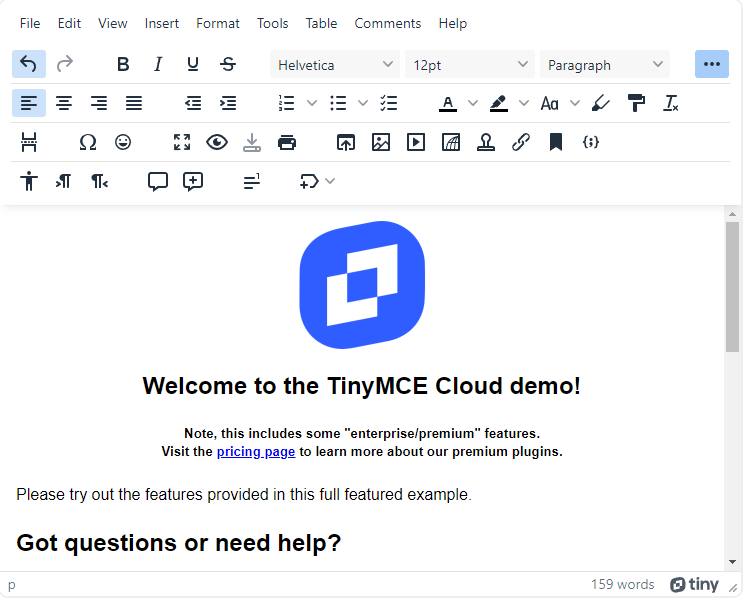
The first on our list is Froala, a lightweight powerhouse of an editor. Written in JavaScript, it’s easy to integrate into any application. Its modular architecture also means that you can easily pick from its hefty arsenal of 100+ features.

Some of the things it prides itself on are its elegance, speed, and user and developer friendliness. It’s often difficult to find an HTML editor that’s feature-rich, fast, and yet still intuitive. Robust premium editors tend to have cluttered toolbars because of their many features. Froala doesn’t, fortunately, because of its thoughtful and usability-focused design, customizability, and extensibility.

What you’ll love:
  • Amazing user experience with 40 ms initialization speed and intuitive interface
  • Modern, sleek, responsive, and platform-independent
  • Easy to use
  • In-depth feature and theme customization
  • An abundance of both basic and advanced features, including real-time editing, Markdown, smart content pasting, and code view
  • Classic, inline, and document-ready modes
  • Supports integration with over 15 frameworks and libraries
  • Good documentation, plenty of examples
  • Affordable, startup-friendly plans for a high-end editor
  • You can have all features across all plans

2. CKEditor
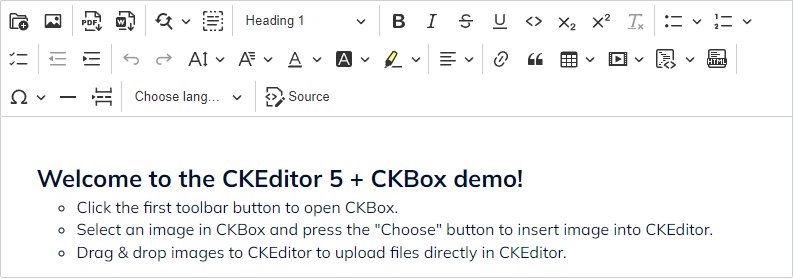


CKEditor is another popular WYSIWYG editor. It’s versatile, customizable, and mature, having existed for 19 years as of now. It has a free plan that contains the basic features and a paid one for which you’ll have to inquire. It also gives you the option to add premium features to an open-source license.

These include export to PDF, import from Word, and real-time collaboration, among others, and will incur additional monthly charges. It’s also plugin-based, so controlling the features you want in your editor should be easy. CKEditor has real-time collaboration features that let users comment and see the revision history.

What you’ll love:
  • Comprehensive real-time editing and collaboration features
  • Modern, responsive, and platform-independent
  • Theme customization
  • Markdown support
  • Supports integration with some popular libraries and frameworks
  • Classic, inline, and document-ready modes
  • Auto formatting and autocorrect features
  • Has the Watchdog feature, which detects, destroys, and resets editor instances when they crash
  • Detailed documentation
  • Open source plan with basic rich text features

3. Quill
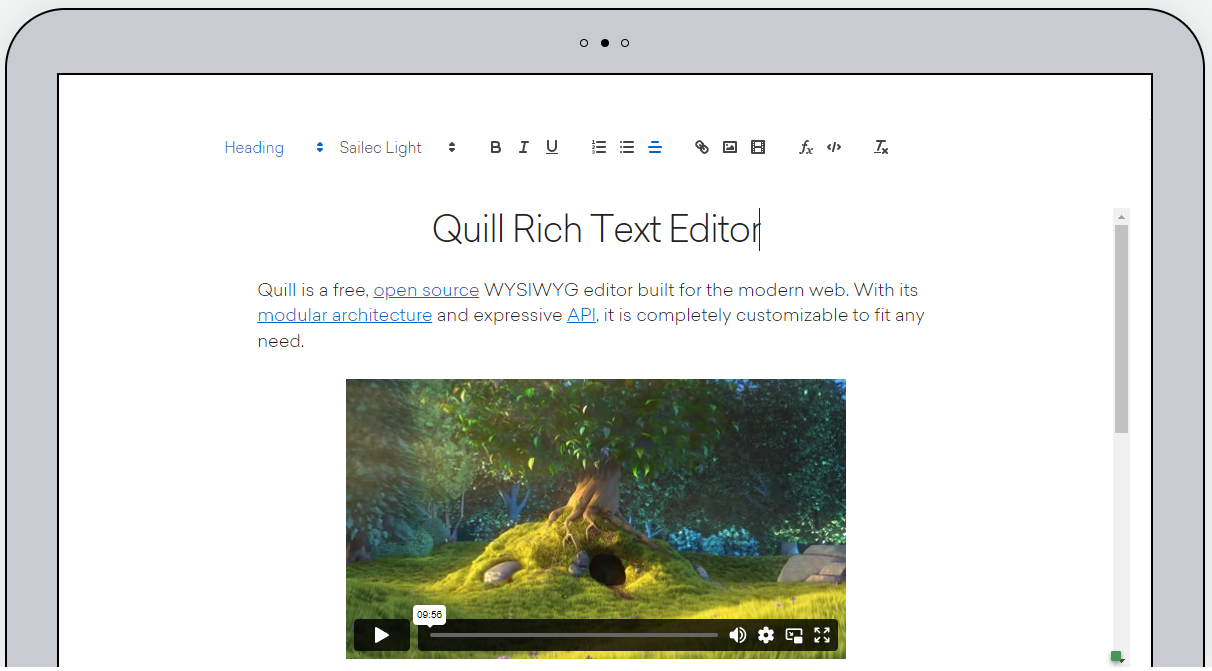


Next up, we have Quill, another open-source, modular, customizable, and developer-friendly WYSIWYG editor. Despite being lighter in terms of features, support, and number of users, Quill is still a solid, free option. It lets users start with the core features and add extensions once their applications scale.

This makes Quill very startup-friendly. It’s also fairly popular, having over 34,000 stars on GitHub at this article’s time of writing.

What you’ll love:
  • Great features for a fully open source WYSIWYG editor
  • Platform-independent
  • Theme customization
  • Decent documentation
  • Easy to integrate and use
  • Completely free

4. TinyMCE


TinyMCE is a very popular WYSIWYG editor that has both open source and premium plans. It’s developer-first, providing control with customization features. Due to being open-source, it’s accessible enough for smaller companies or individual developers. Those who want better or more features would have to pay extra, however.

It also supports spell checking and autocorrect on its professional and flexible enterprise plans. TinyMCE’s premium plans also have skins and icon packs for UI theming. When it comes to integrations, developers can integrate TinyMCE with about 12 frameworks.

What you’ll love:
  • Modern, sleek, responsive, and platform-independent
  • In-depth feature and theme customization
  • Many editing features for paid plans
  • Classic, inline, and document-ready modes
  • Supports integration with about 12 frameworks
  • Good documentation with a few demos
  • Has an open-source license
  • Large community
  • Real-time editing (all plans), mentions and comments (flexible)

5. Summernote
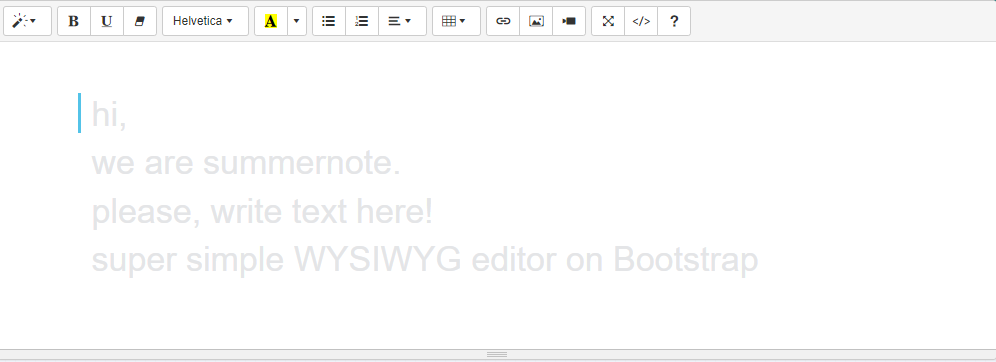


Lastly, we have Summernote, a Bootstrap and jQuery-based open source WYSIWYG editor. It’s also lightweight and modern, although it’s not as presentable as premium editors. However, Summernote has all the features you’d want in a basic rich text editor, including font styling, paragraph formatting, lists, images, and more.

It even has a code view feature where users can see the markup of the editor’s contents. Summernote also allows developers to customize the editor’s toolbar. And while it might not work across all browsers and platforms, it does work in all major or commonly used ones.

What you’ll love:
  • Easy installation and integration
  • Lightweight
  • Has a few advanced features
  • Has enough examples to get you started
  • Completely free

Conclusion

And there you have it, five of the best HTML WYSIWYG editors on the market. All of them are capable when it comes to rich text editing. Some even have additional features for page building or CMS integration. In the end, your choice will depend on your requirements.

Generally, though, you have to find a balance between features, user experience, developer-friendliness, and affordability. Finding an editor that has great documentation, demos, and examples certainly won’t hurt, either. Good luck finding the HTML editor of your choice!

by Web Desk via Digital Information World
Instagram Adds New Option That Snoozes All Suggested Posts For One Month And Tests ‘Watch Time’ For Reels Insights

Instagram is working on a series of changes including a recent launch of an option that snoozes suggested posts. At the same time, it is also internally testing another feature called watch time that provides more insights on Reels.

For starters, let’s look at the new feature that was launched today. Suggested posts can be annoying for obvious reasons, especially when they aren’t helpful. Moreover, it’s annoying when you’re being told to look at something that you’ve got little to no interest in.

And if that’s the case, we’ve got great news for you. Thanks to avid social media enthusiast Ahmed Ghanem who posted the news on his Twitter account, we know now that Instagram users can snooze all such suggestions. And that too for a period that goes up to 30 days.

All you need to do is go up to the settings tab on your account and click on Snooze suggestions for 30 days and that’s it! You’ll be free as can be from all those distracting and annoying suggestions.


On the other hand, Instagram is also working on providing its users with the chance to gain more insights into Reels. Hammad Oh recently shared the news on his Twitter account that shows how the app is adding watch time so creators know how their respective Reels are doing in general.


It’s going to feature some exciting updates that you as a creator would probably be very keen on knowing. This includes the time users are spending watching your Reels and also the average watch time of the Reel as a whole.

It really does make it so much more easier and interesting to know where your Reel stands with such stats. But for now, it’s in Beta so we should be seeing a release later on.

Read next: Zuckerberg Stuns The World By Following In Musk’s Footsteps With Sales Of Meta’s Blue Verification Badge
by Dr. Hura Anwar via Digital Information World

WhatsApp May Take Pride In Its Multi-Device Connectivity But Users Are Tired Of Its Lack Of Core Features

It can be said without any doubt that WhatsApp is one of the most sought-after messaging apps on social media.

We see its parent firm routinely update the app with plenty of new features and offerings, each one making it better and more enhanced than before. This is why we often see critics giving the platform owned by Meta credit where it is due and rightly so.

Despite plenty of other rivals in the business, WhatsApp continues to hold its ground firmly. But does that mean it’s perfect, well, far from it is the answer? And that might have something to do with its multi-device connectivity.

We agree the offering is wonderful and easily loved for obvious reasons. Many people adore the fact that you can log into your main device and at least four others. The only catch here is to ensure your main account is on your phone and nowhere else.

So you can use WhatsApp web from four other PCs without even being online on your phone. It’s definitely convenient but that does come with a fair share of problems. It lacks a lot of the core features that we see on the main account and we’re still wondering why.

Remember, multi-device connectivity is nothing new. It’s been there for nearly a year and each time around, we hear the firm is working on betting the support. But users are getting tired. They’re just not able to enjoy the offering as they should. What’s the point of having some and not all features on WhatsApp web? There has to be some explanation.

Below, we’re breaking down where exactly the lacking is and why quite a few users are getting frustrated by the second.

First things first, WhatsApp on the desktop does not allow its users to speak directly to those whose contact details haven’t been saved first. It’s the same rule as what we’ve been seeing for the parent device so no big differences here. But at the same time, it can get annoying when you can’t engage in a chat because you didn’t save the contact on your phone.

Secondly, you cannot update your status, even if you wanted to. Yes, you heard that right. The feature can only be done from your main account which is on your smartphone. It can’t be done from another linked device, no matter how hard you try.

So if you were worried about the woes of not saving contacts, well, there’s plenty more from where that came from with this feature. Oh, and selfies taken from your webcam are definitely included in this.

But you are allowed to view other people’s statuses and send out reactions and comments to those. And that’s about it.

Where it is bad, we’d like to shed light on some goodness too. Alerts linked to calls or texts don’t disappear when you log into one device and not the other. It’s probably one of the best features that we couldn’t be more grateful for.

The overall verdict is that WhatsApp needs to up its game if it takes this much pride in this multi-device connectivity feature. We understand that some things are still in beta and that support is a long and painstaking process. But almost two years is a long time and we hope to see some progress soon on this front.

The take-home message here is simple. Stop introducing a bucketload of new features when you’re having this much trouble fixing the old ones. What do you think?


Read next: Next WhatsApp Update to Bring Two Major Changes to the Table
by Dr. Hura Anwar via Digital Information World

A Long Awaited Instagram Feature Might Be Right Around the Corner

By this point most social media platforms have been optimized to the extent that they are unlikely to bring any major changes to their fundamental features. In spite of the fact that this is the case, there are a few small upgrades that users tend to request from time to time, and it looks like Instagram is about to bring one of them to the table at long last.

The social media platform is reportedly working on the ability to comment on posts as well as reply to other comments with GIFs (e.g: a Gif the comments can be seen under this post). They have become an important part of online communication, with other platforms like Twitter already having a fairly long tradition of allowing users to communicate with GIFs.


With all of that having been said and now out of the way, it is important to note that Instagram is clearly targeting Gen Zs with this potential update. GIFs can be useful because of the fact that this is the sort of thing that could potentially end up catering to a new generation that has started to get used to having them as an option whenever they are drafting a comment or a post.

The upcoming GIF integration could further improve Instagram’s status as the most popular platform for Gen Z, and potentially even make it more appealing than might have been the case otherwise. Even though Instagram is exceptionally late to the party, most Insta users will prefer to take what they get regardless of how long it took since that would be superior to them not receiving anything at all.

Although it is not yet certain when the feature will make its way to every Instagram user, a few select users have already started to see the option appear when they try to make a comment. This change might not be all that groundbreaking, but it might do a lot to improve Instagram’s ability to stay relevant especially in the face of stiff competition against the likes of TikTok.

Whether or not Instagram survives remains to be seen. However, it is still continuing to be the most valuable social media property that Meta has.

Read next: Zuckerberg Stuns The World By Following In Musk’s Footsteps With Sales Of Meta’s Blue Verification Badge
by Zia Muhammad via Digital Information World