Wednesday, April 4, 2018

How to Build an Interactive History Map with WRLD

There’s nothing new about using maps in education—they engage students and help them visualize location-based information. With the rise of digital e-learning platforms, they remain an important resource. Today’s educators need a mapping tool that is attractive and intuitive, easy to customize, can be accessed online and on mobile devices, and makes sharing with students simple. And if the maps are 3D, so much the better.

WRLD 3D Maps

I’ve just described WRLD. And while it’s great for developers, the company’s online Map Design tools (“a mapping tool for everyone”) open the door for those with absolutely no coding skills to create powerful custom maps.

WRLD invites anyone to design and manage custom 3D maps through our cloud-based mapping tool without extensive coding, optimized for both modern web and mobile applications.

Unlike Google Maps, WRLD is completely 3D. That will make anyone familiar with modern gaming feel completely at home. WRLD also prioritizes privacy, control and developer extensibility. It’s a product that ticks all the boxes. How would a teacher go about using it?

Create Custom 3D Maps with WRLD

Here’s the idea: WRLD provides you with a complete 3D map of the planet. You select the location you’re teaching about, select a suitable theme, add points of interest, and create cards that communicate your location-based content. You can then share a link of your map that opens a web browser or mobile app, embed it on a web page, or even include it in your own e-learning software.

Our goal is to build the most intelligent representation of the world in 3D.

WRLD is a work in progress. Rendering the entire world in 3D is a huge task, and it doesn’t yet offer maps of every country (although users can vote for new areas to be included in WRLD). Features are still being added, and documentation is still being created. But despite those limitations, it’s a compelling mapping product that will already meet many of your needs.

Currently over 300 million square meters of maps are available. There is full coverage of the US, Canada, UK, Ireland, Scandinavia, the Arab Peninsula, Italy and more, as well as partial coverage of Spain, Australia and Thailand. That should cover a lot of your syllabus!
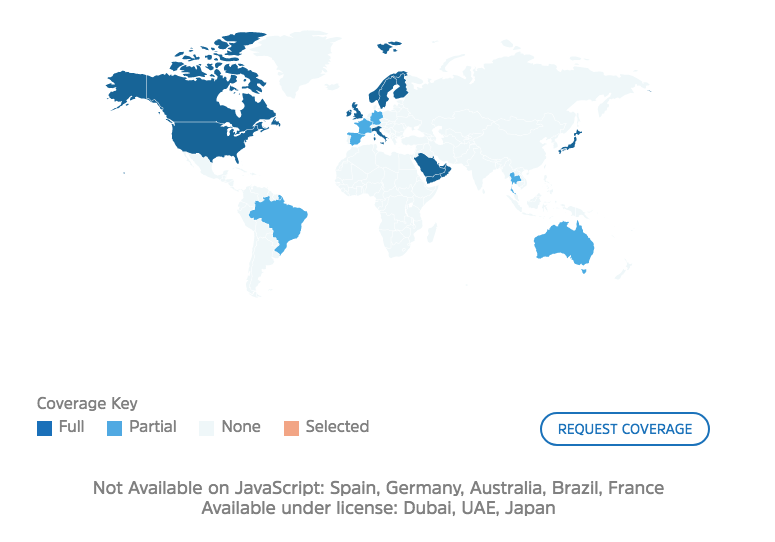
Coverage

The cost should be quite attractive to most educators. WRLD is completely free if you have 1,000 monthly users or less, which will be most teachers and small training organizations. Larger educational institutions and e-learning platforms may need to pay a modest fee, as indicated in the screenshot below.

Pricing

So how do you go about creating a 3D map for education? We’ll show you by creating a map about The Great Fire of London. You can view it in your web browser here, or explore the embed below.

Map Designer: Create a 3D Map Without Coding

Non-developers will use WRLD’s Map Designer, an online tool that is designed for both pros and beginners. Create and manage your own 3D maps, selecting simple or sophisticated styles.
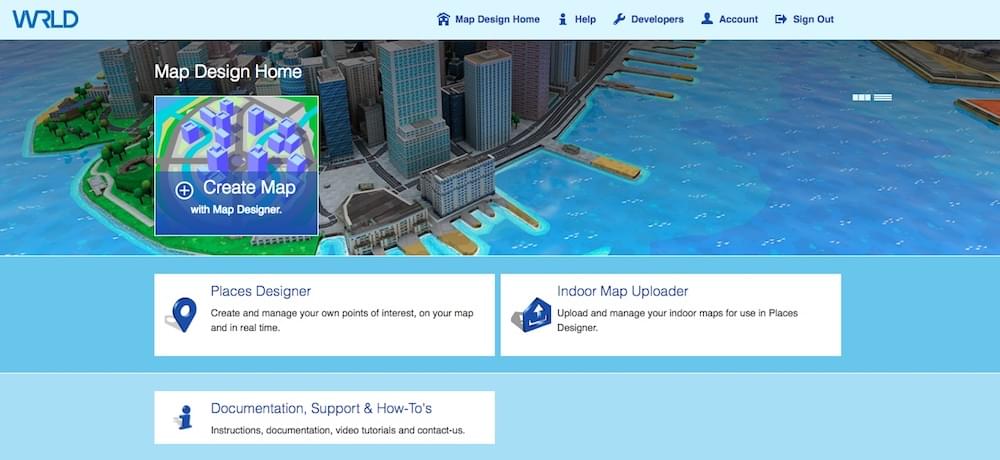
Map Designer Home

Once you create an account, you can create your first map. Give the map a name, and you’ll be given a URL. You may like to paste the address into a different browser tab so you can monitor your progress from your students’ point of view.
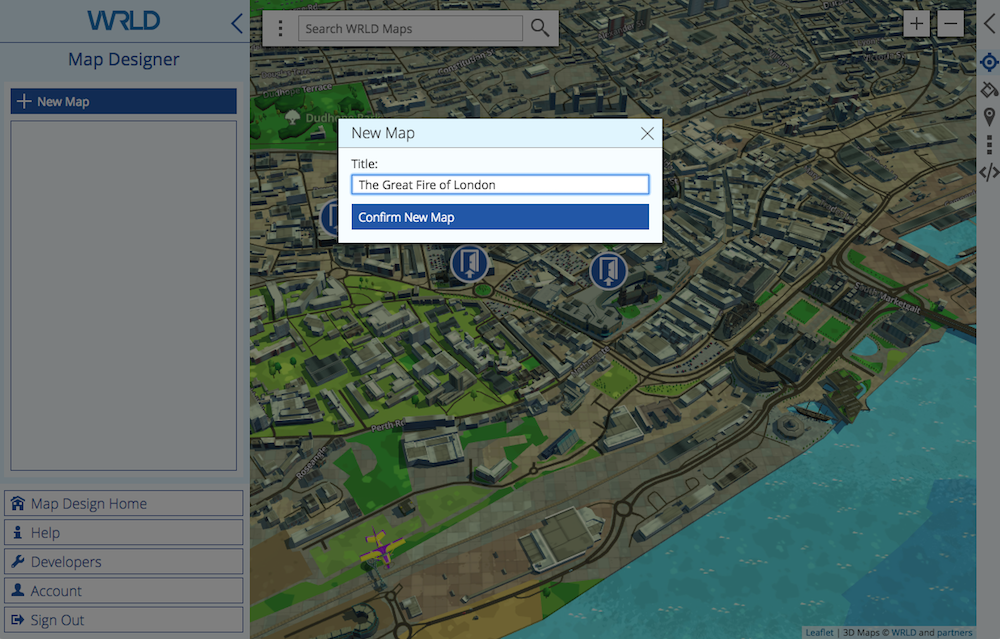
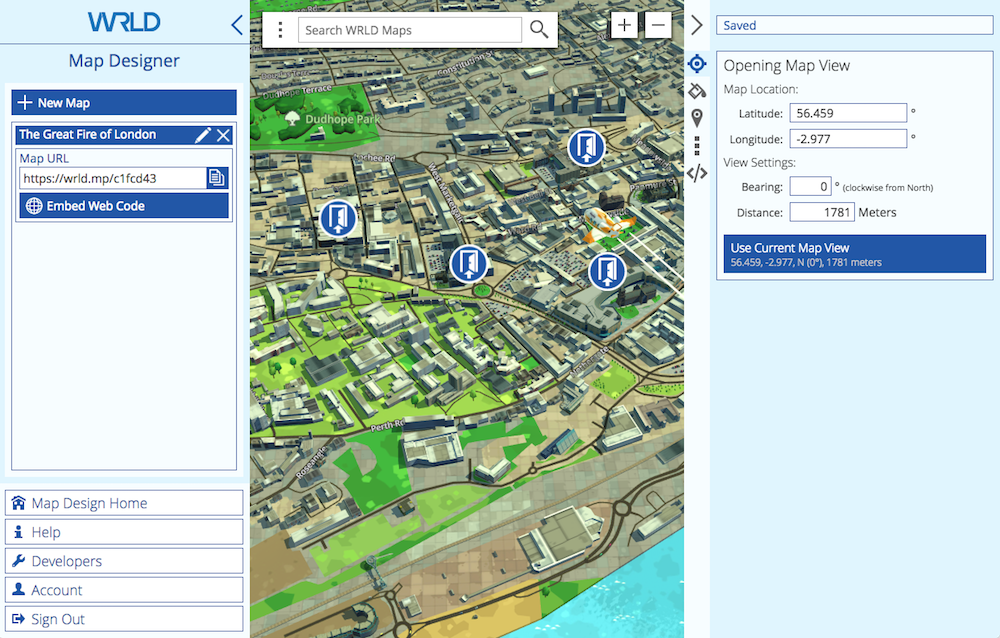
Navigating the map is intuitive. Left click and drag to move the map around, scroll to zoom in and out, and right click and drag to rotate. As you zoom in the display changes from 2D to 3D automatically.

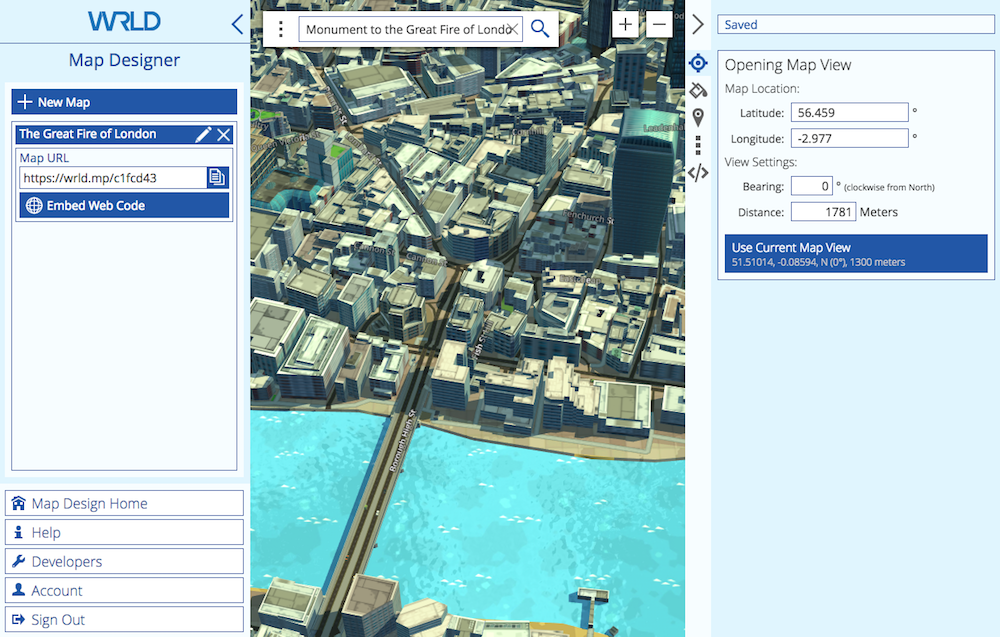
Our first job is to define the initial view that your students will see when they open the map. The Great Fire of London happened north of the Thames, adjacent to London Bridge. I start with a search for “the great fire of london” and discover that there is a monument at the site. That should get me close.
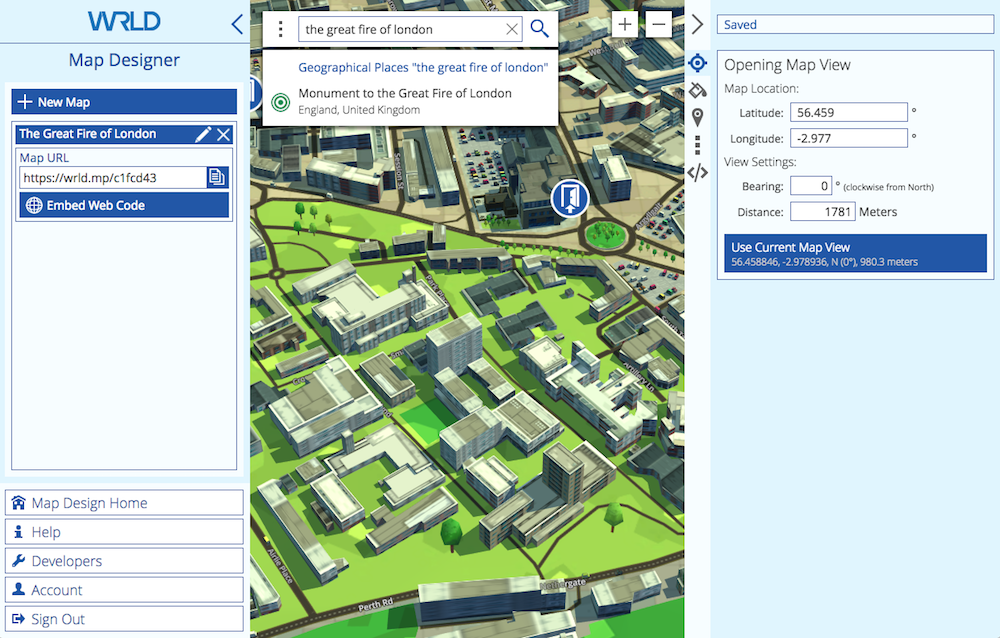
Search

Search

That’s perfect, and I’d like this to be what the map displays when it is opened. I click Use Current Map View in the right pane.

We now need to select a theme, so I click the paint can icon in the right pane. I like the look of the dark theme.
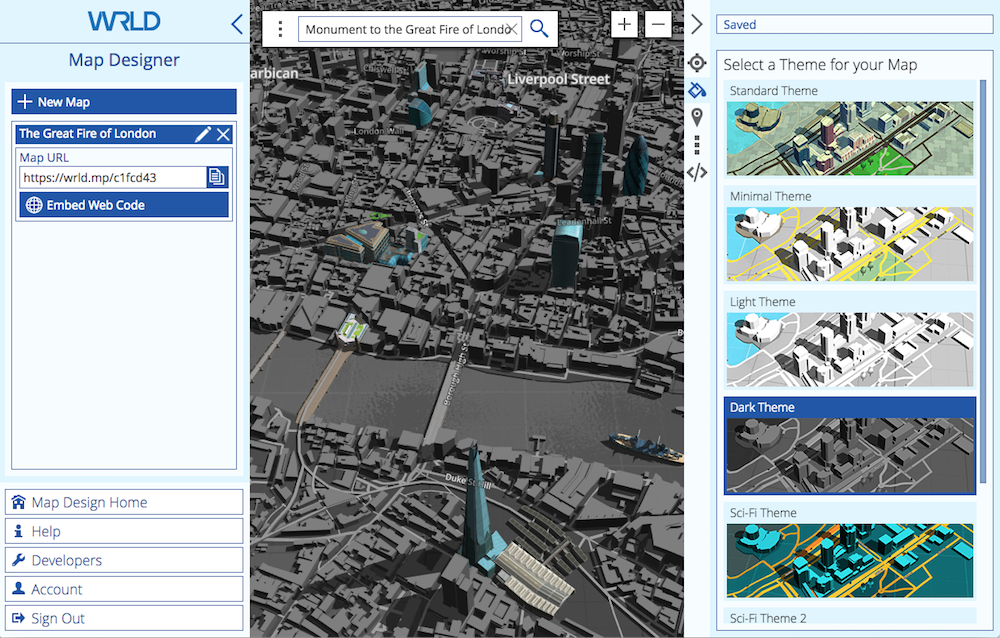
Dark Theme

Now it’s time to add some places of interest. We do that from the Places Designer, which I can open (in a new browser tab) by clicking on the Places icon, then clicking Manage Place Collections.
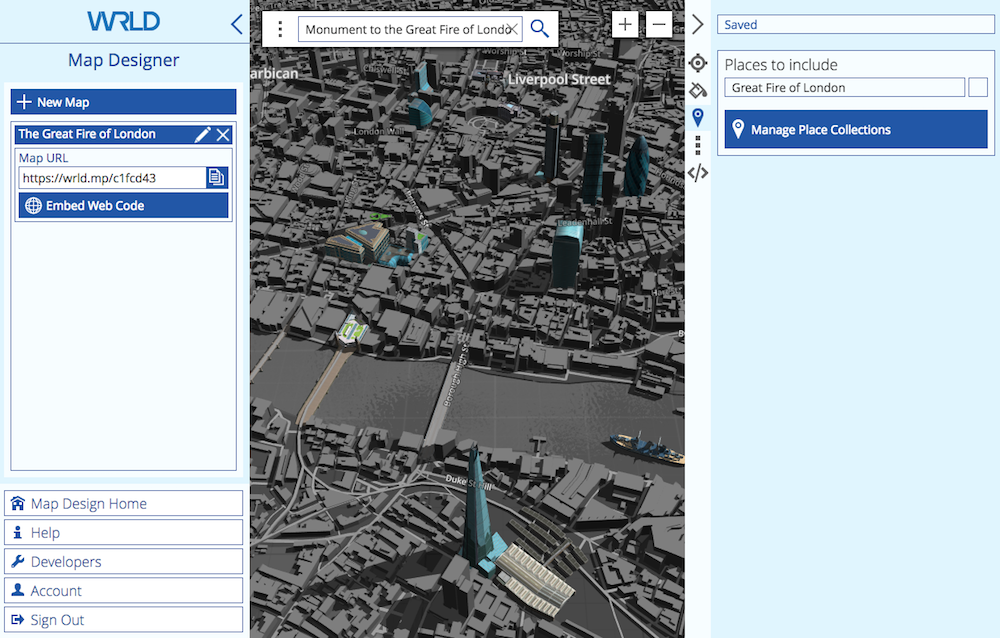
Places

Places Designer: Add Places of Interest and Location-Based Content

The Places Designer is now open. I can switch between it and the Map Designer simply by switching tabs in my browser.
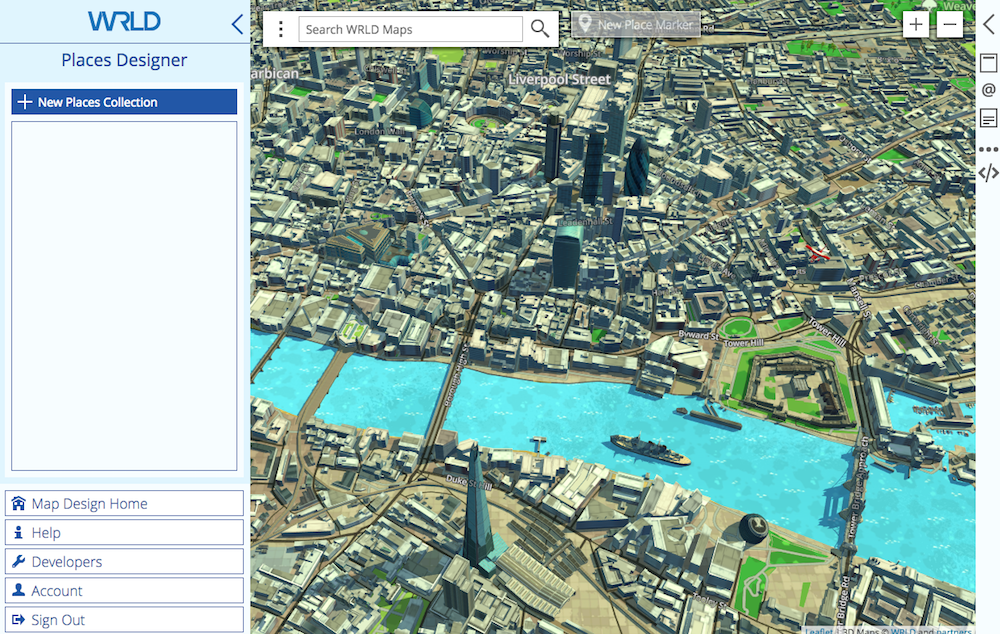
Place Designer

Before I add some places of interest to the map, I first need to create some Places Collections. These are containers for our places, and help us keep things organized.

I first need to have an idea about the content I’d like to add to the map. There’s a lot of interesting material about The Great Fire of London available online. Because the tragedy happened in 1666, there are obviously no photographs, but there are a surprising number of paintings available. To keep things simple for the purpose of this article, I’ll just use Wikipedia as a source.

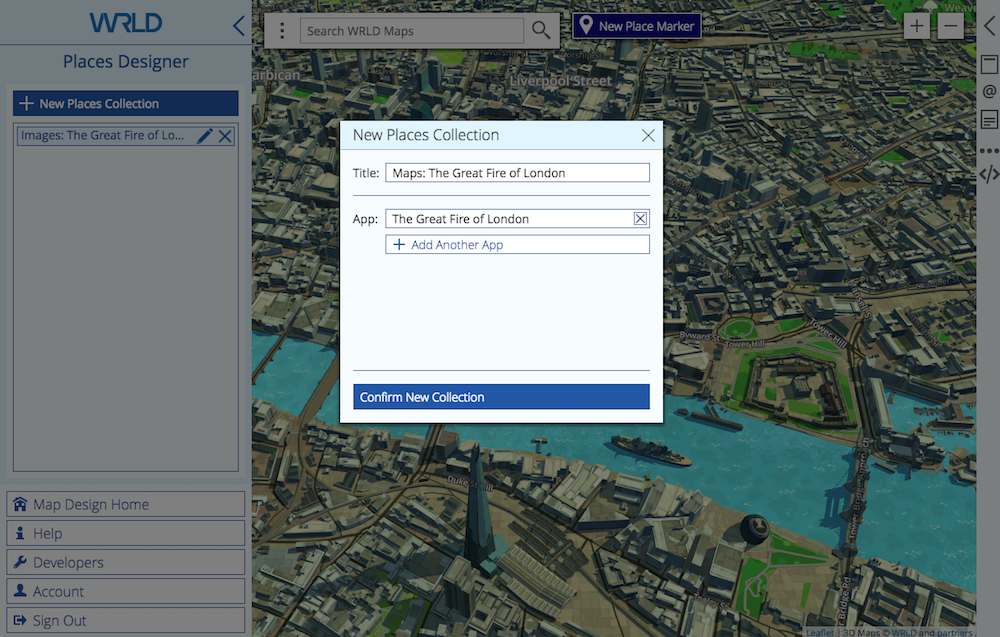
The article includes a few maps of the spread of the fire over the four days, some contemporary paintings of the fire, and more. I decide to create just two collections, and make them available for my map by choosing “The Great Fire of London” under “app”:

  • Images: The Great Fire of London
  • Maps: The Great Fire of London

New Places Collection

Now we’ll add some places of interest to each collection. Each place will add a pin to the map, and selecting the pin will display a card with additional content, including text and an image.

I’ll start with the first painting found in the Wikipedia article, which shows how the fire looked on the third day from near Tower Wharf on the Thames, just to the east of the fire. I want this to be in the “Images” collection, so I click on it, then New Place Marker. A pin is placed at the centre of the map, and I drag it to the vicinity of the wharf.
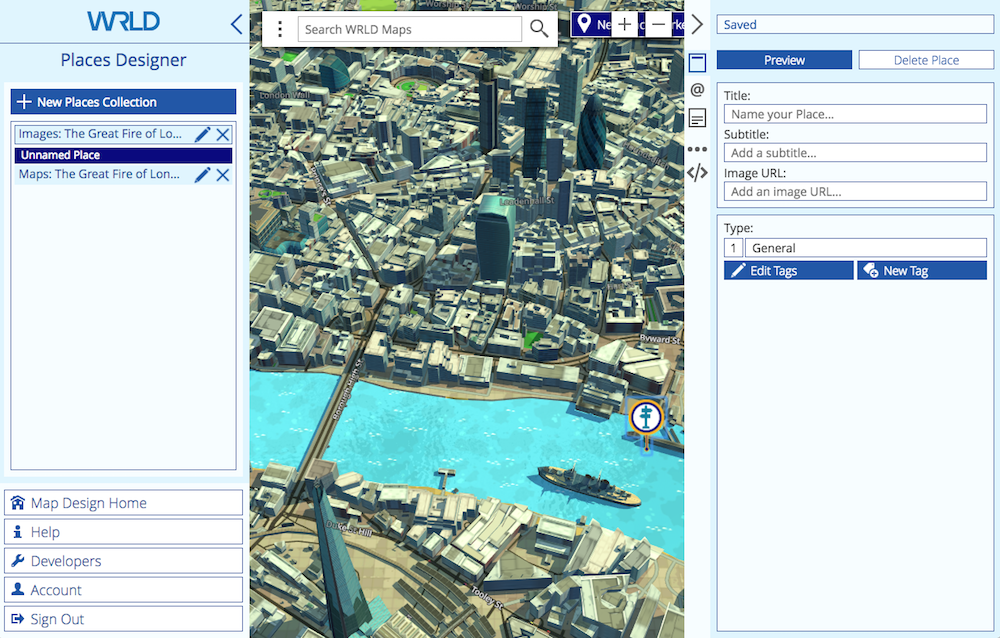
New Place Marker

Now I fill in the form in the right pane, including a title, subtitle and URL to the image. I change the tag to “Fire”, which modifies the image on the pin. I preview the card, and it appears as in the screenshot below.
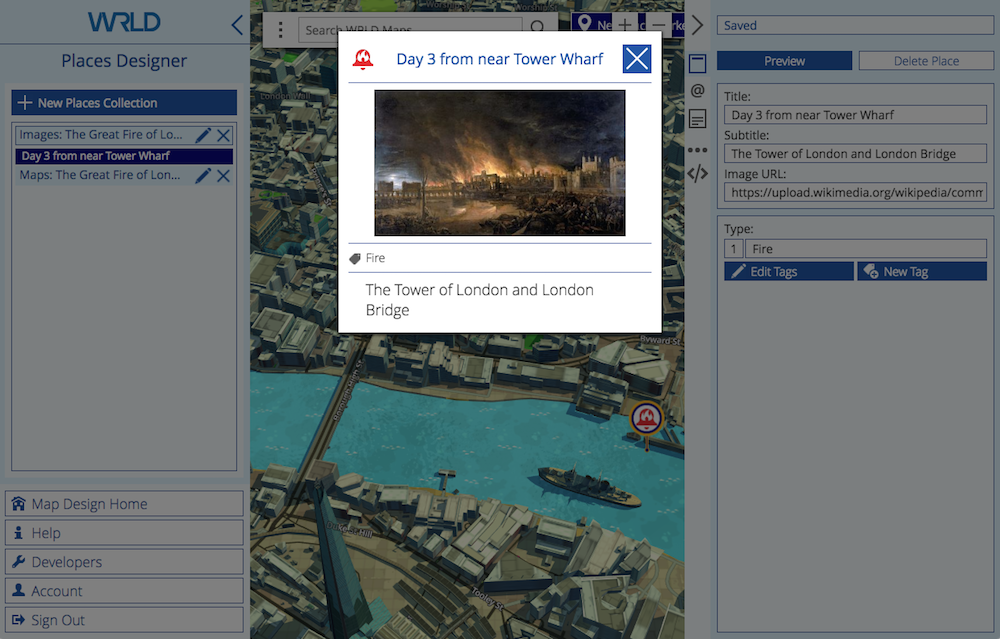
New Place Title Tags

The next form in the right panel is for contact information. That’s not really needed for our use, but I did add a link to the Wikipedia article.
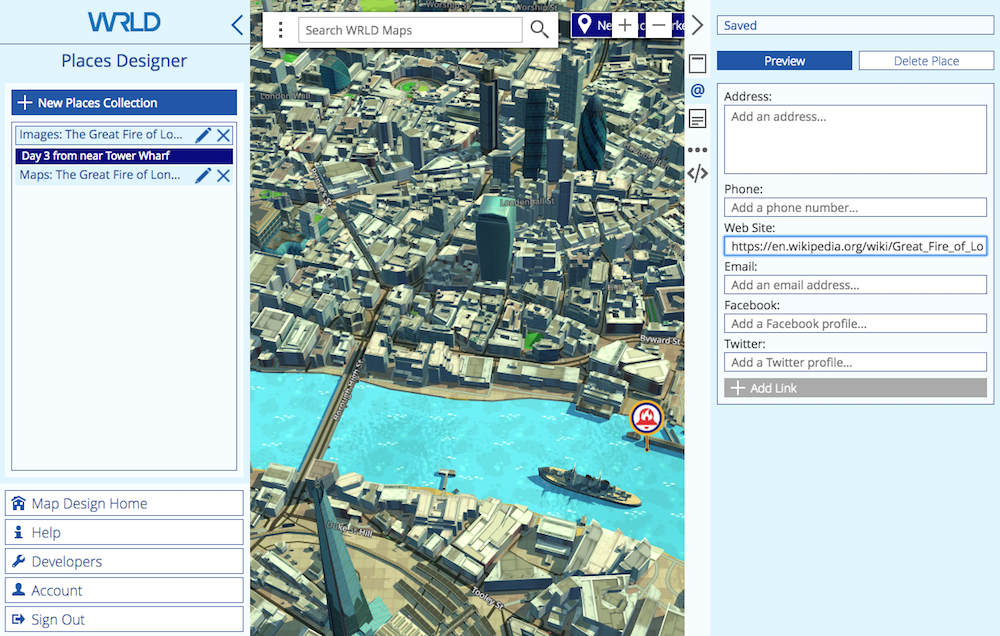
Contact

Next we can enter a description, which is a single paragraph of text content. I add the image description from Wikipedia, and preview the card.

Continue reading %How to Build an Interactive History Map with WRLD%


by Adrian Try via SitePoint

#334: Optimizing Load Times with Chrome DevTools

#334 — April 4, 2018

Read on the Web

Frontend Focus

Progressive Web Apps on iOS Are Here — iOS 11.3 added support for several PWA technologies (such as Service Workers) meaning apps can now be installed on iOS without App Store approval. There are limitations, of course, and here’s a rundown of what you need to know.

Maximiliano Firtman

Introducing Network Error Logging — Server logs are useful, but what if you could request logs from clients? It turns out the W3C’s Web Performance Working Group are working on an approach called Network Error Logging.

Douglas Creager

New Course: From Fundamentals to Functional JavaScript, v2 😀 — Learn the techniques you need to write professional, modern JavaScript. This course starts with the basics and takes you to mastering key functional methods like map, reduce and filter...plus promises and ES6+ asynchronous JavaScript.

Frontend Masters sponsor

Understanding Logical Properties and Values — The CSS Logical Properties and Values spec is still at an early stage but logical properties and values will allow us to control layouts through logical, rather than physical, mappings and it’s worth having an idea of how they work. There’s also a PostCSS plugin if you want to start using them now.

Rachel Andrew

How to Get Started with Coding Email Layouts — An increasingly common task for front-end developers with lots of quirks to be aware of.

Caity G. O'Connor

The Critical Path: Optimizing Load Times with Chrome DevTools — Improvements you can make and measurements to keep track of in order to optimize load times on a complex web application.

Ben Dilts

Calling All Web Developers: Here’s Why You Should Be Using Firefox“In my opinion, Firefox Quantum has superior performance compared to other browsers.” Here’s why.

Ibrahim Nergiz

5 Things with Anders Hejlsberg - Why TypeScript is for you — Quickly learn 5 quick tips about TypeScript and why it’s for you.

Microsoft sponsor

▶  An Introduction to Viewport Units — A look at how you can use vw, vh, vmin, and vmax in creative ways.

Jen Simmons

▶  Cropping Images on the Web with Object Fit

Jen Simmons

The Inside Story of Reddit's Redesign

WIRED

Jobs

Web Backend Developer (Fairfax, VA) — City State Entertainment is looking for an ASP.NET dev to help create Camelot Unchained, an RvR fantasy MMO for its studio in VA.

City State Entertainment

Frontend Developer - Milan, Italy — MotorK is looking for passionate Junior and Senior frontend devs to join the team. Great place to work and career opportunities.

MotorK

Front-End Expert? Sign Up for Vettery — Create your profile and we’ll connect you with top companies looking for talented front-end developers.

Vettery

📘 Tutorials

Designing Systematic Colors — How to make themable, flexible, WCAG 2.0 compliant color ramps for a design system.

Jeeyoung Jung

Easy Accordions with the 'details' and 'summary' Elements

Chris Coyier

Super-Powered layouts with CSS Variables and CSS Grid — A look at using CSS variables to control CSS grid layouts.

Michelle Barker

A Simple Guide to Taking a Web Page Offline, using Service Workers

Adeyinka Adegbenro

Creating Vue.js Transitions & Animation: Live Examples

Snipcart sponsor

Recreating Iron Man’s Arc Reactor Using CSS3 Transforms and Animations

Kunal Sarkar

Contextual Styling with Custom Properties — A look at how using custom properties might make contextual styling (i.e. multiple themes on the same page) a bit easier.

Simurai

Measuring the Hard-to-Measure — A quick tip to measure how many of your users turn up on a device with no JavaScript capabilities.

Harry Roberts

🔧 Code and Tools

loaders.css: Fast Pure CSS Loading AnimationsSee them all in action here.

Connor Atherton

Pose: A Declarative Animation Library for HTML, SVG and React — The powers of SVG, React, and CSS combine to make easily declared and triggered element animations.

Popmotion

imaging-heap: A Command Line Tool to Measure The Efficiency of Your Responsive Image Markup — ..across viewport sizes and device pixel ratios.

Filament Group

Get the Official Bulma Book & Learn How to Create Your Own Interface

Bleeding Edge Press sponsor

Bulma: A Flexbox-based CSS Framework

Jeremy Thomas

A CSS Grid-Powered Expanding 'Box Filled' Menu

Mary Lou

  ✨  Golden Oldies

10 Tips on Typography in Web Design

Nick Babich

A Step-by-Step Guide to Making Pure CSS Tooltips

Youssouf El Azizi

Houdini: Maybe The Most Exciting Development In CSS You'd Never Heard Of — The fruits of this W3C task force are beginning to be seen in browsers now so it’s worth revisiting what they’re all about.

Philip Walton


by via Frontend Focus

ES6 Collections: Using Map, Set, WeakMap, WeakSet

This article examines four new ES6 collections and the benefits they provide.

Most major programming languages have several types of data collections. Python has lists, tuples, and dictionaries. Java has lists, sets, maps, queues. Ruby has hashes and arrays. JavaScript, up until now, had only arrays. Objects and arrays were the workhorses of JavaScript. ES6 introduces four new data structures that will add power and expressiveness to the language: Map, Set, WeakSet, and WeakMap.

Searching for the JavaScript HashMap

HashMaps, dictionaries, and hashes are several ways that various programming languages store key/value pairs, and these data structures are optimized for fast retrieval.

In ES5, JavaScript objects — which are just arbitrary collections of properties with keys and values — can simulate hashes, but there are several downsides to using objects as hashes.

Downside #1: Keys must be strings in ES5

JavaScript object property keys must be strings, which limits their ability to serve as a collection of key/value pairs of varying data types. You can, of course, coerce/stringify other data types into strings, but this adds extra work.

Downside #2: Objects are not inherently iterable

Objects weren’t designed to be used as collections, and as a result there’s no efficient way to determine how many properties an object has. (See, for example, Object.keys is slow). When you loop over an object’s properties, you also get its prototype properties. You could add the iterable property to all objects, but not all objects are meant to be used as collections. You could use the for … in loop and the hasOwnProperty() method, but this is just a workaround. When you loop over an object’s properties, the properties won’t necessarily be retrieved in the same order they were inserted.

Downside #3: Challenges with built-in method collisions

Objects have built-in methods like constructor, toString, and valueOf. If one of these was added as a property, it could cause collisions. You could use Object.create(null) to create a bare object (which doesn't inherit from object.prototype), but, again, this is just a workaround.

ES6 includes new collection data types, so there’s no longer a need to use objects and live with their drawbacks.

Using ES6 Map Collections

Map is the first data structure/collection we’ll examine. Maps are collections of keys and values of any type. It’s easy to create new Maps, add/remove values, loop over keys/values and efficiently determine their size. Here are the crucial methods:

Creating a map and using common methods

const map = new Map(); // Create a new Map
map.set('hobby', 'cycling'); // Sets a key value pair

const foods = { dinner: 'Curry', lunch: 'Sandwich', breakfast: 'Eggs' }; // New Object
const normalfoods = {}; // New Object

map.set(normalfoods, foods); // Sets two objects as key value pair

for (const [key, value] of map) {
  console.log(`${key} = ${value}`); // hobby = cycling  [object Object] = [object Object]
}

map.forEach((value, key) => {
  console.log(`${key} = ${value}`);
}, map); // hobby = cycling  [object Object] = [object Object]

map.clear(); // Clears key value pairs
console.log(map.size === 0); // True

Run this example on JSBin

Using the Set Collection

Sets are ordered lists of values that contain no duplicates. Instead of being indexed like arrays are, sets are accessed using keys. Sets already exist in Java, Ruby, Python, and many other languages. One difference between ES6 Sets and those in other languages is that the order matters in ES6 (not so in many other languages). Here are the crucial Set methods:

const planetsOrderFromSun = new Set();
planetsOrderFromSun.add('Mercury');
planetsOrderFromSun.add('Venus').add('Earth').add('Mars'); // Chainable Method
console.log(planetsOrderFromSun.has('Earth')); // True

planetsOrderFromSun.delete('Mars');
console.log(planetsOrderFromSun.has('Mars')); // False

for (const x of planetsOrderFromSun) {
  console.log(x); // Same order in as out - Mercury Venus Earth
}
console.log(planetsOrderFromSun.size); // 3

planetsOrderFromSun.add('Venus'); // Trying to add a duplicate
console.log(planetsOrderFromSun.size); // Still 3, Did not add the duplicate

planetsOrderFromSun.clear();
console.log(planetsOrderFromSun.size); // 0

Run this example on JSBin

Weak Collections, Memory, and Garbage Collections

JavaScript Garbage Collection is a form of memory management whereby objects that are no longer referenced are automatically deleted and their resources are reclaimed.

Map and Set's references to objects are strongly held and will not allow for garbage collection. This can get expensive if maps/sets reference large objects that are no longer needed, such as DOM elements that have already been removed from the DOM.

To remedy this, ES6 also introduces two new weak collections called WeakMap and WeakSet. These ES6 collections are 'weak' because they allow for objects which are no longer needed to be cleared from memory.

Continue reading %ES6 Collections: Using Map, Set, WeakMap, WeakSet%


by Kyle Pennell via SitePoint

What Is Vue.js?

Google plans to ban cryptocurrency mining extensions from the Chrome Web Store

“Extensions platform product manager James Wagner reports that Google is cracking down on all Chrome extensions that include a cryptocurrency mining component. Starting now, Google is rejecting all cryptocurrency mining extensions submitted to the Chrome Web Store. Those that are already listed...

[ This is a content summary only. Visit our website https://ift.tt/1b4YgHQ for full links, other content, and more! ]

by Irfan Ahmad via Digital Information World

Identified YouTube Shooter Was Upset Over Filtering And Demonetization

An unfortunate incident took place yesterday when 39-year old woman Nasim Aghdam (identified shooter) from San Diego attacked YouTube’s HQ. According to the San Bruno police, the attacker did not attack anyone in particular and that the assault was in general. Upon searching her on YouTube,...

[ This is a content summary only. Visit our website https://ift.tt/1b4YgHQ for full links, other content, and more! ]

by Zubair Ahmed via Digital Information World

Facebook Eases App Removal Process From Privacy Settings

Amid Facebook’s recent privacy scandal, plenty of users headed to their Facebook privacy settings. Their notion was to further tighten the security so that third-party apps cannot access their data. However, prior to the recent controversy, users took an eternity to remove the apps as it used to...

[ This is a content summary only. Visit our website https://ift.tt/1b4YgHQ for full links, other content, and more! ]

by Zubair Ahmed via Digital Information World