The post Progress Bar Style 78 appeared first on Best jQuery.

by Admin via Best jQuery
In this article, we’ll discuss most of the new methods available in ES6 that work with the Array type, using Array.* and Array.prototype.*.
When discussing them, I’ll write Array.method() when I describe a “class” method and Array.prototype.method() when I outline an “instance” method.
We’ll also see some example uses and mention several polyfills for them. If you need a polyfill-them-all library, you can use es6-shim by Paul Miller.
The first method I want to mention is Array.from(). It creates a new Array instance from an array-like or an iterable object. This method can be used to solve an old problem with array-like objects that most developers solve using this code:
// typically arrayLike is arguments
var arr = [].slice.call(arrayLike);
The syntax of Array.from() is shown below:
Array.from(arrayLike[, mapFn[, thisArg]])
The meaning of its parameters are:
arrayLike: an array-like or an iterable objectmapFn: a function to call on every element containedthisArg: a value to use as the context (this) of the mapFn function.Now that we know its syntax and its parameters, let’s see this method in action. In the code below we’re going to create a function that accepts a variable number of arguments, and returns an array containing these elements doubled:
function double(arr) {
  return Array.from(arguments, function(elem) {
    return elem * 2;
  });
}

const result = double(1, 2, 3, 4);

// prints [2, 4, 6, 8]
console.log(result);
A live demo of the previous code is shown below and also available at JSBin.
ES6 in Action: New Array Methods on jsbin.com
This method is supported in Node and all modern browsers, with the exception of Internet Explorer. If you need to support older browsers, there are a couple of polyfills to choose from: one is available on the method’s page on MDN, while the other has been written by Mathias Bynens and is called Array.from.
Another of the methods introduced is Array.prototype.find(). The syntax of this method is:
Array.prototype.find(callback[, thisArg])
As you can see, it accepts a callback function used to test the elements of the array and an optional argument to set the context (this value) of the callback function. The callback function receives three parameters:
element: the current elementindex: the index of the current elementarray: the array you used to invoke the method.This method returns a value in the array if it satisfies the provided callback function, or undefined otherwise. The callback is executed once for each element in the array until it finds one where a truthy value is returned. If there’s more than one element in the array, that will return a truthy value, and only the first is returned.
An example usage is shown below:
const arr = [1, 2, 3, 4];
const result = arr.find(function(elem) { return elem > 2; });

// prints "3" because it’s the first
// element greater than 2
console.log(result);
A live demo of the previous code is shown below and also available at JSBin.
ES6 in Action: New Array Methods on jsbin.com
The method is supported in Node and all modern browsers, with the exception of Internet Explorer. If you need a polyfill, one is provided on the method’s page on MDN.
A method that is very similar to the previous one is Array.prototype.findIndex(). It accepts the same arguments but instead of returning the first element that satisfies the callback function, it returns its index. If none of the elements return a truthy value, -1 is returned. An example usage of this method is shown below:
const arr = [1, 2, 3, 4];
const result = arr.findIndex(function(elem) {return elem > 2;});

// prints "2" because is the index of the
// first element greater than 2
console.log(result);
A live demo of the previous code is shown below and also available at JSBin.
ES6 in Action: New Array Methods on jsbin.com
The method is supported in Node and all modern browsers, with the exception of Internet Explorer. If you need a polyfill, one can be found on the method’s page on MDN.
Yet another method introduced in this new version of JavaScript is Array.prototype.keys(). This method returns a new Array Iterator (not an array) containing the keys of the array’s values. We’ll cover array iterators in an upcoming article, but if you want to learn more about them now, you can refer to the specifications or the MDN page.
The syntax of Array.prototype.keys() is shown below:
Array.prototype.keys()
An example of use is the following:
const arr = [1, 2, 3, 4];
const iterator = arr.keys();

// prints "0, 1, 2, 3", one at a time, because the
// array contains four elements and these are their indexes
let index = iterator.next();
while(!index.done) {
  console.log(index.value);
  index = iterator.next();
}
A live demo is shown below and also available at JSBin.
ES6 in Action: New Array Methods on jsbin.com
Array.prototype.keys() in Node and all modern browsers, with the exception of Internet Explorer.
Continue reading %ES6 in Action: New Array.* and Array.prototype.* Methods%


Lazy loading is technique that defers loading of non-critical resources at page load time. These non-critical resources are loaded at the moment of need.
When we lazy load images and video, we reduce initial page load time, initial page weight, and system resource usage, all of which have positive impacts on performance.

This article was originally published on monday.com. Thank you for supporting the partners who make SitePoint possible.
If you’re responsible for managing a day-to-day social media plan, you know how hard it can be to juggle everything. Chances are at some point you’ve found yourself in this scenario:
You’ve built a strategy you’re so proud of, it can’t fail. You’ve found the perfect publishing tool and have all your posts scheduled for just the right time. Your community management is on point and engagement is through the roof. You’re tracking every metric and measuring the success of your strategy.
Yet no matter how organized you are, your day-to-day life is still more chaotic than anyone else’s in your company. You’re missing an image for tomorrow’s social post. Your team doesn’t understand the tone of voice or visual unity you’re trying to maintain on Instagram. You’re going back and forth with your client to get their approval on your editorial calendar. You need an edit on a graphic that was supposed to go live an hour ago.
Sound familiar? Trust me, we’ve been there. The good news is there’s a solution. Here are the three biggest challenges we’ve encountered managing the social plan here at monday.com and the templates we use to solve them.
After you’ve finished planning your social media schedule for the week or month, the next step is to connect with your team of designers and copywriters. Your goal is to create beautiful images, infographics, and content to distribute across your social channels.
The problem is, keeping everyone up-to-date and getting your assets ready to schedule in your favorite publishing tool (Buffer, Hootsuite, or Coschedule) can quickly get out of hand. The asset you assigned isn’t ready. The designer doesn’t know what’s going live when. No one has access to nor understands how your scheduling tool works.
Moreover, a tool like Buffer or Coschedule doesn’t help your team sync on your editorial calendar. They’re perfect for scheduling and posting, but they lack the essential function of helping your team plan, collaborate, and execute together. Just like that, your perfect social media plan is collapsing.
The solution? Create a monthly schedule and share it with everyone.
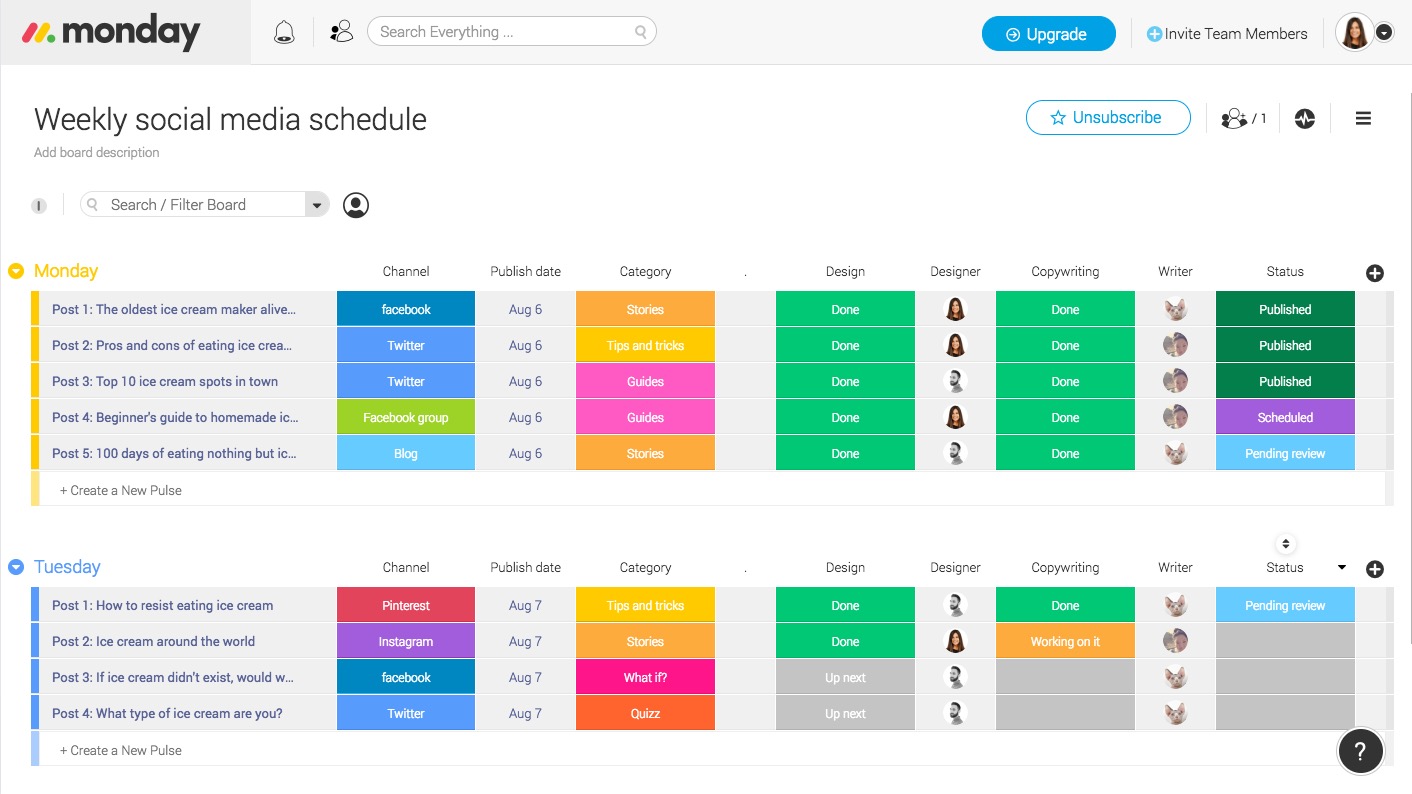
Take a look above. In this template, we’ve outlined a weekly workflow that clearly defines the handshakes between different departments or stakeholders. It syncs everyone on where things stand and helps you plan a consistent weekly content schedule. See the number of posts, the titles, the publishing date, and the category. Your day-to-day job of social media planning just became way less painful. 🙂
Continue reading %Social Media Plan: 3 Challenges + Templates to Solve Them%

