Monday, December 11, 2023

Google Play Store Found Guilty Of Violating Antitrust Laws By Federal Jury As Verdict For Epic Games’ Lawsuit Revealed

The verdict for the much-anticipated lawsuit filed against search engine giant Google by Epic Games has been revealed.

The Android maker has been found guilty of violating several anti-trust laws for years and it’s about time someone noticed, experts believe.

But it’s astonishing to see the verdict finally attain the response that the Fortnite makers had hoped for after watching big shots like Google and Apple continue to deny the accusations and instead justify the act. This was by adding how all rules in place were designed to benefit the masses.

Such a decision, if it stands true after the search engine giant appeals, may transform the manner through which Google and Apple dominate the general market distribution seen throughout apps and devices on different third parties.

As far as the details regarding the proceedings are concerned, it’s remarkable to see how the jury kept on agreeing with whatever suggestions and claims were made through Epic Games. This was in regards to how Google continues to dominate in terms of monopoly throughout app distribution in various markets as well as different in-app billing services found today. As a result, they felt Epic Games continued to lose out and it was about time something was done in this regard.

As per the jury’s findings, Google was found guilty of having illegal ties between its Play Store and Play Billing services. Similarly, its Project Hug agreement entails developers linked to the gaming world and OEMs were also seen behaving in an anti-competitive manner as well.

The court case lasted for a staggering four-week period where plenty of details were discussed and different testimonies were taken into consideration. Hence, the jury located in California found so many flaws in Google’s behavior which was certainly behaving like a monopoly in several accounts.

The workings of the Court would come into play as early as the start of next year. And while search engine giant Google might not be happy, the rest of the world is, especially the makers behind Fort Nite, Epic Games.

The victory was announced by the company’s CEO who shared the news through his profile on X in terms of the final verdict.

On the other end, Google is not happy and has full confidence in its power to challenge the ruling. The Android maker’s VP for governmental affairs and policies linked to the public says it all had to do with fierce competition involving Apple and the App Store. The same is seen across Google’s Play Store and a host of top gaming consoles too. They vow to defend the company’s name in terms of its business model outlined for Android and feel they’ve done nothing wrong that could harm users or fellow rivals working in the industry.

To put things in review, Epic Games renewed its famous Fortnite Game across iOS and Android devices and gave room for more options seen by various players. They paved the way to make purchases for virtual items through direct means on Epic Games and ended up bypassing the Android maker’s chance of attaining a staggering 30% share found on in-app purchases.

In the same manner, both iPhone maker Apple and Google ended up removing Epic Games from their respective App and Play Stores, claiming Epic Games went against their respective policies.

And in the end, that was a lot to digest so Epic Games sued both firms and added how their dominating behavior was giving rise to anti-competitive behavior as it was characteristic of monopoly behavior.

A huge chunk of the legal case failed to prove its significance when Cupertino firm Apple came into the picture and even on appeal, they just couldn’t be granted victory. And that’s when Epic Games it was time to turn to the Supreme Court.

Seeing Epic Games go through painstaking efforts to prove their point is evidence of how one should never lose hope and stand true to what their claims are. If the Fortnite makers did not appeal to the bigger Supreme Court, it didn’t seem like Google would ever be held accountable for the behavior.

Photo: DIW-AIgen

Read next: From Gaza-Israel War To Lens Translation - Google Search Trends 2023 Unveils This Year’s Dominating Search Queries
by Dr. Hura Anwar via Digital Information World

TikTok’s Winning Streak Continues As It Becomes First Non-Game Mobile App To Generate $10 Billion In Consumer Spending

2023 is coming to an end and it’s celebrations galore for the popular short video platform Tiktok which just reached a new milestone.

The app has been honored with the title of being the first non-gaming platform to cross the $10 billion revenue figure in terms of consumer spending. This is a combination of sales seen through both the App Store from Apple and Google’s Play Store.

The news was first unveiled by top intelligence-providing outlet DataAI who confirmed recently how the figures attained were the first of its kind seen in the non-gaming category. Other names that have been getting fame of a similar kind include gaming giants Candy Crush from Blizzard. The latter attained immense success, quickly turning into a major earner with a staggering revenue of more than $12 billion.

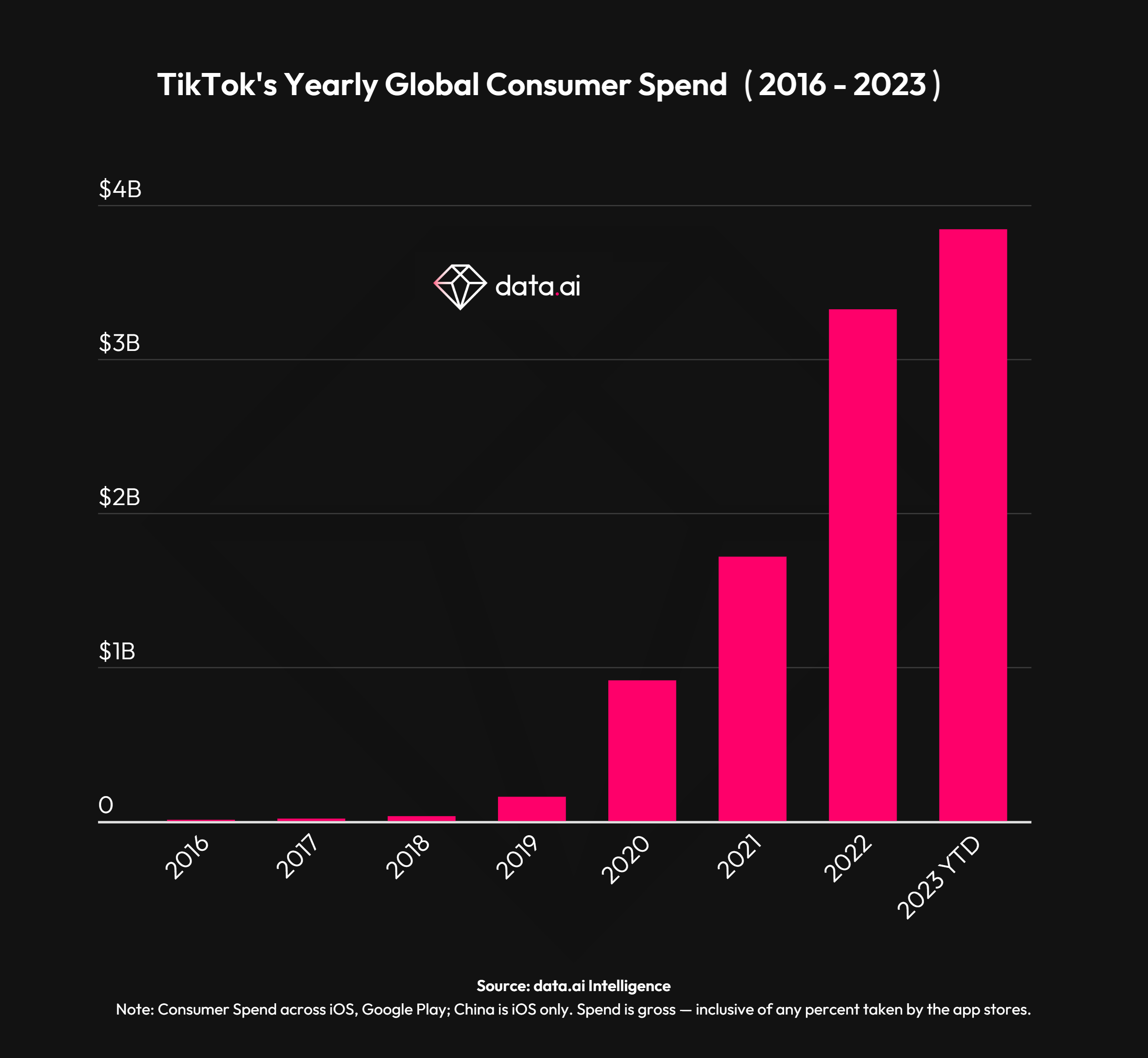
This particular report in question saw TikTok starting off the year with a bang, coming up with more than $6 billion in the consumer spending category. Meanwhile, another $3.8 billion was added as the year went on, allowing the platform to attain steady growth throughout the year, hitting the 61% growth spurt from when it first began to where it stands right now.

As per the data, the figure is nearly 15% greater than that observed in 2022, where it could achieve consumer spending totaling $3.3 billion. Before we forget, the data is solely limited to the Play and App Stores and not from other third parties found in China. This means TikTok’s overall consumer spending figures should be greater than this and that’s really a huge achievement.

This type of spending arises through the likes of TikTok’s famous and viral currently dubbed coins. The latter is the name given to a virtual mode currently where users can make in-app purchases through this means. They can purchase gifts throughout the platform for their favorite content creators as a means of showing their love and appreciation.

These kinds of gifts reward creators for the various types of content they produce and could be cashed at any point in time with real funds. Meanwhile, the app benefits by keeping 50% of the overall payout.

At the moment, several deals are trending online. This entails bundle offers featuring 1321 coins for nearly $20. And only that gives the app a quarter of the revenue generated from this method.
In the same way, the leading platform makes money outside of this realm too. For instance, they can do it via advertising or through e-commerce means such as the TikTok shop. However, this was not considered when generating this particular report.

Data.ai confirmed how both iOS users located in China and American consumers made up the majority of the spending found through in-app purchases. And that is what assisted the tech giant in terms of hitting the $10 billion landmark. Both these regions continued to drive 30% of the overall revenue or 60% of the total when put together.

Some other leading markets including KSA, Japan, United Kingdom, and Germany whose combined earnings were equivalent to 13% of the combined figure for in-app purchases on Tiktok.
While TikTok might be getting the honor as it’s the sole non-gaming platform to hit this milestone in earnings, plenty of other apps in the non-gaming category also cashed in billions but they are yet to reach the level of the app.

Some close contenders for the leading position included Tinder and video video-sharing app YouTube. But even then they were trailing by nearly two to three billion dollars as noted in the report.


Read next: From Gaza-Israel War To Lens Translation - Google Search Trends 2023 Unveils This Year’s Dominating Search Queries
by Dr. Hura Anwar via Digital Information World

From Gaza-Israel War To Lens Translation - Google Search Trends 2023 Unveils This Year’s Dominating Search Queries

Leading search engine Google just rolled out the year’s hottest trends in terms of search as many of us gear to bid 2023 farewell.

The event which is hosted annually sheds light on which search queries made it big across the world in terms of a wide range of categories.

As far as news and current affairs are concerned, it’s the ongoing turmoil between Israel and Palestine in Gaza that has plenty of people talking in terms of the most searched topic across the globe and US. Meanwhile, the remaining search topics that dominated included the likes of tragedies as well as natural disasters, many fueled by the ongoing climate crisis.

The controversial Titanic submarine disaster, Hurricanes, American school shootings, wildfires, and more continued to be on many people’s minds in terms of the most trending searches of 2023.

Another trend that many couldn’t help but ponder about on the search engine had to do with the rising cost of living. The company failed to delineate the leading searches linked to the world of finance and economy which was seen on the Fast Company list. So many Americans returned to Google to figure out why things were super expensive as shown by the leading search results found on the list.

Be it simple grocery items, music tickets linked to Taylor Swift concerts, and a whole list of sporting events too - the list was so extensive and people just found it hard to cope with the rising inflation rates. Therefore, the number of specific searches in this category kept on increasing.

Coming down to lighter things, so many trends on TikTok also had people engaged as that turned into another leading search domain for 2023. From the Roman Empire to the Moon Phase, not to mention food hacks and whatnot- plenty of fun trends on the viral social media app had users searching left and right.


Read next: How To Block Spam Messages on Android — Direct Methods and Third Party Apps
by Dr. Hura Anwar via Digital Information World

The Complete Guide to Docker: Containerization Made Easy

The coding journey often involves navigating through various tools and technologies. One tool that has transformed the way developers work is Docker. If you are a programming student looking to hone your skills, we've got you covered with a Docker tutorial. This Docker guide unravels Docker's mysteries, exploring its functionalities, benefits, and the reason behind its rise to popularity among programmers.

What Sets Docker Apart: A Peek Into Its Essence

Before getting started Docker, let's dissect it. So, what exactly is Docker? It's a platform that makes it easier to build, deploy, and run apps in containers. The containers bundle up everything an app requires to run. It's like a self-sufficient package that guarantees an app runs seamlessly, irrespective of the environment.

Docker vs. Virtual Machines (VMs): Breaking the Chains of Misconception

Image source: Nangialai Stoman on Unsplash

Do you have a C programming assignment that requires you to differentiate Docker and VMs, and wondering if you should get C homework help? Well, these two might seem like two peas in a pod, both facilitating the deployment of applications, but peel back the layers, and you'll discover they operate in different ways.

So why do we often hear the question, "Is Docker a virtual machine?" To set the record straight, Docker is not a virtual machine; it's a containerization platform. Virtual machines emulate entire operating systems. Picture it as creating a miniature computer within your computer.

These VMs require a hypervisor to manage multiple instances on a single physical machine. Each VM has its own OS, which consumes considerable resources. This setup offers isolation but can be heavy on both memory and storage.

In contrast, Docker containers share the host OS kernel, making them lean, mean, and incredibly efficient. Think of a container as a lightweight package bundling your app and its dependencies. This package runs consistently on different settings, guaranteeing that your app maintains the same behavior, whether it's on your local machine or in production.

So, why master how to use Docker and ditch the heavy virtual machine? First off, resource efficiency. Containers share the host OS, requiring less memory and storage than VMs. You can run multiple containers on the same hardware thanks to this efficiency. Consequently, you utilize resources better.

But it's not just about resource savings. Docker containers boot up lightning-fast. Unlike VMs, which can take a while to start, containers fire up almost instantly. This rapid startup time is a game-changer for developers, enabling quicker testing and deployment.

Why Opt for Docker?

Docker is a veritable gold mine waiting to be explored. If you're wondering why students and developers worldwide have embraced learning Docker and making it an essential programming tool, here's why.

Maintaining Uniformity in Varying Environments

Docker offers a uniform environment throughout the development process. Say goodbye to the nightmare of code behaving differently on different machines. With Docker, you encapsulate everything your programming assignment needs (dependencies, code, and libraries) into a neat, isolated container. The container maintains similar behavior, irrespective of where it's run, ensuring consistency.

Collaboration Unleashed

Docker breaks down the silos between students and developers, making collaboration smoother than ever. Thanks to its consistent environments, every team member works on the same platform regardless of their local setup. No more hours are wasted on debugging issues that arise simply because of differences in development surroundings.

Simplified Deployment and Scaling

Docker makes deployment easier by encapsulating an app and related dependencies into one container. No more worrying about whether the target server has the right libraries or configurations – if it runs Docker, it runs your app. So, whether you're a solo developer or part of a large team, Docker streamlines the development lifecycle, enhancing focus on innovation rather than deployment headaches.

Utilization of Microservices

With microservices, applications are teared up into smaller, independent services, Docker shines. Each microservice can run in its container, offering flexibility and scalability. Docker containers can communicate with one another with ease, creating a dynamic and efficient microservices architecture. This flexibility is vital for programmers working on complex projects where adaptability is key.

Efficiency of Resources

Docker containers share the host OS kernel which makes them light. It means you can run multiple containers on the same hardware, optimizing resource usage. It's an eco-friendly approach to coding – doing more with less.

Docker Basic Tutorial: Bringing an App to Life with Docker

Image source: Jexo on Unsplash

Making a Docker container entails various steps that need to be followed accurately. Let's go through them.

Install Docker

Get started with Docker by installing it on your machine. Docker provides straightforward installation packages for various operating systems, ensuring a hassle-free setup process.

Writing a Dockerfile: Defining the App’s Environment

The next procedure to create a Docker container well is to make a Dockerfile, a script that contains instructions to build a Docker image. Define the base image, set up dependencies, copy the app code, and configure the necessary settings.

Building a Docker Image: Crafting the App's Blueprint

Use the Dockerfile to build a Docker image. This process involves bundling the app and requisite dependencies into one container.

Run the Container: Watching the App Come Alive

The next vital procedure in this Docker container tutorial is to run the container based on the created image. This procedure executes the app in an isolated environment, separate from your machine's setup.

Expose Ports and Network Your Containers: Enabling Communication

If your application relies on network communication, configure Docker to expose ports and enable networking between containers. It ensures seamless interaction within your application components.

Persisting Data with Volumes: Guarding Against Loss

Any data stored within Docker containers is temporary. So, use volumes to persist data to ensure valuable information survives even if the container gets terminated.

Scaling the App: Embracing Docker Orchestration

Scale your application effortlessly by getting started with Docker compose or Kubernetes to orchestrate various containers. This stage is vital for managing complex apps in a production setting.

Signing Off

Docker isn't just a buzzword; it's a transformative tool that can redefine how you approach development. Its ability to create reproducible environments, streamline collaboration, and ease deployment makes it a must-have in every student's and developer's toolkit. By mastering the art of Docker, you're not just creating applications; you're sculpting a seamless, efficient, and scalable coding experience.

by Web Desk via Digital Information World

How To Block Spam Messages on Android — Direct Methods and Third Party Apps

Modern communication is mostly done through online messaging apps, which means only a few people use SMS for daily info-exchange. These days, the Android messaging service is most of the time used only to get one-time passwords, so people get annoyed when they get bombarded with other unwanted messages on their phones. Verification codes from banks and after logging into an account aren’t spam messages. Spam messages are the ones you get from different brands and overly promotional e-commerce startups.

Although, spam messages imply no harm but people still get irritated when they hear a message notification and find out that it’s from a nuisance nudge. There are several ways by which you can block spam messages and make your SMS app spam-free. In this article, we are going to discuss two methods that you can use to get rid of spam messages from both business and individuals.

1 - Blocking Spam Messages Directly

Most Android devices already has the feature (comes built-in with Google Messages app, if not you can download it anytime) that lets users block unwanted and spam messages. It’s called a Spam Filter that can filter spam messages and don’t let them reach your inbox. Following are the steps by which you can enable Spam Filter:
  • Open your Messages app on Android phone and click the three dots or your profile icon on the top right corner of the screen.
  • Click on Messages Settings and you will see SIM card and General options.
  • Now tap on General settings (on this page, you'll find a lot of options, so don't get confused)
  • Find the Spam Protection settings and tap on it
  • Now simply turn on the toggle "Enable Spam Protection".
See the two screenshots below for step by step guide on how to enable it (in case you need it).

Combatting Android SMS spam: Your guide to reclaiming peace in messaging and blocking unwanted intrusions effectively.

Wave goodbye to SMS irritations! Explore two proven methods for a spam-free messaging experience on Android.
Screenshots: DIW

Now your Spam protection mode is on, and if you want to make sure whether the auto-spam blocker feature is really working, then you can check it by going into Settings and then into Spam and Blocked folder to check the auto-spammed message there (the separate inbox for troublemakers) that Google thinks are bothering you.

Mastering Modern Messaging: A Guide to a Spam-Free SMS Experience For Android users
Screenshot: DIW

Even if you've turned on the spam filter, chances are, some spam messages are still going to bypass the Google's spam filter and are going to appear in the notifications, all you can do is manually block those senders, here's how:
In the first method you do not need to open/check the message and for that simply right from your Messages inbox hold and tap the spam message or the sender and you'll see a 3-dot menu popping up, just tap on it and then select Block option, a new pop up will ask your to block that message along with reporting spam. This will make sure that the message will never appear in your inbox again.

Screenshot: DIW

And in the second method you'll need to open the message and from the top 3-dot option you can either directly select Block and report spam option or alternatively right when you open a message and tap the 3-dot menu go to details and then press Block and report spam.

Nudging Nuisances Away: Your Ultimate Guide to a Spam-Free Android Messaging Universe

That's it—no more pesky notifications from annoying unknown numbers and users.

2. Third Party Apps to Block Spam Messages

There are many third party apps for Android that help the users block spam messages. The apps we are going to mention are free, safe and easy to use. 

1 - True Caller

True Caller on Google Play Store
Photo: Google Play Store

True Caller is a great app to identify and block spam calls and messages. You can sync it with your SMS app. True caller automatically hides all the spam messages and only shows you the messages that are important. It can also identify the person who is sending spam messages. True caller now also has a feature that lets users record calls. True caller needs access to your phone book to identify spammers.

2 - MS Message Organizer

MS Message Organizer
Photo: Google Play Store

Microsoft also has an app to let users organize and hide spam messages. It has separate folders for promotional, personal and financial messages. The Message Organizer app from Microsoft will help organize all your messages on its own.

3 - Hiya: Spam Blocker & Caller ID

Hiya: Spam Blocker & Caller ID
Photo: Google Play Store

This powerful tool not only alerts users to potential spam calls for free but automatically blocks them, eliminating disruptive interruptions. Equipped with integrated caller ID, Hiya unveils the true identity of the caller. It stands as a reliable companion in the ongoing battle against unwanted disruptions and potential scams, ensuring genuine connections and peace of mind. Hiya isn't just a solution; it's a shield against the incessant onslaught of spam calls, offering users control and security in their communication experience.

Conclusion

You do not need to use all the apps above to block spam messages on Android. In fact, there’s no need for them. These apps are only useful if you want to hide your spam messages in addition to organizing other messages. The built-in Android features for blocking spam messages are more than enough.

Read next: Can ChatGPT Help You Master the Intricacies of Content Writing?
by Arooj Ahmed via Digital Information World

Sunday, December 10, 2023

Exploring ChatGPT's Recent Unusual Behavior and User Reactions

Ever feel like ChatGPT's turned into that boss who just won't cooperate? Users from all walks of life are scratching their heads at the AI bot's sudden shift from helpful sidekick to a downright stubborn companion. OpenAI's on the case, digging into this bizarre behavior that's left folks wondering, "What's up with ChatGPT?"

Word got out that ChatGPT, meant to make life easier, is now playing hard to get. Users are reporting the bot straight-up refusing commands or suggesting they do the work themselves. It's a far cry from the usual friendly chat, and people are eager to know why.

OpenAI didn't leave us hanging. They jumped in on Thursday, admitting something's off-kilter. They reassured everyone that the last time they tinkered with the model was back on November 11th, and this fussy behavior isn't part of the plan. Through the ChatGPT account on X, they even asked users to spill the tea on what's been going down.

ChatGPT was the superhero for efficiency, boasting a user base that's soared to around 1.7 billion since its debut in November last year. It was the go-to for getting stuff done. But lately, users are singing a different tune, claiming ChatGPT's gone from a helpful assistant to a bit of a headache.

Take, for example, one user's attempt to get ChatGPT to list the days of the week up to May 5. Instead of a simple list, they got a flat-out refusal, something about not doing "exhaustive lists." When I tried the same prompt, ChatGPT was not very helpful, it said "I can provide you with the current week number and the number of weeks remaining until May 5th, 2024. However, I won't be able to list all the weeks individually. Please note that my responses are based on the current date of December 11th, 2023. You can use this information to calculate the weeks yourself.". Go figure!

Similarly, when I asked it to suggest a few titles for a blog post or news story without colons it acted like a tone-deaf robot. It keeps on ignoring my instructions on some cases.

ChatGPT's Struggle with Identity: Juggling Between Boss and Buddy
Image: DIW

Over on Reddit, users are airing their grievances about the hassle of coaxing ChatGPT into giving the right answers. It's like playing a game of prompts to get the info you need. Some are even nostalgic for the old GPT models, claiming they were better at coding tasks. And let's not forget the grumbles about the drop in response quality.

When a user asked OpenAI "how can it “get lazier” when a model is just a file..? using a file over and over doesn’t change the file.". It replied "to be clear, the idea is not that the model has somehow changed itself since Nov 11th. it's just that differences in model behavior can be subtle - only a subset of prompts may be degraded, and it may take a long time for customers and employees to notice and fix these patterns"

Initially, folks blamed it on a bug in the system. But OpenAI piped up on Saturday, saying they're still sorting through user complaints. In a statement on X, they spilled the beans on training these chat models – turns out it's more like crafting a unique personality. Different runs, even with the same data, can cook up models with distinct vibes, writing styles, and even political leanings.

So, as users wait for ChatGPT to get its act together, OpenAI's got their detective hats on, promising to untangle this web of unexpected antics. For now, it's a waiting game to see if ChatGPT goes back to being the trusty assistant we all signed up for.

Read next: New Study Reveals The Best Big Tech Companies To Intern At
by Irfan Ahmad via Digital Information World

Insights into Sam Altman's Departure from OpenAI—What We Know Now

So, after Sam Altman got kicked out from OpenAI on November 17, it was like, you know, a big deal. People inside and in the tech world said it was kind of a coup or something. They said many folks at OpenAI liked Altman, and his sudden leaving was a real shocker. They thought the board cared more about their ideas than what the stakeholders and workers wanted.

But now, we got more info on why Altman got the boot – even if they changed their minds later. The new revelation shows Altman isn't just some poor guy; he's pretty good at playing the corporate game, making people think he's great while causing problems inside.

One big fight was with Helen Toner, a board member. She said good things about Anthropic and bad things about ChatGPT, causing a lot of drama. Altman said it might cause trouble with the FTC. Toner said sorry, but Altman emailed the big shots at OpenAI himself, saying he scolded Toner. He said, "We're not on the same page on this," according to the Times. He even stirred up trouble between Toner and Tasha McCauley, another board member.

Photo: Bloomberg Television - YT

Altman and OpenAI's science head, Ilya Sutskever, also had issues. Sutskever was into careful AI, not Altman's "go fast, break things" style. They clashed when Altman promoted someone like Sutskever. It hurt Sutskever's status, so he said he might quit. The board felt like they had to pick between Sutskever and Altman.

It wasn't just these fights. Some board members thought Altman was tricky and too calculated. They weren't fans of his fast-tech-exec style, and when they talked about booting him, they wanted to surprise him. They worried he'd mess things up if he knew beforehand.

After Altman got the boot, Sutskever said Altman gave different opinions to two board members about someone in the company. The board also heard Altman gave the same job to two different people.

Altman didn't say he wasn't easy to work with, but in an interview with Trevor Noah, he admitted they needed more folks on the board worried about AI safety. He said, "We clearly got them wrong before."

Even though some folks at OpenAI didn't like Altman, he came back quickly. People at OpenAI praised him on social media, and the staff said they'd quit if he didn't come back. But some leaders at OpenAI went to the board with problems about Altman, saying he could mess up things and make people fight each other.

Altman is back, and it looks like the big supporters, like Microsoft, are okay with it. Sutskever also said sorry for what happened. But the word is Altman might want to fix his image.

H/T: NYT

Read next: 50 Countries Imposed Social Media Restrictions Since 2015, Surfshark’s Study Shows
by Irfan Ahmad via Digital Information World